


- Posts: 9
- Thank you received: 0
Kunena 7.0.9 & Kunena 6.4.14 – Security Updates Released
The Kunena team has announce the arrival of Kunena 7.0.9 [K 7.0.9] in stable which is now available for download as a native Joomla extension for J! 5.4.x/6.0.x./6.1.x. This version addresses most of the issues that were discovered in K 6.2 / K 6.3 / K 6.4 and issues discovered during the last development stages of K 7.0
Solved Removing kunena Version 6 Beta 3/4
5 years 1 day ago #219219
by MrE
Replied by MrE on topic Removing kunena Version 6 Beta 3/4
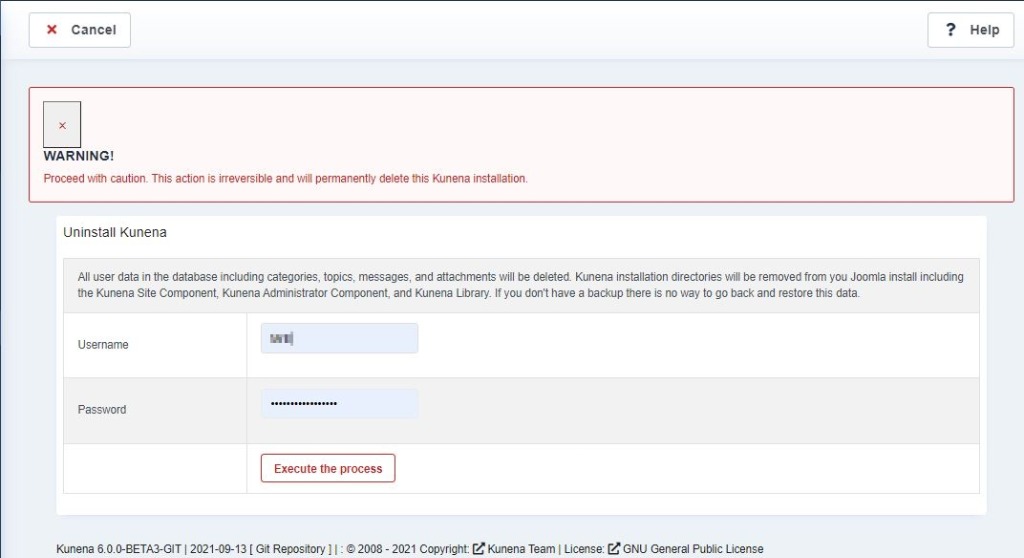
I am having the same issue. It seems the uninstall links/images are broken. I am not able to uninstall Kunena. It seems my install didn't work correctly with the Beta version. Please see the screen shot. I enter username and password and click on execute, but nothing happens. How do I manually uninstall?
Please Log in or Create an account to join the conversation.


Less
More
- Posts: 12291
- Thank you received: 2538
5 years 1 day ago #219222
by rich
Important! Always create a backup before you make any changes to your website!
Replied by rich on topic Removing kunena Version 6 Beta 3/4
Have you not read this topic? Here is the solution:
www.kunena.org/forum/k-6-0-support/16276...on-6-beta-3-4#219198
Important! Always create a backup before you make any changes to your website!
Please Log in or Create an account to join the conversation.
5 years 1 day ago #219223
by MrE
Replied by MrE on topic Removing kunena Version 6 Beta 3/4
Apparently I HAVE read it. If you look up to my post you will see my screen shot. Your directions don't work.
Looks like I need to remove it How do I do that without breaking my whole Joomla install?
Looks like I need to remove it How do I do that without breaking my whole Joomla install?
Please Log in or Create an account to join the conversation.
Less
More
- Posts: 12291
- Thank you received: 2538
5 years 1 day ago #219239
by rich
Important! Always create a backup before you make any changes to your website!
Replied by rich on topic Removing kunena Version 6 Beta 3/4
I've seen your screenshot and know that the button "Execute the Process" does not work. Press the Enter key of your keyboard instead of this button.
I hope you are not using a beta version on your live site without backup it first.
I hope you are not using a beta version on your live site without backup it first.
Important! Always create a backup before you make any changes to your website!
Please Log in or Create an account to join the conversation.
Time to create page: 0.248 seconds