


- Posts: 1249
- Thank you received: 187
Kunena 7.0.9 & Kunena 6.4.14 – Security Updates Released
The Kunena team has announce the arrival of Kunena 7.0.9 [K 7.0.9] in stable which is now available for download as a native Joomla extension for J! 5.4.x/6.0.x./6.1.x. This version addresses most of the issues that were discovered in K 6.2 / K 6.3 / K 6.4 and issues discovered during the last development stages of K 7.0
Solved Removing kunena Version 6 Beta 3/4
5 years 4 days ago #219174
by Leen
With kind regards
Leen
Removing kunena Version 6 Beta 3/4 was created by Leen
removing kunena via kunena itself does not work.
do i kunena via extensions > manage delete remains
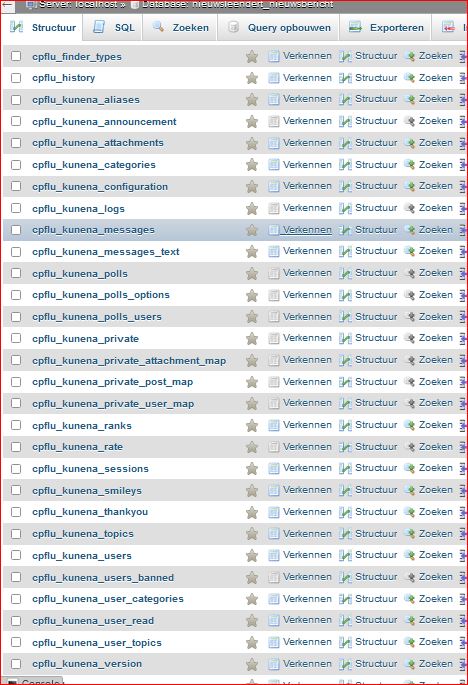
all kunena items exist in the database.
do i kunena via extensions > manage delete remains
all kunena items exist in the database.
With kind regards
Leen
Please Log in or Create an account to join the conversation.


Less
More
- Posts: 12291
- Thank you received: 2538
5 years 4 days ago #219183
by rich
Important! Always create a backup before you make any changes to your website!
Replied by rich on topic Removing kunena Version 6 Beta 3/4
If you uninstall Kunena via the Joomla extension manager, the database and uploaded attachments and avatars remain. That's correct.
And if you uninstall Kunena via Kunena tools it should be all removed, along with the database. For me, it works both.
And if you uninstall Kunena via Kunena tools it should be all removed, along with the database. For me, it works both.
Important! Always create a backup before you make any changes to your website!
Please Log in or Create an account to join the conversation.
5 years 3 days ago - 5 years 3 days ago #219192
by Leen
With kind regards
Leen
Replied by Leen on topic Removing kunena Version 6 Beta 3/4
ha ok I will try again via the Kunena via Kunena tools with the Debug setting on maybe that difference could be
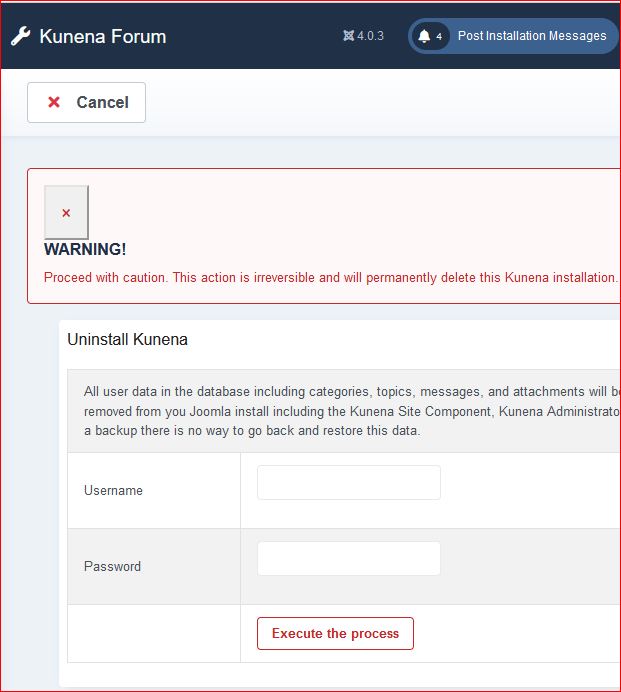
I have tried with various settings but can't remove the test version kunena 6 with the Uninstall Kunena tool
it also seems that uninstall tool is not loading everything right buttons and also the warning popup does not come up anywhere in kuena version 6 in my test
ps
I also tried Joomla 3.10.2 with kunena 5.2.6 and that goes well everything has been removed
I have tried with various settings but can't remove the test version kunena 6 with the Uninstall Kunena tool
it also seems that uninstall tool is not loading everything right buttons and also the warning popup does not come up anywhere in kuena version 6 in my test
ps
I also tried Joomla 3.10.2 with kunena 5.2.6 and that goes well everything has been removed
With kind regards
Leen
Last edit: 5 years 3 days ago by Leen.
Please Log in or Create an account to join the conversation.
Less
More
- Posts: 12291
- Thank you received: 2538
5 years 3 days ago #219195
by rich
Important! Always create a backup before you make any changes to your website!
Replied by rich on topic Removing kunena Version 6 Beta 3/4
Have you entered username and password before execute the process?
The difference between Joomla 3.10 and Joomla 4.0 is:
In Joomla 3.10 you don't need to enter username and password if you already logged in as Super User in the backend
In Joomla 4.0 you must nevertheless to enter the username and password before execute this process
But if you see the message "The Forum is currently offline for maintenance..." the installation is not complete.
Maybe therefore not all options working correct.
The difference between Joomla 3.10 and Joomla 4.0 is:
In Joomla 3.10 you don't need to enter username and password if you already logged in as Super User in the backend
In Joomla 4.0 you must nevertheless to enter the username and password before execute this process
But if you see the message "The Forum is currently offline for maintenance..." the installation is not complete.
Maybe therefore not all options working correct.
Important! Always create a backup before you make any changes to your website!
Please Log in or Create an account to join the conversation.
Less
More
- Posts: 12291
- Thank you received: 2538
5 years 2 days ago #219198
by rich
Important! Always create a backup before you make any changes to your website!
Replied by rich on topic Removing kunena Version 6 Beta 3/4
Ok, I saw it now. I've not noticed this issue, because I always use the Enter key instead of the execute button.
Press on your keyboard Enter after insert your username and password, then it works.
Press on your keyboard Enter after insert your username and password, then it works.
Important! Always create a backup before you make any changes to your website!
Please Log in or Create an account to join the conversation.
5 years 2 days ago #219202
by Leen
With kind regards
Leen
Replied by Leen on topic Removing kunena Version 6 Beta 3/4
thanks for the explanation I tried that and then kunena will be removed
With kind regards
Leen
Please Log in or Create an account to join the conversation.
Time to create page: 0.248 seconds