


- Posts: 18
- Thank you received: 1
Kunena 7.0.9 & Kunena 6.4.14 – Security Updates Released
The Kunena team has announce the arrival of Kunena 7.0.9 [K 7.0.9] in stable which is now available for download as a native Joomla extension for J! 5.4.x/6.0.x./6.1.x. This version addresses most of the issues that were discovered in K 6.2 / K 6.3 / K 6.4 and issues discovered during the last development stages of K 7.0
Question Unable to change avatar in profile
6 years 2 months ago #213726
by DeeEmm
Replied by DeeEmm on topic Unable to change avatar in profile
Thanks rich, however that setting made no difference, nor did the other SEO settings.
I also tried changing the path within /components/com_kunena/template/crypsis/assets/js/upload.avatar.js at line 40 as suggested in the linked article, but this too made no difference.
There was another suggestion mentioned that it could be related to a .htaccess file, however I am running nginx and so .htaccess are redundant.
I did however have some success. I turned 'Search Engine Friendly URLs' off in Joomla and it worked. So your suggestion was somewhat close. It seems that it does not want to play nicely with Joomla SEO.
Any further thoughts or ideas?
/DM
I also tried changing the path within /components/com_kunena/template/crypsis/assets/js/upload.avatar.js at line 40 as suggested in the linked article, but this too made no difference.
There was another suggestion mentioned that it could be related to a .htaccess file, however I am running nginx and so .htaccess are redundant.
I did however have some success. I turned 'Search Engine Friendly URLs' off in Joomla and it worked. So your suggestion was somewhat close. It seems that it does not want to play nicely with Joomla SEO.
Any further thoughts or ideas?
/DM
Please Log in or Create an account to join the conversation.


6 years 2 months ago #213730
by ssh
Replied by ssh on topic Unable to change avatar in profile
If you are using cloudflare, make sure you purge the cache there.
Also try Ctrl+F5
Also try Ctrl+Shift+Delete
Also try to install the .htacces file that comes with Joomla by default
Also try to see in your server directory if the image is uploaded, even when you can't see it in the frontend
Also try Ctrl+F5
Also try Ctrl+Shift+Delete
Also try to install the .htacces file that comes with Joomla by default
Also try to see in your server directory if the image is uploaded, even when you can't see it in the frontend
Please Log in or Create an account to join the conversation.
6 years 2 months ago #213731
by DeeEmm
Replied by DeeEmm on topic Unable to change avatar in profile
CMD+R / CMD+Shift+R (hard refresh) make no difference (I'm on a mac). Definitely not a browser problem as the 404 is the status sent from the server in response to the upload. So either the URL is incorrect or it does not actually exist. The 404 is a soft 404 as https://my...web...site.com/forum/profile/edit/index.php is a valid url. So it's only getting rejected on the basis that the query string is incorrect or missing (or any other reason that the component decides)
I'm not using clouflare and have all caching disabled.
.htaccess is an apache thing, it does not work on an Nginx server. Nginx uses a modified version of mod-rewrite within the server directives. However, the only rule there is passing the query strings, which is working fine, otherwise basic navigation would not work.
One thing to note, I cannot see where the userdata is generated / passed. Obviously with Joomla SEO turned off it is passed as 'GET' vars within the URL query strings, however with SEO turned on, no vars are present in the URL and no POST vars are created within the page that I can see. However I will be the first to admit that javascript is not really my thing.
I've looked to see if I can grab the URL of the file upload when SEO is turned off but not sure how to do that (I'm using chrome).
Any further advice warmly welcomed.
I'm not using clouflare and have all caching disabled.
.htaccess is an apache thing, it does not work on an Nginx server. Nginx uses a modified version of mod-rewrite within the server directives. However, the only rule there is passing the query strings, which is working fine, otherwise basic navigation would not work.
One thing to note, I cannot see where the userdata is generated / passed. Obviously with Joomla SEO turned off it is passed as 'GET' vars within the URL query strings, however with SEO turned on, no vars are present in the URL and no POST vars are created within the page that I can see. However I will be the first to admit that javascript is not really my thing.
I've looked to see if I can grab the URL of the file upload when SEO is turned off but not sure how to do that (I'm using chrome).
Any further advice warmly welcomed.
Please Log in or Create an account to join the conversation.
6 years 2 months ago #213732
by DeeEmm
Replied by DeeEmm on topic Unable to change avatar in profile
There is also another possibility...
maybe the URL and #GET data is well formed but the server is rejecting the request.!?
I find this one hard to believe as the site is working fine otherwise.
Also; normal forum attachment upload works fine. Does this use the same script?
maybe the URL and #GET data is well formed but the server is rejecting the request.!?
I find this one hard to believe as the site is working fine otherwise.
Also; normal forum attachment upload works fine. Does this use the same script?
Please Log in or Create an account to join the conversation.
6 years 2 months ago #213733
by DeeEmm
Replied by DeeEmm on topic Unable to change avatar in profile
OK. Some more digging...
I managed to monitor the call for a successful transfer (With Joomla SEO turned off). This is what I saw...
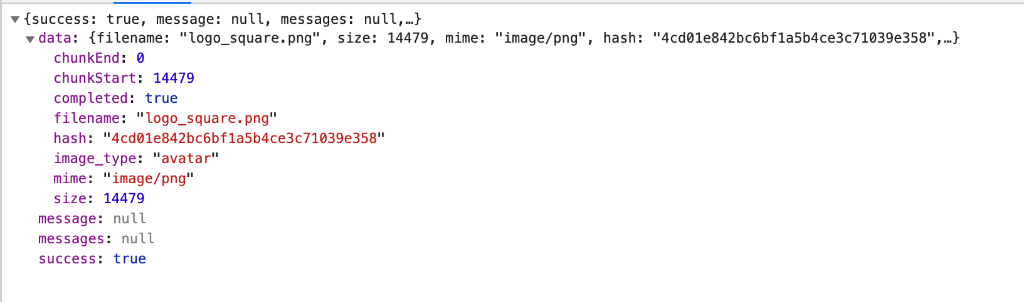
I then did the same with SEO turned on...

The actual error response here is a 400 which is Bad Request. This seems to point towards some kind of issue with the URL query data.
I went and double checked my server configuration and that is fine.The re-write directive is as per the Joomla recommendations. I've been using the same rule for a decade or more with no issues.
It is a very curious problem.
/DM
I managed to monitor the call for a successful transfer (With Joomla SEO turned off). This is what I saw...
I then did the same with SEO turned on...
The actual error response here is a 400 which is Bad Request. This seems to point towards some kind of issue with the URL query data.
I went and double checked my server configuration and that is fine.The re-write directive is as per the Joomla recommendations. I've been using the same rule for a decade or more with no issues.
Code:
location / {
try_files $uri $uri/ /index.php?$args;
}
It is a very curious problem.
/DM
Please Log in or Create an account to join the conversation.


Less
More
- Posts: 12291
- Thank you received: 2538
6 years 2 months ago - 6 years 2 months ago #213740
by rich
Important! Always create a backup before you make any changes to your website!
Replied by rich on topic Unable to change avatar in profile
I'm not sure if it helps but it's worth a try. In your Kunena menu you have linked the menu item Kunena-home with himself (see image). Maybe therefore you have an url problem. Please repair this menu item. Choose as target the Index.
docs.kunena.org/en/faq/kunena-menu

Important! Always create a backup before you make any changes to your website!
Last edit: 6 years 2 months ago by rich.
Please Log in or Create an account to join the conversation.
Time to create page: 0.264 seconds