


- Posts: 10
- Thank you received: 7
Kunena 7.0.9 & Kunena 6.4.14 – Security Updates Released
The Kunena team has announce the arrival of Kunena 7.0.9 [K 7.0.9] in stable which is now available for download as a native Joomla extension for J! 5.4.x/6.0.x./6.1.x. This version addresses most of the issues that were discovered in K 6.2 / K 6.3 / K 6.4 and issues discovered during the last development stages of K 7.0
Solved Editor icons & Preview not working
9 years 9 months ago #182247
by Edu
Replied by Edu on topic Editor icons & Preview not working
Hi!
I'd like to confirm, as the other mates, that everything worked fine before the last update (non-english site).
I'd like to confirm, as the other mates, that everything worked fine before the last update (non-english site).
Please Log in or Create an account to join the conversation.


9 years 9 months ago - 9 years 9 months ago #182282
by JorgeMax
Replied by JorgeMax on topic Editor icons & Preview not working
Hi again!
Two weeks and we continue without emoticons, without preview.... without help... about this error in "security" update...
Kunena 5.0.3 works.... 5.0.4.1.... NO
Can anyone help us, please???
Two weeks and we continue without emoticons, without preview.... without help... about this error in "security" update...
Kunena 5.0.3 works.... 5.0.4.1.... NO
Can anyone help us, please???
Last edit: 9 years 9 months ago by JorgeMax.
The following user(s) said Thank You: Edu
Please Log in or Create an account to join the conversation.


Less
More
- Posts: 12291
- Thank you received: 2538
9 years 9 months ago #182283
by rich
Important! Always create a backup before you make any changes to your website!
Replied by rich on topic Editor icons & Preview not working
I am sorry! I tried now many days everything which is possible but can't reproduce this error. There must be something on your page, which triggers the error. If you want, I can try to find the error. But i need a account. You can send it to rich @kunena.org
Important! Always create a backup before you make any changes to your website!
The following user(s) said Thank You: JorgeMax
Please Log in or Create an account to join the conversation.
9 years 9 months ago - 9 years 9 months ago #182287
by Edu
Replied by Edu on topic Editor icons & Preview not working
Vale, he encontrado la solución al problema (versión es-es):
- Nos vamos a: components/com_kunena/template/crypsis/assets/js/markitup.editor.js
- Nos vamos a la línea 21, posición 465
- Encontraremos: name: 'Línea horizontal
Algo así -->
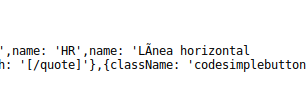
Fijaos en que la comilla de cierre está en la siguiente línea. Esta división de la línea inesperada es la que genera el problema. Simplemente os situáis tras la l de horizontal, pulsáis suprimir y listo.
Sólo queda guardar y sustituir el fichero original (recomiendo guardarlo como markitup.editor.js.bak hasta comprobar que funciona).
Y ese parece ser todo el problema, un simple salto de línea :whistle:
And now en English:
All you have to do is fix the division between 21 and 22 lines in components/com_kunena/template/crypsis/assets/js/markitup.editor.js file
- Nos vamos a: components/com_kunena/template/crypsis/assets/js/markitup.editor.js
- Nos vamos a la línea 21, posición 465
- Encontraremos: name: 'Línea horizontal
Algo así -->
Fijaos en que la comilla de cierre está en la siguiente línea. Esta división de la línea inesperada es la que genera el problema. Simplemente os situáis tras la l de horizontal, pulsáis suprimir y listo.
Sólo queda guardar y sustituir el fichero original (recomiendo guardarlo como markitup.editor.js.bak hasta comprobar que funciona).
Y ese parece ser todo el problema, un simple salto de línea :whistle:
And now en English:
All you have to do is fix the division between 21 and 22 lines in components/com_kunena/template/crypsis/assets/js/markitup.editor.js file
Last edit: 9 years 9 months ago by Edu.
Please Log in or Create an account to join the conversation.
Less
More
- Posts: 12291
- Thank you received: 2538
9 years 9 months ago #182288
by rich
Important! Always create a backup before you make any changes to your website!
Replied by rich on topic Editor icons & Preview not working
I've tested it now. With line break I can confirm this error. It seems to actually be the solution. Only the question remains, why only some users have this line break.
Many thanks!
Many thanks!
Important! Always create a backup before you make any changes to your website!
The following user(s) said Thank You: JorgeMax
Please Log in or Create an account to join the conversation.
9 years 9 months ago #182289
by cucumiau
Replied by cucumiau on topic Editor icons & Preview not working
In catalan version there is the same problem, in the same line, but instead, the error is an apostrophe taken as a single quote:
- components/com_kunena/template/crypsis/assets/js/markitup.editor.js
- line 21, position 389
- you will find 'Llista d'elements' ==> substitute with 'Llista d`elements'
- components/com_kunena/template/crypsis/assets/js/markitup.editor.js
- line 21, position 389
- you will find 'Llista d'elements' ==> substitute with 'Llista d`elements'
The following user(s) said Thank You: JorgeMax
Please Log in or Create an account to join the conversation.
Time to create page: 0.252 seconds