
Kunena 7.0.9 & Kunena 6.4.14 – Security Updates Released
The Kunena team has announce the arrival of Kunena 7.0.9 [K 7.0.9] in stable which is now available for download as a native Joomla extension for J! 5.4.x/6.0.x./6.1.x. This version addresses most of the issues that were discovered in K 6.2 / K 6.3 / K 6.4 and issues discovered during the last development stages of K 7.0
Solved Editor icons & Preview not working
- GODpleasers
-

- Offline
- Senior Member
-

Please Log in or Create an account to join the conversation.


Please Log in or Create an account to join the conversation.

Wild Duck wrote: No solution?... somebody? anybody?
I ask the same ... There is no solution? Can anyone help us?
Please Log in or Create an account to join the conversation.
- GODpleasers
-
- Offline
- Senior Member
-
810 wrote: After update please clear all cache, also on cloudflare if you use that, or other cache plugins
Did taht several times and no luck with preview mode.
Please Log in or Create an account to join the conversation.


- Posts: 12291
- Thank you received: 2538
Have you tried disable third party plugins? Maybe there are a conflict with a extension or your Joomla template.
Important! Always create a backup before you make any changes to your website!
Please Log in or Create an account to join the conversation.
- GODpleasers
-
- Offline
- Senior Member
-
rich wrote: I try now 3 days everything which is possible but can't reproduce this error.
Have you tried disable third party plugins? Maybe there are a conflict with a extension or your Joomla template.
Tried on the prostar template and still no preview mode.
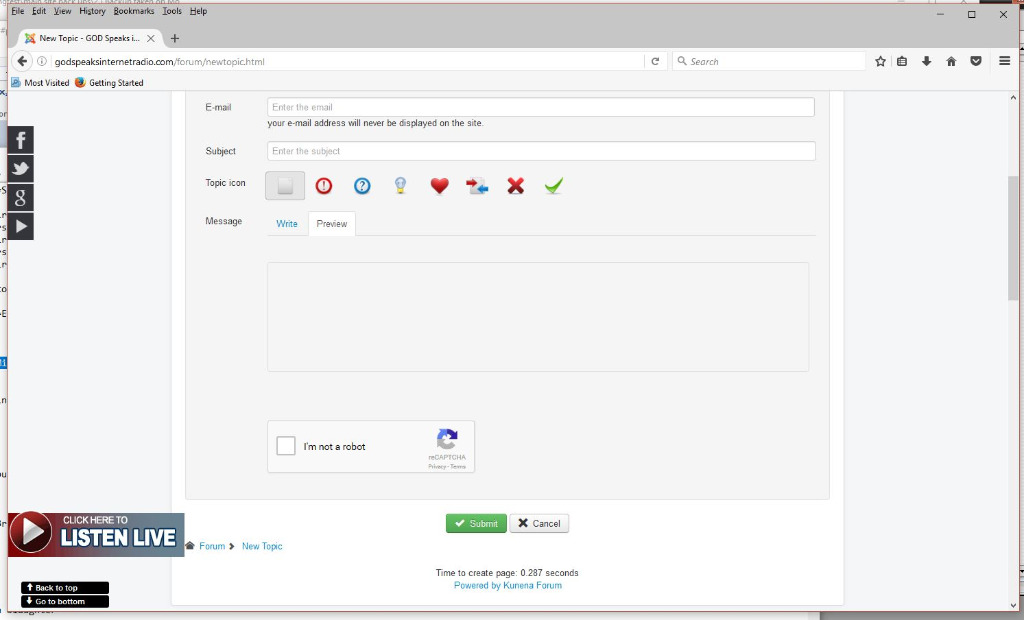
I may go back to k 5.0.3 it worked perfectly.
Please Log in or Create an account to join the conversation.