
Kunena 7.0.5 & Kunena 6.4.11 – Security Updates Released
The Kunena team has announce the arrival of Kunena 7.0.5 [K 7.0.5] in stable which is now available for download as a native Joomla extension for J! 5.4.x/6.0.x. This version addresses most of the issues that were discovered in K 6.2 / K 6.3 / K 6.4 and issues discovered during the last development stages of K 7.0.
The Kunena team is also pleased to announce the eleventh version of Kunena 6.4, a native Joomla extension for Joomla! 5.0, 5.1, 5.2, 5.3, 5.4 and 6.0.
Important Topic icon folder changes in K 4.0


1) Upload the files and place them in the folder /media/kunena/topic_icons/XBOX
2) Edit the file topic_icons.xml
3) Use the Kunena Category Manager (see the image below):

Is this all that you have to do?
Blue Eagle vs. Crypsis reference guide
Read my blog and

Please Log in or Create an account to join the conversation.


Please Log in or Create an account to join the conversation.
As you know, the versions of K 4.0 that have been released to date use the topic icons from K 2.0. I will prepare a topic icon pack for K 3.0 and submit it here (after I have tested it, of course) with instructions on how people can use the K 3.0 topic icons instead of the K 2.0 topic icons that are included with the K 4.0 installation package.
Blue Eagle vs. Crypsis reference guide
Read my blog and
Please Log in or Create an account to join the conversation.
I am attaching a zip file of the K 3.0 topic icon "package" (obviously, the files need to extracted first). Yes, the new folder name appears in the Kunena Category Manager, but it doesn't seem to work if you select that folder.
Blue Eagle vs. Crypsis reference guide
Read my blog and
Please Log in or Create an account to join the conversation.
Database collation check: The collation of your table fields are correct
Joomla! SEF: Enabled | Joomla! SEF rewrite: Enabled | FTP layer: Disabled |
This message contains confidential informationhtaccess: Exists | PHP environment: Max execution time: 30 seconds | Max execution memory: 128M | Max file upload: 64M
Kunena menu details:
Warning: Spoiler!
ID Name Menutype Link Path In trash 146 Forum mainmenu Itemid=159 kunena-2013-06-28 No 159 Forum kunenamenu view=home&defaultmenu=160 forum No 160 Index kunenamenu view=category&layout=list forum/index No 161 Recent Topics kunenamenu view=topics&mode=replies forum/recent No 162 New Topic kunenamenu view=topic&layout=create forum/newtopic No 163 No Replies kunenamenu view=topics&mode=noreplies forum/noreplies No 164 My Topics kunenamenu view=topics&layout=user&mode=default forum/mylatest No 165 Profile kunenamenu view=user forum/profile No 166 Help kunenamenu view=misc forum/help No 167 Search kunenamenu view=search forum/search No 375 Custom kunenamenu view=misc forum/custom Yes
Joomla default template details : protostar | author: Kyle Ledbetter | version: 1.0 | creationdate: Unknown
Kunena default template details : Blue Eagle | author: Kunena Team | version: 4.0.1 | creationdate: 2015-06-10
Kunena version detailed: Kunena 4.0.1 | 2015-06-10 [ Alto ]
| Kunena detailed configuration:| Kunena integration settings:Warning: Spoiler!
Kunena config settings: board_offline 0 enablerss 1 threads_per_page 20 messages_per_page 6 messages_per_page_search 15 showhistory 1 historylimit 6 shownew 1 disemoticons 0 template blue_eagle showannouncement 1 avataroncat 0 catimagepath category_images showchildcaticon 1 rtewidth 450 rteheight 300 enableforumjump 1 reportmsg 1 username 1 askemail 0 showemail 0 showuserstats 1 showkarma 0 useredit 1 useredittime 0 useredittimegrace 600 editmarkup 1 allowsubscriptions 1 subscriptionschecked 0 allowfavorites 1 maxsubject 255 maxsig 300 regonly 0 pubwrite 0 floodprotection 0 mailmod 0 mailadmin 0 captcha 0 mailfull 1 allowavatarupload 1 allowavatargallery 1 avatarquality 75 avatarsize 2048 imageheight 800 imagewidth 800 imagesize 150 filetypes txt,rtf,pdf,zip,tar.gz,tgz,tar.bz2 filesize 120 showranking 1 rankimages 1 userlist_rows 30 userlist_online 1 userlist_avatar 1 userlist_posts 1 userlist_karma 1 userlist_email 0 userlist_joindate 1 userlist_lastvisitdate 1 userlist_userhits 1 latestcategory showstats 1 showwhoisonline 1 showgenstats 1 showpopuserstats 1 popusercount 5 showpopsubjectstats 1 popsubjectcount 5 showspoilertag 1 showvideotag 1 showebaytag 1 trimlongurls 1 trimlongurlsfront 40 trimlongurlsback 20 autoembedyoutube 1 autoembedebay 1 ebaylanguagecode en-us sessiontimeout 1800 highlightcode 0 rss_type topic rss_timelimit month rss_limit 100 rss_included_categories rss_excluded_categories rss_specification rss2.0 rss_allow_html 1 rss_author_format name rss_author_in_title 1 rss_word_count 0 rss_old_titles 1 rss_cache 900 defaultpage recent default_sort asc sef 1 showimgforguest 1 showfileforguest 1 pollnboptions 4 pollallowvoteone 1 pollenabled 1 poppollscount 5 showpoppollstats 1 polltimebtvotes 00:15:00 pollnbvotesbyuser 100 pollresultsuserslist 1 maxpersotext 50 ordering_system mesid post_dateformat ago post_dateformat_hover datetime hide_ip 1 imagetypes jpg,jpeg,gif,png checkmimetypes 1 imagemimetypes image/jpeg,image/jpg,image/gif,image/png imagequality 50 thumbheight 32 thumbwidth 32 hideuserprofileinfo put_empty boxghostmessage 0 userdeletetmessage 0 latestcategory_in 1 topicicons 1 debug 0 catsautosubscribed 0 showbannedreason 0 showthankyou 1 showpopthankyoustats 1 popthankscount 5 mod_see_deleted 0 bbcode_img_secure text listcat_show_moderators 1 lightbox 1 show_list_time 720 show_session_type 0 show_session_starttime 0 userlist_allowed 1 userlist_count_users 1 enable_threaded_layouts 0 category_subscriptions post topic_subscriptions every pubprofile 0 thankyou_max 10 email_recipient_count 0 email_recipient_privacy bcc captcha_post_limit 0 keywords 0 userkeywords 0 image_upload registered file_upload registered topic_layout flat time_to_create_page 1 show_imgfiles_manage_profile 1 hold_newusers_posts 0 hold_guest_posts 0 attachment_limit 8 pickup_category 0 article_display intro send_emails 1 fallback_english 1 cache 1 cache_time 60 iptracking 1 rss_feedburner_url autolink 1 access_component 1 statslink_allowed 0 superadmin_userlist 0 legacy_urls 1 attachment_protection 0 categoryicons 1 avatarresizemethod 1 avatarcrop 0 user_report 1 searchtime 365 teaser 0 ebay_language 0 twitter_consumer_key twitter_consumer_secret max_links 6 userlist_name 1 usernamechange 0 version_check 1 credits 1 | Joomla! detailed language files installed:Warning: Spoiler!Kunena - AlphaUserPoints Disabled
Kunena - Community Builder Disabled
Kunena - Gravatar Disabled
Kunena - JomSocial Disabled
Kunena - Joomla Enabled: access=1 login=1
Kunena - Kunena Enabled: avatar=1 profile=1
Kunena - UddeIM Disabled
Warning: Spoiler!
Joomla! languages installed: en-GB English (en-GB)
Third-party components: None
Third-party SEF components: None
Plugins: None
Modules: None
In this test site, there are three categories:
Welcome Mat
---| Test subcategory
Suggestions Box
The topic icons are those that are shipped with K 4.0.1 (in effect, they are the K 2.0 styled images). I uploaded the files (see my earlier message where you can see the .ZIP file) into the folder /media/kunena/topic_icons/k30
The image below shows that the new "k30" folder can be selected.
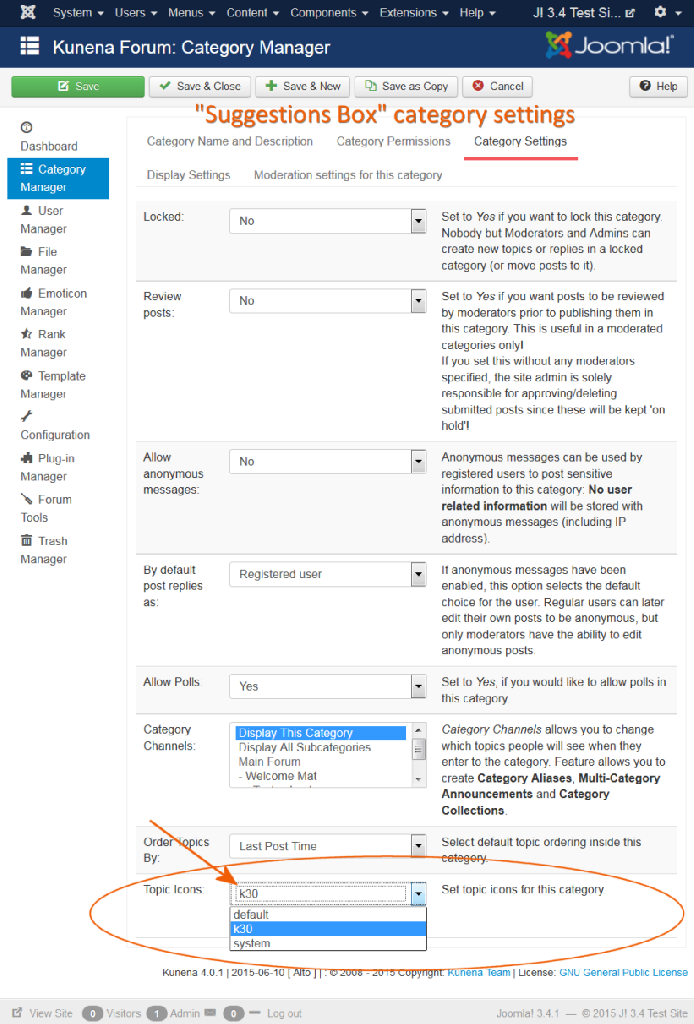
Now look at the topics in the Recent Topics view:
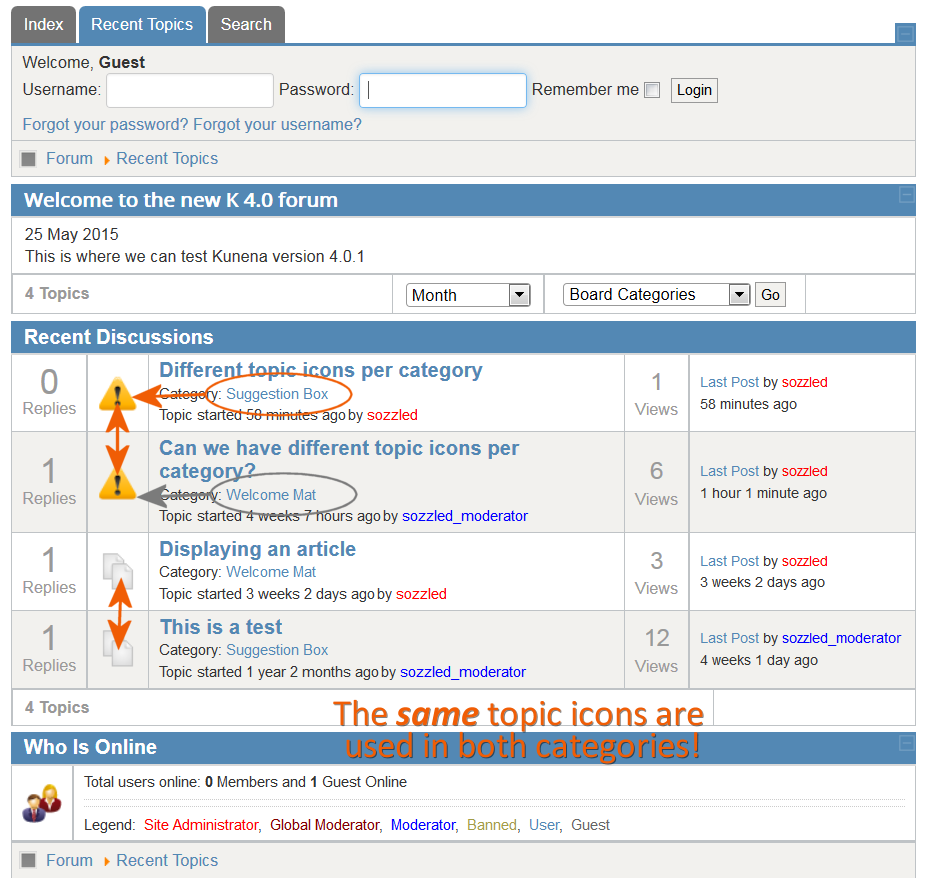
Have I got your instructions wrong?
Blue Eagle vs. Crypsis reference guide
Read my blog and
Please Log in or Create an account to join the conversation.


- Posts: 12285
- Thank you received: 2535
I'm not sure whether the option selectable topic icons for Blue Eagle is available. On my test page it works only with Crypsis.
Important! Always create a backup before you make any changes to your website!
Please Log in or Create an account to join the conversation.