
Kunena 7.0.9 & Kunena 6.4.14 – Security Updates Released
The Kunena team has announce the arrival of Kunena 7.0.9 [K 7.0.9] in stable which is now available for download as a native Joomla extension for J! 5.4.x/6.0.x./6.1.x. This version addresses most of the issues that were discovered in K 6.2 / K 6.3 / K 6.4 and issues discovered during the last development stages of K 7.0
Important Topic icon folder changes in K 4.0


There are no overrides on this site. It is a "vanilla-flavoured" J! 3.4.1 site with Protostar.rich wrote: I think, you get a override from "components/com_kunena/template/blue_eagle/images/topicicons". Rename or remove this folder and it should work.
This is the whole point!rich wrote: I'm not sure whether the option selectable topic icons for Blue Eagle is available. On my test page it works only with Crypsis.
In the beginning of this topic I wrote:
The change that was made in K 4.0 effectively makes all alternative Blue Eagle-based templates not work with topic icons because the K 4.0 looks for the topic icons (for Blue Eagle templates) in the folderssozzled wrote: As we all know, 99% of Kunena templates developed commercially (or privately) are based on Blue Eagle. The only Kunena template (that I am aware of) that is not based on Blue Eagle is the Crypsis template.
- /components/com_kunena/template/blue_eagle/images/topicicons/system
- /components/com_kunena/template/blue_eagle/images/topicicons/user
If you use the Crypsis template, K 4.0 uses topic icons in the folder /media/kunena/topic_icons/default/system.
In other words, K 4.0 topic icons work one way for Crypsis and an entirely different way for Blue Eagle (and every other template derived from Blue Eagle). In effect, this means that all alternative templates (whether they are commercially available or developed by users) will not work with K 4.0.
This is either a deliberate design change or it is a defect.
In summary, the instructions that 810 gave in msg #6 earlier are clearly invalid and only apply to Crypsis.
Have I correctly summarised the situation?
Blue Eagle vs. Crypsis reference guide
Read my blog and

Please Log in or Create an account to join the conversation.
I uninstalled K 4.0.1 from my test site. The uninstallation removed all the Kunena files from my site but it did not remove the Kunena tables from the database. I re-installed K 4.0.1 and uploaded a new set of topic icons to the folder /media/kunena/topic_icons/k30.
I then changed one icon (exclamation.png) in the folder /media/kunena/topic_icons/k30/user.
I made sure that the topic icon folder in the category "Welcome Mat" pointed to default and saved the category. I also made sure the topic icon folder in the category "Suggestions Box" pointed to k30 and saved the category.
These are the results:
Blue Eagle view:

Crypsis view:
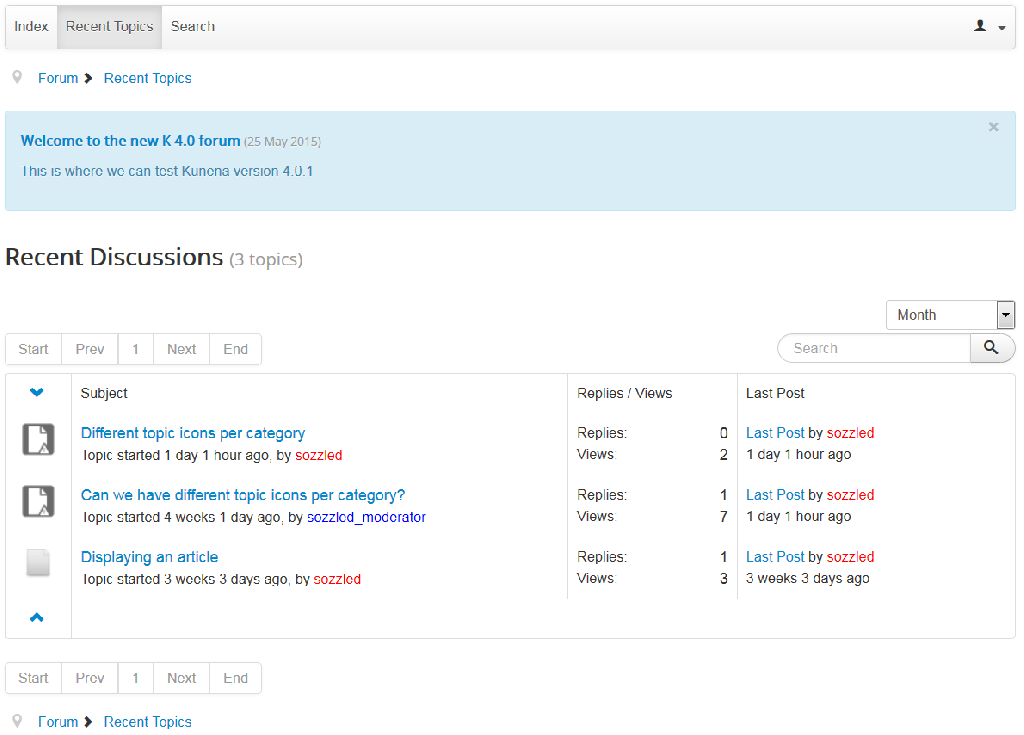
As you can see, the same "exclamation.png" image is used in both cases. In the case of Blue Eagle, the image (for both categories) is obtained from /media/kunena/topic_icons/default/user/exclamation.png. In the case of Crypsis, the image (for both categories) is obtained from /media/kunena/topic_icons/k30/user/exclamation.png.
Clearly this feature does not work on a stock-standard, "vanilla-flavoured" Joomla website with the default Protostar template.
This is a defect. Please move this topic back to the K 4.0 Support (reporting defects) category until you have resolved the problem. I am willing to provide any of the developers with an administrator account to my website to investigate.
Blue Eagle vs. Crypsis reference guide
Read my blog and
Please Log in or Create an account to join the conversation.


- Posts: 12291
- Thank you received: 2538
Confirmed it's a bug. When you create a own icon folder and choose this folder for a single category, then all categories use these icons. I've created a report.
Important! Always create a backup before you make any changes to your website!
Please Log in or Create an account to join the conversation.
github.com/Kunena/Kunena-Forum/issues/3251
Perhaps this should be flagged as a known issue ?
Blue Eagle vs. Crypsis reference guide
Read my blog and
Please Log in or Create an account to join the conversation.
Blue Eagle vs. Crypsis reference guide
Read my blog and
Please Log in or Create an account to join the conversation.
In other words, the Category Manager settings are still useless for Blue Eagle and any other template derived from Blue Eagle.
The files in /media/kunena/topic_icons/default are replaced when the Kunena component is upgraded. Therefore, if (as a temporary workaround) people copy their own custom icons into this folder, they will be overwritten when they upgrade from one version of Kunena to the next. Ideally, people should be able to upload their own custom topic icons and place them in a folder that will not be overwritten; this is why the Category Manager settings are important. But, if the Category Manager settings do not apply to Blue Eagle (and, therefore, do not work with 99% of all existing alternative Kunena templates available today, all of which are derived from Blue Eagle) this isn't much help.
This issue still needs to be fixed.
Blue Eagle vs. Crypsis reference guide
Read my blog and
Please Log in or Create an account to join the conversation.