


- Posts: 12291
- Thank you received: 2538
Kunena 7.0.9 & Kunena 6.4.14 – Security Updates Released
The Kunena team has announce the arrival of Kunena 7.0.9 [K 7.0.9] in stable which is now available for download as a native Joomla extension for J! 5.4.x/6.0.x./6.1.x. This version addresses most of the issues that were discovered in K 6.2 / K 6.3 / K 6.4 and issues discovered during the last development stages of K 7.0
Solved "recent posts" does nog display all recent posts....
Less
More
4 years 6 months ago #222122
by rich
Important! Always create a backup before you make any changes to your website!
Replied by rich on topic "recent posts" does nog display all recent posts....
1. You have the configuration setting "Recent Topics Time Period = Month". Therefore, topics disappear automatically if there was no response for more than one month.
2. What is the menu item with the ID 170 for (see image) ? This menu item is wrong and should be deleted. You find this menu item in the Kunena menu.
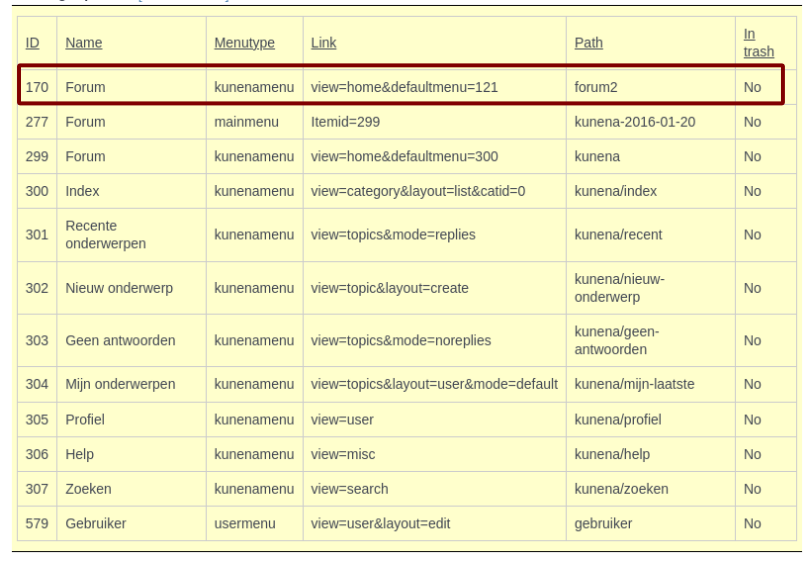
2. What is the menu item with the ID 170 for (see image) ? This menu item is wrong and should be deleted. You find this menu item in the Kunena menu.
Important! Always create a backup before you make any changes to your website!
Please Log in or Create an account to join the conversation.


4 years 6 months ago #222129
by BadBert
i know that it is set to a month, but now the messages are not displayed, even if the post is 1 minute old, but messages in several other topics that are the same age, ARE showed....
When i change the setting "hide" or "display" and don't change anything else on the filter, i see different posts in the recent list. You can see that in the pictures i posted earlier.
I don't know what that menu is for, as i stated before, i did not configure this forum, i took over from the previous guy who ran the forum.... so i really don't know.
I depublished that menu item, but i don't see any chages.
But i think i found something.
Normally i did the settings for the recent posts and such using the main overview in the front end tab.
But now i went to MENU and then to the settings of recent, there the settings were all wrong i think....
I changed the settings THERE to what i think should be OK, and i think it's OK now.....
i'll test and report back!
Thanks so far.
Replied by BadBert on topic "recent posts" does nog display all recent posts....
Hi Rich,1. You have the configuration setting "Recent Topics Time Period = Month". Therefore, topics disappear automatically if there was no response for more than one month.
2. What is the menu item with the ID 170 for (see image) ? This menu item is wrong and should be deleted. You find this menu item in the Kunena menu.
i know that it is set to a month, but now the messages are not displayed, even if the post is 1 minute old, but messages in several other topics that are the same age, ARE showed....
When i change the setting "hide" or "display" and don't change anything else on the filter, i see different posts in the recent list. You can see that in the pictures i posted earlier.
I don't know what that menu is for, as i stated before, i did not configure this forum, i took over from the previous guy who ran the forum.... so i really don't know.
I depublished that menu item, but i don't see any chages.
But i think i found something.
Normally i did the settings for the recent posts and such using the main overview in the front end tab.
But now i went to MENU and then to the settings of recent, there the settings were all wrong i think....
I changed the settings THERE to what i think should be OK, and i think it's OK now.....
i'll test and report back!
Thanks so far.
Please Log in or Create an account to join the conversation.
Less
More
- Posts: 12291
- Thank you received: 2538
4 years 6 months ago #222133
by rich
Important! Always create a backup before you make any changes to your website!
Replied by rich on topic "recent posts" does nog display all recent posts....
Probably her predecessor had made this setting in the menu. As I had already written, the menu setting has priority over the configuration setting.
If you set "Use Global" in the menu item, then the setting from the configuration is displayed.
If you set "Show categories" or "Hide categories" in the menu item, then the setting from that menu item will be displayed (see picture).
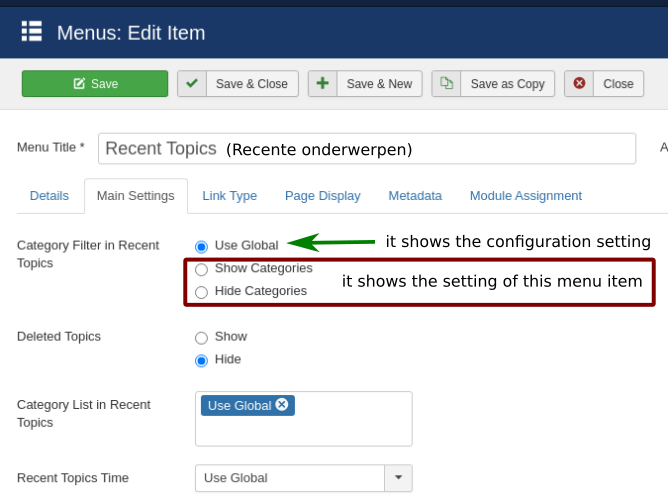
If you set "Use Global" in the menu item, then the setting from the configuration is displayed.
If you set "Show categories" or "Hide categories" in the menu item, then the setting from that menu item will be displayed (see picture).
Important! Always create a backup before you make any changes to your website!
The following user(s) said Thank You: BadBert
Please Log in or Create an account to join the conversation.
4 years 6 months ago #222134
by BadBert
Replied by BadBert on topic "recent posts" does nog display all recent posts....
Thanks a lot!
Please Log in or Create an account to join the conversation.
4 years 4 months ago #223070
by BadBert
Replied by BadBert on topic "recent posts" does nog display all recent posts....
just to be complete:
All is working OK now :side:
All is working OK now :side:
Please Log in or Create an account to join the conversation.
Time to create page: 0.252 seconds