


- Posts: 21
- Thank you received: 0
Kunena 7.0.8 Released
The Kunena team has announce the arrival of Kunena 7.0.8 [K 7.0.8] in stable which is now available for download as a native Joomla extension for J! 5.4.x/6.0.x./6.1.x. This version addresses most of the issues that were discovered in K 6.2 / K 6.3 / K 6.4 and issues discovered during the last development stages of K 7.0
Topics that are moved into this category are generally considered to be closed. Users may want to add additional information but these topics should not be resurrected in order to discuss new problems or unrelated matters.
Solved Internal server error attempting to upgrade from K 2.0.3 -> K 3.0.5 on J! 2.5.9
12 years 3 months ago #155640
by tamirzzz
Replied by tamirzzz on topic Internal server error attempting to upgrade from K 2.0.3 -> K 3.0.5 on J! 2.5.9
Hi There,
Your approach is very good. :woohoo:
As a result of your reply, I have started to created second site, a copy of my prod site in which I`ll first upgrade to the latest version of the j.2.5 series and then try to install the K 3.0.
Since it is a big site, and I prefer to do it by ftpping the files (Cpanel copyying has failures), it will be ready only tommarow morning.
I will keep you updated.
Thank you very much for your help and concern.
Tamir
Your approach is very good. :woohoo:
As a result of your reply, I have started to created second site, a copy of my prod site in which I`ll first upgrade to the latest version of the j.2.5 series and then try to install the K 3.0.
Since it is a big site, and I prefer to do it by ftpping the files (Cpanel copyying has failures), it will be ready only tommarow morning.
I will keep you updated.
Thank you very much for your help and concern.
Tamir
Please Log in or Create an account to join the conversation.
12 years 3 months ago - 12 years 3 months ago #155654
by tamirzzz
Replied by tamirzzz on topic Internal server error attempting to upgrade from K 2.0.3 -> K 3.0.5 on J! 2.5.9
Hi,
I upgraded the J2.5 to J.2.5.19, tried to install pkg_kunena_v3.0.5_2014-03-09, but still, keep getting:
Any other suggestions?
Tnx
I upgraded the J2.5 to J.2.5.19, tried to install pkg_kunena_v3.0.5_2014-03-09, but still, keep getting:
Internal Server Error
The server encountered an internal error or misconfiguration and was unable to complete your request.
Please contact the server administrator, [email protected] and inform them of the time the error occurred, and anything you might have done that may have caused the error.
More information about this error may be available in the server error log.
Additionally, a 404 Not Found error was encountered while trying to use an ErrorDocument to handle the request.
Any other suggestions?
Tnx
Last edit: 12 years 3 months ago by tamirzzz.
Please Log in or Create an account to join the conversation.


12 years 3 months ago #155664
by sozzled
Blue Eagle vs. Crypsis reference guide
Read my blog and

Replied by sozzled on topic Internal server error attempting to upgrade from K 2.0.3 -> K 3.0.5 on J! 2.5.9
Can you produce your configuration report (even for K 2.0)? This may give us a clue.
Blue Eagle vs. Crypsis reference guide
Read my blog and
The following user(s) said Thank You: tamirzzz
Please Log in or Create an account to join the conversation.
12 years 3 months ago - 12 years 3 months ago #155668
by tamirzzz
Replied by tamirzzz on topic Internal server error attempting to upgrade from K 2.0.3 -> K 3.0.5 on J! 2.5.9
hi,
Sure:
Thanks!!!
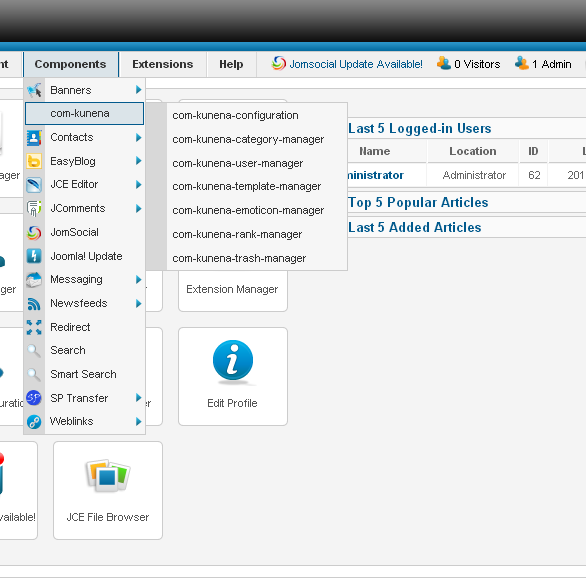
P.S, the reason why you`d see the J version as being 2.5.9 and not 2.5.19 is because, I took the configuration from the prod web site in which I still did not upgrade it`s version to 2.5.19. I upgrade the dev site to j.2.5.19, but since the Kunena installation failed during the process, I can not take the configuration file from it. In fact, I am attaching a screenshot, so you would have a sense of what happend to the Kunena after the failed installation.
While clikcing on any of the menu items, I get: Joomla!
404 - An error has occurred.
Component not found
Return to Control Panel
Sure:
This message contains confidential information
Database collation check: The collation of your table fields are correct
Legacy mode: Disabled | Joomla! SEF: Enabled | Joomla! SEF rewrite: Enabled | FTP layer: Enabled |
This message contains confidential informationhtaccess: Exists | PHP environment: Max execution time: 300 seconds | Max execution memory: 128M | Max file upload: 32M
Kunena menu details:
Warning: Spoiler!
ID Name Menutype Link Path 263 קוננה mainmenu view=home&defaultmenu=101 forumssfsfsf 166 פורומים mainmenu view=category&layout=list&catid=0 forums 354 כריית מידע mainmenu view=category&catid=4 forums/כריית-מידע 168 Baba BO mainmenu view=category&catid=6 forums/baba-bo 169 Qlikview mainmenu view=category&catid=15 forums/qlikview 170 Cognos mainmenu view=category&catid=10 forums/cognos 171 אלדד הרץ mainmenu view=category&catid=7 forums/אלדד-הרץ 172 Panorama mainmenu view=category&catid=13 forums/panorama 174 Informatica mainmenu view=category&catid=14 forums/informatica-sp-792664693
Joomla default template details : traction | author: Shape5.com | version: 1.0 | creationdate: July 2012
Kunena default template details : Blue Eagle_rtl 2.0 | author: Kunena Team | version: 2.0.0-RC3 | creationdate: 2012-06-22
Kunena version detailed: Kunena 2.0.3 | 2012-11-24 [ Reconciliation ]
| Kunena detailed configuration:| Kunena integration settings:Warning: Spoiler!
Kunena config settings: board_offline 0 enablerss 1 threads_per_page 20 messages_per_page 20 messages_per_page_search 15 showhistory 1 historylimit 6 shownew 1 disemoticons 0 template blue_eagle_rtl showannouncement 1 avataroncat 0 catimagepath category_images/ showchildcaticon 1 rtewidth 450 rteheight 300 enableforumjump 1 reportmsg 1 username 0 askemail 0 showemail 0 showuserstats 1 showkarma 1 useredit 1 useredittime 0 useredittimegrace 600 editmarkup 1 allowsubscriptions 1 subscriptionschecked 1 allowfavorites 1 maxsubject 50 maxsig 300 regonly 0 pubwrite 0 floodprotection 0 mailmod 1 mailadmin 0 captcha 0 mailfull 1 allowavatarupload 0 allowavatargallery 1 avatarquality 65 avatarsize 2048 imageheight 800 imagewidth 800 imagesize 150 filetypes zip,unv,rep,txt,doc,pdf,jpg,gif,mpg,png,ppt,xlf,qvw,docx,xksx filesize 750 showranking 1 rankimages 1 userlist_rows 30 userlist_online 1 userlist_avatar 1 userlist_name 1 userlist_posts 1 userlist_karma 1 userlist_email 0 userlist_usertype 0 userlist_joindate 1 userlist_lastvisitdate 1 userlist_userhits 1 latestcategory 0 showstats 1 showwhoisonline 1 showgenstats 1 showpopuserstats 1 popusercount 5 showpopsubjectstats 1 popsubjectcount 5 usernamechange 0 showspoilertag 1 showvideotag 1 showebaytag 1 trimlongurls 1 trimlongurlsfront 40 trimlongurlsback 20 autoembedyoutube 1 autoembedebay 1 ebaylanguagecode en-us sessiontimeout 1800 highlightcode 0 rss_type topic rss_timelimit month rss_limit 100 rss_included_categories rss_excluded_categories rss_specification rss2.0 rss_allow_html 1 rss_author_format name rss_author_in_title 1 rss_word_count 0 rss_old_titles 1 rss_cache 900 defaultpage categories default_sort asc sef 1 sefutf8 0 showimgforguest 1 showfileforguest 1 pollnboptions 4 pollallowvoteone 1 pollenabled 1 poppollscount 5 showpoppollstats 1 polltimebtvotes 00:15:00 pollnbvotesbyuser 100 pollresultsuserslist 1 maxpersotext 50 ordering_system mesid post_dateformat ago post_dateformat_hover datetime hide_ip 1 imagetypes jpg,jpeg,gif,png checkmimetypes 1 imagemimetypes image/jpeg,image/jpg,image/gif,image/png imagequality 50 thumbheight 32 thumbwidth 32 hideuserprofileinfo put_empty boxghostmessage 0 userdeletetmessage 0 latestcategory_in 1 topicicons 1 debug 0 catsautosubscribed 0 showbannedreason 0 version_check 1 showthankyou 1 showpopthankyoustats 1 popthankscount 5 mod_see_deleted 0 bbcode_img_secure text listcat_show_moderators 1 lightbox 1 show_list_time 720 show_session_type 0 show_session_starttime 0 userlist_allowed 0 userlist_count_users 1 enable_threaded_layouts 0 category_subscriptions post topic_subscriptions every pubprofile 1 thankyou_max 10 email_recipient_count 0 email_recipient_privacy bcc captcha_post_limit 0 keywords 0 userkeywords 0 image_upload registered file_upload registered topic_layout flat time_to_create_page 1 show_imgfiles_manage_profile 1 hold_newusers_posts 0 hold_guest_posts 0 attachment_limit 8 pickup_category 0 article_display intro send_emails 1 fallback_english 1 cache 1 cache_time 60 iptracking 1 rss_feedburner_url changename 0 default_view flat enablepdf 1 newchar חדש jmambot 0 templateimagepath default_ex_RTL joomlastyle 0 numchildcolumn 0 annmodid 62 enablerulespage 1 poststats 1 statscolor 9 wrap 250 imageprocessor gd2 avatarsmallheight 50 avatarsmallwidth 50 avatarheight 100 avatarwidth 100 avatarlargeheight 250 avatarlargewidth 250 cb_profile 0 discussbot 0 userlist_username 1 userlist_group 0 showlatest 1 latestcount 10 latestcountperpage 5 latestsinglesubject 1 latestreplysubject 1 latestsubjectlength 100 latestshowdate 1 latestshowhits 1 latestshowauthor 1 rules_infb 1 rules_link www.kunena.com/ enablehelppage 1 help_infb 1 help_link www.kunena.com/ rsstype thread rsshistory month | Joomla! detailed language files installed:Warning: Spoiler!Kunena - AlphaUserPoints Disabled
Kunena - Community Builder Disabled
Kunena - Gravatar Disabled
Kunena - JomSocial Enabled: access=1 login=1 activity=1 avatar=1 profile=1 private=1 activity_points_limit=0 activity_stream_limit=0
Kunena - Joomla Enabled: access=1 login=1
Kunena - Kunena Enabled: avatar=1 profile=1
Kunena - UddeIM Disabled
Warning: Spoiler!
Joomla! languages installed: en-GB English (United Kingdom) he-IL Hebrew
Third-party components: Jomsocial 3.1.0.4
Third-party SEF components: None
Plugins: Search - Kunena Search 2.0.4 | JomSocial - My Kunena Forum Menu 2.0.3 | JomSocial - My Kunena Forum Posts 2.0.3 | JomSocial - Kunena Groups 2.0.3
Modules: Kunena Latest 2.0.4
Thanks!!!
P.S, the reason why you`d see the J version as being 2.5.9 and not 2.5.19 is because, I took the configuration from the prod web site in which I still did not upgrade it`s version to 2.5.19. I upgrade the dev site to j.2.5.19, but since the Kunena installation failed during the process, I can not take the configuration file from it. In fact, I am attaching a screenshot, so you would have a sense of what happend to the Kunena after the failed installation.
While clikcing on any of the menu items, I get: Joomla!
404 - An error has occurred.
Component not found
Return to Control Panel
Last edit: 12 years 3 months ago by tamirzzz.
Please Log in or Create an account to join the conversation.
12 years 3 months ago #155681
by sozzled
Blue Eagle vs. Crypsis reference guide
Read my blog and
Replied by sozzled on topic Internal server error attempting to upgrade from K 2.0.3 -> K 3.0.5 on J! 2.5.9
Thanks.
The configuration report indicates that you have the required versions of PHP and MySQL and that you should have sufficient server resources (e.g. memory and execution times) to handle most tasks that you need to do.
As I am sure you have read in the article I referred you to read in msg #4 of this topic ( HTTP 500 Internal Server Error ), the "internal server error" is one of those catch-all conditions when something goes wrong. There can be thousands of possible reasons for getting an error like this but, depending on one's experience, they can take minutes, hours, days or weeks before you eventually determine the cause. Most of the time (and when I say most of the time I mean perhaps one time in 10,000 times) these problems are not caused by Kunena but they are result of something completely external to Kunena. For example, if you do not have sufficient memory you will get an "internal server error".
I could make dozens of educated guesses about what could be the cause of your internal server error when you attempt to upgrade from K 2.0.3 to K 3.0.5, starting with
but, rather than try to guess what is the cause of the problem it would make far better sense if you enabled Joomla debug mode, attempt the upgrade again, and see if there is any additional information that appears on the screen at the time that you get "internal server error".
For a person like me to tell you what is wrong when someone reports "I get an 'internal server error' when I try to upgrade" is a bit like someone on the other end of the telephone hearing "I cannot start my car" and that's all the information you're given. :laugh:
So, unless there is some additional information you can give us about why you get the HTTP 500 Internal Server Error , there is not a lot that we can do to assist you without spending time working alongside you while you're doing the work. Have you any ideas, yourself, how you would like us to help you better than we already have tried?
In conclusion, I cannot tell you exactly why you are getting the internal server error when you try to upgrade from K 2.0.3 to K 3.0.5; I have changed the subject of this topic so that people will better understand what is happening.
If you have some ideas how we can assist you further, I am sure that we would welcome those suggestions.
The configuration report indicates that you have the required versions of PHP and MySQL and that you should have sufficient server resources (e.g. memory and execution times) to handle most tasks that you need to do.
As I am sure you have read in the article I referred you to read in msg #4 of this topic ( HTTP 500 Internal Server Error ), the "internal server error" is one of those catch-all conditions when something goes wrong. There can be thousands of possible reasons for getting an error like this but, depending on one's experience, they can take minutes, hours, days or weeks before you eventually determine the cause. Most of the time (and when I say most of the time I mean perhaps one time in 10,000 times) these problems are not caused by Kunena but they are result of something completely external to Kunena. For example, if you do not have sufficient memory you will get an "internal server error".
I could make dozens of educated guesses about what could be the cause of your internal server error when you attempt to upgrade from K 2.0.3 to K 3.0.5, starting with
- the outdated version J! 2.5.9 (that was made obsolete over a year ago) that you are using;
- the fact that we have had numerous reports from members of this community about their problems with Shape5.com templates;
- your "release candidate" Kunena template (that was made obsolete over 2 years ago)
- the outdated verion K 2.0.3 that was superseded by K 2.0.4 in January 2013)
but, rather than try to guess what is the cause of the problem it would make far better sense if you enabled Joomla debug mode, attempt the upgrade again, and see if there is any additional information that appears on the screen at the time that you get "internal server error".
For a person like me to tell you what is wrong when someone reports "I get an 'internal server error' when I try to upgrade" is a bit like someone on the other end of the telephone hearing "I cannot start my car" and that's all the information you're given. :laugh:
So, unless there is some additional information you can give us about why you get the HTTP 500 Internal Server Error , there is not a lot that we can do to assist you without spending time working alongside you while you're doing the work. Have you any ideas, yourself, how you would like us to help you better than we already have tried?
In conclusion, I cannot tell you exactly why you are getting the internal server error when you try to upgrade from K 2.0.3 to K 3.0.5; I have changed the subject of this topic so that people will better understand what is happening.
If you have some ideas how we can assist you further, I am sure that we would welcome those suggestions.
Blue Eagle vs. Crypsis reference guide
Read my blog and
The following user(s) said Thank You: tamirzzz
Please Log in or Create an account to join the conversation.
12 years 3 months ago #155688
by tamirzzz
Replied by tamirzzz on topic Internal server error attempting to upgrade from K 2.0.3 -> K 3.0.5 on J! 2.5.9
Hi,
Thank you very much for the detailed reply.
You must have looked the last paragraph I added below the configuration report. (marked P.S,)
I will further investigate the issue while giving special attention to the points you pointed out in your posts.
I will keep you updated.
Many thanks,
Tamir
Thank you very much for the detailed reply.
You must have looked the last paragraph I added below the configuration report. (marked P.S,)
I will further investigate the issue while giving special attention to the points you pointed out in your posts.
I will keep you updated.
Many thanks,
Tamir
Please Log in or Create an account to join the conversation.
Time to create page: 0.315 seconds