
Kunena 7.0.5 & Kunena 6.4.11 – Security Updates Released
The Kunena team has announce the arrival of Kunena 7.0.5 [K 7.0.5] in stable which is now available for download as a native Joomla extension for J! 5.4.x/6.0.x. This version addresses most of the issues that were discovered in K 6.2 / K 6.3 / K 6.4 and issues discovered during the last development stages of K 7.0.
The Kunena team is also pleased to announce the eleventh version of Kunena 6.4, a native Joomla extension for Joomla! 5.0, 5.1, 5.2, 5.3, 5.4 and 6.0.
Solved Tabs in administration bar does not work


EDIT: Thanks for your configuration report. Let us study it to see if there is something obvious.
Blue Eagle vs. Crypsis reference guide
Read my blog and

Please Log in or Create an account to join the conversation.
1) You are using K 3.0.3. Has the problem gone away now?
2) You are using a third-party Kunena template that was not designed or developed by the Kunena project and we no nothing about it. Perhaps you should contact the person who developed this Kunena template to ask them for their help (or use unmodified Blue Eagle template instead)?
3) Please change your Kunena integration plugin settings as shown in red below:
Kunena - AlphaUserPoints Disabled
Kunena - Community Builder Disabled
Kunena - Gravatar Disabled
Kunena - JomSocial Disabled
Kunena - Joomla Enabled: access=1 login=1
Kunena - Kunena Enabled: avatar=1 profile=1
Kunena - UddeIM Disabled
4) What is the name of the Administration site template that you are using?
Blue Eagle vs. Crypsis reference guide
Read my blog and
Please Log in or Create an account to join the conversation.


2) I tried to change template - it also didn't help

3) I changed configuration

4)The name of Administration site template is Bluestork - Default
Still...problem is the same
Please Log in or Create an account to join the conversation.
Does this problem seem to affect only one user account or many user accounts?
If I understand the problem correctly, you are using the Kunena User Manager to select a user account and, when you click the account name the Kunena User Manager does not show any information about this account. Is that a fair summary of the problem? Or, perhaps, I have completely misunderstood the point you were making about "tabs in the administration bar not working"? :S
I have seen this problem before here, on this website, where we had a few old accounts created when this site was running J! 1.5 when Joomla's account creation procedure was - how can I say this delicately - not as good as it is today.
Perhaps there is something unusual about this particular user account? For example, does the account name consist of latin characters or are there non-latin characters in the account name? Perhaps the record (for this specific account) in the database is "corrupted" in some way?
I appreciate the helpful information you are now providing to us. I hope we find the cause of your problem.
Blue Eagle vs. Crypsis reference guide
Read my blog and
Please Log in or Create an account to join the conversation.


- Posts: 12285
- Thank you received: 2535

Maybe a browser problem. Which browser you use? Please try with another.
Important! Always create a backup before you make any changes to your website!
Please Log in or Create an account to join the conversation.
Unfortunately, I have only one SA account, and i'm trying to manage users via dashboard...Does this problem seem to affect only one user account or many user accounts?
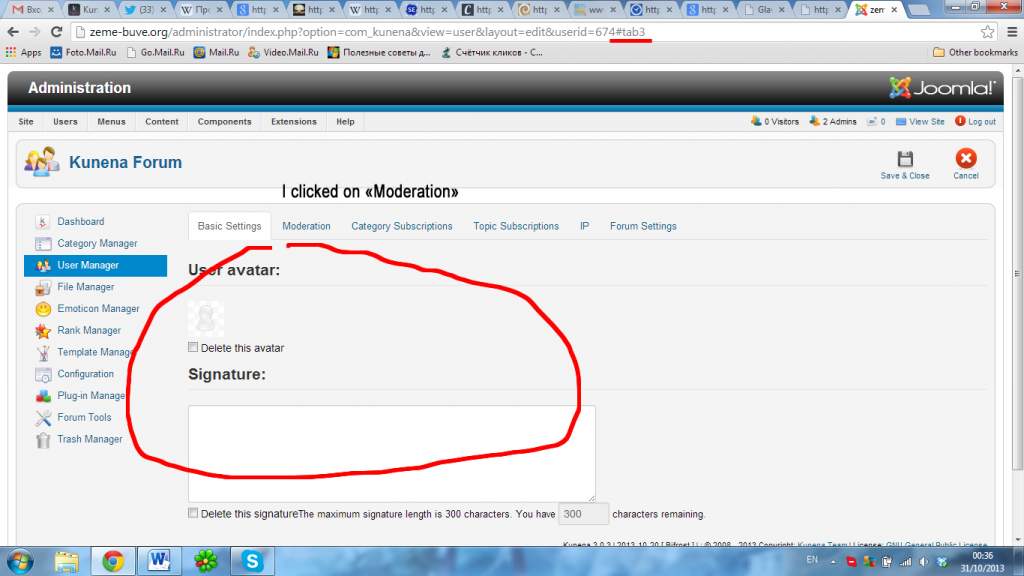
This problem exist not only with user list. It appears everywhere where are tabs...and i cannot switch them, before it was okay, and truly I have no idea, why it happened
Please Log in or Create an account to join the conversation.