
Kunena 7.0.9 & Kunena 6.4.14 – Security Updates Released
The Kunena team has announce the arrival of Kunena 7.0.9 [K 7.0.9] in stable which is now available for download as a native Joomla extension for J! 5.4.x/6.0.x./6.1.x. This version addresses most of the issues that were discovered in K 6.2 / K 6.3 / K 6.4 and issues discovered during the last development stages of K 7.0
The topics in this category are for historical interest only. Owing to the structural changes that occurred in K 2.0, many of the ideas in these topics will not work with later versions and, for that reason, the topics are locked.
Question Kunena Solved Plugin


baijianpeng wrote:
lavsteph wrote: for this to work we need the admins are also moderators.
This rule is illogical !
I am the Super User on my website, means the highest level Admin, but I still can not see a button that a Mod can see?
The worst is, I tried to set my account as the "Global Moderator" in Kunena settings, but I still can not see that button. Why? You think Global Mod is lower than the specific Mod for each category? Very bad rule!
I think the Admin, no matter assigned as Mod or not, as Global Mod or a specific Mod, can ALWAYS see this "solved" button. Do you agree?
At least, the Global Mod should see it, right?
Hello,
you´re absolutely right - I think I confirm this as a bug. What names have your admins/super users? What language do you running on your site? Next update will come up in february - it will be fixed then.
EDIT: We fixed the issue - the update is ready to download on our website.
Please Log in or Create an account to join the conversation.
This feature is already available - it copied the phrase [solved] in the title of the first post.MarioMari wrote: 1. Selected post as "SOLVED" is automatically copied and displayed in the first post. According to me, just so you do not need to look for and topics "SOLVED" are easy for people looking for a solution to the main topic.
Not really sure what you mean, but I think this can not be fixed by our plugin.MarioMari wrote: 2. Green or any other color should be reserved only for the signs of "SOLVED" - key, color bar under the title solved or background response "SOLVED".

This makes no sense. If there more then one supporterst, who will receive the thank you?MarioMari wrote: 3. Select post as "SOLVED" by the author automatically launches the "Thank You" for the author of this post.
 Sorry, will not put this on our feature-list. People should click "thank you", if they want to say thank you.
Sorry?MarioMari wrote: 4. At any time, the author may change his choice of "SOLVED" and select a different post or add one as an alternative way, which turned out to be the solution for him.
Your users can search for this phrase in the standard search, why a own module?MarioMari wrote: 5. Plugin online search and online search module should take into account the category of SOLVED. Yes, you can create a separate module called "Find in SOLVED"
Please Log in or Create an account to join the conversation.
baijianpeng wrote:
lavsteph wrote: for this to work we need the admins are also moderators.
This rule is illogical !
I am the Super User on my website, means the highest level Admin, but I still can not see a button that a Mod can see?
The worst is, I tried to set my account as the "Global Moderator" in Kunena settings, but I still can not see that button. Why? You think Global Mod is lower than the specific Mod for each category? Very bad rule!
I think the Admin, no matter assigned as Mod or not, as Global Mod or a specific Mod, can ALWAYS see this "solved" button. Do you agree?
At least, the Global Mod should see it, right?
The issue is fixed, you can find the update on our website.
www.yagendoo.com/en/blog/free-kunena-sol...la-kunena-forum.html
Please Log in or Create an account to join the conversation.

2. Green or any other color should be reserved only for the signs of "SOLVED" - key, color bar under the title solved or background response "SOLVED".
— Not really sure what you mean, but I think this can not be fixed by our plugin.
— Kunena forum should be restricted to one color threads and posts marked as "SOLVED". Marking the topic, theme icons, backgrounds beams under the title subject, button "SOLVED" - all in one color. It certainly increase the readability and further differentiate threads "SOLVED".
— in my opinion, to make it clear and practical must be very clearly presented. Post considered to be the solution must be clearly described and shown just below the content of the subject.1. Selected post as "SOLVED" is automatically copied and displayed in the first post. According to me, just so you do not need to look for and topics "SOLVED" are easy for people looking for a solution to the main topic.
— This feature is already available - it copied the phrase [solved] in the title of the first post.
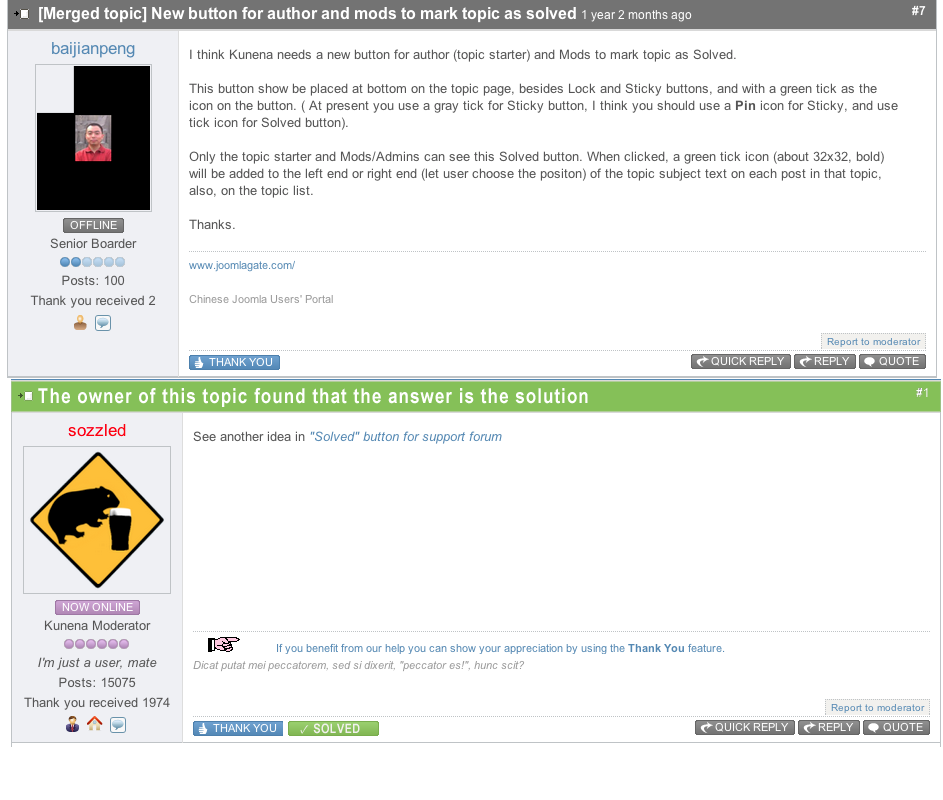
— If the author decided that this post is a solution to the topic or are looking for a response which probably also wants to thank the author of this according to me is logical. Logical and practical need for a forum to develop and encourage the provision of reasonable responses. This has a major impact on the forum and its future.3. Select post as "SOLVED" by the author automatically launches the "Thank You" for the author of this post.
This makes no sense. If there more then one supporterst, who will receive the thank you? Sorry, will not put this on our feature-list. People should click "thank you", if they want to say thank you.
4. At any time, the author may change his choice of "SOLVED" and select a different post or add one as an alternative way, which turned out to be the solution for him.
— Sorry?
— Sorry. my fault. Keep in mind that sometimes some answers are worth selection as SOLVED.
5. Plugin online search and online search module should take into account the category of SOLVED. Yes, you can create a separate module called "Find in SOLVED"
— Your users can search for this phrase in the standard search, why a own module?
It is, to adapt the module "search the forum" to allow only look for answers among the answers marked as "SOLVED".
Kunena Module "search", has a great advantage, it can be configured.
Had to add to his options are possible to limit the search to specific categories or topics such as the status of "SOLVED" it would be a great tool forum. Tool by which decreased by the number of junk questions already solved once.

Needed configuration Kunena module "Search":
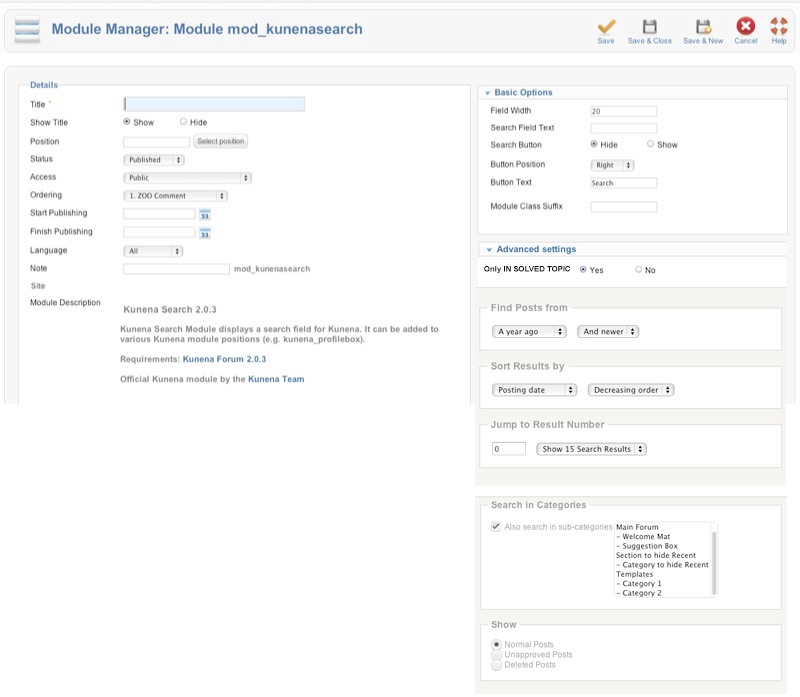
or:
www.kunena.org/forum/119-Feature-Requests/123389-smart-search
Regards!
Joomla 2.5.8, and 3.0 K.2.0.3, default Chrome
Please Log in or Create an account to join the conversation.
* Change the icon theme to "SOLVED"
* Will give the status of the topic to "SOLVED", which will be searchable on the module "search in SEOLVED"
* Displayed in a special color post marked as "SOLVED" just below the content topic thread, thanks to this search already once given froum questions and solutions will be quick and clear.
* Automatically adds the author points highlighted solutions "Thank You"
* Allow many posts in the topic as SOLVED.
* Block the ability to edit the post status marked "SOLVED"
According to me, the only solution the "SOLVED" makes sense ifit is made completely but is important tool for the creation and development of the forum.
P.S.
It would be good to protect the resolved issues from accidental deletion by a moderator or administrator.
Eg
By automatically moving the subject marked as "SOLVED"
the category of 'SOLVED' (new option in preferences?).
or manual
by Administartor or moderator, then sorting and collection themes of "SOLVED" is easier because you only see a list of topics "SOLVED" (a new type of menu list?), select the topics and move them to the selected category archive forum.
Reagrds!
Joomla 2.5.8, and 3.0 K.2.0.3, default Chrome
Please Log in or Create an account to join the conversation.
- baijianpeng
-

- Offline
- Premium Member
-

- Posts: 230
- Thank you received: 5
Then I open a topic which was started by me, I can not find this button either.
It seems that this plugin did not work. But I surely had enabled it!
Why?
www.joomlagate.com/
Chinese Joomla Users' Portal
Please Log in or Create an account to join the conversation.