
Kunena 7.0.4 Released
The Kunena team has announce the arrival of Kunena 7.0.4 [K 7.0.4] in stable which is now available for download as a native Joomla extension for J! 5.4.x/6.0.x. This version addresses most of the issues that were discovered in K 6.2 / K 6.3 / K 6.4 and issues discovered during the last development stages of K 7.0
Question CB Integration - Profile tab says "You are not authorized to view this page!"


Same problem, my 'index' page (kunena section page r/w for registered users and above) says "You are not authorized to view this page!" with the following settings:
Forum Configuration » Integration » Integration Options » Avatars = Community Builder
Forum Configuration » Integration » Integration Options » Profiles and Userlist = Community Builder
Forum Configuration » Integration » Integration Options » Login and Registration = Community Builder
Forum Configuration » Integration » Integration Options » Private Messagin = UddeIM
Forum Configuration » Integration » Integration Options » Activity Notifications = AUP
Forum Configuration » Integration » Integration Options » Access Control = Joomla
If 'Access Control = Community Builder' or 'Automatic' the page is accessible to logged-in users, and the subordinated categories are visible. That's where my problem starts:
all subordinated categories are visible ... even the ones that are restricted to view for this user
See the topic: Posts-in-private-restricted-boards-visible-to-general-public-through-User-Activity-and-Recent-Post
Please Log in or Create an account to join the conversation.


Kunena 1.7 (and older) has a bug/limitation where latest post was saved into all parent categories and visible even if the topic itself wasn't. It's been fixed in K2.0. If you have some other issue, it could be a bug either in Kunena or GroupJive.
Please Log in or Create an account to join the conversation.
Not sure whether I should start a new thread titled
"Group-restricted categories are visible to all registered users in section categories list (forum/index)" ... anyway, let's go ...
In menues group-restricted categories are hidden/visible properly, e.g. the frontend screenshot from a user assigned for Editor-"SEO & Webdevelopment" and "Musik & Audio-Media":

Private K-section/categories | forum/index
BTW: The same problem consisted in my former installation (J! 1.6.* + K 1.6.* + CB 1.4 + AUP 1.7.3 and more WITHOUT GroupJive)! As You can see, no posts yet. Toggling categories to "Moderated" doesn't make a difference. That's why we just didn't use the private section of Kunena in the past - now, after upgrading all components, I'd love to take advantage of the great benefits of K-GJ integration. A perfect solution, just this little step...
My set-up:

Kunena_showAdministration

GroupJive_categories

Joomla_ACL-groups
Forum Configuration » Integration » Integration Options » Avatars = Community Builder
Forum Configuration » Integration » Integration Options » Profiles and Userlist = Community Builder
Forum Configuration » Integration » Integration Options » Login and Registration = Community Builder
Forum Configuration » Integration » Integration Options » Private Messagin = UddeIM
Forum Configuration » Integration » Integration Options » Activity Notifications = AUP
Forum Configuration » Integration » Integration Options » Access Control = Community Builder
Database collation check: The collation of your table fields are correct
Kunena menu details:Legacy mode: Disabled | Joomla! SEF: Enabled | Joomla! SEF rewrite: Enabled | FTP layer: Enabled |
This message contains confidential informationhtaccess: Exists | PHP environment: Max execution time: 30 seconds | Max execution memory: 128M | Max file upload: 200M
| ID | Name | Alias | Menutype | Link | Path |
| 266 | Forum Index | index | forummenu | index.php?option=com_kunena&view=listcat&catid=1 | kmu-forum/index |
| 267 | Forum Aktuell | aktuell | forummenu | index.php?option=com_kunena&view=latest&do=latest | kmu-forum/aktuell |
| 272 | Forum-Regeln | regeln | forummenu | index.php?option=com_kunena&view=rules&do=rules | kmu-forum/regeln |
| 273 | Forum-Hilfe | hilfe | forummenu | index.php?option=com_kunena&view=help&do=help | kmu-forum/hilfe |
| 274 | Forum durchsuchen | suche | forummenu | index.php?option=com_kunena&view=search | kmu-forum/suche |
Joomla default template details : start5 | author: Mathias Roth, Trade Service | version: 2.5.0 | creationdate: 2011-04-05
Kunena default template details : Starthilfe Template | author: Mathias Roth, Trade Service | version: 1.7.2 | creationdate: 2012-01-31
Kunena version detailled: Installed version: 1.7.2 | Build: 5215 | Version name: Omega | Kunena detailled configuration:
Warning: Spoiler![th]Kunena config settings:[/th]
board_offline 0 board_ofset 0.00 enablerss 1 enablepdf 1 threads_per_page 10 messages_per_page 3 messages_per_page_search 15 showhistory 1 historylimit 6 shownew 1 jmambot 1 disemoticons 0 template startklar showannouncement 1 avataroncat 0 catimagepath categories/ showchildcaticon 1 annmodid 96,42,43 rtewidth 425 rteheight 300 enableforumjump 0 reportmsg 1 username 1 askemail 1 showemail 0 showuserstats 1 showkarma 1 useredit 1 useredittime 0 useredittimegrace 600 editmarkup 1 allowsubscriptions 1 subscriptionschecked 1 allowfavorites 1 maxsubject 50 maxsig 300 regonly 0 changename 1 pubwrite 1 floodprotection 0 mailmod 0 mailadmin 1 captcha 1 mailfull 0 allowavatar 1 allowavatarupload 1 allowavatargallery 1 avatarquality 65 avatarsize 2048 allowimageupload 0 allowimageregupload 1 imageheight 800 imagewidth 800 imagesize 150 allowfileupload 0 allowfileregupload 1 filetypes txt,rtf,pdf,zip,tar.gz,tgz,tar.bz2 filesize 120 showranking 1 rankimages 1 avatar_src fb fb_profile fb pm_component no userlist_rows 10 userlist_online 1 userlist_avatar 1 userlist_name 1 userlist_username 1 userlist_posts 1 userlist_karma 0 userlist_email 0 userlist_usertype 1 userlist_joindate 1 userlist_lastvisitdate 1 userlist_userhits 1 latestcategory 2,3,7,19,4,5,6 showstats 1 showwhoisonline 1 showgenstats 1 showpopuserstats 1 popusercount 5 showpopsubjectstats 1 popsubjectcount 5 usernamechange 0 rules_infb 1 rules_cid 40 help_infb 1 help_cid 48 showspoilertag 1 showvideotag 1 showebaytag 1 trimlongurls 0 trimlongurlsfront 40 trimlongurlsback 20 autoembedyoutube 1 autoembedebay 1 ebaylanguagecode de-de fbsessiontimeout 1800 highlightcode 0 rss_type recent rss_timelimit year rss_limit 10 rss_included_categories rss_excluded_categories rss_specification rss2.0 rss_allow_html 1 rss_author_format name rss_author_in_title 1 rss_word_count 50 rss_old_titles 0 rss_cache 900 fbdefaultpage recent default_sort asc alphauserpointsnumchars 40 sef 1 sefcats 1 sefutf8 0 showimgforguest 1 showfileforguest 1 pollnboptions 4 pollallowvoteone 1 pollenabled 1 poppollscount 5 showpoppollstats 1 polltimebtvotes 00:15:00 pollnbvotesbyuser 100 pollresultsuserslist 1 maxpersotext 50 ordering_system replyid post_dateformat ago post_dateformat_hover datetime hide_ip 1 js_actstr_integration 0 imagetypes jpg,jpeg,gif,png checkmimetypes 1 imagemimetypes image/jpeg,image/jpg,image/gif,image/png imagequality 50 thumbheight 32 thumbwidth 32 hideuserprofileinfo put_empty integration_access communitybuilder integration_login communitybuilder integration_avatar communitybuilder integration_profile communitybuilder integration_private uddeim integration_activity alphauserpoints boxghostmessage 0 userdeletetmessage 0 latestcategory_in 1 topicicons 1 onlineusers 1 debug 0 catsautosubscribed 0 showbannedreason 0 version_check 1 showthankyou 1 showpopthankyoustats 1 popthankscount 5 mod_see_deleted 1 bbcode_img_secure text listcat_show_moderators 0 lightbox 1 activity_limit 0 show_list_time 8760 show_session_type 2 show_session_starttime 133920 userlist_allowed 0 userlist_count_users 2 enable_threaded_layouts 0 category_subscriptions post topic_subscriptions every pubprofile 1 thankyou_max 10 email_recipient_count 0 email_recipient_privacy bcc email_visible_address captcha_post_limit 0
Third-party components: AlphaUserPoints 1.7.3 | CommunityBuilder 1.8 | UddeIm 2.7
Third-party SEF components: None
Plugins: System - Mootools Upgrade: Disabled | System - Mootools12: Disabled | Kunena Search 1.6.4
Modules: Kunena Login 1.6.4
Please Log in or Create an account to join the conversation.
Additionally all moderators and administrators gain access to every published category. So if you are site administrator or have administrative rights to Kunena, you will see everything.
Please Log in or Create an account to join the conversation.
I know, the example user is none of them, just an "Editor category A and B".Matias wrote: moderators and administrators gain access to every published category
Thanks for the hint, I've changed this, and modified "pub_recurse" with the same value in addition (thought thhis might be useful for newly created GJ groups/K sub-cats). In any way, this causes a phenomenon that I remember from my former installation (J! 1.6.* + K 1.6.* + CB 1.4):Matias wrote: kunena_categories table, field "pub_access" ... Check the value against group ids.
All categories are still visible in the example described above, but restricted category titles grab Alias from my "mandatory and not in use" Kunena menu to build an URL like "domain.de/forum/grafik-design.html" where clicking redirects to "domain.de/kmu-forum/index.html" (the public top level K-category) ...
while allowed categoriy titles keep the correct URL, in this example "domain.de/projekt-forum/webdevelopment.html", which contains the correct Alias of the private top level K-category.
At this point, it seems to be corresponding to "How to set up Kunena menu structure properly" ??
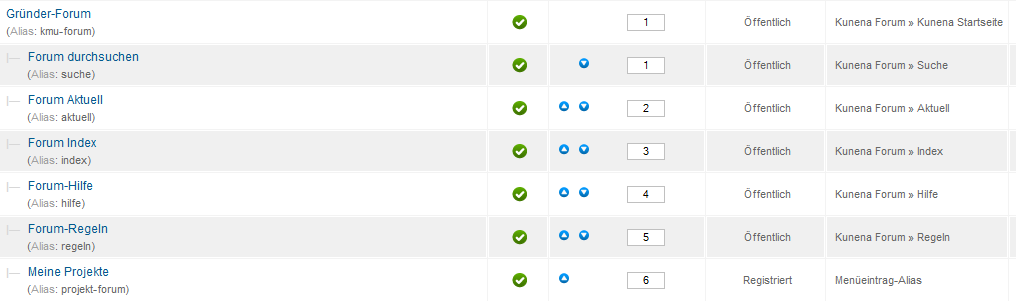
Kunena admin: public forum menu
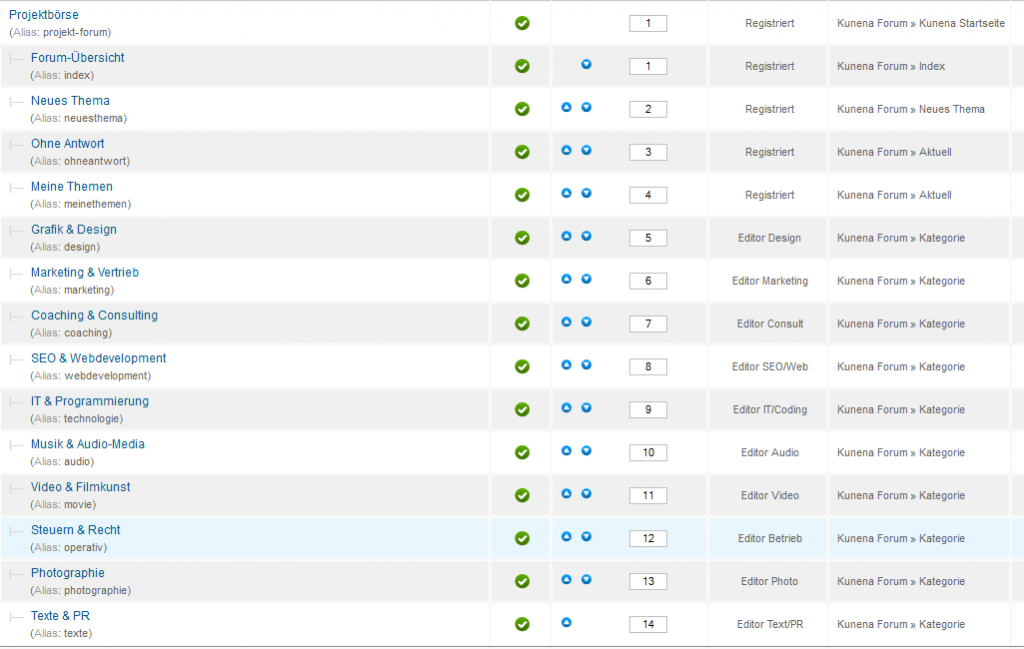
Kunena admin: private forum menu
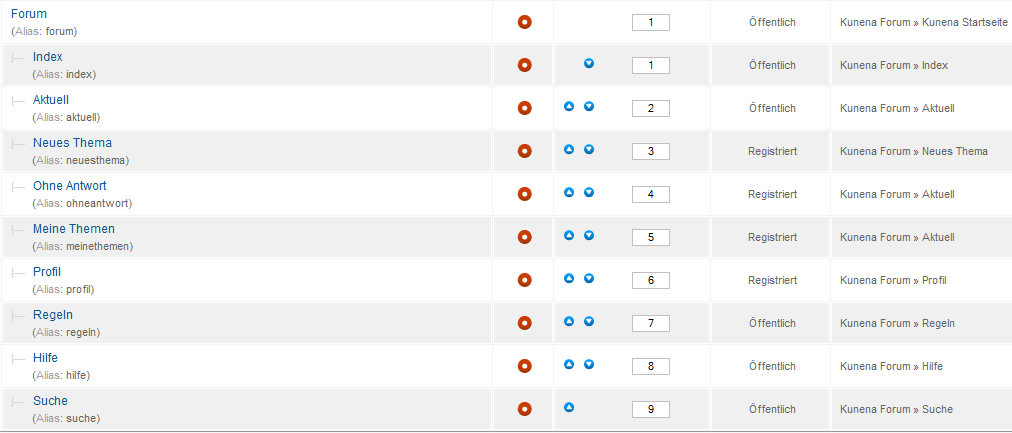
Kunena admin: component-created "hidden" menu > after locking
these items, all restricted category titles are changed, similar to
"domain.de/component/kunena/grafik-design.html?Itemid=0".
I'm certainly confused. What's next?
Beside, Kunenas 2.0 Beta is released, and over at Joomlapolis, they've just announced
new versions: CB GroupJive 2.5.2 RC1 and CB Forums plugin 2.1.0 - a better way to go?
Regarding this, I've ordered my hoster to upgrade the V-webserver to PHP 5.3 tonight.
And I'm thankful for any advice to get this awesome corporate community project working.
Please Log in or Create an account to join the conversation.
PS. current beta1 release has bug in CB integration.
Please Log in or Create an account to join the conversation.