


- Posts: 1253
- Thank you received: 188
Kunena 7.0.9 & Kunena 6.4.14 – Security Updates Released
The Kunena team has announce the arrival of Kunena 7.0.9 [K 7.0.9] in stable which is now available for download as a native Joomla extension for J! 5.4.x/6.0.x./6.1.x. This version addresses most of the issues that were discovered in K 6.2 / K 6.3 / K 6.4 and issues discovered during the last development stages of K 7.0
Solved Kunena export php tables to fix 404 error
2 years 11 months ago - 2 years 11 months ago #229533
by Leen
With kind regards
Leen
Replied by Leen on topic Kunena export php tables to fix 404 error
Hello
I have a question: the test site /Kunena2/ uses a different database, I hope?
And are there no xxxxx_kunena tables in that database?
if the working website database does label the xxxxx_kunena
and the xxxxx_ prefix is the same as the kunena2 test site
then export the kunena tables and import it into the kunena2 test site.
or if you still have the Kunena tables from version 5.2 and that prefix is the same as that of test kunena 2 then uses it to import
(actually this is the same as what Rich described earlier, I think you deleted just a little too much)
I have a question: the test site /Kunena2/ uses a different database, I hope?
And are there no xxxxx_kunena tables in that database?
if the working website database does label the xxxxx_kunena
and the xxxxx_ prefix is the same as the kunena2 test site
then export the kunena tables and import it into the kunena2 test site.
or if you still have the Kunena tables from version 5.2 and that prefix is the same as that of test kunena 2 then uses it to import
(actually this is the same as what Rich described earlier, I think you deleted just a little too much)
With kind regards
Leen
Last edit: 2 years 11 months ago by Leen.
Please Log in or Create an account to join the conversation.
- timpennington
-
 Topic Author
- Offline
- Junior Member
-

Less
More
- Posts: 24
- Thank you received: 0
2 years 11 months ago #229535
by timpennington
Replied by timpennington on topic Kunena export php tables to fix 404 error
Thank you for taking a look at this.
I am not sure whether I deleted "too much" bit here is a screenshot of the tables I found when I searched "Kunena" in the tables; I exported them, then deleted them and then reinstalled them when I installed the new Kunena version.
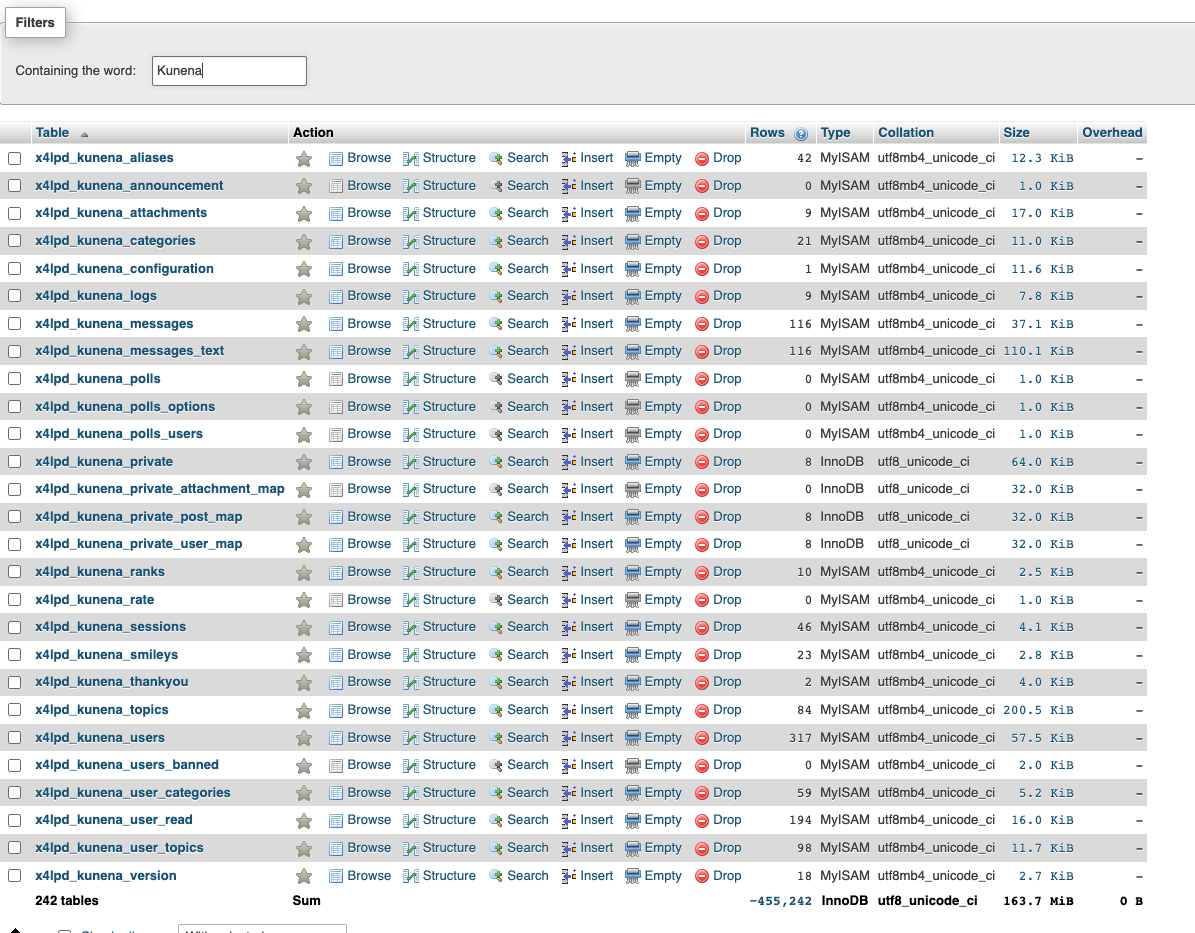
I am not sure whether I deleted "too much" bit here is a screenshot of the tables I found when I searched "Kunena" in the tables; I exported them, then deleted them and then reinstalled them when I installed the new Kunena version.
Please Log in or Create an account to join the conversation.
2 years 11 months ago #229536
by Gindi
Replied by Gindi on topic Kunena export php tables to fix 404 error
In my opinion, table type and collation do not match.
In the tables where the type is wrong, the collation is right and in the tables where the type is right, the collation is wrong.
All tables should be of type InnoDB and collation should be utf8mb4_unicode_ci.
Gindi
In the tables where the type is wrong, the collation is right and in the tables where the type is right, the collation is wrong.
All tables should be of type InnoDB and collation should be utf8mb4_unicode_ci.
Gindi
Please Log in or Create an account to join the conversation.
- timpennington
-
Topic Author
- Offline
- Junior Member
-
Less
More
- Posts: 24
- Thank you received: 0
2 years 11 months ago #229545
by timpennington
Replied by timpennington on topic Kunena export php tables to fix 404 error
Can you assist me on how to fix this?
Thank you
Thank you
Please Log in or Create an account to join the conversation.
- timpennington
-
Topic Author
- Offline
- Junior Member
-
Less
More
- Posts: 24
- Thank you received: 0
2 years 11 months ago #229546
by timpennington
Replied by timpennington on topic Kunena export php tables to fix 404 error
I used Akeeba to backup my site, and am using XAMPP to work on it as a test site.
Here is a screenshot of my Kunena tables in my database; what do you recommend I delete after I export them, with the purpose of reinstalling Kunena and then uploading the old tables into the new, as per the instruction?
I think you all in advance for your help!

Here is a screenshot of my Kunena tables in my database; what do you recommend I delete after I export them, with the purpose of reinstalling Kunena and then uploading the old tables into the new, as per the instruction?
I think you all in advance for your help!
Please Log in or Create an account to join the conversation.


Less
More
- Posts: 12291
- Thank you received: 2538
2 years 11 months ago - 2 years 11 months ago #229553
by rich
Important! Always create a backup before you make any changes to your website!
Replied by rich on topic Kunena export php tables to fix 404 error
Do you have a backup of the Kunena tables from the old Kunena 5 installation, or only from the migrated page?
Before you do anything else, delete these menu items from your test page, then also from the trash (see image).
Then go to Kunena -> Tools -> Menu Manager and restore the menu.
After that, there should be a menu item for the forum in the main menu. Publish this menu item.
Choose the Kunena template Aurelia and check if the forum works.
.

Before you do anything else, delete these menu items from your test page, then also from the trash (see image).
Then go to Kunena -> Tools -> Menu Manager and restore the menu.
After that, there should be a menu item for the forum in the main menu. Publish this menu item.
Choose the Kunena template Aurelia and check if the forum works.
.
Important! Always create a backup before you make any changes to your website!
Last edit: 2 years 11 months ago by rich.
Please Log in or Create an account to join the conversation.
Time to create page: 0.205 seconds