
- Posts: 5
- Thank you received: 0
Kunena 7.0.9 & Kunena 6.4.14 – Security Updates Released
The Kunena team has announce the arrival of Kunena 7.0.9 [K 7.0.9] in stable which is now available for download as a native Joomla extension for J! 5.4.x/6.0.x./6.1.x. This version addresses most of the issues that were discovered in K 6.2 / K 6.3 / K 6.4 and issues discovered during the last development stages of K 7.0
Topics must relate to a currently supported version of Kunena. If you are unsure what is the current supported version of Kunena, please go to the
download
page.
If you are having problems then, for your own benefit, it would save us all a lot of time if you would kindly post your configuration report when you ask for help from this forum. If you do not post your configuration report we will not ask you for it but you will probably not get your problem solved, either.
If you are having problems then, for your own benefit, it would save us all a lot of time if you would kindly post your configuration report when you ask for help from this forum. If you do not post your configuration report we will not ask you for it but you will probably not get your problem solved, either.
Question Please help me to solve this peculiar problem
- Skywalker71
-
 Topic Author
- Offline
- New Member
-

Less
More
1 year 6 months ago #233084
by Skywalker71

Replied by Skywalker71 on topic Please help me to solve this peculiar problem
Before commenting, I should advice you to read the original post... not once but thrice.
Yeah! It is never the fault of the template developersI have used the Joomshaper 'Megainc' template which is based on Helix Framework. But it seems it is basically Joomla, Kunena conflict and as per Joomla experts in their forum, the problem lies with Kunena.
. Have you tried switching to Cassiopeia as I suggested? Do you have a link to your website? Or can you post a configuration report?
Please Log in or Create an account to join the conversation.


Less
More
- Posts: 1020
- Thank you received: 165
1 year 6 months ago #233085
by Pinkeltje
Replied by Pinkeltje on topic Please help me to solve this peculiar problem
As @rich explained, Kunena offers the option to change JOOMLA user settings, so users don't have to go to JOOMLA profile to change those settings. That's all. I disable them by default because in my opinion they are not usefull for registered users.
Please Log in or Create an account to join the conversation.


1 year 6 months ago #233087
by Leen
With kind regards
Leen
Replied by Leen on topic Please help me to solve this peculiar problem
I saw that you also asked the question here
forum.joomla.org/viewtopic.php?f=834&t=1015450
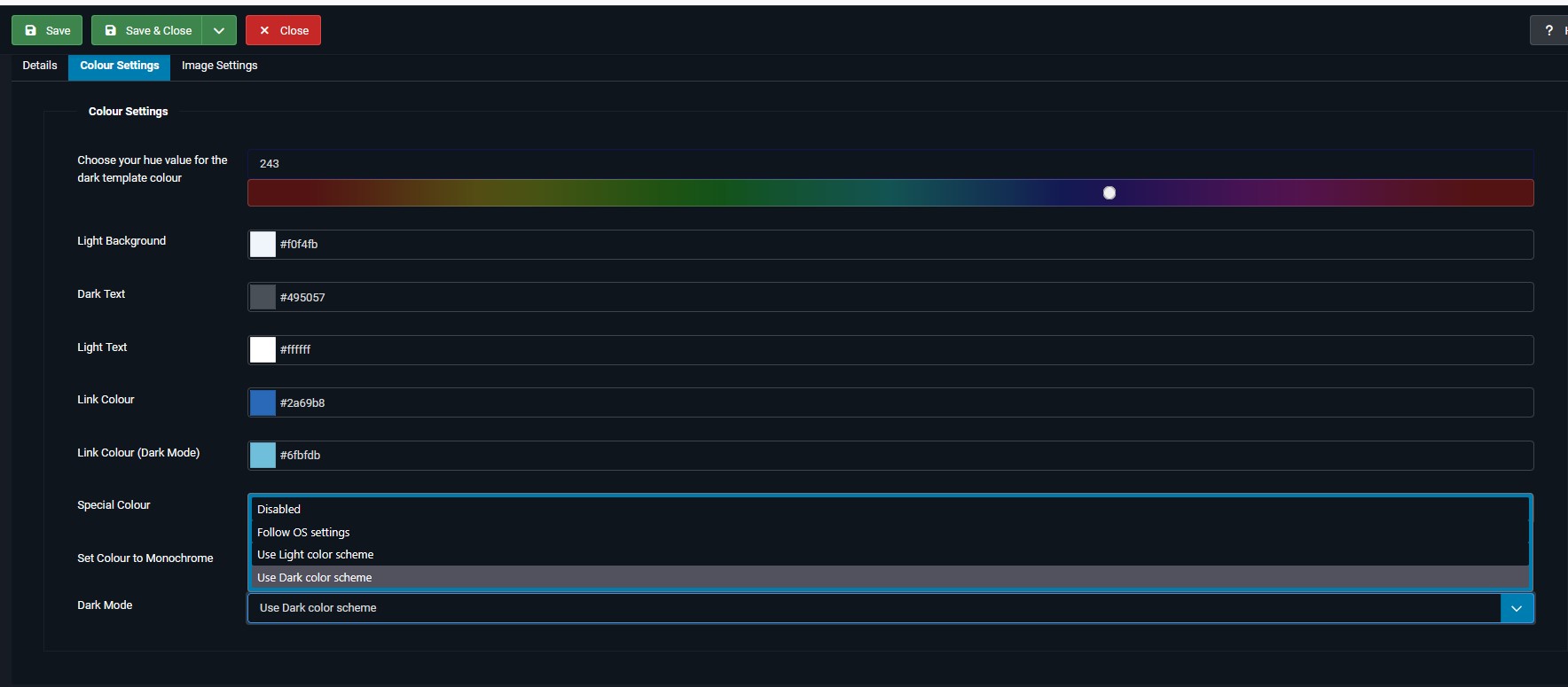
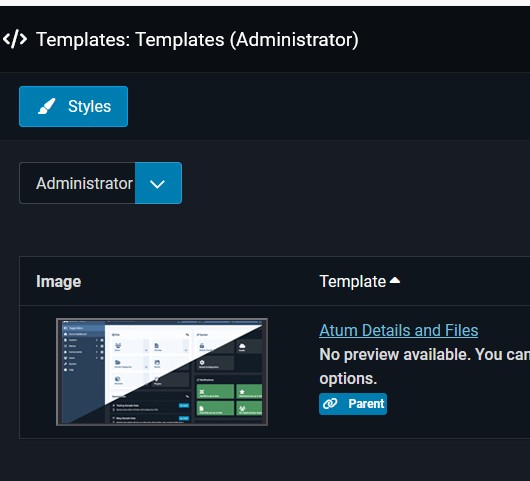
look in your website at the administrator template Atum-Default
and then at the bottom of the tab color settings at Dark Mode if it changes if you change something there
forum.joomla.org/viewtopic.php?f=834&t=1015450
look in your website at the administrator template Atum-Default
and then at the bottom of the tab color settings at Dark Mode if it changes if you change something there
With kind regards
Leen
The following user(s) said Thank You: rich
Please Log in or Create an account to join the conversation.
Less
More
- Posts: 1020
- Thank you received: 165
1 year 6 months ago #233088
by Pinkeltje
Replied by Pinkeltje on topic Please help me to solve this peculiar problem
And you might want te re-read
this answer
in joomla forum. So if you have problems in your FRONTEND, it is due to your JOOMLA template. So either adjust css, use a light JOOMLA template or look for a
Kunena template
that works with dark Joomla templates.
Please Log in or Create an account to join the conversation.

Less
More
- Posts: 12291
- Thank you received: 2538
1 year 6 months ago #233093
by rich
Important! Always create a backup before you make any changes to your website!
Replied by rich on topic Please help me to solve this peculiar problem
@Leen Thanks for the link.
In principle, nothing else was said in the Joomla forum than here and it confirms that our answers are correct.
But I agree with the user Mr. Wimpy that these settings are a bit confusing (see here) .
Since Kunena does not have a dark mode either, I will open a ticket on Git and suggest that the other settings except from the frontend language selection and the time zones be removed.
In principle, nothing else was said in the Joomla forum than here and it confirms that our answers are correct.
But I agree with the user Mr. Wimpy that these settings are a bit confusing (see here) .
Since Kunena does not have a dark mode either, I will open a ticket on Git and suggest that the other settings except from the frontend language selection and the time zones be removed.
Important! Always create a backup before you make any changes to your website!
Please Log in or Create an account to join the conversation.
Less
More
- Posts: 1020
- Thank you received: 165
1 year 5 months ago #233094
by Pinkeltje
Replied by Pinkeltje on topic Please help me to solve this peculiar problem
Agree that they are confusing, and maybe better to remove, but it is a Joomla issue as well. Try to edit Joomla user profile in frontend, it is just as confusing!
But as I understand @Skywalker71 was trying to use those options to solve layout/color problems in frontend. So removing some setting from Kunena profile, won't solve the problem.
But as I understand @Skywalker71 was trying to use those options to solve layout/color problems in frontend. So removing some setting from Kunena profile, won't solve the problem.
Please Log in or Create an account to join the conversation.
Time to create page: 0.269 seconds