
- Posts: 5
- Thank you received: 0
Kunena 7.0.9 & Kunena 6.4.14 – Security Updates Released
The Kunena team has announce the arrival of Kunena 7.0.9 [K 7.0.9] in stable which is now available for download as a native Joomla extension for J! 5.4.x/6.0.x./6.1.x. This version addresses most of the issues that were discovered in K 6.2 / K 6.3 / K 6.4 and issues discovered during the last development stages of K 7.0
Topics must relate to a currently supported version of Kunena. If you are unsure what is the current supported version of Kunena, please go to the
download
page.
If you are having problems then, for your own benefit, it would save us all a lot of time if you would kindly post your configuration report when you ask for help from this forum. If you do not post your configuration report we will not ask you for it but you will probably not get your problem solved, either.
If you are having problems then, for your own benefit, it would save us all a lot of time if you would kindly post your configuration report when you ask for help from this forum. If you do not post your configuration report we will not ask you for it but you will probably not get your problem solved, either.
Question Please help me to solve this peculiar problem
- Skywalker71
-
 Topic Author
- Offline
- New Member
-

Less
More
1 year 6 months ago #233072
by Skywalker71
Please help me to solve this peculiar problem was created by Skywalker71
Hello Friends! I am facing a peculiar problem. I am using Joomla 5.2.5 and Kunena 6.3.10. The problem is, whenever I change the 'Dark Theme' option in Kunena user profile, the Joomla Admin panel colour changes. You will be able to understand the problem if you see the images below:
Image 1. Effect of 'Light color scheme':
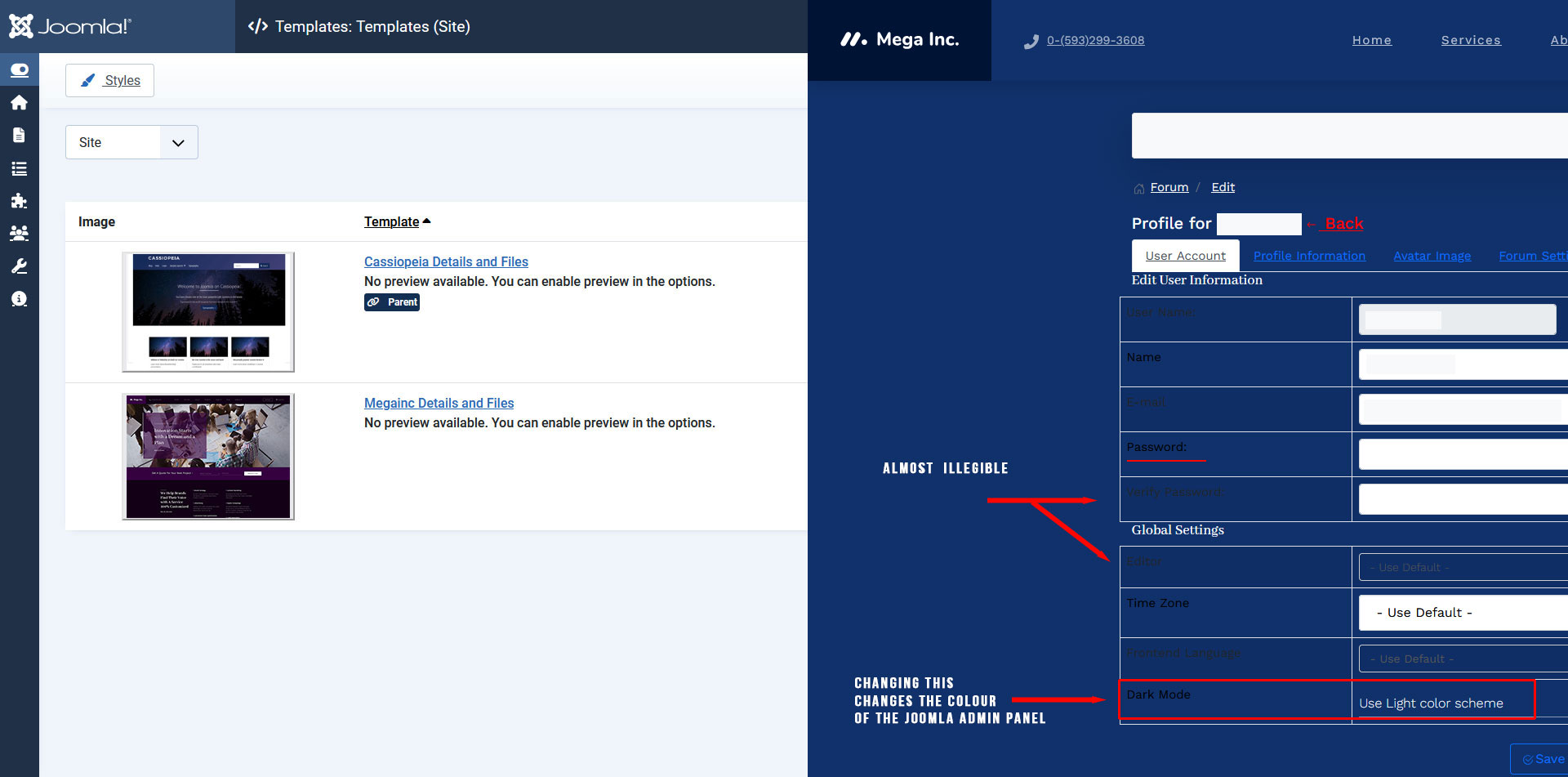
Image 2. Effect of 'Dark color scheme':
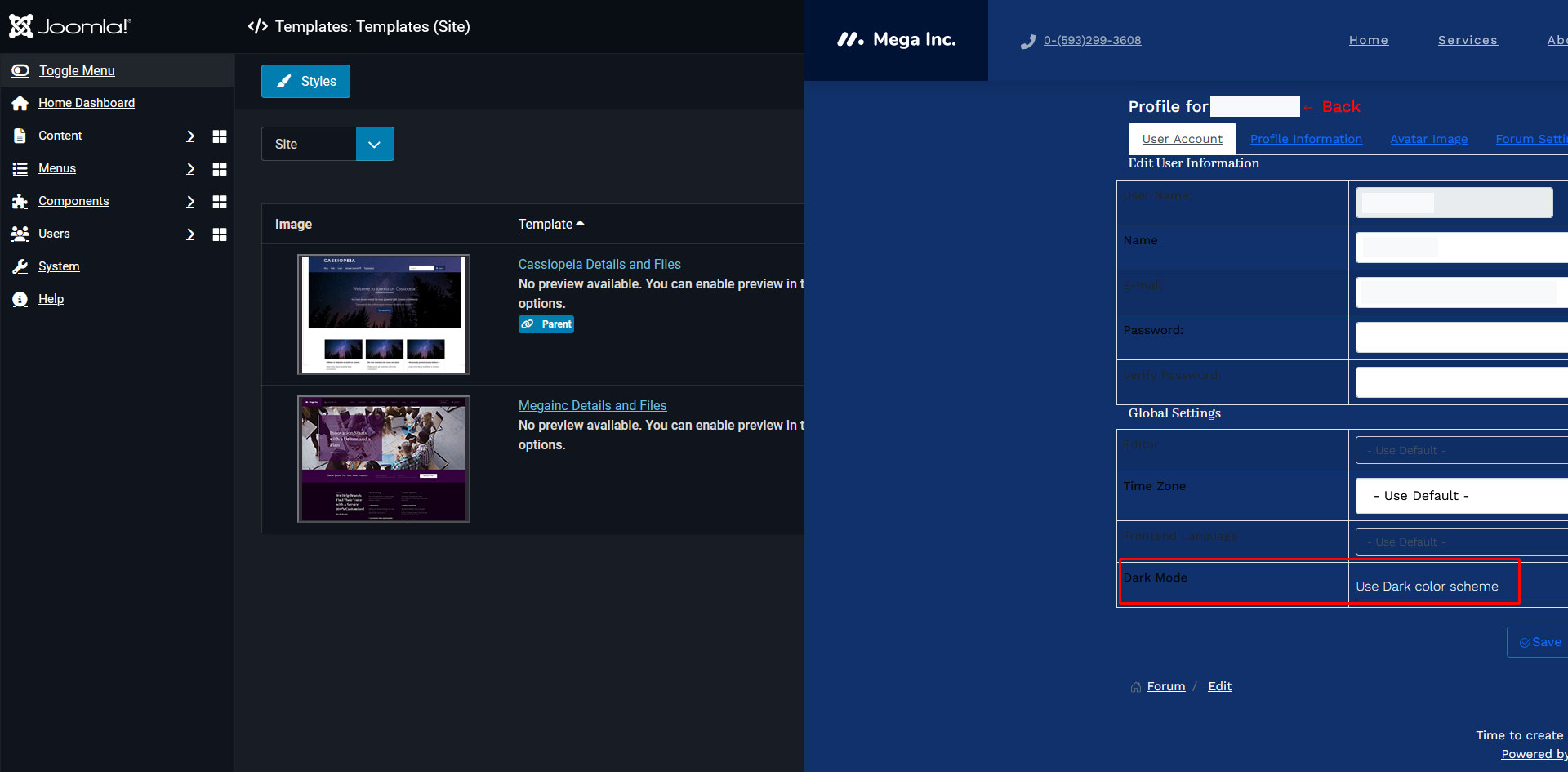
Please note that I have combined screenshots of Joomla Admin Panel and Kunena frontend after each change on Kunena frontend which I have marked with Red colour. Now, as you can clearly see in the images above that though I changed the colour schemes of Kunena in the user profile, nothing actually changed there (and some fields' names are almost impossible to see) but the change happened in the Joomla Admin panel. First I thought this problem is the fault of the template I am using but it occurred even with the default Joomla Cassiopeia template and Kunena is using its default template all along. I don't know whether it is a bug of Joomla or Kunena, I just want Kunena to behave properly i.e. how it should work, that's all. Please help me on this and I will be grateful.
Thank you all in advance.
P.S: My OS, Windows 10 Pro 22H2 and set in a Dark theme mode. I changed it to Light theme mode but nothing changed in the behaviour of Joomla and Kunena.
Image 1. Effect of 'Light color scheme':
Image 2. Effect of 'Dark color scheme':
Please note that I have combined screenshots of Joomla Admin Panel and Kunena frontend after each change on Kunena frontend which I have marked with Red colour. Now, as you can clearly see in the images above that though I changed the colour schemes of Kunena in the user profile, nothing actually changed there (and some fields' names are almost impossible to see) but the change happened in the Joomla Admin panel. First I thought this problem is the fault of the template I am using but it occurred even with the default Joomla Cassiopeia template and Kunena is using its default template all along. I don't know whether it is a bug of Joomla or Kunena, I just want Kunena to behave properly i.e. how it should work, that's all. Please help me on this and I will be grateful.
Thank you all in advance.
P.S: My OS, Windows 10 Pro 22H2 and set in a Dark theme mode. I changed it to Light theme mode but nothing changed in the behaviour of Joomla and Kunena.
Please Log in or Create an account to join the conversation.


Less
More
- Posts: 1020
- Thank you received: 165
1 year 6 months ago #233075
by Pinkeltje
Replied by Pinkeltje on topic Please help me to solve this peculiar problem
I think that problem comes from your Joomla template. Try switching to Casseiopeia and check if the problem still exists.
Please Log in or Create an account to join the conversation.
- Skywalker71
-
Topic Author
- Offline
- New Member
-
Less
More
- Posts: 5
- Thank you received: 0
1 year 6 months ago #233079
by Skywalker71
Replied by Skywalker71 on topic Please help me to solve this peculiar problem
Thank you for your suggestions. Following your suggestion, I just tested another fresh installation of Joomla 5.2.5 and Kunena 6.3.10 and tested with same steps and the results are the same. I also have created another user and logged in as that user in the Frontend and when I changed the same settings in Kunena, it didn't effect neither Kunena, nor the Joomla Admin panel. That means, when logged in as a Superuser, Kunena and Joomla both are using the same file (which one I don't know) which is making this conflict. BTW, in the given example screenshots, I have used the Joomshaper 'Megainc' template which is based on Helix Framework. But it seems it is basically Joomla, Kunena conflict and as per Joomla experts in their forum, the problem lies with Kunena.
Please Log in or Create an account to join the conversation.

Less
More
- Posts: 12291
- Thank you received: 2538
1 year 6 months ago - 1 year 6 months ago #233080
by rich
Important! Always create a backup before you make any changes to your website!
Replied by rich on topic Please help me to solve this peculiar problem
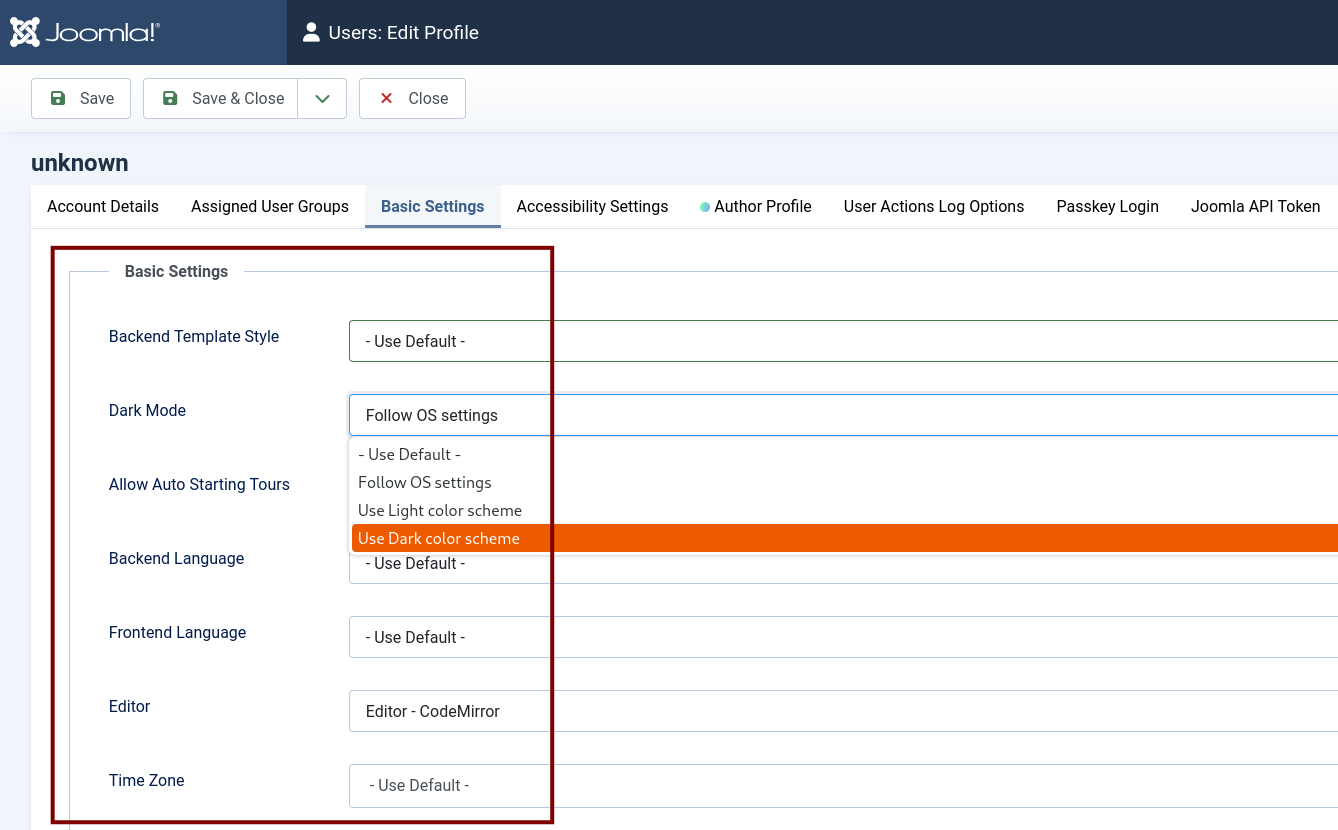
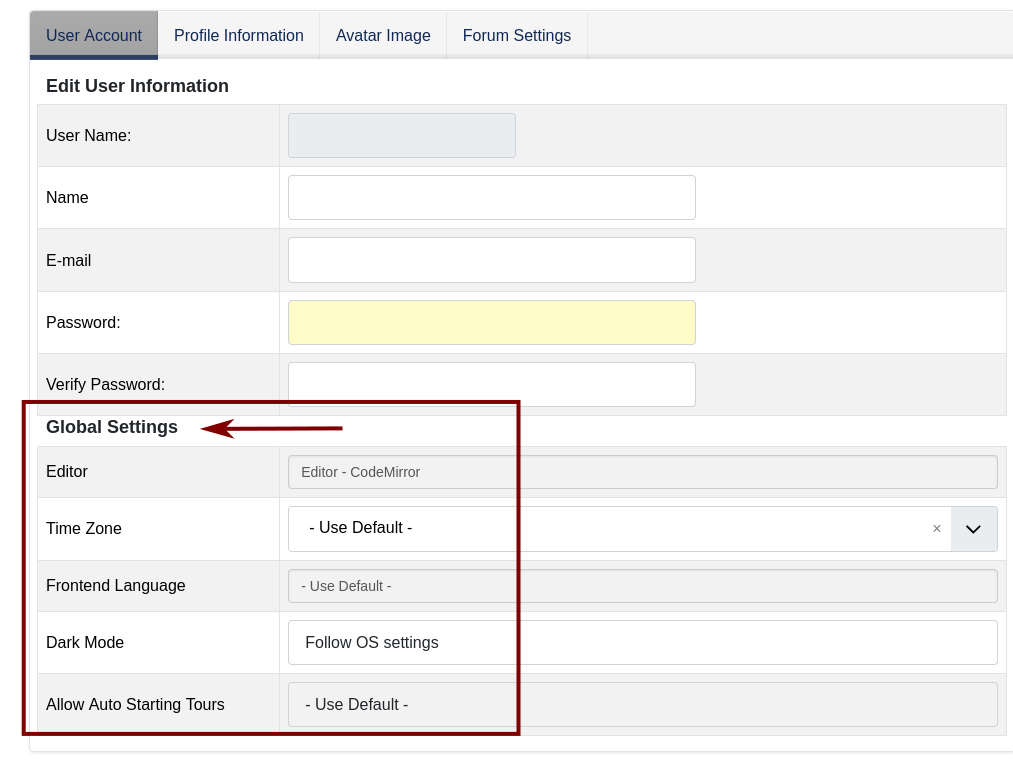
This is a Joomla defined user setting and has nothing to do with Kunena. Kunena only offers the possibility for the user to customize some settings such as the time zone (or language if these are installed) to his needs. This setting only applies to the user in question, if you log in with another user, you will have the default setting.
By the way: Dark mode does not work in the frontend because the Joomla template Cassiopeia does not offer this feature.
(Image one is the Joomla user settings and image two is the Kunena user profile.)
Image one
.
.
.
Image two
.
By the way: Dark mode does not work in the frontend because the Joomla template Cassiopeia does not offer this feature.
(Image one is the Joomla user settings and image two is the Kunena user profile.)
Image one
.
.
.
Image two
.
Important! Always create a backup before you make any changes to your website!
Last edit: 1 year 6 months ago by rich.
Please Log in or Create an account to join the conversation.
Less
More
- Posts: 1020
- Thank you received: 165
1 year 6 months ago #233082
by Pinkeltje
 . Have you tried switching to Cassiopeia as I suggested? Do you have a link to your website? Or can you post a configuration report?
Replied by Pinkeltje on topic Please help me to solve this peculiar problem
Yeah! It is never the fault of the template developersI have used the Joomshaper 'Megainc' template which is based on Helix Framework. But it seems it is basically Joomla, Kunena conflict and as per Joomla experts in their forum, the problem lies with Kunena.
Please Log in or Create an account to join the conversation.
- Skywalker71
-
Topic Author
- Offline
- New Member
-
Less
More
- Posts: 5
- Thank you received: 0
1 year 6 months ago - 1 year 6 months ago #233083
by Skywalker71
Sorry to say, you have failed to understand my problem. I have made another fresh installation of Joomla 5.2.5 and installed Gantry 5 framework and helium template and Kunena 6.3.10 and went through the same steps and the problem occurred again. So, it is clearly Kunena's fault which the 'Kunena Cult' doesn't want to recognize and this is why Kunena is still not very popular forum component. No sane person looks for reasons in the house's structure if the furniture doesn't fit. They fix the furniture. Sorry if I sound rude but the reaction I got here instead of trying to see the source of the problem, my reaction justified. Thanks for replying.
P.S: The change in the 'Dark Theme' option doesn't even work here. If that option has no effect, then why that option is even there which is nothing but a PROBLEM-MAKER??!!
Replied by Skywalker71 on topic Please help me to solve this peculiar problem
This is a Joomla defined user setting and has nothing to do with Kunena. Kunena only offers the possibility for the user to customize some settings such as the time zone (or language if these are installed) to his needs. This setting only applies to the user in question, if you log in with another user, you will have the default setting.
By the way: Dark mode does not work in the frontend because the Joomla template Cassiopeia does not offer this feature.
(Image one is the Joomla user settings and image two is the Kunena user profile.)
Sorry to say, you have failed to understand my problem. I have made another fresh installation of Joomla 5.2.5 and installed Gantry 5 framework and helium template and Kunena 6.3.10 and went through the same steps and the problem occurred again. So, it is clearly Kunena's fault which the 'Kunena Cult' doesn't want to recognize and this is why Kunena is still not very popular forum component. No sane person looks for reasons in the house's structure if the furniture doesn't fit. They fix the furniture. Sorry if I sound rude but the reaction I got here instead of trying to see the source of the problem, my reaction justified. Thanks for replying.
P.S: The change in the 'Dark Theme' option doesn't even work here. If that option has no effect, then why that option is even there which is nothing but a PROBLEM-MAKER??!!
Last edit: 1 year 6 months ago by Skywalker71.
Please Log in or Create an account to join the conversation.
Time to create page: 0.234 seconds