
- Posts: 63
- Thank you received: 1
Kunena 7.0.9 & Kunena 6.4.14 – Security Updates Released
The Kunena team has announce the arrival of Kunena 7.0.9 [K 7.0.9] in stable which is now available for download as a native Joomla extension for J! 5.4.x/6.0.x./6.1.x. This version addresses most of the issues that were discovered in K 6.2 / K 6.3 / K 6.4 and issues discovered during the last development stages of K 7.0
Topics must relate to a currently supported version of Kunena. If you are unsure what is the current supported version of Kunena, please go to the
download
page.
If you are having problems then, for your own benefit, it would save us all a lot of time if you would kindly post your configuration report when you ask for help from this forum. If you do not post your configuration report we will not ask you for it but you will probably not get your problem solved, either.
If you are having problems then, for your own benefit, it would save us all a lot of time if you would kindly post your configuration report when you ask for help from this forum. If you do not post your configuration report we will not ask you for it but you will probably not get your problem solved, either.
Question Add files
- karloshull
-
 Topic Author
- Offline
- Junior Member
-

Less
More
4 years 2 months ago #224174
by karloshull
Replied by karloshull on topic Add files
I disabled "Load bootstrap css" (in the Aurelia setting) And the action button stopped working.
I disabled CSS & JS Optimization - ADD Files still not working.
Any more ideas?
I disabled CSS & JS Optimization - ADD Files still not working.
Any more ideas?
Please Log in or Create an account to join the conversation.


4 years 2 months ago #224176
by Leen
With kind regards
Leen
no can't think of any more ideas
it seems that somewhere or by a website security or setting the upload is blocked
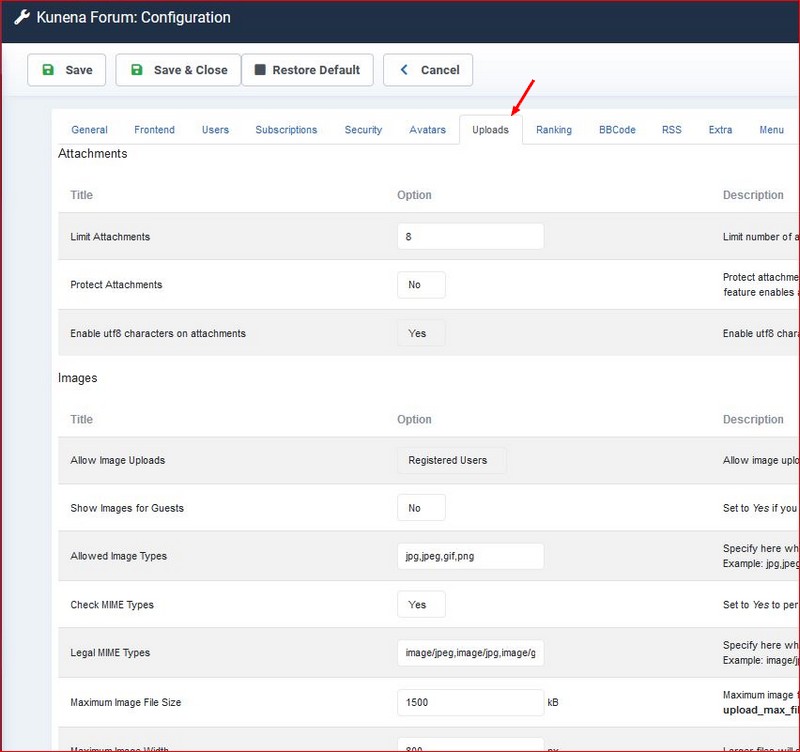
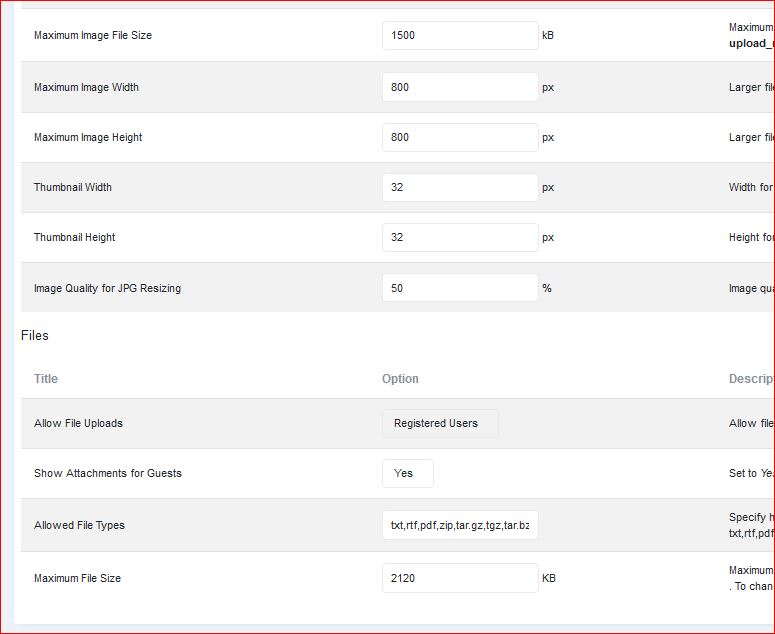
you could try again to re-enter and save the kunena uploads setting one by one
it seems that somewhere or by a website security or setting the upload is blocked
you could try again to re-enter and save the kunena uploads setting one by one
With kind regards
Leen
Please Log in or Create an account to join the conversation.
- karloshull
-
Topic Author
- Offline
- Junior Member
-
Less
More
- Posts: 63
- Thank you received: 1
4 years 2 months ago #224180
by karloshull
Replied by karloshull on topic Add files
Tried the upload settings again - no luck
I have created a new site to test if the button works
I copied all the kunena data from the sql database and then I insert it into the new database.
Then I instaled kunena on the new website
The add button works as file manager pop up, and clicked on a file
and I got this error
Failed to open upload input stream.
So how can I fix this error?
I have created a new site to test if the button works
I copied all the kunena data from the sql database and then I insert it into the new database.
Then I instaled kunena on the new website
The add button works as file manager pop up, and clicked on a file
and I got this error
Failed to open upload input stream.
So how can I fix this error?
Please Log in or Create an account to join the conversation.
4 years 2 months ago - 4 years 2 months ago #224182
by Leen
With kind regards
Leen
perhaps there is some configuration required for Joomla to use the correct paths. ?
or folder permissions
check administrator > System Information whether with folder permissions everything is green except configuration.php
or folder permissions
check administrator > System Information whether with folder permissions everything is green except configuration.php
With kind regards
Leen
Last edit: 4 years 2 months ago by Leen.
Please Log in or Create an account to join the conversation.


Less
More
- Posts: 12291
- Thank you received: 2538
4 years 2 months ago #224186
by rich
Important! Always create a backup before you make any changes to your website!
Have you also cleared the cache afterwards?I disabled "Load bootstrap css" (in the Aurelia setting) And the action button stopped working.
I disabled CSS & JS Optimization - ADD Files still not working.
Any more ideas?
Important! Always create a backup before you make any changes to your website!
Please Log in or Create an account to join the conversation.
- karloshull
-
Topic Author
- Offline
- Junior Member
-
Less
More
- Posts: 63
- Thank you received: 1
4 years 2 months ago #224191
by karloshull
Replied by karloshull on topic Add files
All the folders are green
So I decided to start again with fresh new joomla installed and fresh new kunena installed without editing the database
And I got the same error
Failed to open upload input stream.
So it must be the server? If so, any ideas where to look?
I am using plesk
OS
Ubuntu 20.04.4 LTS
Product
Plesk Obsidian
Version 18.0.45 Update #2, last updated on Aug 2, 2022 11:18 AM
So I decided to start again with fresh new joomla installed and fresh new kunena installed without editing the database
And I got the same error
Failed to open upload input stream.
So it must be the server? If so, any ideas where to look?
I am using plesk
OS
Ubuntu 20.04.4 LTS
Product
Plesk Obsidian
Version 18.0.45 Update #2, last updated on Aug 2, 2022 11:18 AM
Please Log in or Create an account to join the conversation.
Time to create page: 0.259 seconds