


- Posts: 61
- Thank you received: 9
Kunena 7.0.9 & Kunena 6.4.14 – Security Updates Released
The Kunena team has announce the arrival of Kunena 7.0.9 [K 7.0.9] in stable which is now available for download as a native Joomla extension for J! 5.4.x/6.0.x./6.1.x. This version addresses most of the issues that were discovered in K 6.2 / K 6.3 / K 6.4 and issues discovered during the last development stages of K 7.0
If you are having problems then, for your own benefit, it would save us all a lot of time if you would kindly post your
configuration report
when you ask for help from this forum. If you do not post your configuration report we will not ask you for it but you will probably not get your problem solved, either.
K 2.0 support will cease on 31 August 2013 and this section of the forum will be closed and archived after that time and no further questions will be answered about this version.
K 2.0 support will cease on 31 August 2013 and this section of the forum will be closed and archived after that time and no further questions will be answered about this version.
Sticky K 2.0 general menu issues
14 years 3 months ago - 14 years 3 months ago #127069
by Garry1953
Replied by Garry1953 on topic After upgrade - no Menu
Matias
Thanks
I have the Menu up and running now.
Thanks
I have the Menu up and running now.
Last edit: 14 years 3 months ago by sozzled. Reason: Change topic icon to "solved"
Please Log in or Create an account to join the conversation.
- freedomcoach
-

- Offline
- Premium Member
-

Less
More
- Posts: 307
- Thank you received: 3
14 years 3 months ago #127081
by freedomcoach
Replied by freedomcoach on topic After upgrade - no Menu
Hi Matias:
Can these menu items be copied as submenu items or do they need to be first level menu items? This solution is quite unwieldy since it will mess up the design and aesthetics of existing menus on my site. Is there some way of creating a default option for future upgrades to simply allow the standard kunena tab menu to appear on the top of forum page? I believe many sites will prefer this.
Another idea. What if.. the Kunena menu is simply published somewhere as in a new drop down menu? Will doing this cause the kunena tab menus now appear at the top of the forum?
Can these menu items be copied as submenu items or do they need to be first level menu items? This solution is quite unwieldy since it will mess up the design and aesthetics of existing menus on my site. Is there some way of creating a default option for future upgrades to simply allow the standard kunena tab menu to appear on the top of forum page? I believe many sites will prefer this.
Another idea. What if.. the Kunena menu is simply published somewhere as in a new drop down menu? Will doing this cause the kunena tab menus now appear at the top of the forum?
Please Log in or Create an account to join the conversation.


14 years 3 months ago #127083
by sozzled
The main problem at this stage, Howard, is how you go about getting your Kunena menu re-instated. I may be able to work through the process with you, when you and I both have a spare hour or so. On the other hand, I'm part-way through writing The Kunena Menu and, no joking, I figure I have about another 16 hours without interruptions to complete it. The trouble is, of course, I never seem to be able to make time for documentation projects like these, because I am overwhelmed dealing with questions on the forum. :whistle:
Blue Eagle vs. Crypsis reference guide
Read my blog and

Replied by sozzled on topic After upgrade - no Menu
Did you first try Mortti's suggestion?freedomcoach wrote: Can these menu items be copied as submenu items or do they need to be first level menu items?
For new installations of Kunena this is the standard approach. As soon as people start customising their own versions of a Kunena menu (without first reading Customised menus ) or fully appreciating Joomla's highly complicate menuing system, that's when problems arise.freedomcoach wrote: Is there some way of creating a default option for future upgrades to simply allow the standard kunena tab menu to appear on the top of forum page?
That's not going to re-instate the tabbed menu; however, if someone can demonstrate how a drop down menuing system might work, in a practical way, and help develop their ideas with the team, I'm all in favour of that. The simple fact is that the current Blue Eagle template incorporates a "tabbed" menu, and that's really all that I can say.freedomcoach wrote: What if the Kunena menu is simply published somewhere as in a new drop down menu? Will doing this cause the Kunena tab menus now appear at the top of the forum?
The main problem at this stage, Howard, is how you go about getting your Kunena menu re-instated. I may be able to work through the process with you, when you and I both have a spare hour or so. On the other hand, I'm part-way through writing The Kunena Menu and, no joking, I figure I have about another 16 hours without interruptions to complete it. The trouble is, of course, I never seem to be able to make time for documentation projects like these, because I am overwhelmed dealing with questions on the forum. :whistle:
Blue Eagle vs. Crypsis reference guide
Read my blog and
Please Log in or Create an account to join the conversation.
- freedomcoach
-
- Offline
- Premium Member
-
Less
More
- Posts: 307
- Thank you received: 3
14 years 3 months ago #127086
by freedomcoach
Replied by freedomcoach on topic After upgrade - no Menu
After some experimenting, I came up with a workaround for getting the kunena menu back onto my forum.
I put my entire Forum menu on a new top (drop down) menu and on my main menu link, instead of directing it to the forum itself, it directs the user to the other (drop down) menu using the external link feature.
This is certainly a clutsy solution in my opinion but it does work okay for now. I'm hoping this can be made easier in subsequent releases.
I put my entire Forum menu on a new top (drop down) menu and on my main menu link, instead of directing it to the forum itself, it directs the user to the other (drop down) menu using the external link feature.
This is certainly a clutsy solution in my opinion but it does work okay for now. I'm hoping this can be made easier in subsequent releases.
Please Log in or Create an account to join the conversation.
14 years 3 months ago - 14 years 3 months ago #127090
by sozzled
Blue Eagle vs. Crypsis reference guide
Read my blog and
Replied by sozzled on topic After upgrade - no Menu
If you want a drop-down menu then you have to do it yourself. If you want a standard Kunena tabbed menu, as you wrote:
I'm pleased to hear that you got everything to work even though I would never, ever advise the use of External Link types of menu items as far as Kunena is concerned.
Whether or not these menu-related issued can be more easily resolved in future releases of Kunena depends entirely on whatever-the-heck the guys who develop Joomla will devilishly devise that will further confuse and confound us more! And that's about all I have to say about that, too! :whistle:
this is already done for you with a standard installation of Kunena. As we have commented in the past, Howard, your particular instance of Kunena is very much tailored to your specific needs - needs that may not necessarily suit everyone. And that's really all that I have to say about that.Is there some way of creating a default option for future upgrades to simply allow the standard kunena tab menu to appear on the top of forum page?
I'm pleased to hear that you got everything to work even though I would never, ever advise the use of External Link types of menu items as far as Kunena is concerned.
Whether or not these menu-related issued can be more easily resolved in future releases of Kunena depends entirely on whatever-the-heck the guys who develop Joomla will devilishly devise that will further confuse and confound us more! And that's about all I have to say about that, too! :whistle:
Blue Eagle vs. Crypsis reference guide
Read my blog and
Last edit: 14 years 3 months ago by sozzled.
Please Log in or Create an account to join the conversation.


14 years 3 months ago #127095
by milkov
Replied by milkov on topic After update to Kunena 2.0, the main menu is not visible correctly
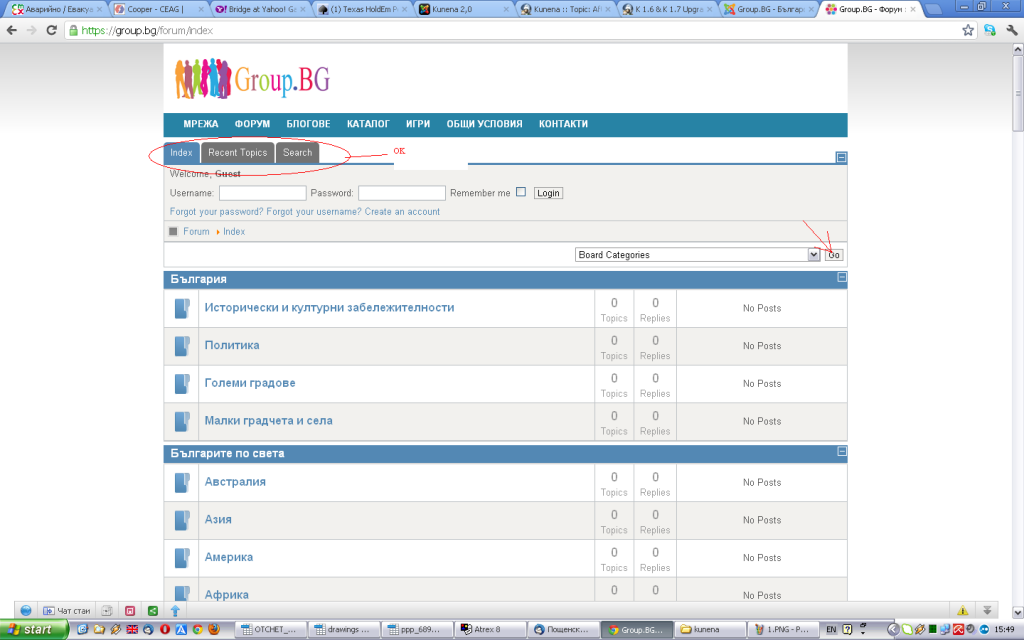
Hello, I uninstalled Kunena 1.7.2 and then installed Kunena 2.0. The problem is that when I load a forum page, main menu Kunena does not load properly (not visible). If I push the button "go" to load categories, then the menu is displayed.
I am using PHP 5.2.17, Joomla 2.5.6 and template for joomla - Afterburner from Rockettheme.
I publish 2 picture with this issue.
My site with forum is: group.bg/forums
Best regards,
Milko Milkov
I am using PHP 5.2.17, Joomla 2.5.6 and template for joomla - Afterburner from Rockettheme.
I publish 2 picture with this issue.
My site with forum is: group.bg/forums
Best regards,
Milko Milkov

Please Log in or Create an account to join the conversation.
Time to create page: 0.266 seconds