


- Posts: 2
- Thank you received: 0
Kunena 7.0.9 & Kunena 6.4.14 – Security Updates Released
The Kunena team has announce the arrival of Kunena 7.0.9 [K 7.0.9] in stable which is now available for download as a native Joomla extension for J! 5.4.x/6.0.x./6.1.x. This version addresses most of the issues that were discovered in K 6.2 / K 6.3 / K 6.4 and issues discovered during the last development stages of K 7.0
Topics that are moved into this category are generally considered to be closed. Users may want to add additional information but these topics should not be resurrected in order to discuss new problems or unrelated matters.
Solved Allow only specified users to view/post (private part of forum)
13 years 6 months ago #141847
by Rexi
How can i set access to some subforum (for moderators) for only few ppl.
Moreover, how to be able so only they can see it?
Moreover, how to be able so only they can see it?
Please Log in or Create an account to join the conversation.


13 years 6 months ago #141852
by sozzled
Blue Eagle vs. Crypsis reference guide
Read my blog and

Replied by sozzled on topic Allow only specified users to view/post (private part of forum)
This is done by changing the permissions for the specific category. Use Joomla ACL, create a user group and assign your moderators to that group, and then define the category permissions so that only members of that user group can view, post new topics or reply to topics as you want.
This is covered, in general, in Simple forum setup instructions
This is covered, in general, in Simple forum setup instructions
Blue Eagle vs. Crypsis reference guide
Read my blog and
Please Log in or Create an account to join the conversation.

13 years 6 months ago - 13 years 6 months ago #141857
by ClydeTACH
Replied by ClydeTACH on topic Allow only specified users to view/post (private part of forum)
Hi sozzel,
I have a problem regarding this option... I want to have a section and categories in that section visible only to a certain group of users so, I've created a user group in Joomla called "Knights". Then in Kunena I've set a section Access level type to "User Groups" and selected "Knights" in the Primary user Group option and also set the"Primary includes Child Groups" to NO. Then I've tested it with one of my users that is not in the "Knights" user group and he tels me he can see the forum section that is suppose to be hidden. Even categories in that section (that are set to "Knights") he can see the topics.
Am I missing something?!
EDIT: I have Joomla 2.5.9 and Kunena 2.0.4
I have a problem regarding this option... I want to have a section and categories in that section visible only to a certain group of users so, I've created a user group in Joomla called "Knights". Then in Kunena I've set a section Access level type to "User Groups" and selected "Knights" in the Primary user Group option and also set the"Primary includes Child Groups" to NO. Then I've tested it with one of my users that is not in the "Knights" user group and he tels me he can see the forum section that is suppose to be hidden. Even categories in that section (that are set to "Knights") he can see the topics.
Am I missing something?!
EDIT: I have Joomla 2.5.9 and Kunena 2.0.4
Last edit: 13 years 6 months ago by ClydeTACH.
Please Log in or Create an account to join the conversation.
- coder4life
-

- Offline
- Kunena Contributor
-

Less
More
- Posts: 296
- Thank you received: 50
13 years 6 months ago #141930
by coder4life
Replied by coder4life on topic Allow only specified users to view/post (private part of forum)
Just curious, even though it is visible can the individual post a topic?
Please Log in or Create an account to join the conversation.
13 years 6 months ago #141953
by sozzled
Blue Eagle vs. Crypsis reference guide
Read my blog and
Replied by sozzled on topic Allow only specified users to view/post (private part of forum)
This is a 30-second tutorial in how to use Joomla ACL to define your users and create a category that only those users can access.
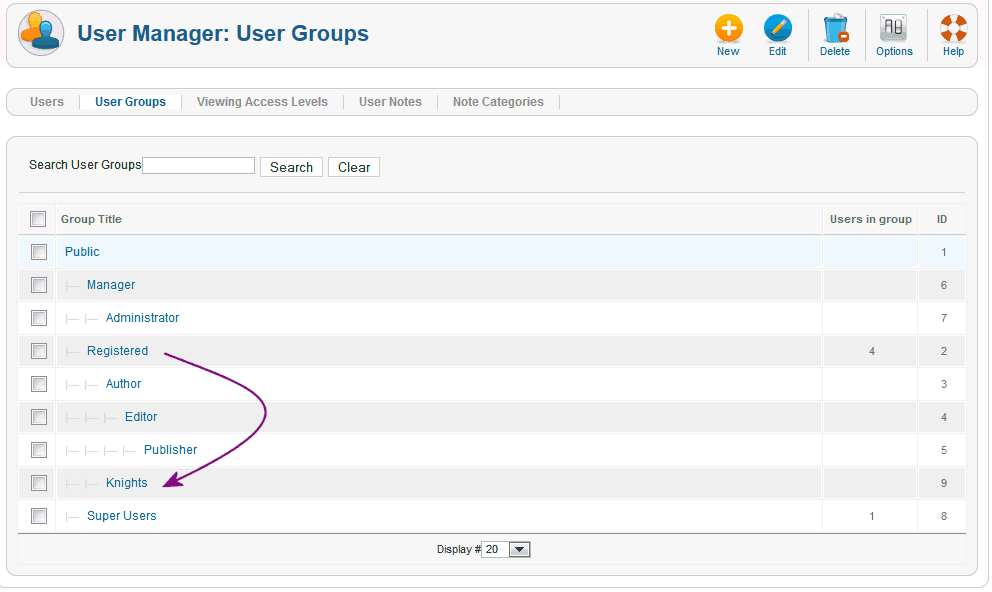
First of all you need to define your user group as a sub-group of the Registered user group. In your case, you want your new group to be called "Knights". This is how the "Knights" user group should be created (as a sub-group of "Registered"):
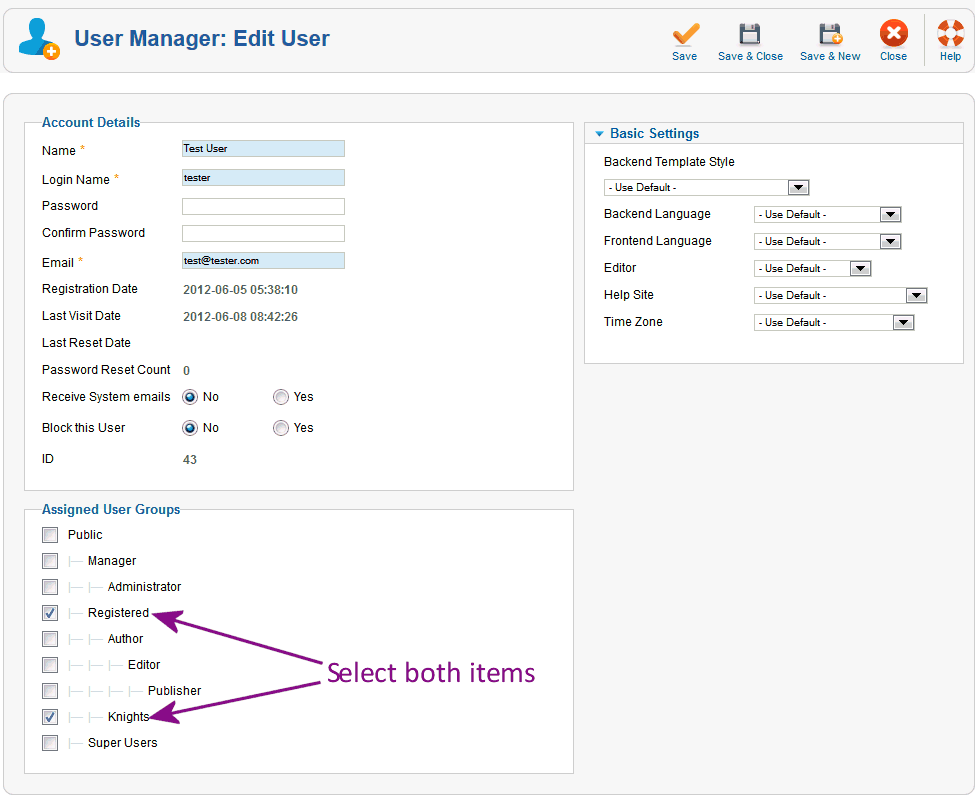
The next step is to allocate those users to the "Knights" user group, like this:
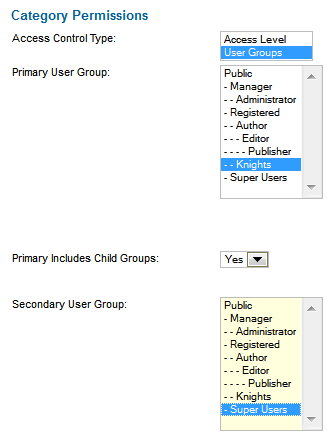
The final step is to set the permissions on the category so that only members of the "Knights" user group can access. Like this:
That's the general idea. Try it out.
First of all you need to define your user group as a sub-group of the Registered user group. In your case, you want your new group to be called "Knights". This is how the "Knights" user group should be created (as a sub-group of "Registered"):
The next step is to allocate those users to the "Knights" user group, like this:
The final step is to set the permissions on the category so that only members of the "Knights" user group can access. Like this:
That's the general idea. Try it out.
Blue Eagle vs. Crypsis reference guide
Read my blog and
The following user(s) said Thank You: QuakeLive
Please Log in or Create an account to join the conversation.


13 years 6 months ago - 13 years 6 months ago #142024
by QuakeLive

Hi,
First of all, I apologize - my English is bad but I hope you will understand me.
Is it possible to create a private part (section/categories) of forum, so only users that I allowed can see what's inside and create threads and posts (other users can only see that there is private section/categories - but they cannot see threads, posts... ) ?
Thanks in advance!
Replied by QuakeLive on topic Allow only specified users to view/post (private part of forum)
Hi,
First of all, I apologize - my English is bad but I hope you will understand me.
Is it possible to create a private part (section/categories) of forum, so only users that I allowed can see what's inside and create threads and posts (other users can only see that there is private section/categories - but they cannot see threads, posts... ) ?
Thanks in advance!
Last edit: 13 years 6 months ago by QuakeLive.
Please Log in or Create an account to join the conversation.
Time to create page: 0.249 seconds