


- Posts: 12287
- Thank you received: 2535
Kunena 7.0.6 & Kunena 6.4.12 – Security Updates Released
The Kunena team has announce the arrival of Kunena 7.0.6 [K 7.0.6] in stable which is now available for download as a native Joomla extension for J! 5.4.x/6.0.x. This version addresses most of the issues that were discovered in K 6.2 / K 6.3 / K 6.4 and issues discovered during the last development stages of K 7.0.
The Kunena team is also pleased to announce the twelfth version of Kunena 6.4, a native Joomla extension for Joomla! 5.0, 5.1, 5.2, 5.3, 5.4 and 6.0.
Question Nederlandse vertaling
Less
More
4 years 8 months ago #219389
by rich
Important! Always create a backup before you make any changes to your website!
Replied by rich on topic Nederlandse vertaling
Do you have a search tool with which you can also find file contents? Download the language pack from our download page and unzip the nl-NL zip file. Search for a part of the charakter string which you want to edit.
Make sure you don't search for the complete phrase, if they contain html codes like e.g.
Vertrouwelijk knop weergeven
searched by
Vertrouwelijk knop weergeven
will not find this string
"<strong>Vertrouwelijk</strong> knop weergeven"
Make sure you don't search for the complete phrase, if they contain html codes like e.g.
Vertrouwelijk knop weergeven
searched by
Vertrouwelijk knop weergeven
will not find this string
"<strong>Vertrouwelijk</strong> knop weergeven"
Important! Always create a backup before you make any changes to your website!
Please Log in or Create an account to join the conversation.


4 years 8 months ago - 4 years 8 months ago #219419
by A3S
Replied by A3S on topic Nederlandse vertaling
Thanks.
I had to invest in figuring out how things work.
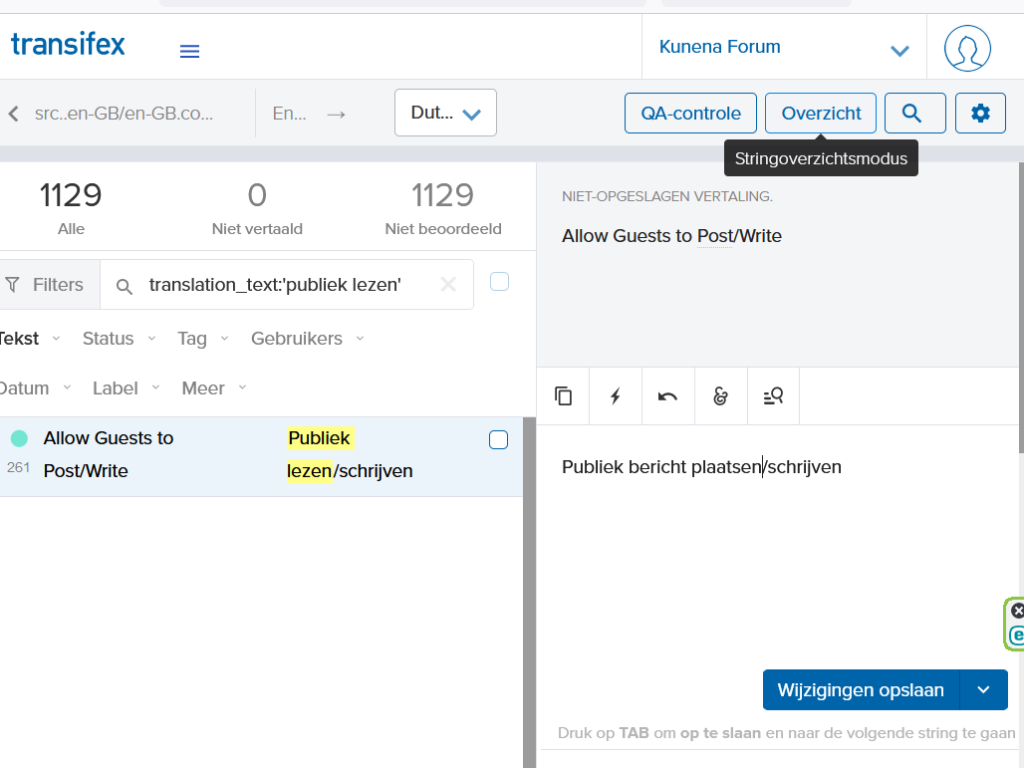
But I just posted my first correction: change 'Allow Guests to Post/Write' = 'Publiek lezen/schrijven' into = 'Publiek bericht plaatsen/schrijven' in ' file ' in map 'admin'.
Preceding that I installed Astrogrep for searching in the two maps of the Dutch translation files after selecting them from the Kunena language package.
And I had to understand that there is a difference in Transifex between searching for a text and for example searching for a translation_text.
Adrie
I had to invest in figuring out how things work.
But I just posted my first correction: change 'Allow Guests to Post/Write' = 'Publiek lezen/schrijven' into = 'Publiek bericht plaatsen/schrijven' in ' file ' in map 'admin'.
Preceding that I installed Astrogrep for searching in the two maps of the Dutch translation files after selecting them from the Kunena language package.
And I had to understand that there is a difference in Transifex between searching for a text and for example searching for a translation_text.
Adrie
Last edit: 4 years 8 months ago by A3S.
Please Log in or Create an account to join the conversation.
Less
More
- Posts: 12287
- Thank you received: 2535
4 years 8 months ago - 4 years 8 months ago #219423
by rich
Important! Always create a backup before you make any changes to your website!
Replied by rich on topic Nederlandse vertaling
This way, you will quickly find the right code in Transifex:
1. Search in the downloaded language package the text passage which you want edit (in this example Sta anonieme berichten toe).
You get the hit in the folder site in the file nl-NL.com_kunena.ini, so you know, this file is for the frontend language.
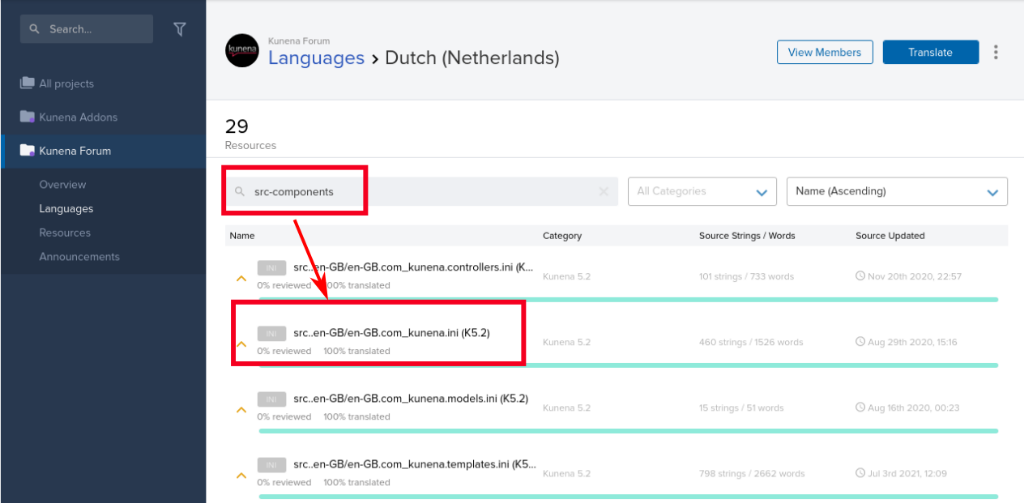
2. Copy only the code and go to Transifex and open the resources for your language

3. Enter the search keyword src-components, this listed all frontend files (for administrator files use the keyword src-administrator)
4. Click on src..en-GB/en-GB.com_kunena.ini (K5.2)
5. Enter in the search filter key:COM_KUNENA_CATEGORY_ANONYMOUS_ALLOW and press Enter
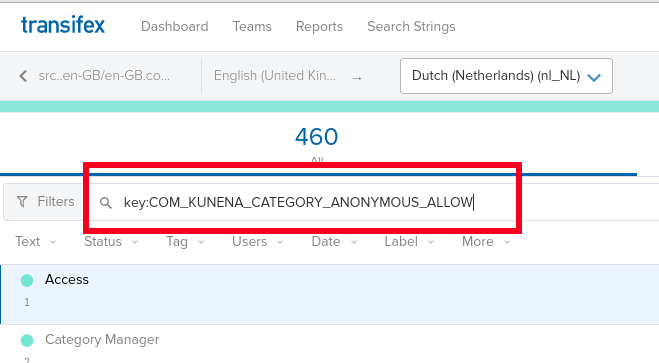
You get these 2 hits:
COM_KUNENA_CATEGORY_ANONYMOUS_ALLOW = "Sta anonieme berichten toe"
COM_KUNENA_CATEGORY_ANONYMOUS_ALLOW_DESC = "Anonieme berichten kunnen door geregistreerde gebruikers gebruikt worden om gevoelige informatie in deze categorie te plaatsen: <b>Geen gebruikersgerelateerde informatie</b> wordt opgeslagen bij anonieme plaatsing (incl. IP-adres)."
1. Search in the downloaded language package the text passage which you want edit (in this example Sta anonieme berichten toe).
You get the hit in the folder site in the file nl-NL.com_kunena.ini, so you know, this file is for the frontend language.
2. Copy only the code and go to Transifex and open the resources for your language
3. Enter the search keyword src-components, this listed all frontend files (for administrator files use the keyword src-administrator)
4. Click on src..en-GB/en-GB.com_kunena.ini (K5.2)
5. Enter in the search filter key:COM_KUNENA_CATEGORY_ANONYMOUS_ALLOW and press Enter
You get these 2 hits:
COM_KUNENA_CATEGORY_ANONYMOUS_ALLOW = "Sta anonieme berichten toe"
COM_KUNENA_CATEGORY_ANONYMOUS_ALLOW_DESC = "Anonieme berichten kunnen door geregistreerde gebruikers gebruikt worden om gevoelige informatie in deze categorie te plaatsen: <b>Geen gebruikersgerelateerde informatie</b> wordt opgeslagen bij anonieme plaatsing (incl. IP-adres)."
Important! Always create a backup before you make any changes to your website!
Last edit: 4 years 8 months ago by rich.
Please Log in or Create an account to join the conversation.
Time to create page: 0.241 seconds