


- Posts: 3
- Thank you received: 0
Kunena 7.0.4 Released
The Kunena team has announce the arrival of Kunena 7.0.4 [K 7.0.4] in stable which is now available for download as a native Joomla extension for J! 5.4.x/6.0.x. This version addresses most of the issues that were discovered in K 6.2 / K 6.3 / K 6.4 and issues discovered during the last development stages of K 7.0
This category contains miscellaneous, uncategorised user contributions, (templates, modules, plugins and hacks) relating to older versions of Kunena that are no longer supported.
This category may also contain a few topics relating to K 1.6 that may have been moved here possibly by mistake.
The topics in this category are for historical interest only. Owing to the structural differences between K 1.6 and K 1.7, these ideas in these topics will not work with later versions and, for that reason, the topics are locked.
This category may also contain a few topics relating to K 1.6 that may have been moved here possibly by mistake.
The topics in this category are for historical interest only. Owing to the structural differences between K 1.6 and K 1.7, these ideas in these topics will not work with later versions and, for that reason, the topics are locked.
Question Euro Templates - Free K1.6 Templates
14 years 9 months ago #101233
by tforsman
Replied by tforsman on topic Re: Euro Templates - Free K1.6 Templates
Yeah, im also looking for euro green template. Hopefully working against newest Kunena version too 
Please Log in or Create an account to join the conversation.

14 years 9 months ago - 14 years 9 months ago #101234
by cliffvt
Replied by cliffvt on topic Re: Euro Templates - Free K1.6 Templates
In the absence of this template being provided after so many requests, I thought I would post it here.
This is the January 2011 version which I use on the latest version of Kunena - YOU NEED TO MAKE THE CHANGES as instructed by Mizunga elsewhere in this post (about 2 months ago). This includes downloading the "addthis.zip" file and "socialshare.png" AS DIRECTED IN HIS POST. ALSO MAKE ALL THE CHANGES HE DIRECTS.
It works VERY WELL for me on the latest version of Kunena.
Hope this helps!
Cheers
Cliff
FOR CONVENIENCE, HERE IS MIZUNGA'S POST AGAIN:
This is the January 2011 version which I use on the latest version of Kunena - YOU NEED TO MAKE THE CHANGES as instructed by Mizunga elsewhere in this post (about 2 months ago). This includes downloading the "addthis.zip" file and "socialshare.png" AS DIRECTED IN HIS POST. ALSO MAKE ALL THE CHANGES HE DIRECTS.
It works VERY WELL for me on the latest version of Kunena.
Hope this helps!
Cheers
Cliff
FOR CONVENIENCE, HERE IS MIZUNGA'S POST AGAIN:
Mizunga wrote: To solve the Social Bookmarking Buttons problem do this:
download this image and upload it to: components/com_kunena/template/euro-template/images/ folder.

Download the new addthis.php and upload it to: components/com_kunena/template/euro-template/view/
Then go to:
components/com_kunena/template/euro-template/css/kunena.forum-min.css
Find and change this:Code:#socialshare{float:right;}
For this:Code:#socialshare { background: url(/"../images/socialshare.png") no-repeat scroll 0 0 transparent;float: right;height: 24px;margin-top: 3px;width: 348px;}
And add this:Code:.addthis_toolbox a { height: 24px;margin-right: 4px;text-indent: -9999px;width: 21px;}
Or you can remove your template, download it and install again. I hope that's help.
Last edit: 14 years 9 months ago by cliffvt.
The following user(s) said Thank You: Mizunga
Please Log in or Create an account to join the conversation.


14 years 9 months ago #103951
by dgvapor
Replied by dgvapor on topic Re: Euro Templates - Free K1.6 Templates
The top links of the menu are still not working !
Please Log in or Create an account to join the conversation.


14 years 8 months ago #104162
by C0n
Replied by C0n on topic Re: Euro Templates - Free K1.6 Templates
I think this is a very nifty little idea 
Please Log in or Create an account to join the conversation.

14 years 8 months ago #106870
by PGLion
Replied by PGLion on topic Re: Euro Templates - Free K1.6 Templates
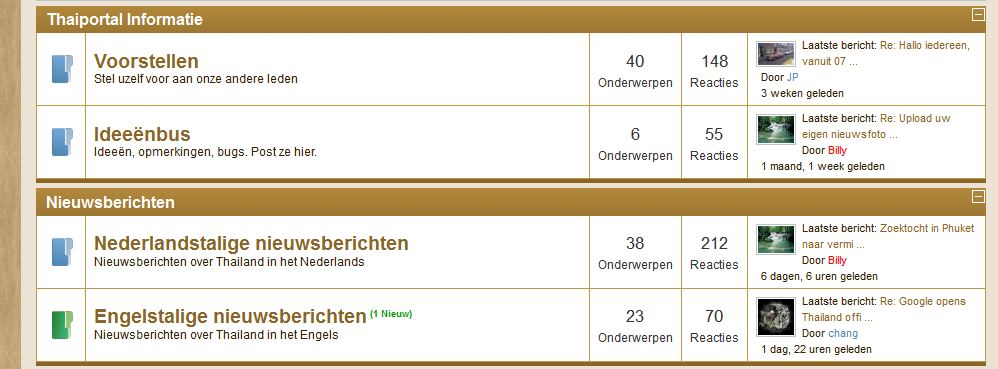
The text in my forumview is very large compared to catagoryview. Is this normal in this template or did I miss something?

Please Log in or Create an account to join the conversation.
14 years 6 months ago #109038
by lucablue
Replied by lucablue on topic Re: Euro Templates - Free K1.6 Templates
Ehm... where is the EURO Green file???...
sigh, just that I need
sigh, just that I need
Please Log in or Create an account to join the conversation.
Time to create page: 0.280 seconds