
Kunena 6.3.0 released
The Kunena team has announce the arrival of Kunena 6.3.0 [K 6.3.0] in stable which is now available for download as a native Joomla extension for J! 4.4.x/5.0.x/5.1.x. This version addresses most of the issues that were discovered in K 6.2 and issues discovered during the last development stages of K 6.3
Question [Merged topic] Hiding the profile box at the top of the page (Blue Eagle template)

Most importantly of all, please do not use the "loginbox.zip" file contained in an earlier message which was built for an previous release of K 1.6 and it will not work in K 1.6.3.
As with just about everything in this Templates and Design category, if you use a web developer's tool like Firebug for Firefox - or some other equivalent product that you might prefer - you can solve most of these issues by using a couple of mouse-clicks. If you want to remove the whole profile box and everything it contains - including the link to private messages (like you see here at www.kunena.com ) - then add the following three lines to the end of your Joomla site template CSS file:
#Kunena table.kprofilebox {
display:none;
}
I dont know the full path of your Joomla site template file. You haven't given us any information about your website. Everyone's site template files are different. Firebug for Firefox will tell you what CSS files are loaded on your site.
Blue Eagle vs. Crypsis reference guide
Read my blog and

Please Log in or Create an account to join the conversation.

How do you remove it from the template?
There is a doc on the wiki but it is really old and the files it talks about don't exist in 1.6.
docs.kunena.org/index.php/How_I_can_disa..._or_whole_Profilebox
Please help.
cheers
schmaka
Please Log in or Create an account to join the conversation.

Your question has been answered (as far as K 1.6 is concerned) if you had searched the forum for it.
Blue Eagle vs. Crypsis reference guide
Read my blog and
Please Log in or Create an account to join the conversation.
Btw, I did see the banner and I did search the forum but couldn't find the answer which is why I asked for some help. I showed the link to help others and to show I hadn't just asked a question without looking around first.
I'm sure you guys don't mean it, but the moderation from this forum has some serious passive agresive tone in it's replies. It's something I always remember from last time I used Kunena and frequented tthis toolhis forum. Shame, because the tool is very impressive.
I'll make sure to open my eyes more next time I need an answer.
Please Log in or Create an account to join the conversation.

I'm pleased that you took the trouble to use your initiative to look for the information and I'm sorry if the information was not immediately available or intuitively easy to find. We are aware that this forum is used by a lot of people and, for many of them (particularly those for whom English is not their native language) they need extra help. I found the information for you and I'm pleased that your question was answered.
I apologise if my answer seems a little "abrupt". I only meant to explain why the information you found was inappropriate (in the context of K 1.6) and to help ... as quickly and as concisely as possible. I'm only human, too, you know

Blue Eagle vs. Crypsis reference guide
Read my blog and
Please Log in or Create an account to join the conversation.

I want to remove header area of the forum. You may check it from the picture attached...
will you please let me know?
Thank You In Advance

Please Log in or Create an account to join the conversation.
Please Log in or Create an account to join the conversation.

I shall explain my situation.
I am using kunena forum for old people to communicate.
They don't seem to understand how a forum works.
Even the manager doesn't. I removed the whole forum index and created a simple article with 3 links, to 3 forum area's.
You can see that here:

Now when you click on one of the 3 links, you will go to this:
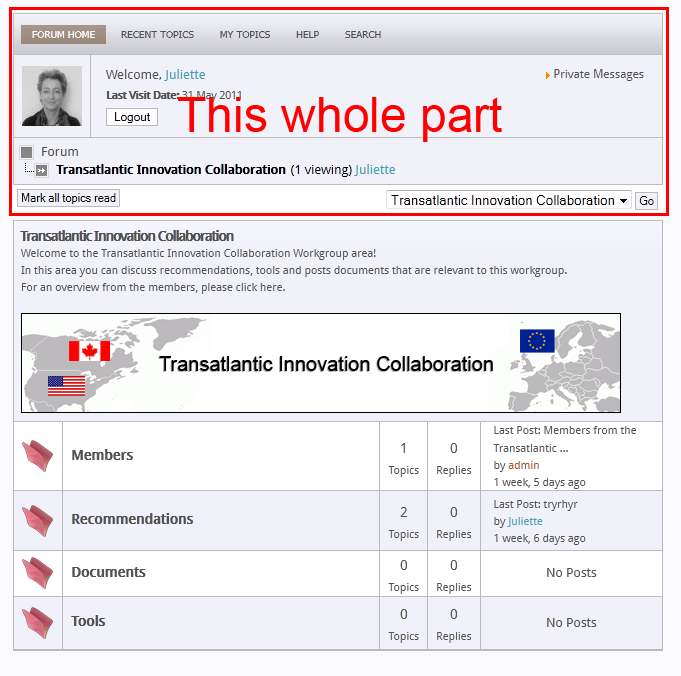
The thing is, that I only want to show the Topic Header, with the description and all the topics ofcource.
I want to remove the whole upper part, the red selected part. They don't need that, because there is another menu somewhere to go to their profile and stuff.
I think I need the right php file to just delete some divs.
I tried it with firebug in firefox and it worked.
Just tell me where I can find that php file please.
Thnx! :laugh:
Please Log in or Create an account to join the conversation.
Blue Eagle vs. Crypsis reference guide
Read my blog and
Please Log in or Create an account to join the conversation.
Please Log in or Create an account to join the conversation.