


- Posts: 31
- Thank you received: 0
Kunena 7.0.4 Released
The Kunena team has announce the arrival of Kunena 7.0.4 [K 7.0.4] in stable which is now available for download as a native Joomla extension for J! 5.4.x/6.0.x. This version addresses most of the issues that were discovered in K 6.2 / K 6.3 / K 6.4 and issues discovered during the last development stages of K 7.0
Topics that are moved into this category are generally considered to be closed. Users may want to add additional information but these topics should not be resurrected in order to discuss new problems or unrelated matters.
Question Weird layout in profile section
15 years 7 months ago - 15 years 7 months ago #61717
by gyedema
JFile::copy: Cannot find or read file: ''
All we did was made a rather basic template with Artisteer; blue background, a picture as header, layout two columns. Thats all. Something in that template seems to corrupt the layout of the forum; I can't present it like that; all our members would protest. However, at this time changing an avatar is something everyone is also asking. I hoped that K1.6 would have sorted out that error, and it did. Alas, another one appeared. This time something in the template, but I tried everything with firebug but can't figure out what it is...
Replied by gyedema on topic Re: Weird layout in profile section
I tried another one, the AgentRC. As I see now, that's not intended for K1.6?sozzled wrote:
What other template? This is news to me!gyedema wrote: I installed 1.6 again, dutch translations and another template, but without positive results

The tabbed menu is back, although very small.Your re-installed K 1.6 shows some surprising changes. You've lost the Kunena tabbed menu; the colours are different, too.
The error is an error that, according to a lot of posts, is rather common:Did you report (in one of K 1.5 categories) your "avatar error"? What avatar error is this?
JFile::copy: Cannot find or read file: ''
All help is highly appreciated. Its just so that I have really no idea where to find the stuff in the template that worked with K1.5 and doesn't work with K1.6.Do you require assistance in restoring the Kunena tabbed menu for K 1.6 or are you going to give up your attempts to get things working? Thanks
All we did was made a rather basic template with Artisteer; blue background, a picture as header, layout two columns. Thats all. Something in that template seems to corrupt the layout of the forum; I can't present it like that; all our members would protest. However, at this time changing an avatar is something everyone is also asking. I hoped that K1.6 would have sorted out that error, and it did. Alas, another one appeared. This time something in the template, but I tried everything with firebug but can't figure out what it is...
Last edit: 15 years 7 months ago by gyedema.
Please Log in or Create an account to join the conversation.


15 years 7 months ago - 15 years 7 months ago #61743
by sozzled

This discussion topic has been difficult enough without bringing K 1.5 issues into it.
The menu tabs issue: I don't quite understand, but there looks to be something missing from the source code that generates your page. The menu tabs are very different to those here at www.kunena.com as you will find with closer inspection using Firebug. Anyway, I've found a way to workaround the problem for you.
At around line 570 of the file kunena.forum.css make the changes indicated in red below:
#Kunena #ktab a {
background-color: #737373;
margin: 0;
padding: 0.5em 1.1em;
text-decoration: none;
border: 0;
display: block;
float: left;
-moz-border-radius-topright: 5px;
-moz-border-radius-topleft: 5px;
-webkit-border-radius-topright: 5px;
-webkit-border-radius-topleft: 5px;
color: #ffffff;
font-size: 1.1em;
}
Please read the Wiki article Minified CSS for further instructions.
Other changes that I recommend you also make to your Joomla site template CSS are:
(1) at around line 705 make the changes indicated in red below:
h2, h2 a, h2 a:link, h2 a:visited, h2 a:hover {
color:#3C97AA;
font-family:Tahoma,Arial,Helvetica,Sans-Serif;
text-align:left;
// font-size: 25px;
}
(2) at around line 749 make the changes indicated in red below:
/* begin PostBullets */
/* Start Content list */
/*
ol, ul
{
color: #2E3D4C;
margin:1em 0 1em 2em;
padding:0;
font-family: Tahoma, Arial, Helvetica, Sans-Serif;
font-size: 11px;
}
li ol, li ul
{
margin:0.5em 0 0.5em 2em;
padding:0;
}
li
{
margin:0.2em 0;
padding:0;
}
ul
{
list-style-type: none;
}
ol
{
list-style-position:inside;
}
*/
Let's see how you go with making those few changes, OK? BTW, This "small" effort took 2 hours today. This whole job has taken about 10 hours so far and we still haven't even begun to figure out what is causing the "weird layout in the profile section". That, I suspect, will take several more hours.
Blue Eagle vs. Crypsis reference guide
Read my blog and

Replied by sozzled on topic Re: Weird layout in profile section
K 1.6 templates are completely different to K 1.5 templates.gyedema wrote: Its just so that I have really no idea where to find the stuff in the template that worked with K1.5 and doesn't work with K1.6.
This discussion topic has been difficult enough without bringing K 1.5 issues into it.
The menu tabs issue: I don't quite understand, but there looks to be something missing from the source code that generates your page. The menu tabs are very different to those here at www.kunena.com as you will find with closer inspection using Firebug. Anyway, I've found a way to workaround the problem for you.
At around line 570 of the file kunena.forum.css make the changes indicated in red below:
#Kunena #ktab a {
background-color: #737373;
margin: 0;
padding: 0.5em 1.1em;
text-decoration: none;
border: 0;
display: block;
float: left;
-moz-border-radius-topright: 5px;
-moz-border-radius-topleft: 5px;
-webkit-border-radius-topright: 5px;
-webkit-border-radius-topleft: 5px;
color: #ffffff;
font-size: 1.1em;
}
Please read the Wiki article Minified CSS for further instructions.
Other changes that I recommend you also make to your Joomla site template CSS are:
(1) at around line 705 make the changes indicated in red below:
h2, h2 a, h2 a:link, h2 a:visited, h2 a:hover {
color:#3C97AA;
font-family:Tahoma,Arial,Helvetica,Sans-Serif;
text-align:left;
// font-size: 25px;
}
(2) at around line 749 make the changes indicated in red below:
/* begin PostBullets */
/* Start Content list */
/*
ol, ul
{
color: #2E3D4C;
margin:1em 0 1em 2em;
padding:0;
font-family: Tahoma, Arial, Helvetica, Sans-Serif;
font-size: 11px;
}
li ol, li ul
{
margin:0.5em 0 0.5em 2em;
padding:0;
}
li
{
margin:0.2em 0;
padding:0;
}
ul
{
list-style-type: none;
}
ol
{
list-style-position:inside;
}
*/
Let's see how you go with making those few changes, OK? BTW, This "small" effort took 2 hours today. This whole job has taken about 10 hours so far and we still haven't even begun to figure out what is causing the "weird layout in the profile section". That, I suspect, will take several more hours.
Blue Eagle vs. Crypsis reference guide
Read my blog and
Last edit: 15 years 7 months ago by sozzled.
The following user(s) said Thank You: gyedema
Please Log in or Create an account to join the conversation.
15 years 7 months ago - 15 years 7 months ago #61799
by gyedema
Replied by gyedema on topic Re: Weird layout in profile section
Sozzled,
First of all: again thanks a very great deal for all your time. I DO appreciate that highly!
I made the changes as you suggested and it seems the menu tabs are slightly bigger now. Not the size it should be like the originals, but bigger than before.
Again, thanks for being such a help, and all your patience. I will continue to look and read the things you suggested so I can try to figure out how CSS works.
I also try to find out if standard templates like rhuk_milkyway can be changed, and if I can add a background and header there. Maybe that will work?
Furthermore it seems to me that in the site template, there is no "wordwrap"; it tries very hard to keep everything on one line of code. Is that of any help? Or can I search for something that does that?
First of all: again thanks a very great deal for all your time. I DO appreciate that highly!
I made the changes as you suggested and it seems the menu tabs are slightly bigger now. Not the size it should be like the originals, but bigger than before.
Again, thanks for being such a help, and all your patience. I will continue to look and read the things you suggested so I can try to figure out how CSS works.
I also try to find out if standard templates like rhuk_milkyway can be changed, and if I can add a background and header there. Maybe that will work?
Furthermore it seems to me that in the site template, there is no "wordwrap"; it tries very hard to keep everything on one line of code. Is that of any help? Or can I search for something that does that?
Last edit: 15 years 7 months ago by gyedema.
Please Log in or Create an account to join the conversation.
15 years 7 months ago #61846
by sozzled
Blue Eagle vs. Crypsis reference guide
Read my blog and
Replied by sozzled on topic Re: Weird layout in profile section
I've had another look at your website (see image below):
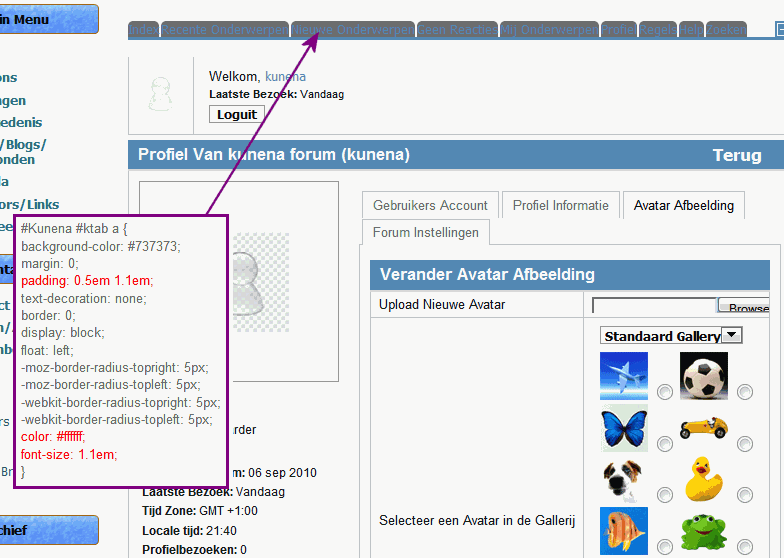
I notice that the recommended changes to your Kunena template CSS did not "take"; this is probably because you did not read the important information in the article Minified CSS . It takes too long to explain everything here but you have a choice: set Kunena to run with debug mode enabled to use the clear-text kunena.forum.css or minify the file kunena.forum.css as kunena.forum-min.css
What we can say, though, is that your "weird layout in profile section" problem has been fixed.
I notice that the recommended changes to your Kunena template CSS did not "take"; this is probably because you did not read the important information in the article Minified CSS . It takes too long to explain everything here but you have a choice: set Kunena to run with debug mode enabled to use the clear-text kunena.forum.css or minify the file kunena.forum.css as kunena.forum-min.css
What we can say, though, is that your "weird layout in profile section" problem has been fixed.
Blue Eagle vs. Crypsis reference guide
Read my blog and
The following user(s) said Thank You: gyedema
Please Log in or Create an account to join the conversation.
15 years 7 months ago - 15 years 7 months ago #61966
by gyedema
Replied by gyedema on topic Re: Weird layout in profile section
Sozzled.....
You are TOTALLY RIGHT..!! I checked again; minified the CSS (reading took my a while, btw.. again, Im really NOT into this kind of stuff..), uploaded it and it seems that all problems are fixed!! The profile section does miss a very small part of the text for uploading another image, but is acceptable now because changing and uploading of a new image functions as it should.
Again, I would like to thank you a lot; for your time AND your patience. I learned a lot during this "project"...
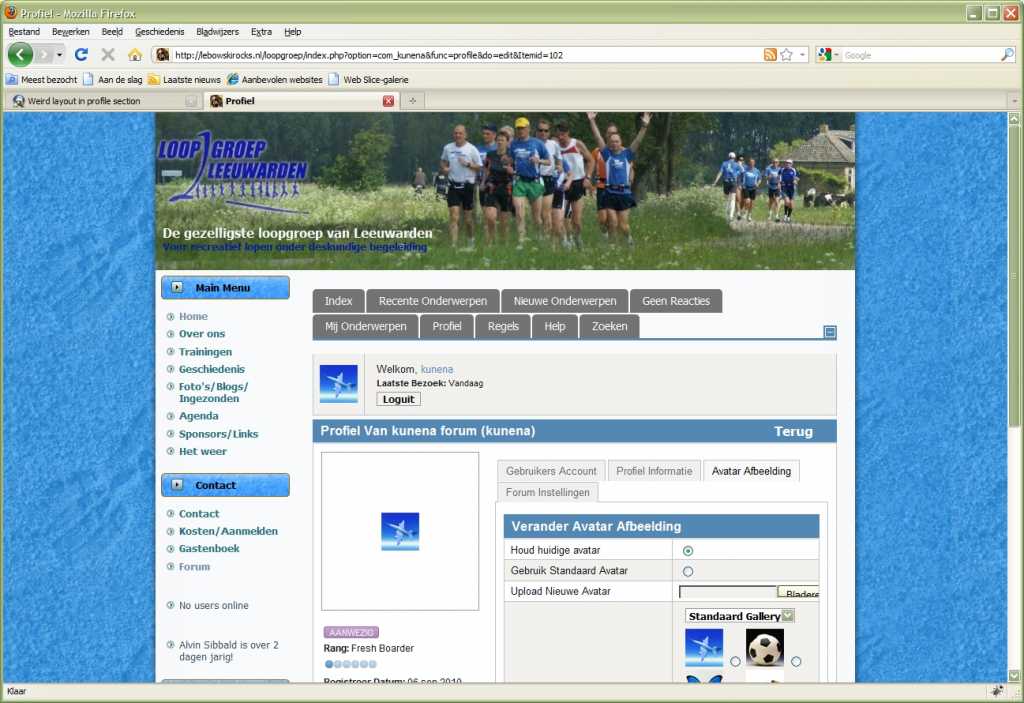
You are TOTALLY RIGHT..!! I checked again; minified the CSS (reading took my a while, btw.. again, Im really NOT into this kind of stuff..), uploaded it and it seems that all problems are fixed!! The profile section does miss a very small part of the text for uploading another image, but is acceptable now because changing and uploading of a new image functions as it should.
Again, I would like to thank you a lot; for your time AND your patience. I learned a lot during this "project"...
Last edit: 15 years 7 months ago by gyedema.
Please Log in or Create an account to join the conversation.
15 years 7 months ago - 15 years 7 months ago #61967
by sozzled
Blue Eagle vs. Crypsis reference guide
Read my blog and
Replied by sozzled on topic Re: Weird layout in profile section
Over the past year or so I've learned that there are two ways that people go about designing websites.
If we assume that people have as one of their primary goals, to have a forum as the centrepiece of their website then shouldn't people start by finding the best forum for the job and then adding the other bits and pieces on later? This, to me, would be a sensible approach. In other words, you start with Joomla and Kunena as the first two things you put into your website and then you have a whole world full of tools that you can select from to add to that basic combination.
If, on the other hand, you start with everything else added before you install Kunena, you're likely to have to make tailored changes to Kunena to make it fit and, unless you really know what you're doing, this can be a painful ordeal.
This is why I go about my web design in this way:
Joomla 1.5.20 with rhuk_milkyway template and Kunena 1.6 first.
Then I find a template that works with this.
I've usually got a working website up and running in less than 2 days. And I don't have any changes that I need to make ... ever!
Then there's the other way:
Joomla 1.5.20 and ... oh ... I'd better find a template that I like ... (2 days later and a couple of hundred dollars poorer) I have a template. Now I'd better add JomSocial or Community Builder next, then I'd better add the shoutbox module ... oh ... I need a u-beaut' menu system (another 2 days later and a couple of hundred dollars poorer) I have a template with a flashy menu and my social networking software. Now I'd better add the site analytics, the "member of the month" feature, the PayPal donation widget and the thing that turns the mouse cursor into a butterfly ...
and I suppose now I should install Kunena ... why doesn't it work? Let me change it ... oops, my whole site has gone down ... where's my site backup? Backup?! What backup? I forgot to install the backup?! Oh ... this is useless. I've wasted three weeks, $500 and I don't have diddly-squat to show for it ...
I'm not saying this is what happened in this case. I'm saying that people need to plan, ahead of time, what they're going to need instead of, perhaps, what they might want. Many people think that what they want and what they need are the same thing. If that's the case then I have to say they're not fooling anyone but themselves. Nothing is impossible but everything has a cost. For me, I try to keep the costs down to the minimum. If someone wants a website built for them, I want to have the job done in a couple of days - a week at most - including all the information about how to look after the site.
The longest it has taken be to build a website in Joomla is 3½ days (and that was only because I had to start all over again after I'd lost a day-and-a-half's work). The shortest time it's taken me to have Kunena installed and running on a Joomla website is 2½ hours (and I think I had a meal-break during that time). How do you get fast results? Don't try to be fancy. The customer doesn't want fancy; the customer wants something that works.
If we assume that people have as one of their primary goals, to have a forum as the centrepiece of their website then shouldn't people start by finding the best forum for the job and then adding the other bits and pieces on later? This, to me, would be a sensible approach. In other words, you start with Joomla and Kunena as the first two things you put into your website and then you have a whole world full of tools that you can select from to add to that basic combination.
If, on the other hand, you start with everything else added before you install Kunena, you're likely to have to make tailored changes to Kunena to make it fit and, unless you really know what you're doing, this can be a painful ordeal.
This is why I go about my web design in this way:
Joomla 1.5.20 with rhuk_milkyway template and Kunena 1.6 first.
Then I find a template that works with this.
I've usually got a working website up and running in less than 2 days. And I don't have any changes that I need to make ... ever!
Then there's the other way:
Joomla 1.5.20 and ... oh ... I'd better find a template that I like ... (2 days later and a couple of hundred dollars poorer) I have a template. Now I'd better add JomSocial or Community Builder next, then I'd better add the shoutbox module ... oh ... I need a u-beaut' menu system (another 2 days later and a couple of hundred dollars poorer) I have a template with a flashy menu and my social networking software. Now I'd better add the site analytics, the "member of the month" feature, the PayPal donation widget and the thing that turns the mouse cursor into a butterfly ...
and I suppose now I should install Kunena ... why doesn't it work? Let me change it ... oops, my whole site has gone down ... where's my site backup? Backup?! What backup? I forgot to install the backup?! Oh ... this is useless. I've wasted three weeks, $500 and I don't have diddly-squat to show for it ...
I'm not saying this is what happened in this case. I'm saying that people need to plan, ahead of time, what they're going to need instead of, perhaps, what they might want. Many people think that what they want and what they need are the same thing. If that's the case then I have to say they're not fooling anyone but themselves. Nothing is impossible but everything has a cost. For me, I try to keep the costs down to the minimum. If someone wants a website built for them, I want to have the job done in a couple of days - a week at most - including all the information about how to look after the site.
The longest it has taken be to build a website in Joomla is 3½ days (and that was only because I had to start all over again after I'd lost a day-and-a-half's work). The shortest time it's taken me to have Kunena installed and running on a Joomla website is 2½ hours (and I think I had a meal-break during that time). How do you get fast results? Don't try to be fancy. The customer doesn't want fancy; the customer wants something that works.
Blue Eagle vs. Crypsis reference guide
Read my blog and
Last edit: 15 years 7 months ago by sozzled.
Please Log in or Create an account to join the conversation.
Time to create page: 0.233 seconds