


- Posts: 31
- Thank you received: 0
Kunena 7.0.4 Released
The Kunena team has announce the arrival of Kunena 7.0.4 [K 7.0.4] in stable which is now available for download as a native Joomla extension for J! 5.4.x/6.0.x. This version addresses most of the issues that were discovered in K 6.2 / K 6.3 / K 6.4 and issues discovered during the last development stages of K 7.0
Topics that are moved into this category are generally considered to be closed. Users may want to add additional information but these topics should not be resurrected in order to discuss new problems or unrelated matters.
Question Weird layout in profile section
15 years 7 months ago - 15 years 7 months ago #61523
by gyedema
Replied by gyedema on topic Re: Weird layout in profile section
I agree with you; lets be sure about that. But the point is: we made the template in artisteer, which seemed to work OK with the K1.5 forum. Being no CSS experts, its hard to determine where to start; I don't recall making weird choices in artisteer that could influence the layout so drastic..
**EDIT**
I'm sure it has something to do with a standard Artisteer function. I just made another template, and the only things I did were:
- Layout: only header, two columns
- background
- header pic
Thats all. The template is called loopgroep20 and I tested it the way you said (with &template=loopgroep20). It scr*ws the layout up even more. So I think we have to search somewhere for an option to make an complete new template....
Anyway, thanks for your help so far.
**EDIT 2**
I installed the Dutch translation as you suggested. After that, I looked at the site again, with &template=rhuk_milkyway. Here's the result..:

**EDIT**
I'm sure it has something to do with a standard Artisteer function. I just made another template, and the only things I did were:
- Layout: only header, two columns
- background
- header pic
Thats all. The template is called loopgroep20 and I tested it the way you said (with &template=loopgroep20). It scr*ws the layout up even more. So I think we have to search somewhere for an option to make an complete new template....
Anyway, thanks for your help so far.
**EDIT 2**
I installed the Dutch translation as you suggested. After that, I looked at the site again, with &template=rhuk_milkyway. Here's the result..:
Last edit: 15 years 7 months ago by gyedema.
Please Log in or Create an account to join the conversation.


15 years 7 months ago #61627
by sozzled
Blue Eagle vs. Crypsis reference guide
Read my blog and

Replied by sozzled on topic Re: Weird layout in profile section
I think I've found out why your forum pages are different to everyone else's. You've modified your Kunena template, haven't you? You've ripped out the CSS parts that handle the menu tabs (you're missing a <SPAN> rule). So, how about you go back and use the original Blue Eagle CSS template and I don't have to spend another hour scratching my head trying to figure out what's wrong with your website. Thank you.
Blue Eagle vs. Crypsis reference guide
Read my blog and
Please Log in or Create an account to join the conversation.
15 years 7 months ago #61686
by gyedema
Replied by gyedema on topic Re: Weird layout in profile section
Sozzled,
As I said before: I don't know CSS. And I didn't alter any parts of it. I followed the tips, installed and tried to understand Firebug, and changed the artisteer templates of the site.
Furthermore: suppose I did change Kunena CSS (which I didn't), then why am I seeing strange layout, and all others dont..?? It should have effect for everyone?
I will uninstall K1.6 (again) and install it fresh again, including the dutch templates. I will post the result here, although I'm unsure, regarding your tone of voice, if you're interested in it. I try to make clear that without any alterations the layout between 1.5 and 1.6 changed, but it seems you don't believe me.
As I said before: I don't know CSS. And I didn't alter any parts of it. I followed the tips, installed and tried to understand Firebug, and changed the artisteer templates of the site.
Furthermore: suppose I did change Kunena CSS (which I didn't), then why am I seeing strange layout, and all others dont..?? It should have effect for everyone?
I will uninstall K1.6 (again) and install it fresh again, including the dutch templates. I will post the result here, although I'm unsure, regarding your tone of voice, if you're interested in it. I try to make clear that without any alterations the layout between 1.5 and 1.6 changed, but it seems you don't believe me.
Please Log in or Create an account to join the conversation.
15 years 7 months ago - 15 years 7 months ago #61689
by sozzled
From your site:
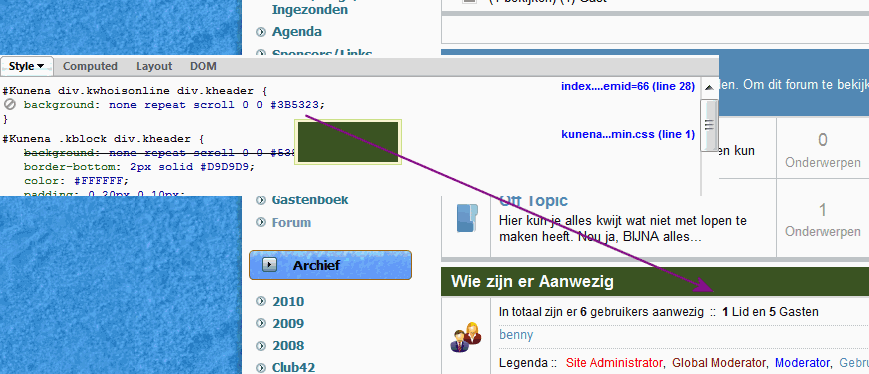
Notice the dark green background? The colour comes from the value div.kheader; this is a uniquely named class that is found in the Kunena Blue Eagle template CSS. In your case the value is
background:none repeat scroll 0 0 #3B5323;
From this website:
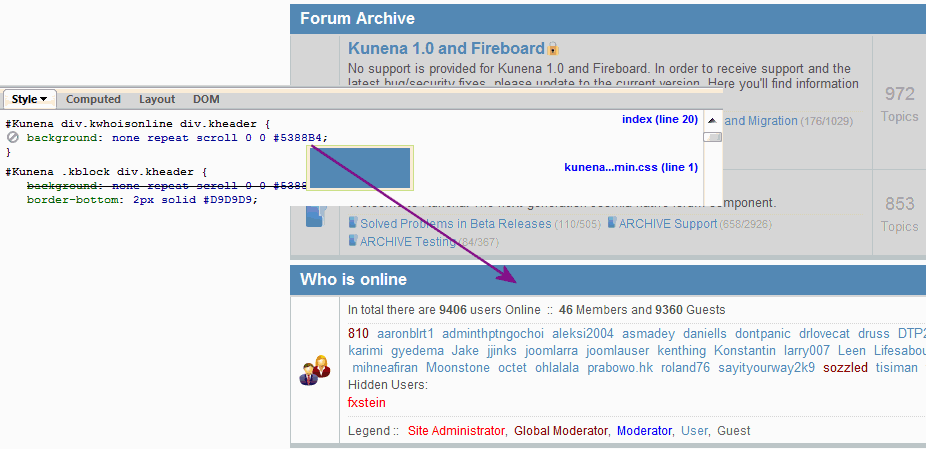
Notice that light blue background? The colour comes from the value div.kheader; in this case the value is
background:none repeat scroll 0 0 #5388B4;
So, if you didn't change the colour, who did? Let's get back to a common starting point and let's not argue about who is right and who isn't. My tone hasn't changed; I'm just very disappointed that we seem to be taking far too long to resolve what is basically a simple problem and one that could be easily solved by having less CSS overrides in your site template to allow your Kunena template to do what it's supposed to do.
In effect, the only message that I've been trying to get across is that your site template is extremely complicated, extremely difficult to analyse and it's this added layer of complexity that making it very hard to deliver a nice, neatly packaged solution that will fit your needs but that is extremely unlikely to affect anyone else. If it was affecting other people then I'm sure there would have been a lot more contributions made by others on this discussion topic. What do you think?
There should be no need to uninstall Kunena. You can simply re-install it from the same installation kit that you used last time.
Blue Eagle vs. Crypsis reference guide
Read my blog and
Replied by sozzled on topic Re: Weird layout in profile section
All that I'm trying to do is to get a clean starting point. The cleanest starting point is the original Kunena Blue Eagle template. So let's look at what you've got, and let's look at a standard Blue Eagle template.gyedema wrote: Suppose I did change Kunena CSS (which I didn't) ...
From your site:
Notice the dark green background? The colour comes from the value div.kheader; this is a uniquely named class that is found in the Kunena Blue Eagle template CSS. In your case the value is
background:none repeat scroll 0 0 #3B5323;
From this website:
Notice that light blue background? The colour comes from the value div.kheader; in this case the value is
background:none repeat scroll 0 0 #5388B4;
So, if you didn't change the colour, who did? Let's get back to a common starting point and let's not argue about who is right and who isn't. My tone hasn't changed; I'm just very disappointed that we seem to be taking far too long to resolve what is basically a simple problem and one that could be easily solved by having less CSS overrides in your site template to allow your Kunena template to do what it's supposed to do.
In effect, the only message that I've been trying to get across is that your site template is extremely complicated, extremely difficult to analyse and it's this added layer of complexity that making it very hard to deliver a nice, neatly packaged solution that will fit your needs but that is extremely unlikely to affect anyone else. If it was affecting other people then I'm sure there would have been a lot more contributions made by others on this discussion topic. What do you think?
There should be no need to uninstall Kunena. You can simply re-install it from the same installation kit that you used last time.
Blue Eagle vs. Crypsis reference guide
Read my blog and
Last edit: 15 years 7 months ago by sozzled.
Please Log in or Create an account to join the conversation.
15 years 7 months ago - 15 years 7 months ago #61707
by gyedema
Replied by gyedema on topic Re: Weird layout in profile section
Well I hope you believe me, because I didn't change any CSS, let alone know how and where to alter it.
All we would like is to have the new forum because in the K1.5 everything is ok, only changing the avatars result in error messages (and no changing of avatars).
Again, I'm no CSS expert, don't know where to search in what templates whatsoever. I installed 1.6 again, dutch translations and another template, but whithout positive results.
I guess we have to accept the avatar error and stick with the K1.5 forum.
All we would like is to have the new forum because in the K1.5 everything is ok, only changing the avatars result in error messages (and no changing of avatars).
Again, I'm no CSS expert, don't know where to search in what templates whatsoever. I installed 1.6 again, dutch translations and another template, but whithout positive results.
I guess we have to accept the avatar error and stick with the K1.5 forum.
Last edit: 15 years 7 months ago by gyedema.
Please Log in or Create an account to join the conversation.
15 years 7 months ago - 15 years 7 months ago #61708
by sozzled

Your re-installed K 1.6 shows some surprising changes. You've lost the Kunena tabbed menu; the colours are different, too.
Did you report (in one of K 1.5 categories) your "avatar error"? What avatar error is this?
Do you require assistance in restoring the Kunena tabbed menu for K 1.6 or are you going to give up your attempts to get things working? Thanks
Blue Eagle vs. Crypsis reference guide
Read my blog and
Replied by sozzled on topic Re: Weird layout in profile section
What other template? This is news to me!gyedema wrote: I installed 1.6 again, dutch translations and another template, but without positive results
Your re-installed K 1.6 shows some surprising changes. You've lost the Kunena tabbed menu; the colours are different, too.
Did you report (in one of K 1.5 categories) your "avatar error"? What avatar error is this?
Do you require assistance in restoring the Kunena tabbed menu for K 1.6 or are you going to give up your attempts to get things working? Thanks
Blue Eagle vs. Crypsis reference guide
Read my blog and
Last edit: 15 years 7 months ago by sozzled.
Please Log in or Create an account to join the conversation.
Time to create page: 0.262 seconds