


- Posts: 12291
- Thank you received: 2538
Kunena 7.0.9 & Kunena 6.4.14 – Security Updates Released
The Kunena team has announce the arrival of Kunena 7.0.9 [K 7.0.9] in stable which is now available for download as a native Joomla extension for J! 5.4.x/6.0.x./6.1.x. This version addresses most of the issues that were discovered in K 6.2 / K 6.3 / K 6.4 and issues discovered during the last development stages of K 7.0
Before posting in this category, please read sticky topics and, as general background,
My Joomla site template makes a mess of Kunena
.
If you have questions about third-party templates, please use the User-written Templates category or contact the author directly. This category should only be used for questions about templates developed and supported by the Kunena project.
If you have questions about third-party templates, please use the User-written Templates category or contact the author directly. This category should only be used for questions about templates developed and supported by the Kunena project.
Sticky My Joomla site template makes a mess of Kunena ... a collection of the many requests that we receive
Less
More
14 years 10 months ago - 14 years 10 months ago #110134
by rich
Important! Always create a backup before you make any changes to your website!
Replied by rich on topic Aw: Problem with menu allocation with Artisteer template
sozzled: your code moved also the top menu. Maybe is better following code?
#Kunena #ktab ul {
margin: 15px 0 0 -475px;
}
#Kunena #ktab ul {
margin: 15px 0 0 -475px;
}
Important! Always create a backup before you make any changes to your website!
Last edit: 14 years 10 months ago by sozzled.
Please Log in or Create an account to join the conversation.

14 years 10 months ago #110148
by SlayrNeo
Replied by SlayrNeo on topic Re: Problem with menu allocation with Artisteer template
Thanks!
That fix did the trick, but it messed up the artisteer template too.
But because of your fix I did find another fix.
I edited:
kunena.forum-min.css
color: #FFFFFF !important;
display: block;
float: left;
left: -464px;
That fix did the trick, but it messed up the artisteer template too.
But because of your fix I did find another fix.
I edited:
kunena.forum-min.css
color: #FFFFFF !important;
display: block;
float: left;
left: -464px;
Please Log in or Create an account to join the conversation.


14 years 10 months ago - 14 years 10 months ago #110176
by sozzled
Blue Eagle vs. Crypsis reference guide
Read my blog and

Replied by sozzled on topic Re: Problem with menu allocation with Artisteer template
Please read
How do I change the colours of my template in Kunena?
. We do not recommend directly changing the Kunena template and definitely do not edit the file kunena.forum-min.css. Add any changes that you want to make to your Joomla site template (in that way the changes will remain in place whenever you update Kunena). Another suggestion might be to add the rich's suggestion above to the end of your Joomla site template.
Blue Eagle vs. Crypsis reference guide
Read my blog and
Last edit: 14 years 10 months ago by sozzled.
Please Log in or Create an account to join the conversation.
- Azounstone
-

- Offline
- New Member
-

Less
More
- Posts: 1
- Thank you received: 0
14 years 9 months ago #113666
by Azounstone
Replied by Azounstone on topic [ASSISTANCE] K 1.7 Layout Issue
Hi,
Awesome forum for Joomla!
Just installed it and hoping somebody can help me to adjust the right-hand side so that it is a little to the left. In other words make the width of the forum slightly less than it currently displays.
The image below shows this probably better than I have described:
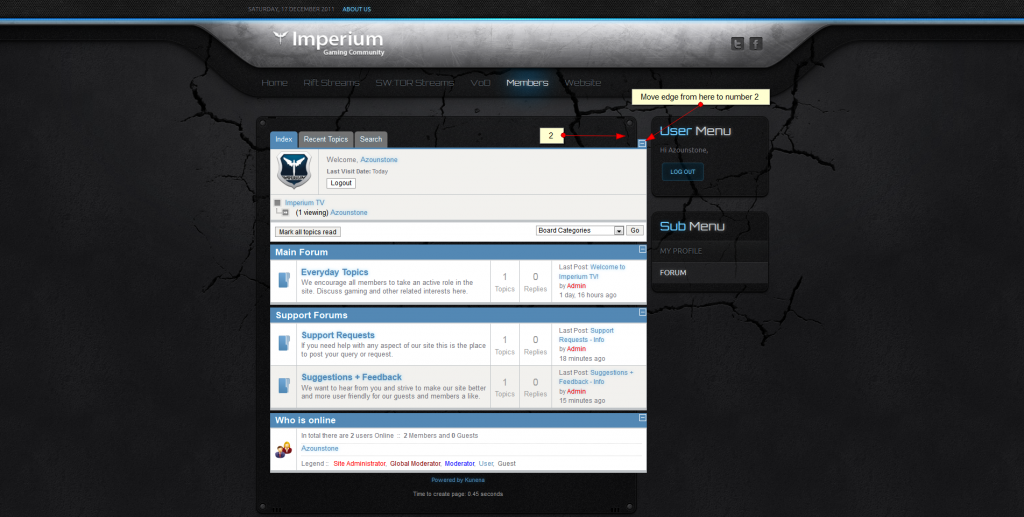
Many thanks in advance for your help with this
Awesome forum for Joomla!
Just installed it and hoping somebody can help me to adjust the right-hand side so that it is a little to the left. In other words make the width of the forum slightly less than it currently displays.
The image below shows this probably better than I have described:
Many thanks in advance for your help with this
Please Log in or Create an account to join the conversation.
14 years 9 months ago #113670
by sozzled
Blue Eagle vs. Crypsis reference guide
Read my blog and
Replied by sozzled on topic Re: [ASSISTANCE] K 1.7 Layout Issue
G'day, Azounstone, and welcome to Kunena.
The easiest fix for your problem is to remove the menu modules on the right (your "User Menu" and "Sub Menu" modules look to be a waste of valuable screen space). If that idea doesn't appeal to you, I suggest you read at My Joomla site template makes a mess of Kunena
The easiest fix for your problem is to remove the menu modules on the right (your "User Menu" and "Sub Menu" modules look to be a waste of valuable screen space). If that idea doesn't appeal to you, I suggest you read at My Joomla site template makes a mess of Kunena
Blue Eagle vs. Crypsis reference guide
Read my blog and
Please Log in or Create an account to join the conversation.
14 years 9 months ago - 14 years 9 months ago #114027
by roberto_b
Replied by roberto_b on topic How to change the font size (text is too big)
Hi, i have installed the Kunena last version on Joomla 1.7, seem all workign fine except i don't like the font size. (all them)
I try to check different template but it's the same, reading around the wen now is not clear for me is depend from my template or from forum template.
I see on template CSS a lot of font-size defined for any field, before change them i like know the right procedure.
my forum here
Any indication is welcome,
regards
I try to check different template but it's the same, reading around the wen now is not clear for me is depend from my template or from forum template.
I see on template CSS a lot of font-size defined for any field, before change them i like know the right procedure.
my forum here
Any indication is welcome,
regards
Last edit: 14 years 9 months ago by roberto_b.
Please Log in or Create an account to join the conversation.
Time to create page: 0.277 seconds