


- Posts: 11
- Thank you received: 0
Kunena 7.0.9 & Kunena 6.4.14 – Security Updates Released
The Kunena team has announce the arrival of Kunena 7.0.9 [K 7.0.9] in stable which is now available for download as a native Joomla extension for J! 5.4.x/6.0.x./6.1.x. This version addresses most of the issues that were discovered in K 6.2 / K 6.3 / K 6.4 and issues discovered during the last development stages of K 7.0
Before posting in this category, please read sticky topics and, as general background,
My Joomla site template makes a mess of Kunena
.
If you have questions about third-party templates, please use the User-written Templates category or contact the author directly. This category should only be used for questions about templates developed and supported by the Kunena project.
If you have questions about third-party templates, please use the User-written Templates category or contact the author directly. This category should only be used for questions about templates developed and supported by the Kunena project.
Sticky My Joomla site template makes a mess of Kunena ... a collection of the many requests that we receive
15 years 2 months ago - 15 years 2 months ago #101024
by virulent
Replied by virulent on topic Re: template css
GOT IT !
in kunena.default-min.css... the red color is written short #F00 instead of #FF0000
that's why we don't see it when we first search for it...
That's it !
in kunena.default-min.css... the red color is written short #F00 instead of #FF0000
that's why we don't see it when we first search for it...
That's it !
Last edit: 15 years 2 months ago by virulent.
Please Log in or Create an account to join the conversation.


15 years 2 months ago #101025
by sozzled
Blue Eagle vs. Crypsis reference guide
Read my blog and

Replied by sozzled on topic Re: template css
We also do not recommend that you directly modify the file kunena.default-min.css either. However, if it works for you, that's OK. Just remember that, when you modify this file (instead of modifying your Joomla site template CSS file) you will have to re-do those changes when you upgrade Kunena. If you modify your site template file, instead, then you have nothing to worry about when it comes to upgrading Kunena in the future.
Blue Eagle vs. Crypsis reference guide
Read my blog and
Please Log in or Create an account to join the conversation.

15 years 1 month ago #104177
by beyond
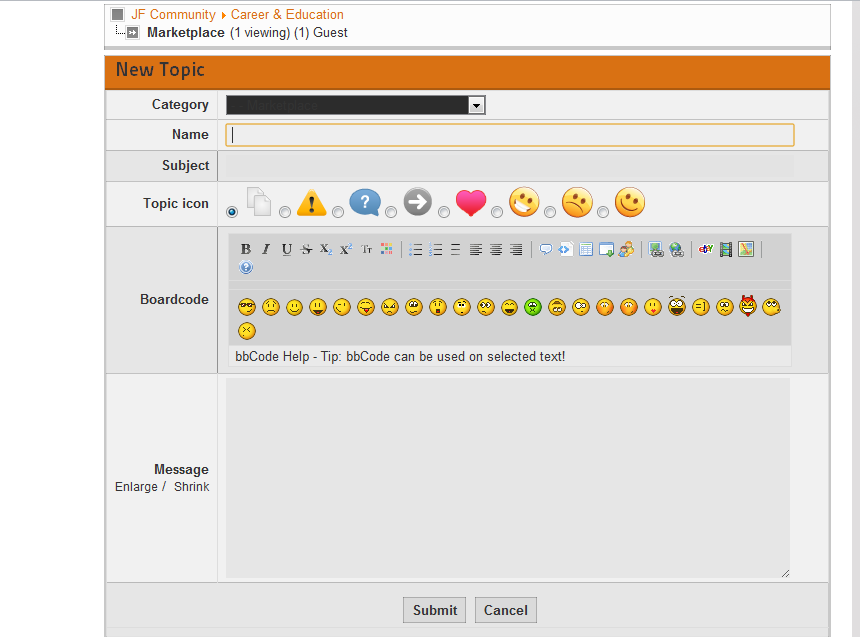
Replied by beyond on topic Select List Box is Dark Color, difficult to see text
Hi,
I installed kunena 1.6.5 successfully.
However, the category chooser select box is dark color. How can I change that? I am using the the template configuration below:
Template: Blue Eagle Default
I installed kunena 1.6.5 successfully.
However, the category chooser select box is dark color. How can I change that? I am using the the template configuration below:
Template: Blue Eagle Default
Please Log in or Create an account to join the conversation.
15 years 1 month ago #104178
by sozzled
Blue Eagle vs. Crypsis reference guide
Read my blog and
Replied by sozzled on topic Re: Select List Box is Dark Color, difficult to see text
The dark colour is caused by your Joomla site template. See
How do I change the colours of my template in Kunena?
; it's easy if you use an in-browser developer tool, like
Firebug
.
If you can't do this yourself, you will need to post the URL of your website. Someone might be able to answer your question if you provide that important piece of information.
If you can't do this yourself, you will need to post the URL of your website. Someone might be able to answer your question if you provide that important piece of information.
Blue Eagle vs. Crypsis reference guide
Read my blog and
Please Log in or Create an account to join the conversation.
14 years 10 months ago #110129
by SlayrNeo
Replied by SlayrNeo on topic Problem with menu allocation with Artisteer template
Hi there!
I have a small problem with my website and forum.
The problem is that the Kunena menu starts in the middle and not in the left.
I know it is an issue caused by my Artisteer template, but where?
Can someone please help me?
www.schildpadinfo.nl/index.php/forum
I have a small problem with my website and forum.
The problem is that the Kunena menu starts in the middle and not in the left.
I know it is an issue caused by my Artisteer template, but where?
Can someone please help me?
www.schildpadinfo.nl/index.php/forum
Please Log in or Create an account to join the conversation.
14 years 10 months ago - 14 years 10 months ago #110133
by sozzled
Blue Eagle vs. Crypsis reference guide
Read my blog and
Replied by sozzled on topic Re: Problem with menu allocation with Artisteer template
Your site template file (../templates/schildpadinfov1/css/template.css) has the following CSS rule at about line 572:
ul.menu {
float: left;
left: 50%;
position: relative;
}
Comment-out the line as show below:
ul.menu {
float: left;
// left: 50%;
position: relative;
}
ul.menu {
float: left;
left: 50%;
position: relative;
}
Comment-out the line as show below:
ul.menu {
float: left;
// left: 50%;
position: relative;
}
Blue Eagle vs. Crypsis reference guide
Read my blog and
Last edit: 14 years 10 months ago by sozzled.
Please Log in or Create an account to join the conversation.
Time to create page: 0.319 seconds