
Kunena 7.0.9 & Kunena 6.4.14 – Security Updates Released
The Kunena team has announce the arrival of Kunena 7.0.9 [K 7.0.9] in stable which is now available for download as a native Joomla extension for J! 5.4.x/6.0.x./6.1.x. This version addresses most of the issues that were discovered in K 6.2 / K 6.3 / K 6.4 and issues discovered during the last development stages of K 7.0
If you have questions about third-party templates, please use the User-written Templates category or contact the author directly. This category should only be used for questions about templates developed and supported by the Kunena project.
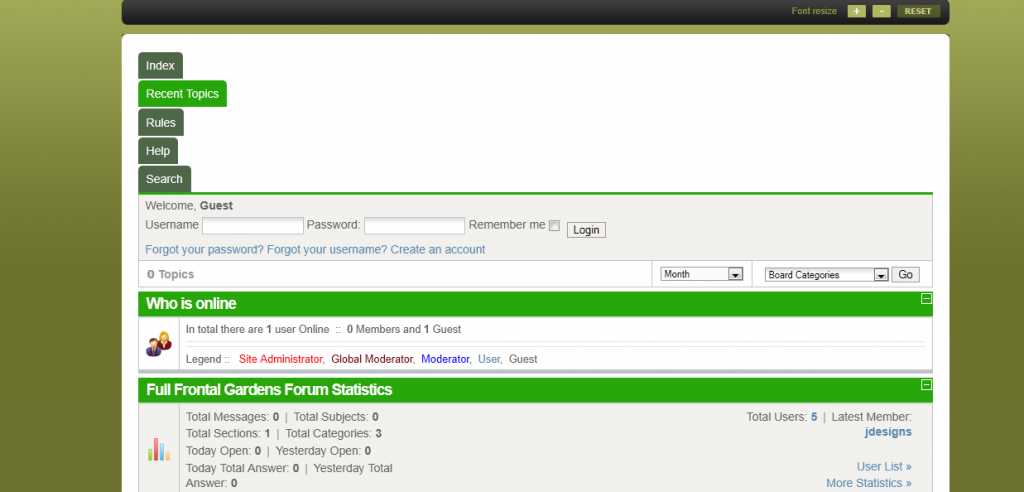
Question [Merged topic] Menu tabs display vertically


Blue Eagle vs. Crypsis reference guide
Read my blog and

Please Log in or Create an account to join the conversation.

sozzled wrote: Topics merged: See answers earlier in this topic (e.g. msg # 38)
Thanks alot sozzled
Regards
Please Log in or Create an account to join the conversation.
- Enlightenme
-

- Offline
- New Member
-

- Posts: 9
- Thank you received: 0
I have not done any tinkering after straight installation, except to some standard configs.
Suggestions rectifying the issue appreciated, thanks
Please Log in or Create an account to join the conversation.
G'day, Enlightenme, and welcome to Kunena.
I think you will find your answer here, in this topic. (I found this topic by searching for menu tabs vertical )
Blue Eagle vs. Crypsis reference guide
Read my blog and
Please Log in or Create an account to join the conversation.
- Enlightenme
-
- Offline
- New Member
-
- Posts: 9
- Thank you received: 0
Belgarath007 wrote: Other solution :
on kunena.forum-min.css
replace :
ul.menu li{
with
ul.menu li{width:auto;
That worked for me !

Thank you this also worked for me.
Going into the post topic option, the same thing is happening with the board code (displaying vertically).
Reading through previous boardcode issues, the suggestion is that it's the Joomla template.
Now please be kind to me here.... I am new.... can someone recommend a fix (on Joomla template or Kunena, I don't mind), that will help me fix the vertical arrangement of the boardcode to horizontal?
Thanks!
Please Log in or Create an account to join the conversation.
Board code displaying vertically? I don't remember seeing that problem before. Would you like to start a new topic in the K 1.6 Template and Design category about this new issue and please include a screenshot that illustrates the problem. Please also read What information should I include when I ask for help (including how to post my configuration report)?
Blue Eagle vs. Crypsis reference guide
Read my blog and
Please Log in or Create an account to join the conversation.