


- Posts: 22
- Thank you received: 0
Kunena 7.0.8 Released
The Kunena team has announce the arrival of Kunena 7.0.8 [K 7.0.8] in stable which is now available for download as a native Joomla extension for J! 5.4.x/6.0.x./6.1.x. This version addresses most of the issues that were discovered in K 6.2 / K 6.3 / K 6.4 and issues discovered during the last development stages of K 7.0
Before posting in this category, please read sticky topics and, as general background,
My Joomla site template makes a mess of Kunena
.
If you have questions about third-party templates, please use the User-written Templates category or contact the author directly. This category should only be used for questions about templates developed and supported by the Kunena project.
If you have questions about third-party templates, please use the User-written Templates category or contact the author directly. This category should only be used for questions about templates developed and supported by the Kunena project.
Question [Merged topic] Menu tabs display vertically
15 years 10 months ago - 15 years 7 months ago #63664
by saddoris
[Merged topic] Menu tabs display vertically was created by saddoris
I've just installed 1.6 final over an existing version, and while the install went beautifully, the menu tabs are displaying in a vertical list, rather than inline. Any ideas??
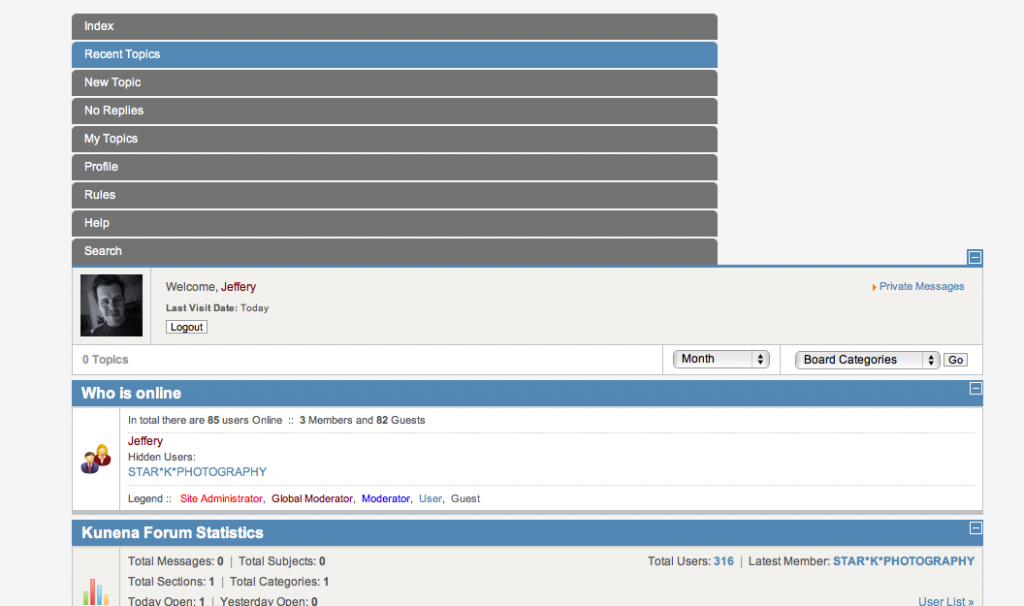
Last edit: 15 years 7 months ago by sozzled. Reason: Merged topic: Changed subject to improve search relevance
Please Log in or Create an account to join the conversation.


15 years 10 months ago #63666
by fxstein
We love stars on the Joomla Extension Directory .
Replied by fxstein on topic Re: Menu tabs display vertically (1.6.0 final)
1.) Can you please provide your config report
2.) Have you cleared your browsers cache?
2.) Have you cleared your browsers cache?
We love stars on the Joomla Extension Directory .
Please Log in or Create an account to join the conversation.


15 years 10 months ago #63667
by Matias
Replied by Matias on topic Re: Menu tabs display vertically (1.6.0 final)
We are using Main Menu module to show our own menu. Your template may have CSS rule for it:
div.moduletable ul.menu
Please use FireBug, Opera inspect or similar tool to find out which CSS rules apply to those elements.
div.moduletable ul.menu
Please use FireBug, Opera inspect or similar tool to find out which CSS rules apply to those elements.
Please Log in or Create an account to join the conversation.
15 years 10 months ago - 15 years 10 months ago #63668
by saddoris
Replied by saddoris on topic Re: Menu tabs display vertically (1.6.0 final)
I'll check the CSS for Main Menu. One thing, if I change the Kunena Menu type to Legacy - Horizontal they change. They still don't display correctly, but they are at least horizontal. Have cleared cache. Do I paste in the report or attach as .txt?
Here are the only references to "div.moduletable ul" in the main template CSS:
/* mis */
div.moduletable ul {
margin: 0;
padding: 0;
list-style-type:none;
list-style: none;
}
div.moduletable ul li {
margin: 0;
padding-left: 0px;
list-style-type:none;
list-style: none;
}
Here are the only references to "div.moduletable ul" in the main template CSS:
/* mis */
div.moduletable ul {
margin: 0;
padding: 0;
list-style-type:none;
list-style: none;
}
div.moduletable ul li {
margin: 0;
padding-left: 0px;
list-style-type:none;
list-style: none;
}
Last edit: 15 years 10 months ago by saddoris.
Please Log in or Create an account to join the conversation.
15 years 10 months ago #63671
by Matias
Replied by Matias on topic Re: Menu tabs display vertically (1.6.0 final)
There may be other rules as well, which are affecting to the menu. So FireBug or similar tool would be handy.
Or you could give us URL to your forum so that someone could take a look on it.
Or you could give us URL to your forum so that someone could take a look on it.
Please Log in or Create an account to join the conversation.
15 years 10 months ago #63672
by saddoris
Replied by saddoris on topic Re: Menu tabs display vertically (1.6.0 final)
Please Log in or Create an account to join the conversation.
Time to create page: 0.507 seconds