


- Posts: 157
- Thank you received: 9
Kunena 7.0.4 Released
The Kunena team has announce the arrival of Kunena 7.0.4 [K 7.0.4] in stable which is now available for download as a native Joomla extension for J! 5.4.x/6.0.x. This version addresses most of the issues that were discovered in K 6.2 / K 6.3 / K 6.4 and issues discovered during the last development stages of K 7.0
This category is only for reporting defects or problems with Kunena 1.6 test versions with Joomla 1.6. This is NOT a support forum - there is no support for test versions. Users should NOT install K 1.6 alpha or beta test versions on websites with live production data.
Question J! 1.6 + K 1.6 Upgrade error: unable to write entry
15 years 2 months ago #83679
by xreliable
Replied by xreliable on topic Re: Aw: J! 1.6 + K 1.6 Upgrade error: unable to write entry
Yes to empty the menu trash go to the menu manager. In each menu you'll see a list of all the menu items by status. To empty the trash for a particular menu, click on the number (the indicator of how many trash items there are) then when that opens select them and empty the trash.
I did go into jos_menu. I completely emptied every kunena related item as well as others completely unrelated.
I did go into jos_menu. I completely emptied every kunena related item as well as others completely unrelated.
rich wrote:
Joomla!16. has a trash menu?I even emptied the menu trash.
You have this report:You can delete in the backend all menus, but in the database jos_menu remains a rest. You must find this entry....FAILED Uncaught Exception: Another menu item has the same alias in Root. Root is the top level parent
The following user(s) said Thank You: rich
Please Log in or Create an account to join the conversation.


15 years 2 months ago #83681
by rich
Ttry the following:
step 1 make a completely backup from your database
step 2 to export only jos_menu
step 3 emty the table jos_menu (not delete!)
step 4 install kunena
step 5 to import the table jos menu again
i hope, this help you
Important! Always create a backup before you make any changes to your website!
Replied by rich on topic Aw: J! 1.6 + K 1.6 Upgrade error: unable to write entry
Thanks!Yes to empty the menu trash go to the menu manager. In each menu you'll see a list of all the menu items by status. To empty the trash for a particular menu, click on the number (the indicator of how many trash items there are) then when that opens select them and empty the trash.
Ttry the following:
step 1 make a completely backup from your database
step 2 to export only jos_menu
step 3 emty the table jos_menu (not delete!)
step 4 install kunena
step 5 to import the table jos menu again
i hope, this help you
Important! Always create a backup before you make any changes to your website!
Please Log in or Create an account to join the conversation.
15 years 2 months ago #83896
by xreliable
Replied by xreliable on topic Re: Aw: J! 1.6 + K 1.6 Upgrade error: unable to write entry
thanks. tried it but this time I get the error: "JTableMenu: :_getNode Failed -
I'm going to try wiping the entire Joomla 1.6 install and start from scratch.
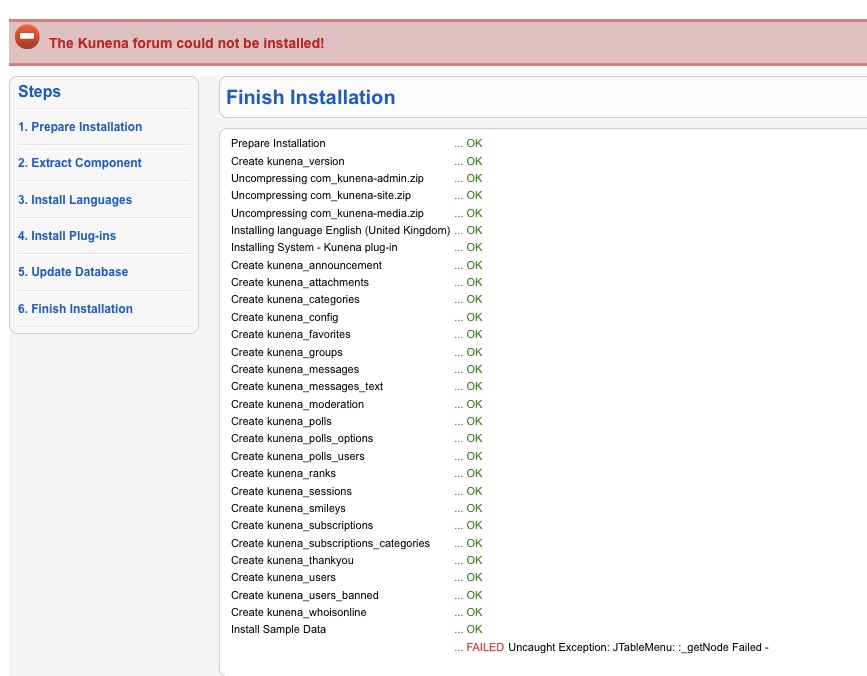
I'm going to try wiping the entire Joomla 1.6 install and start from scratch.
rich wrote:
Thanks!Yes to empty the menu trash go to the menu manager. In each menu you'll see a list of all the menu items by status. To empty the trash for a particular menu, click on the number (the indicator of how many trash items there are) then when that opens select them and empty the trash.
Ttry the following:
step 1 make a completely backup from your database
step 2 to export only jos_menu
step 3 emty the table jos_menu (not delete!)
step 4 install kunena
step 5 to import the table jos menu again
i hope, this help you
Please Log in or Create an account to join the conversation.


15 years 2 months ago #83914
by Simiys
Replied by Simiys on topic Re: Aw: J! 1.6 + K 1.6 Upgrade error: unable to write entry
Upgrade error 1.6.2 to 1.6.3
Подготовка установки ... OK
Распаковка com_kunena-admin.zip ... OK
Распаковка com_kunena-site.zip ... OK
Распаковка com_kunena-media.zip ... OK
Установка English (United Kingdom) языка ... OK
Установка Russian (CIS) языка ... OK
Установка плагина System - Kunena ...
Подготовка установки ... OK
Распаковка com_kunena-admin.zip ... OK
Распаковка com_kunena-site.zip ... OK
Распаковка com_kunena-media.zip ... OK
Установка English (United Kingdom) языка ... OK
Установка Russian (CIS) языка ... OK
Установка плагина System - Kunena ...
Please Log in or Create an account to join the conversation.
15 years 2 months ago #83976
by xreliable
Replied by xreliable on topic Re: Aw: J! 1.6 + K 1.6 Upgrade error: unable to write entry
FYI the menu issue looks to be related to a known J1.6 bug that was thought to be fixed:
joomlacode.org/gf/project/joomla/tracker...racker_item_id=21441
and others are having problems since Stable:
forum.joomla.org/viewtopic.php?f=615&p=2394854
joomlacode.org/gf/project/joomla/tracker...racker_item_id=21441
and others are having problems since Stable:
forum.joomla.org/viewtopic.php?f=615&p=2394854
Please Log in or Create an account to join the conversation.
15 years 2 months ago #83983
by rich
Important! Always create a backup before you make any changes to your website!
Replied by rich on topic Aw: J! 1.6 + K 1.6 Upgrade error: unable to write entry
Hello xreliable,
you have a export data only from the table jos_menu. Please can you send as attachement for me? I would test upgrade with your menus. In table jos_menu there is no private dates from you.
But you can upload the file and insert. With the code "confidential" see only admins and moderators this file.
you have a export data only from the table jos_menu. Please can you send as attachement for me? I would test upgrade with your menus. In table jos_menu there is no private dates from you.
But you can upload the file and insert. With the code "confidential" see only admins and moderators this file.
Code:
[confidential][attachment:1]C:\fakepath\jos_menu.sql.zip[/attachment][/confidential]
Important! Always create a backup before you make any changes to your website!
Please Log in or Create an account to join the conversation.
Time to create page: 0.258 seconds