


- Posts: 4
- Thank you received: 0
Kunena 7.0.9 & Kunena 6.4.14 – Security Updates Released
The Kunena team has announce the arrival of Kunena 7.0.9 [K 7.0.9] in stable which is now available for download as a native Joomla extension for J! 5.4.x/6.0.x./6.1.x. This version addresses most of the issues that were discovered in K 6.2 / K 6.3 / K 6.4 and issues discovered during the last development stages of K 7.0
Sticky If you are having problems with Kunena, please read this first
14 years 3 months ago #126469
by Phunder
Replied by Phunder on topic Tabs not working in Profile tab after upgrade
Hi there
I upgraded from K 1.5 to K 1.7 yesterday. So far everything is working great, except for one element:
When you go to the "Profile" tab, there are several tabs on the page named "Unapproved posts", "Posts", "Thank You", "Subscriptions", "Favorites" and "Ban Manager". These tabs do not seem to work. There is no content displayed, and you can not switch between tabs.
The same thing happens when you try to edit a user's details. When you click on "Edit" there is another set of tabs called "User Account", "Profile Information", "Avatar Image", "Forum" and "Settings", that does the same thing.
I have added two images to show what I mean.
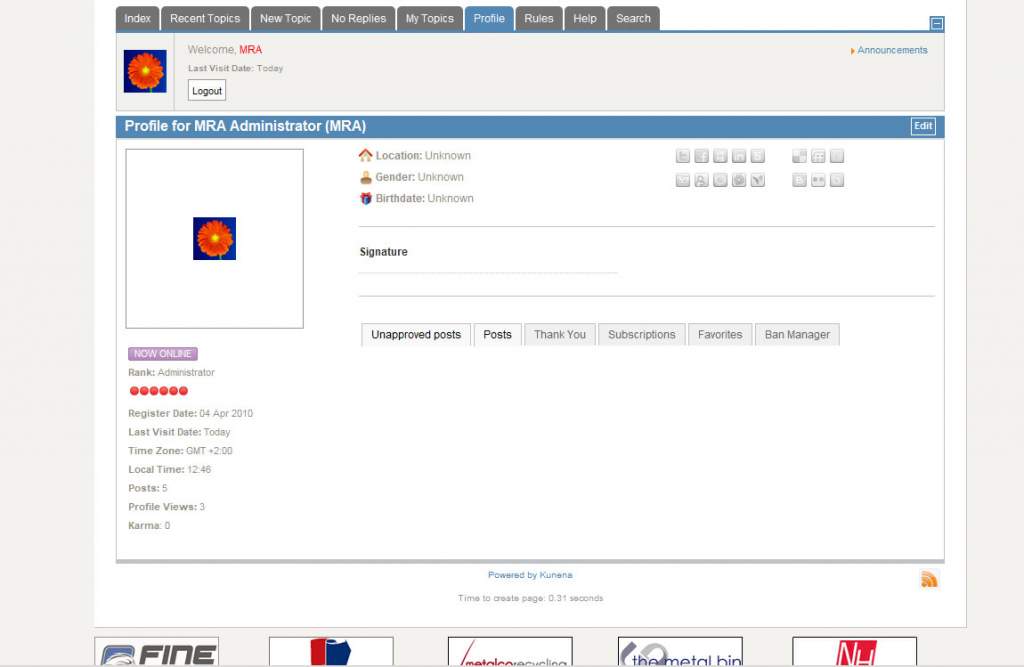
Any idea why this is happening?
I upgraded from K 1.5 to K 1.7 yesterday. So far everything is working great, except for one element:
When you go to the "Profile" tab, there are several tabs on the page named "Unapproved posts", "Posts", "Thank You", "Subscriptions", "Favorites" and "Ban Manager". These tabs do not seem to work. There is no content displayed, and you can not switch between tabs.
The same thing happens when you try to edit a user's details. When you click on "Edit" there is another set of tabs called "User Account", "Profile Information", "Avatar Image", "Forum" and "Settings", that does the same thing.
I have added two images to show what I mean.
Any idea why this is happening?
Please Log in or Create an account to join the conversation.


14 years 3 months ago #126474
by sozzled
Blue Eagle vs. Crypsis reference guide
Read my blog and

Replied by sozzled on topic Tabs not working in Profile tab after upgrade
Phunder: I replied to this topic yesterday.
Blue Eagle vs. Crypsis reference guide
Read my blog and
Please Log in or Create an account to join the conversation.
14 years 3 months ago #126552
by Phunder
Replied by Phunder on topic How to obtain email address for another user
Hi again
Thanks for pointing me in the right direction. This is turning into a real pain though.
I have upgraded my Joomla version to 1.5.26 and activated the Mootools Upgrade plugin, but still no luck.
If I understand correctly the next step is to uninstall and re-install Kunena. Will this cause me to loose all of the posts that are already in the forum? If so, is there some way I can revert to an older version of Kunena that does not need Mootools?
Thanks for pointing me in the right direction. This is turning into a real pain though.
I have upgraded my Joomla version to 1.5.26 and activated the Mootools Upgrade plugin, but still no luck.
If I understand correctly the next step is to uninstall and re-install Kunena. Will this cause me to loose all of the posts that are already in the forum? If so, is there some way I can revert to an older version of Kunena that does not need Mootools?
Please Log in or Create an account to join the conversation.


14 years 3 months ago #126570
by Matias
Replied by Matias on topic How to obtain email address for another user
Phunder: Your issue is probably a conflict between some very old javascript and latest Mootools.
Without seeing it, there are usually 2 possibilities where these kinds of issues come from:
1) template
2) old components / modules
You should try to update everything to the newest version to see if that fixes the issue. Also try default Joomla templates and turn off modules in Kunena pages. Once you find out the extension that's causing the issue, rest should be easy.
Without seeing it, there are usually 2 possibilities where these kinds of issues come from:
1) template
2) old components / modules
You should try to update everything to the newest version to see if that fixes the issue. Also try default Joomla templates and turn off modules in Kunena pages. Once you find out the extension that's causing the issue, rest should be easy.
Please Log in or Create an account to join the conversation.
14 years 3 months ago - 14 years 3 months ago #126579
by sozzled
The information in msg #1 of this topic will assist you.
I understand that this must seem painful for you. Most of these problems come from the hundreds of thousands of badly written Joomla templates (written before mid-2010) that still rely on outmoded and outdated Javascript. In many cases, the simplest solution is to uninstall the Joomla template that you're using and use different one.
Blue Eagle vs. Crypsis reference guide
Read my blog and
Replied by sozzled on topic How to obtain email address for another user
No, that is not the next step. The next step is to identify the culprit - the Joomla extension that includes its own Javascript library that interferes with the standard Mootools library that is used by Joomla (and by Kunena) - and fix the problem.Phunder wrote: If I understand correctly the next step is to uninstall and re-install Kunena.
The information in msg #1 of this topic will assist you.
I understand that this must seem painful for you. Most of these problems come from the hundreds of thousands of badly written Joomla templates (written before mid-2010) that still rely on outmoded and outdated Javascript. In many cases, the simplest solution is to uninstall the Joomla template that you're using and use different one.
Blue Eagle vs. Crypsis reference guide
Read my blog and
Last edit: 14 years 3 months ago by sozzled.
Please Log in or Create an account to join the conversation.

14 years 3 months ago #126779
by d_siotos
Replied by d_siotos on topic Can´t change profiles settings in profile
hi i have the same problem as you do with the edit button in the kunena profiles. I cant find it to press it so to start editing the profile. I show that you solved it so can you tell me how exactly you did it so i will try to apply the same solution to my website. I am new to joomla so i don't really know where exactly turn off title spans.
Please Log in or Create an account to join the conversation.
Time to create page: 0.279 seconds