
Kunena 7.0.9 & Kunena 6.4.14 – Security Updates Released
The Kunena team has announce the arrival of Kunena 7.0.9 [K 7.0.9] in stable which is now available for download as a native Joomla extension for J! 5.4.x/6.0.x./6.1.x. This version addresses most of the issues that were discovered in K 6.2 / K 6.3 / K 6.4 and issues discovered during the last development stages of K 7.0
Sticky If you are having problems with Kunena, please read this first


14 years 3 months ago - 14 years 3 months ago #126325
by sozzled
Blue Eagle vs. Crypsis reference guide
Read my blog and

Replied by sozzled on topic Can´t change profiles settings in profile
G'day, planetmoon, and welcome to Kunena.
Thank you for your configuration report and your very broad question about some problem(s) that you or your users seem to be having with editing user profiles. Could you elaborate more on what seems to be the specific problem, please?
We note that, as visitors to your website, we are not actually able to see, at first-hand, any of your forum pages. Perhaps you might consider offering a test account on your site where we could see the issue for ourselves? You can do that using the confidential BBcode tag, thus
You question has been asked and answered many tmes before as any
search
using the keywords "cannot edit profiles" would show.
Thank you for your configuration report and your very broad question about some problem(s) that you or your users seem to be having with editing user profiles. Could you elaborate more on what seems to be the specific problem, please?
We note that, as visitors to your website, we are not actually able to see, at first-hand, any of your forum pages. Perhaps you might consider offering a test account on your site where we could see the issue for ourselves? You can do that using the confidential BBcode tag, thus
Code:
[confidential]Account:
Password:[/confidential]
Blue Eagle vs. Crypsis reference guide
Read my blog and
Last edit: 14 years 3 months ago by sozzled.
The following user(s) said Thank You: planetmoon
Please Log in or Create an account to join the conversation.
- planetmoon
-

- Offline
- New Member
-

Less
More
- Posts: 3
- Thank you received: 0
14 years 3 months ago - 14 years 3 months ago #126331
by planetmoon
Replied by planetmoon on topic Can´t change profiles settings in profile
Hello Sozzled.
Thanks for your reply. The problem is that users (and administrators) can´t upload a avatar or change any setting under profile. The edit button is not there. Try this login - thank you.
Thanks for your reply. The problem is that users (and administrators) can´t upload a avatar or change any setting under profile. The edit button is not there. Try this login - thank you.
This message contains confidential information
Last edit: 14 years 3 months ago by planetmoon.
Please Log in or Create an account to join the conversation.
14 years 3 months ago #126343
by sozzled
Blue Eagle vs. Crypsis reference guide
Read my blog and
Replied by sozzled on topic Can´t change profiles settings in profile
Thank you for the additional information which helps to clarify the problem.
Kunena requires full access to Joomla's Mootools library (which is installed with J! 2.5) - you are using an older version of J! 2.5 that contains many bugs and I advise you to update to J! 2.5.4 as soon as possible.
The reason that Kunena does not work on your site is because you have other software that uses Javascript which interferes with the Mootools library to stop it working the way that it needs to for Kunena to work properly.
This is a short list of the Javascript libraries that I see you are using on your site (Note: this list is incomplete):
Most of the J! 2.5 websites that I visit have about 7 or 8 references to Javascript; your site has 22. One of these additional ones appears to be interfering with Mootools.
For a typical J! 2.5 website, you need the following as a minimum:
There are two others, that have the name "calendar" in them, that are normal for J! 2.5. I am simply saying that you need the ones I have listed above as an abolute minimum.
These issues are addressed in the links referred to in msg #1 of this topic which discusses, as well as other matters, what to do when you do not have a profile Edit button. Many of these issues arise when people use templates based on the Gantry framework (for example, if you have Build Title Spans = On).
Many other problems arise when people have loaded plugins in the wrong order (for example, if you are using plugins installed with the K2 component) or if you run jQuery Javascript libraries in the wrong way (i.e. not explicitly setting "no conflict" mode). In all cases where Kunena fails to work in the ways we're discussing here, these are caused by the choices that people have made and the different Joomla extensions that they're added to their "software soup".
I am not sure which Joomla extension(s) you've added are the actual cause but I hope the guide given in msg #1 of this topic will assist you.
Kunena requires full access to Joomla's Mootools library (which is installed with J! 2.5) - you are using an older version of J! 2.5 that contains many bugs and I advise you to update to J! 2.5.4 as soon as possible.
The reason that Kunena does not work on your site is because you have other software that uses Javascript which interferes with the Mootools library to stop it working the way that it needs to for Kunena to work properly.
This is a short list of the Javascript libraries that I see you are using on your site (Note: this list is incomplete):
Code:
<script src="/media/system/js/mootools-core.js" type="text/javascript"></script>
<script src="/media/system/js/core.js" type="text/javascript"></script>
<script src="/media/system/js/mootools-more.js" type="text/javascript"></script>
<script src="/media/system/js/modal.js" type="text/javascript"></script>
<script src="http://ajax.googleapis.com/ajax/libs/jquery/1.7/jquery.min.js" type="text/javascript"></script>
<script src="/components/com_k2/js/k2.js" type="text/javascript"></script>
<script src="http://www.openmindconference.com/components/com_kunena/js/mediaboxadvanced/js/mediaboxAdv.js" type="text/javascript"></script>
<script src="http://www.openmindconference.com/components/com_kunena/template/default/js/default-min.js" type="text/javascript"></script>
<script src="/media/system/js/calendar.js" type="text/javascript"></script>
<script src="/media/system/js/calendar-setup.js" type="text/javascript"></script>
<script src="/plugins/system/rokbox/rokbox.js" type="text/javascript"></script>
<script src="/plugins/system/rokbox/themes/light/rokbox-config.js" type="text/javascript"></script>
<script src="https://ajax.googleapis.com/ajax/libs/jquery/1.7.1/jquery.min.js" type="text/javascript"></script>
<script src="/libraries/gantry/js/gantry-buildspans.js" type="text/javascript"></script>
<script src="/templates/theme902/js/jQuery.ScrollTo.js" type="text/javascript"></script>
<script src="/templates/theme902/js/tooltips.js" type="text/javascript"></script>
<script src="/templates/theme902/js/jquery.tipsy.js" type="text/javascript"></script>
<script src="/templates/theme902/js/jquery.prettyPhoto.js" type="text/javascript"></script>
<script src="/templates/theme902/js/scripts.js" type="text/javascript"></script>
<script src="/modules/mod_roknavmenu/themes/fusion/js/fusion.js" type="text/javascript"></script>
<script src="/modules/mod_rokajaxsearch/js/rokajaxsearch.js" type="text/javascript"></script
For a typical J! 2.5 website, you need the following as a minimum:
Code:
<script src="/media/system/js/mootools-core.js" type="text/javascript"></script>
<script src="/media/system/js/core.js" type="text/javascript"></script>
<script src="/media/system/js/mootools-more.js" type="text/javascript"></script>
<script src="/media/kunena/js/mediaboxAdv-min.js" type="text/javascript"></script>
<script src="/media/kunena/js/default-min.js" type="text/javascript"></script>
These issues are addressed in the links referred to in msg #1 of this topic which discusses, as well as other matters, what to do when you do not have a profile Edit button. Many of these issues arise when people use templates based on the Gantry framework (for example, if you have Build Title Spans = On).
Many other problems arise when people have loaded plugins in the wrong order (for example, if you are using plugins installed with the K2 component) or if you run jQuery Javascript libraries in the wrong way (i.e. not explicitly setting "no conflict" mode). In all cases where Kunena fails to work in the ways we're discussing here, these are caused by the choices that people have made and the different Joomla extensions that they're added to their "software soup".
I am not sure which Joomla extension(s) you've added are the actual cause but I hope the guide given in msg #1 of this topic will assist you.
Blue Eagle vs. Crypsis reference guide
Read my blog and
The following user(s) said Thank You: planetmoon
Please Log in or Create an account to join the conversation.
- planetmoon
-
- Offline
- New Member
-
Less
More
- Posts: 3
- Thank you received: 0
14 years 3 months ago - 14 years 3 months ago #126368
by planetmoon
Replied by planetmoon on topic Can´t change profiles settings in profile
Hello Sozzled.
"Build Title Spans = off" solved the problem - thank you very much for your time.
"Build Title Spans = off" solved the problem - thank you very much for your time.
Last edit: 14 years 3 months ago by planetmoon.
Please Log in or Create an account to join the conversation.
14 years 3 months ago #126385
by Phunder
Replied by Phunder on topic Error on profile page after upgrade
Hi there
I upgraded from K 1.5 to the latest version today. After the upgrade it seems that there is an error on the User Profile page.
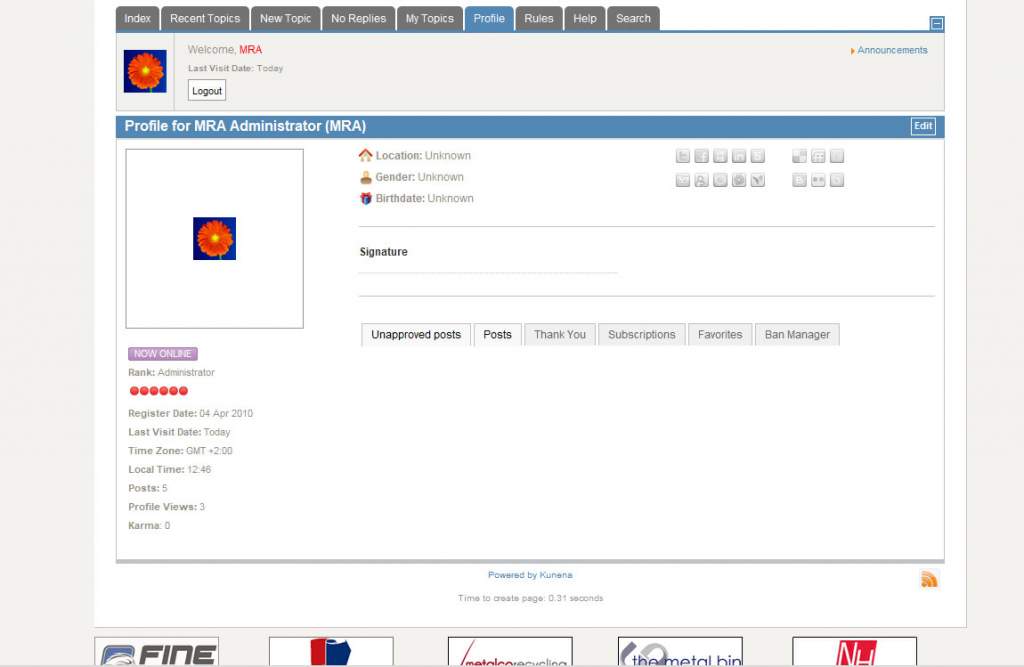
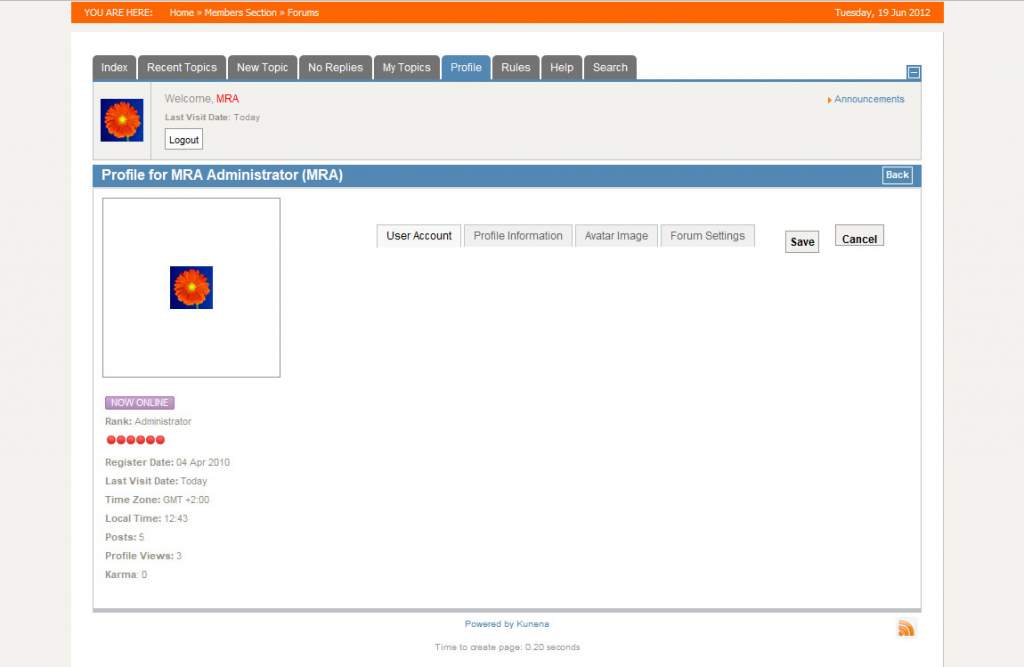
There are some tabs labeled "Unapproved posts", "Posts", "Thank You","Subscriptions", "Favorites" and "Ban Manage". When you click on edit the same kind of tabs reads "User Account", "Profile Information", "Avatar Image" and "Forum Settings". On both pages the content in these tabs does not show. Clicking on the tabs also does not cause the tabs to open. This means that users can no longer update their user details.
The site in question is www.mra.co.za/ and the forum can be found at www.mra.co.za/forum/ . Let me know if you need me to create a user for you to test it out on.
I have attached some images that shows the tabs in question.
Any advice would be much appreciated.
I upgraded from K 1.5 to the latest version today. After the upgrade it seems that there is an error on the User Profile page.
There are some tabs labeled "Unapproved posts", "Posts", "Thank You","Subscriptions", "Favorites" and "Ban Manage". When you click on edit the same kind of tabs reads "User Account", "Profile Information", "Avatar Image" and "Forum Settings". On both pages the content in these tabs does not show. Clicking on the tabs also does not cause the tabs to open. This means that users can no longer update their user details.
The site in question is www.mra.co.za/ and the forum can be found at www.mra.co.za/forum/ . Let me know if you need me to create a user for you to test it out on.
I have attached some images that shows the tabs in question.
Any advice would be much appreciated.
Please Log in or Create an account to join the conversation.
14 years 3 months ago #126388
by sozzled
Blue Eagle vs. Crypsis reference guide
Read my blog and
Replied by sozzled on topic Error on profile page after upgrade
Yes, we've seen these things before. These symptoms occur because your site loads a Javascript library that is incompatible with Joomla Mootools. The symptoms you describe are not the only things that are not going to work in your case. The answer is to read the information contained in msg #1 of this topic.
Blue Eagle vs. Crypsis reference guide
Read my blog and
Please Log in or Create an account to join the conversation.
Time to create page: 0.249 seconds