
- Posts: 13
- Thank you received: 0
Kunena 7.0.8 Released
The Kunena team has announce the arrival of Kunena 7.0.8 [K 7.0.8] in stable which is now available for download as a native Joomla extension for J! 5.4.x/6.0.x./6.1.x. This version addresses most of the issues that were discovered in K 6.2 / K 6.3 / K 6.4 and issues discovered during the last development stages of K 7.0
Question Embed images into post?
- soulkeeper
-
 Topic Author
- Offline
- New Member
-

Less
More
15 years 9 months ago #75232
by soulkeeper
Embed images into post? was created by soulkeeper
Is there an addon perhaps so my users can embed an image into their post so it displays, as oppose to an attachment or having to URL link it.
Most don't have web storage, and I'd like them to be able to embed it and have it stored on my end.
Most don't have web storage, and I'd like them to be able to embed it and have it stored on my end.
Please Log in or Create an account to join the conversation.


15 years 9 months ago #75233
by Elnablo
Replied by Elnablo on topic Re: Embed images into post?
You mean like this?
First "ADD FILE" and then "INSERT"
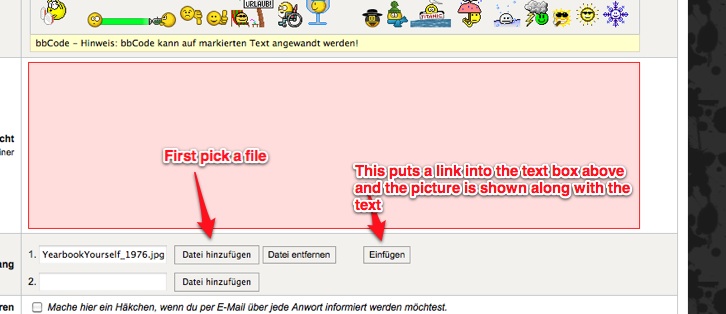
First "ADD FILE" and then "INSERT"
The following user(s) said Thank You: sozzled
Please Log in or Create an account to join the conversation.
- soulkeeper
-
Topic Author
- Offline
- New Member
-
Less
More
- Posts: 13
- Thank you received: 0
15 years 9 months ago #75244
by soulkeeper
Replied by soulkeeper on topic Re: Embed images into post?
Exactly like that, but for some reason, I click add, browse to find the file on my pc, click insert (see the text above) and when I submit I get this:
Attachment lonelytower-2.jpg not found in a nice styled box.
Attachment lonelytower-2.jpg not found in a nice styled box.
Please Log in or Create an account to join the conversation.
- soulkeeper
-
Topic Author
- Offline
- New Member
-
Less
More
- Posts: 13
- Thank you received: 0
15 years 9 months ago #75245
by soulkeeper
Replied by soulkeeper on topic Re: Embed images into post?
Well, as it gave no error, I turned on some debugging and looks like it cannot write to the needed folder, so... I think I can fix this!
Please Log in or Create an account to join the conversation.
- soulkeeper
-
Topic Author
- Offline
- New Member
-
Less
More
- Posts: 13
- Thank you received: 0
15 years 8 months ago - 15 years 8 months ago #75562
by soulkeeper
Replied by soulkeeper on topic Re: Embed images into post?
Turns out, this is more complex that I thought.
If I try to insert/upload a file with MIME on, it tells me it cannot upload MIME Type (). If I then turn it off to see a better error, it tells me the following:
JFile::copy: Cannot find or read file: 'C:\WINDOWS\Temp\phpFCE7.tmp'
Failed to upload file '66654559.jpg': Could not move file into c:\my\web\path\media/kunena/attachments\62/66654559.jpg.
Now, I can go and take that same file and upload it in the Joomla media manager tool. I can also upload it via article creation. I can also go into Community Builder, and upload.
Permissions are set correctly, they were checked.
Joomla: 1.5.22
PHP: 5.2.5
MySQL: 5.1.49
Kunena: 1.6
(Mootools 1.2.4 add on is on)
Windows (iis6)
If I try to insert/upload a file with MIME on, it tells me it cannot upload MIME Type (). If I then turn it off to see a better error, it tells me the following:
JFile::copy: Cannot find or read file: 'C:\WINDOWS\Temp\phpFCE7.tmp'
Failed to upload file '66654559.jpg': Could not move file into c:\my\web\path\media/kunena/attachments\62/66654559.jpg.
Now, I can go and take that same file and upload it in the Joomla media manager tool. I can also upload it via article creation. I can also go into Community Builder, and upload.
Permissions are set correctly, they were checked.
Joomla: 1.5.22
PHP: 5.2.5
MySQL: 5.1.49
Kunena: 1.6
(Mootools 1.2.4 add on is on)
Windows (iis6)
Last edit: 15 years 8 months ago by soulkeeper.
Please Log in or Create an account to join the conversation.


15 years 8 months ago #75570
by sozzled
Blue Eagle vs. Crypsis reference guide
Read my blog and

Replied by sozzled on topic Re: Embed images into post?
Can you upload and embed any images in a posted message here at
www.kunena.org
? You can use the
Playground
for those purposes, if you like.
Blue Eagle vs. Crypsis reference guide
Read my blog and
Please Log in or Create an account to join the conversation.
Time to create page: 0.234 seconds