


- Posts: 4
- Thank you received: 0
Kunena 7.0.8 Released
The Kunena team has announce the arrival of Kunena 7.0.8 [K 7.0.8] in stable which is now available for download as a native Joomla extension for J! 5.4.x/6.0.x./6.1.x. This version addresses most of the issues that were discovered in K 6.2 / K 6.3 / K 6.4 and issues discovered during the last development stages of K 7.0
Question [Merged topic]The great Mootools/Javascript conflict discussion
15 years 8 months ago - 15 years 8 months ago #74246
by data
Replied by data on topic Re: Can't upload files
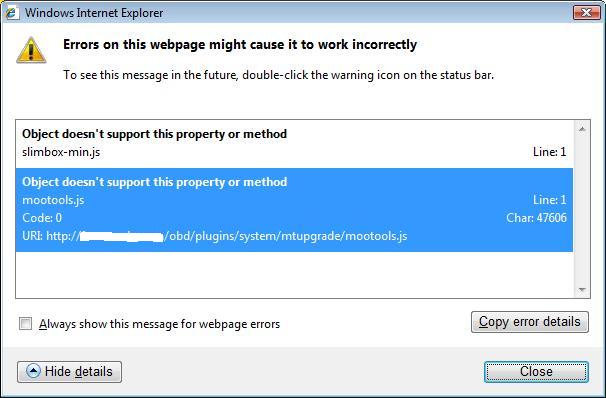
To further highlight the problem (use IE debugger)
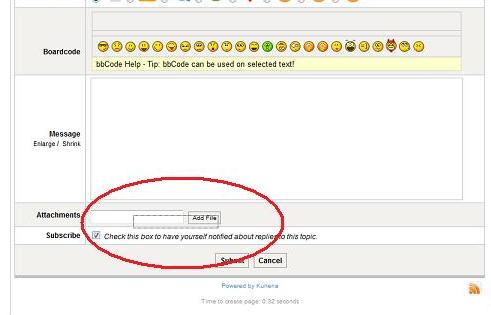
It seems the label appears off from the Add File field.
Anyone can help me realign this back?
it says slimbox-min.js not supported,
And located at plugin/systems/mtuupgrade/mootools.js
Can anyone enlighten me on this please?
thanks
It seems the label appears off from the Add File field.
Anyone can help me realign this back?
it says slimbox-min.js not supported,
And located at plugin/systems/mtuupgrade/mootools.js
Can anyone enlighten me on this please?
thanks
Last edit: 15 years 8 months ago by data.
The topic has been locked.
15 years 8 months ago - 15 years 8 months ago #74247
by secailku
Replied by secailku on topic moootools conflict
Hi,
I'm running kunena 1.6 and joomlavision template and with jv_tools Slideshow Module also..
but unfortunately there are conflict while i tried install / using kunena forum.
i found that the expand + - on kunena forum did not work
index.php template :
index.php :
// Javascript
unset($this->_scripts[$this->baseurl . '/media/system/js/mootools.js']);
unset($this->_scripts[$this->baseurl . '/media/system/js/caption.js']);
if($gzip == "true") :
$this->_scripts = array_merge(array(_TEMPLATE_URL . 'js/jv.script.js.php' => 'text/javascript'), $this->_scripts);
else:
//$this->_scripts = array_merge(array(_TEMPLATE_URL . 'js/jv.collapse.js' => 'text/javascript'), $this->_scripts);
$this->_scripts = array_merge(array(_TEMPLATE_URL . 'js/jv.script.js' => 'text/javascript'), $this->_scripts);
$this->_scripts = array_merge(array(_TEMPLATE_URL . 'js/mootools.js' => 'text/javascript'), $this->_scripts);
endif;
if i remove those code above...
the expand + - kunena forum work well...but the slideshow module will not working.
and here what i gave from asking in joomlavision support forum :
Hello,
Up to the present, we haven't supported Mootools 1.2.x. With joomla 1.5.x we only support mootools 1.1.x (joomla core's library)
We confirm with you that Mootools 1.2.x is NOT a default library. When you want to use, you must enable it via plugin manager.
There are many templates club, extenions club, joomla developers using mootools 1.1.x in order that if you enable mootools 1.2.x then it will killed all templates/extensions.
We recommend you to contact the Kunena team to get their support about this issue. Because the Kunena team has been working with the Joomla Mootools 1.2 plugin for the past 6 months and are excited. So they will know how to make their extension work with joomla 1.5 default and mootool 1.1 and other 3rd extensions
Kind regards,
JV Team
please, could anyone help me to find this solution?
I'm running kunena 1.6 and joomlavision template and with jv_tools Slideshow Module also..
but unfortunately there are conflict while i tried install / using kunena forum.
i found that the expand + - on kunena forum did not work
index.php template :
index.php :
// Javascript
unset($this->_scripts[$this->baseurl . '/media/system/js/mootools.js']);
unset($this->_scripts[$this->baseurl . '/media/system/js/caption.js']);
if($gzip == "true") :
$this->_scripts = array_merge(array(_TEMPLATE_URL . 'js/jv.script.js.php' => 'text/javascript'), $this->_scripts);
else:
//$this->_scripts = array_merge(array(_TEMPLATE_URL . 'js/jv.collapse.js' => 'text/javascript'), $this->_scripts);
$this->_scripts = array_merge(array(_TEMPLATE_URL . 'js/jv.script.js' => 'text/javascript'), $this->_scripts);
$this->_scripts = array_merge(array(_TEMPLATE_URL . 'js/mootools.js' => 'text/javascript'), $this->_scripts);
endif;
if i remove those code above...
the expand + - kunena forum work well...but the slideshow module will not working.
and here what i gave from asking in joomlavision support forum :
Hello,
Up to the present, we haven't supported Mootools 1.2.x. With joomla 1.5.x we only support mootools 1.1.x (joomla core's library)
We confirm with you that Mootools 1.2.x is NOT a default library. When you want to use, you must enable it via plugin manager.
There are many templates club, extenions club, joomla developers using mootools 1.1.x in order that if you enable mootools 1.2.x then it will killed all templates/extensions.
We recommend you to contact the Kunena team to get their support about this issue. Because the Kunena team has been working with the Joomla Mootools 1.2 plugin for the past 6 months and are excited. So they will know how to make their extension work with joomla 1.5 default and mootool 1.1 and other 3rd extensions
Kind regards,
JV Team
please, could anyone help me to find this solution?
Last edit: 15 years 8 months ago by secailku.
The topic has been locked.
- FreeThinker
-

- Offline
- Senior Member
-

Less
More
- Posts: 121
- Thank you received: 0
15 years 8 months ago #74270
by FreeThinker
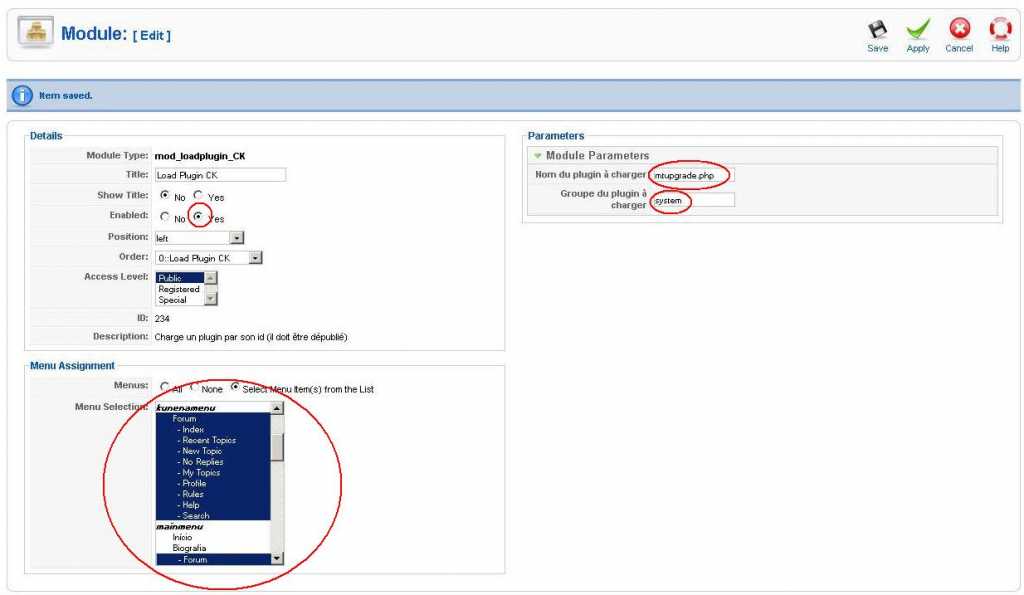
So I've installed this module and enabled it only in kunena, and set it to launch mtupgrade.php located in system and disabled the Mootools plugin (as said in instructions), but it seems not workin'
I'll post here my settings:
Replied by FreeThinker on topic Re: [Merged topic]The great Mootools/Javascript conflict discussion
etkritikonspoudon wrote: There is a Joomla extension called " loadplugin_CK " in JED which allows you to choose the pages in which a particular plugin will be activated...so one could have the plugin called in the Kunena forum pages and disabled in all others, so this would minimize or side-step any library conflicts...
So I've installed this module and enabled it only in kunena, and set it to launch mtupgrade.php located in system and disabled the Mootools plugin (as said in instructions), but it seems not workin'
I'll post here my settings:
The topic has been locked.
15 years 8 months ago #74315
by MeSs
Replied by MeSs on topic Problem with editing profile
I have a big problem with editing profiles on my Kunena Forum, i cant click any of the tabs after clicking edit. I cant even change the avatar picture. 
ive searched and searched for answers, but i keep finding something about mootools.
Here is the data from my page:
ive searched and searched for answers, but i keep finding something about mootools.
Here is the data from my page:
This message contains confidential information
Database collation check: The collation of your table fields are correct
Legacy mode: Disabled | Joomla! SEF: Disabled | Joomla! SEF rewrite: Disabled | FTP layer: Disabled |
This message contains confidential informationhtaccess: Missing | PHP environment: Max execution time: 60 seconds | Max execution memory: 128M | Max file upload: 64M
This message contains confidential information
Joomla default template details : themza_j15_66 | author: Themza Team | version: 1.0.0 | creationdate: 2010-11-22
Kunena version detailled: Installed version: 1.6.1 | Build: 3858 | Version name: Timu | Kunena detailled configuration:
Warning: Spoiler![th]Kunena config settings:[/th]
board_title Sokna Utvikling board_offline 0 board_ofset 0.00 offline_message <h2>Forumet er nede for vedlikehold.</h2>
<div>Prøv igjen senere!</div>enablerss 1 enablepdf 0 threads_per_page 20 messages_per_page 6 messages_per_page_search 15 showhistory 1 historylimit 6 shownew 1 jmambot 0 disemoticons 0 template Euro-Blue showannouncement 1 avataroncat 0 catimagepath category_images/ showchildcaticon 1 annmodid 62 rtewidth 800 rteheight 500 enableforumjump 1 reportmsg 1 username 0 askemail 1 showemail 0 showuserstats 1 showkarma 1 useredit 1 useredittime 0 useredittimegrace 600 editmarkup 1 allowsubscriptions 1 subscriptionschecked 1 allowfavorites 1 maxsubject 50 maxsig 300 regonly 1 changename 1 pubwrite 0 floodprotection 0 mailmod 0 mailadmin 0 captcha 0 mailfull 1 allowavatar 1 allowavatarupload 1 allowavatargallery 1 avatarquality 65 avatarsize 250 allowimageupload 0 allowimageregupload 1 imageheight 800 imagewidth 800 imagesize 250 allowfileupload 0 allowfileregupload 1 filetypes txt,rtf,pdf,zip,tar.gz,tgz,tar.bz2 filesize 120 showranking 1 rankimages 1 avatar_src fb fb_profile fb pm_component no userlist_rows 30 userlist_online 1 userlist_avatar 1 userlist_name 1 userlist_username 1 userlist_posts 1 userlist_karma 1 userlist_email 0 userlist_usertype 0 userlist_joindate 1 userlist_lastvisitdate 1 userlist_userhits 1 latestcategory 0 showstats 1 showwhoisonline 1 showgenstats 1 showpopuserstats 1 popusercount 5 showpopsubjectstats 1 popsubjectcount 5 usernamechange 0 rules_infb 1 rules_cid 1 help_infb 1 help_cid 1 showspoilertag 1 showvideotag 1 showebaytag 1 trimlongurls 1 trimlongurlsfront 40 trimlongurlsback 20 autoembedyoutube 1 autoembedebay 1 ebaylanguagecode en-us fbsessiontimeout 1800 highlightcode 0 rss_type topic rss_timelimit month rss_limit 100 rss_included_categories rss_excluded_categories rss_specification rss2.0 rss_allow_html 1 rss_author_format name rss_author_in_title 1 rss_word_count 0 rss_old_titles 1 rss_cache 900 fbdefaultpage recent default_sort asc alphauserpointsnumchars 0 sef 1 sefcats 0 sefutf8 0 showimgforguest 1 showfileforguest 1 pollnboptions 4 pollallowvoteone 1 pollenabled 1 poppollscount 5 showpoppollstats 1 polltimebtvotes 00:15:00 pollnbvotesbyuser 100 pollresultsuserslist 1 maxpersotext 50 ordering_system mesid post_dateformat ago post_dateformat_hover datetime hide_ip 1 js_actstr_integration 0 imagetypes jpg,jpeg,gif,png checkmimetypes 1 imagemimetypes image/jpeg,image/jpg,image/gif,image/png imagequality 50 thumbheight 32 thumbwidth 32 hideuserprofileinfo put_empty integration_access auto integration_login joomla integration_avatar kunena integration_profile kunena integration_private auto integration_activity auto boxghostmessage 0 userdeletetmessage 2 latestcategory_in 1 topicicons 1 onlineusers 1 debug 0 catsautosubscribed 0 showbannedreason 0 version_check 1 showthankyou 1 showpopthankyoustats 1 popthankscount 5 mod_see_deleted 1 bbcode_img_secure text listcat_show_moderators 1 lightbox 1 activity_limit 0
Third-party components: AlphaUserPoints: Disabled or not installed | CommunityBuilder: Disabled or not installed | Jomsocial: Disabled or not installed | UddeIm: Disabled or not installed
Plugins: System - Mootools12: Disabled | System - Mootools Upgrade: Disabled | JFirePHP: Disabled or not installed | Kunena Discuss: Disabled or not installed | Kunena Search: Disabled or not installed | My Kunena Forum Menu: Disabled or not installed | My Kunena Forum Posts: Disabled or not installed
Modules: Kunena Latest: Disabled or not installed | Kunena Stats: Disabled or not installed | Kunena Login: Disabled or not installed
The topic has been locked.


15 years 8 months ago - 15 years 8 months ago #74317
by sozzled
Blue Eagle vs. Crypsis reference guide
Read my blog and

Replied by sozzled on topic Re: [Merged topic]The great Mootools/Javascript conflict discussion
G'day, MeSs, and welcome to Kunena.
The reason that you keep finding references to Mootools 1.2.4 in connection with your problem is because there is a connection between Mootools 1.2.4 and your problem. Because there is a connection, I have merged your question with an existing topic that should provide all the information that you will need to resolve your problem.
Basically, you need to discover what it is in your website that is calling a Javascript library that is incompatible with Mootools 1.2.4 (that is basically clobbering Mootools 1.2.4) and when you have discovered the cause of that conflict you need to do something about it.
In your case I can see that your site template (themza_j15_66) is loading its own version of a Mootools library - it's probably an older version of Mootools - and that is what is causing this problem. You need to contact the developers of that template and ask them the question "What can I do about using your template that is conflicting with Joomla 1.5.22 and other extensions that I would like to run?" and see what they say.
Alternatively, you could try a different site template and see if this makes a difference.
The reason that you keep finding references to Mootools 1.2.4 in connection with your problem is because there is a connection between Mootools 1.2.4 and your problem. Because there is a connection, I have merged your question with an existing topic that should provide all the information that you will need to resolve your problem.
Basically, you need to discover what it is in your website that is calling a Javascript library that is incompatible with Mootools 1.2.4 (that is basically clobbering Mootools 1.2.4) and when you have discovered the cause of that conflict you need to do something about it.
In your case I can see that your site template (themza_j15_66) is loading its own version of a Mootools library - it's probably an older version of Mootools - and that is what is causing this problem. You need to contact the developers of that template and ask them the question "What can I do about using your template that is conflicting with Joomla 1.5.22 and other extensions that I would like to run?" and see what they say.
Alternatively, you could try a different site template and see if this makes a difference.
Blue Eagle vs. Crypsis reference guide
Read my blog and
Last edit: 15 years 8 months ago by sozzled.
The following user(s) said Thank You: MeSs
The topic has been locked.
15 years 8 months ago - 15 years 8 months ago #74318
by MeSs
Replied by MeSs on topic Re: [Merged topic]The great Mootools/Javascript conflict discussion
Thanks sozzled, but i have tried the default template too.. Did not help at all
If it helps, im using Jevents also..
If it helps, im using Jevents also..
Last edit: 15 years 8 months ago by MeSs.
The topic has been locked.
Time to create page: 0.322 seconds