


- Posts: 1663
- Thank you received: 201
Kunena 7.0.9 & Kunena 6.4.14 – Security Updates Released
The Kunena team has announce the arrival of Kunena 7.0.9 [K 7.0.9] in stable which is now available for download as a native Joomla extension for J! 5.4.x/6.0.x./6.1.x. This version addresses most of the issues that were discovered in K 6.2 / K 6.3 / K 6.4 and issues discovered during the last development stages of K 7.0
This is for users to help other users, to discuss topics that are related to forum administration in general or problems in running Joomla. This is not the place to ask for Joomla support. If you want assistance with Joomla please ask at
forum.joomla.org
Question How to add color to a echo command with a variable?
16 years 2 months ago #54086
by @quila
Replied by @quila on topic Re: How to add color to a echo command with a variable?
I think this is how is valid css you insert, then use Type || (2).
Please Log in or Create an account to join the conversation.


16 years 2 months ago - 16 years 2 months ago #54088
by iLucato
One more question. I activated the Debug mode, and it didn't read my "kunena.forum.css" that I've updated from my "min.css". When I activate the debug mode, what css file does Kunena read? It isn't with the style that it should be.
Kunena 2.0.4 | 2013-01-18 [ Pharmacopoeia ], J!1.5.25, rhuk_milkyway, CB 1.8.1, AUP 1.5.13, UddeIM 2.5 and Akeeba Backup 3.3.9
EsferaDoBem.com.br | iLucato.com.br | BemDoado.com.br
Replied by iLucato on topic Re: How to add color to a echo command with a variable?
Thanks I'll try it out.@quila wrote: I think this is how is valid css you insert, then use Type || (2).
Ops, just forgot to ask. Regarding this one, there are a bunch of checkboxes over there, do I need to check some stuff to compress, or should I leave all blank and just hit compress?Yes, try this one www.lacocina.nl/vrijesoftware/cscssc/css-compressor.html
One more question. I activated the Debug mode, and it didn't read my "kunena.forum.css" that I've updated from my "min.css". When I activate the debug mode, what css file does Kunena read? It isn't with the style that it should be.
Kunena 2.0.4 | 2013-01-18 [ Pharmacopoeia ], J!1.5.25, rhuk_milkyway, CB 1.8.1, AUP 1.5.13, UddeIM 2.5 and Akeeba Backup 3.3.9
EsferaDoBem.com.br | iLucato.com.br | BemDoado.com.br
Last edit: 16 years 2 months ago by iLucato.
Please Log in or Create an account to join the conversation.
16 years 2 months ago #54094
by @quila
Replied by @quila on topic Re: How to add color to a echo command with a variable?
First box is for compression, when you want to compress
Single line chacked, then compress.
Give me a link to your site, and tell me when you are uploded decompressed file to your server, enable debug also, I will check which file is loaded
Single line chacked, then compress.
Give me a link to your site, and tell me when you are uploded decompressed file to your server, enable debug also, I will check which file is loaded
Please Log in or Create an account to join the conversation.
16 years 2 months ago - 16 years 2 months ago #54114
by iLucato
Ops, I posted the wrong link. It should be the first one you gave me:
"3.1 - Go here refresh-sf.com/yui/ and compress kunena.forum.css file, you will have kunena.forum-min.css"
I'm sorry about that.
@quila, here is the link to BemDoado and here is the screenshot how it should looks like with the debug mode on that isn't happening as you're going to check when visiting the link:
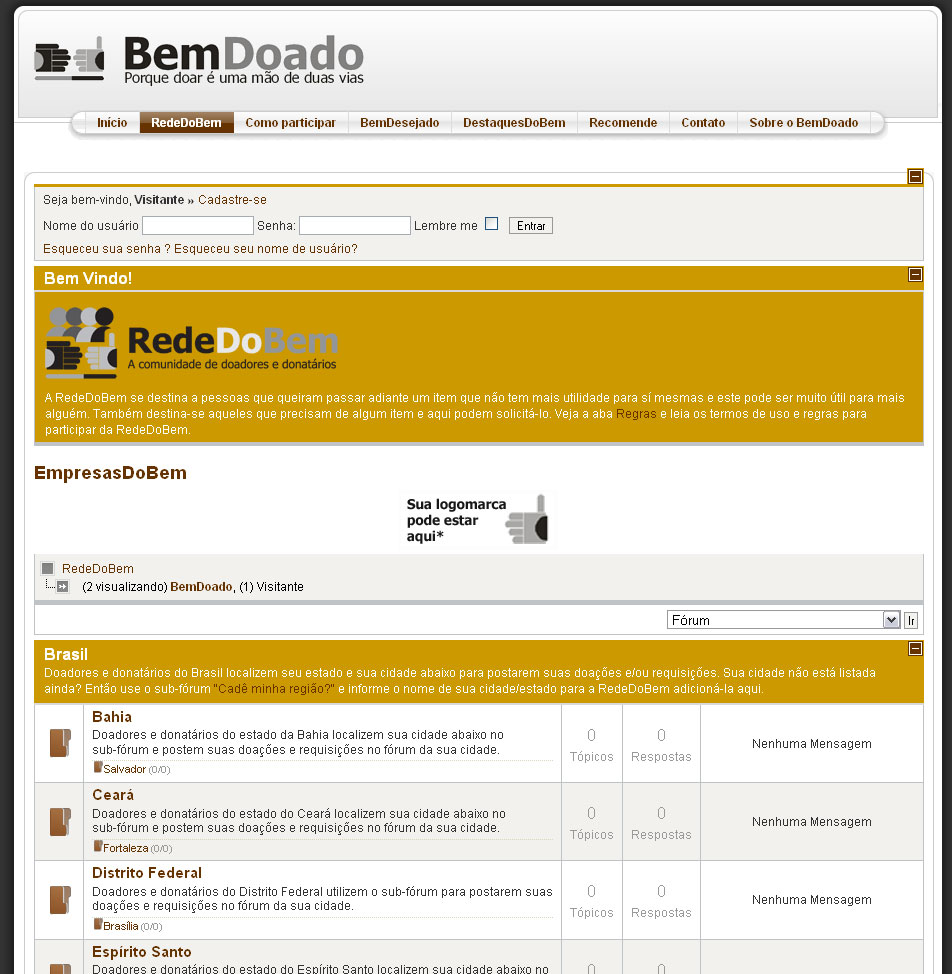
The debug mode is on, and the css is with blue fonts, background an so on instead of as the screenshot above. So, that's why I've asked what CSS file is read when debug mode is on. What is it path and file name?
Kunena 2.0.4 | 2013-01-18 [ Pharmacopoeia ], J!1.5.25, rhuk_milkyway, CB 1.8.1, AUP 1.5.13, UddeIM 2.5 and Akeeba Backup 3.3.9
EsferaDoBem.com.br | iLucato.com.br | BemDoado.com.br
Replied by iLucato on topic Re: How to add color to a echo command with a variable?
@quila wrote: First box is for compression, when you want to compress
Single line chacked, then compress.
Give me a link to your site, and tell me when you are uploded decompressed file to your server, enable debug also, I will check which file is loaded
Ops, I posted the wrong link. It should be the first one you gave me:
"3.1 - Go here refresh-sf.com/yui/ and compress kunena.forum.css file, you will have kunena.forum-min.css"
I'm sorry about that.
@quila, here is the link to BemDoado and here is the screenshot how it should looks like with the debug mode on that isn't happening as you're going to check when visiting the link:
The debug mode is on, and the css is with blue fonts, background an so on instead of as the screenshot above. So, that's why I've asked what CSS file is read when debug mode is on. What is it path and file name?
Kunena 2.0.4 | 2013-01-18 [ Pharmacopoeia ], J!1.5.25, rhuk_milkyway, CB 1.8.1, AUP 1.5.13, UddeIM 2.5 and Akeeba Backup 3.3.9
EsferaDoBem.com.br | iLucato.com.br | BemDoado.com.br
Last edit: 16 years 2 months ago by iLucato.
Please Log in or Create an account to join the conversation.
16 years 2 months ago #54119
by @quila
Replied by @quila on topic Re: How to add color to a echo command with a variable?
Right now this file is loade on your site /components/com_kunena/template/default/css/kunena.forum.css
on the line 411 you have this
well, I cant see any problems. change this two colors and you are ok.
other color to change is on line 227
on the line 411 you have this
#Kunena .kblock div.kheader {
background:none repeat scroll 0 0 #663300;
border-bottom:2px solid #CC9900;
color:#FFFFFF;
padding:0 20px 0 10px;
}
well, I cant see any problems. change this two colors and you are ok.
other color to change is on line 227
Please Log in or Create an account to join the conversation.
16 years 2 months ago - 16 years 2 months ago #54124
by iLucato
I think I didn't express myself very well. The image on the thread above is how I want to be. So, it the "-min.css", until here it is ok. When I active the debug mode, I'm getting this one below with blue links, blue lines, Dark brow header, blue [-] minus square, etc. Here is the image and below it some doubts:
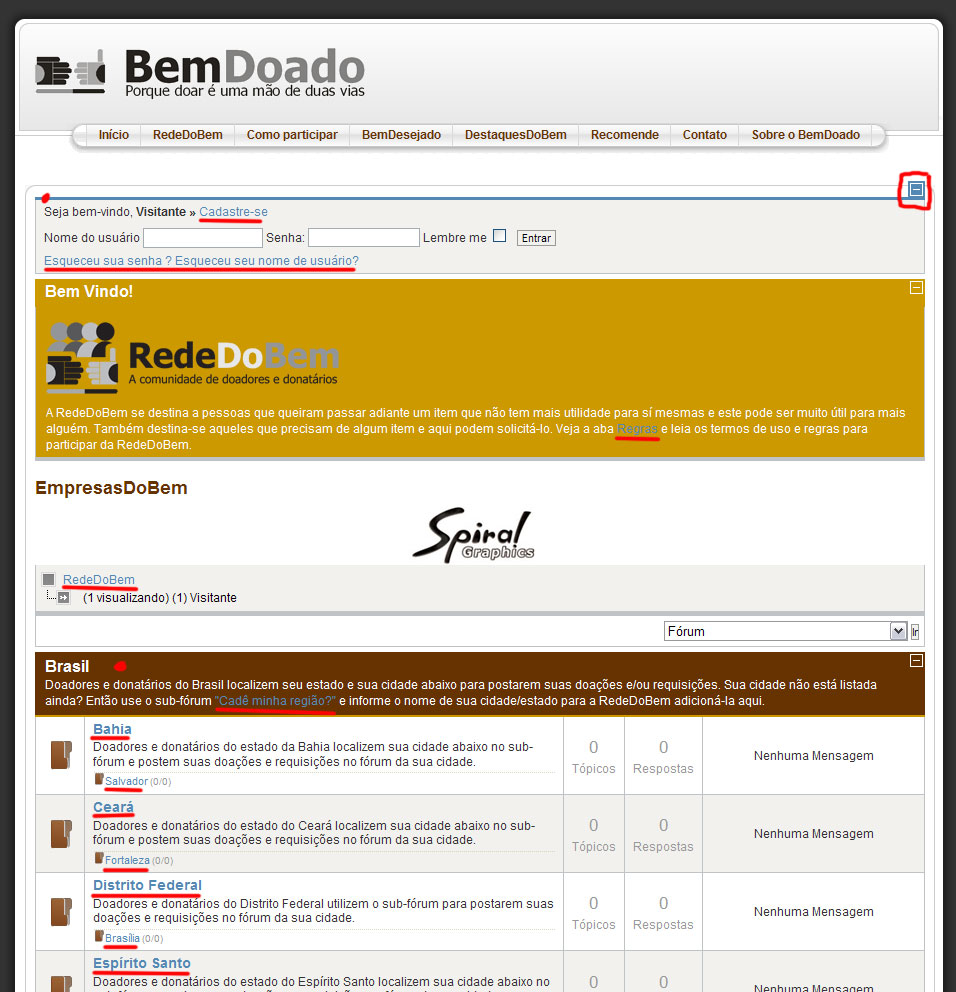
1. Shouldn't it be the same colors when I turn debug on? It should follow my "min.css".
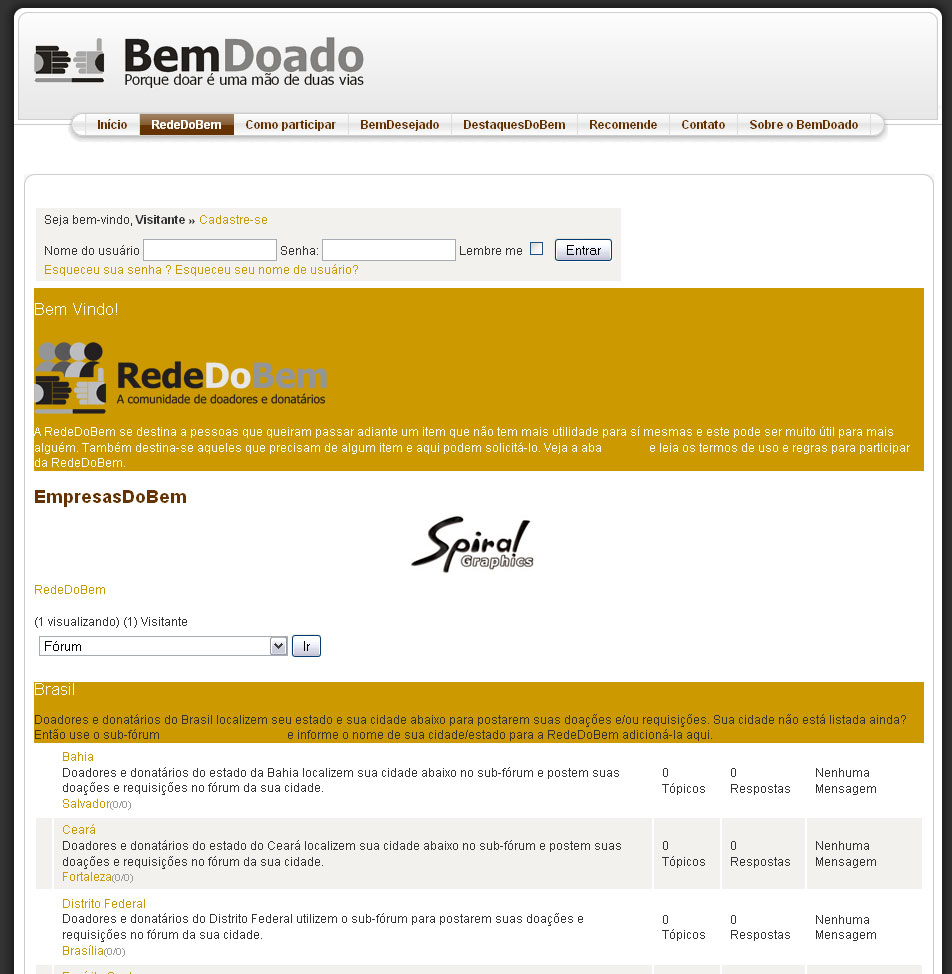
2. I tried to decompress the "-min.css" in that site to get the same results and upload to the server as "kunena.forum.css", but it messed the code. All images got hidden, the texts got aligned to left and so on. Any idea how to make them equal to each other, so I can work normally with the debug mode and compress later. Is there another method to decompress? Any other suggestion?
Here is what I get after using decompress as mentioned above (.2):
Is there any advantage of using compressed CSS style? Woudn't it be just a different file name without compression? Hehehe. :0)
Kunena 2.0.4 | 2013-01-18 [ Pharmacopoeia ], J!1.5.25, rhuk_milkyway, CB 1.8.1, AUP 1.5.13, UddeIM 2.5 and Akeeba Backup 3.3.9
EsferaDoBem.com.br | iLucato.com.br | BemDoado.com.br
Replied by iLucato on topic Re: How to add color to a echo command with a variable?
@quila wrote: Right now this file is loade on your site /components/com_kunena/template/default/css/kunena.forum.css
on the line 411 you have this#Kunena .kblock div.kheader {
background:none repeat scroll 0 0 #663300;
border-bottom:2px solid #CC9900;
color:#FFFFFF;
padding:0 20px 0 10px;
}
well, I cant see any problems. change this two colors and you are ok.
other color to change is on line 227
I think I didn't express myself very well. The image on the thread above is how I want to be. So, it the "-min.css", until here it is ok. When I active the debug mode, I'm getting this one below with blue links, blue lines, Dark brow header, blue [-] minus square, etc. Here is the image and below it some doubts:
1. Shouldn't it be the same colors when I turn debug on? It should follow my "min.css".
2. I tried to decompress the "-min.css" in that site to get the same results and upload to the server as "kunena.forum.css", but it messed the code. All images got hidden, the texts got aligned to left and so on. Any idea how to make them equal to each other, so I can work normally with the debug mode and compress later. Is there another method to decompress? Any other suggestion?
Here is what I get after using decompress as mentioned above (.2):
Is there any advantage of using compressed CSS style? Woudn't it be just a different file name without compression? Hehehe. :0)
Kunena 2.0.4 | 2013-01-18 [ Pharmacopoeia ], J!1.5.25, rhuk_milkyway, CB 1.8.1, AUP 1.5.13, UddeIM 2.5 and Akeeba Backup 3.3.9
EsferaDoBem.com.br | iLucato.com.br | BemDoado.com.br
Last edit: 16 years 2 months ago by iLucato.
Please Log in or Create an account to join the conversation.
Time to create page: 0.263 seconds