Kunena 7.0.2 Released
The Kunena team has announce the arrival of Kunena 7.0.2 [K 7.0.2] in stable which is now available for download as a native Joomla extension for J! 5.3.x/5.4.x/6.0.x. This version addresses most of the issues that were discovered in K 6.2 / K 6.3 / K 6.4 and issues discovered during the last development stages of K 7.0
Topics that are moved into this category are generally considered to be closed. Users may want to add additional information but these topics should not be resurrected in order to discuss new problems or unrelated matters.
Question Kunena 1.5.11 , Adjusting the topic width
15 years 3 months ago #72149
by sozzled
Blue Eagle vs. Crypsis reference guide
Read my blog and
Replied by sozzled on topic Re: Kunena 1.5.11 , Adjusting the topic width
You can't make your forum any wider than it already is because of two things:
(1) The overall width of your site template is too narrow!
(2) You have non-effective content in the right hand module position (move it to another module position or remove it completely)
Look at the second image below (ignore the numbers). In your case, the total effective width of evertyhing you display is 1024px. The left module width 205px and the right module width is 205px; that leaves you 614px for the component display. However, these are only raw widths and they don't take into account any left and right padding.
You have 614px to display everything in Kunena! Some of the images on your forum are 400px wide and so they don't fit.
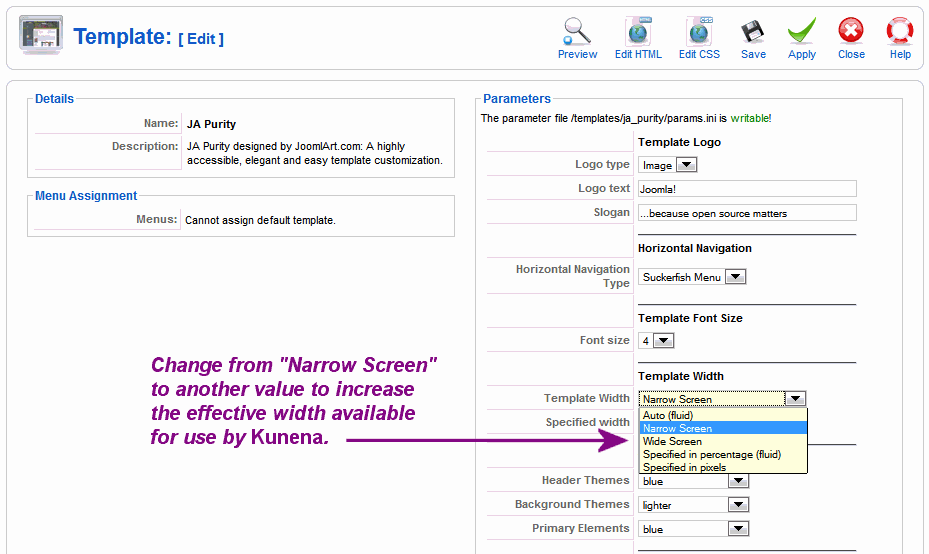
You're using the JA_Purity template (or a slightly modified version of it) which means that this isn't even a Kunena problem! Change the site template width parameters as shown in the following screenshot.
(1) The overall width of your site template is too narrow!
(2) You have non-effective content in the right hand module position (move it to another module position or remove it completely)
Look at the second image below (ignore the numbers). In your case, the total effective width of evertyhing you display is 1024px. The left module width 205px and the right module width is 205px; that leaves you 614px for the component display. However, these are only raw widths and they don't take into account any left and right padding.
You have 614px to display everything in Kunena! Some of the images on your forum are 400px wide and so they don't fit.
You're using the JA_Purity template (or a slightly modified version of it) which means that this isn't even a Kunena problem! Change the site template width parameters as shown in the following screenshot.
Blue Eagle vs. Crypsis reference guide
Read my blog and
The following user(s) said Thank You: iVeedu
Please Log in or Create an account to join the conversation.
15 years 3 months ago #72154
by iVeedu
Replied by iVeedu on topic Re: Kunena 1.5.11 , Adjusting the topic width
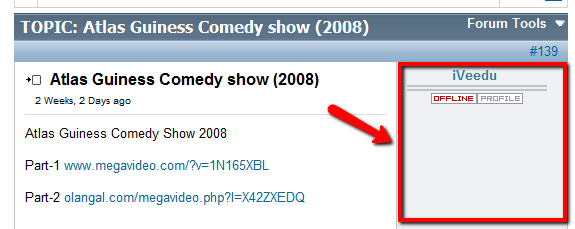
Another quick question. Sorry to bug you too much.My client has future plans for the "right" column. So, is it possible to hide column shown in the attached image. Hoping that will give more room for message text. THANKS!
Please Log in or Create an account to join the conversation.
15 years 3 months ago - 15 years 3 months ago #72157
by sozzled
Blue Eagle vs. Crypsis reference guide
Read my blog and
Replied by sozzled on topic Re: Kunena 1.5.11 , Adjusting the topic width
I'm not answering your "other quick question" until you reply that our earlier advice was appropriate to your circumstances. It seems that you have not acted on any advice we we have previously given.
Your website is www.iveedu.com/forum - a completely new installation of Kunena! You should not be using K 1.5.11 for this purpose; we have previously advised that K 1.5.11 is no longer a supported version.
There is nothing on your website, that I can see, that would prevent you using K 1.6.1. For what reason does your client not wish to use K 1.6.1 or (for that matter) a version of Kunena that is supported?
Your website is www.iveedu.com/forum - a completely new installation of Kunena! You should not be using K 1.5.11 for this purpose; we have previously advised that K 1.5.11 is no longer a supported version.
There is nothing on your website, that I can see, that would prevent you using K 1.6.1. For what reason does your client not wish to use K 1.6.1 or (for that matter) a version of Kunena that is supported?
Blue Eagle vs. Crypsis reference guide
Read my blog and
Last edit: 15 years 3 months ago by sozzled.
Please Log in or Create an account to join the conversation.
15 years 3 months ago #72161
by iVeedu
Replied by iVeedu on topic Re: Kunena 1.5.11 , Adjusting the topic width
Actually I just downloaded the new version of Kunena and was looking for the documentation on how to upgrade an existing site.
Please Log in or Create an account to join the conversation.
15 years 3 months ago #72166
by sozzled
Blue Eagle vs. Crypsis reference guide
Read my blog and
Replied by sozzled on topic Re: Kunena 1.5.11 , Adjusting the topic width
So, is this problem (the "topic width for K 1.5.11" problem) resolved as far as you are concerned?
Blue Eagle vs. Crypsis reference guide
Read my blog and
Please Log in or Create an account to join the conversation.
15 years 3 months ago #72169
by iVeedu
Replied by iVeedu on topic Re: Kunena 1.5.11 , Adjusting the topic width
Unfortunately Not. I don't have the approval to increase the page width now. Other options suggested is to remove everything from Right column which also require some communication with client. will try..
Please Log in or Create an account to join the conversation.
Time to create page: 0.253 seconds