


- Posts: 19
- Thank you received: 0
Kunena 7.0.8 Released
The Kunena team has announce the arrival of Kunena 7.0.8 [K 7.0.8] in stable which is now available for download as a native Joomla extension for J! 5.4.x/6.0.x./6.1.x. This version addresses most of the issues that were discovered in K 6.2 / K 6.3 / K 6.4 and issues discovered during the last development stages of K 7.0
Topics that are moved into this category are generally considered to be closed. Users may want to add additional information but these topics should not be resurrected in order to discuss new problems or unrelated matters.
Question Kunena 1.5.11 , Adjusting the topic width
15 years 8 months ago #71710
by iVeedu
Kunena 1.5.11 , Adjusting the topic width was created by iVeedu
Hello Everybody, This is my first post and not sure whether I posted it in the right place.
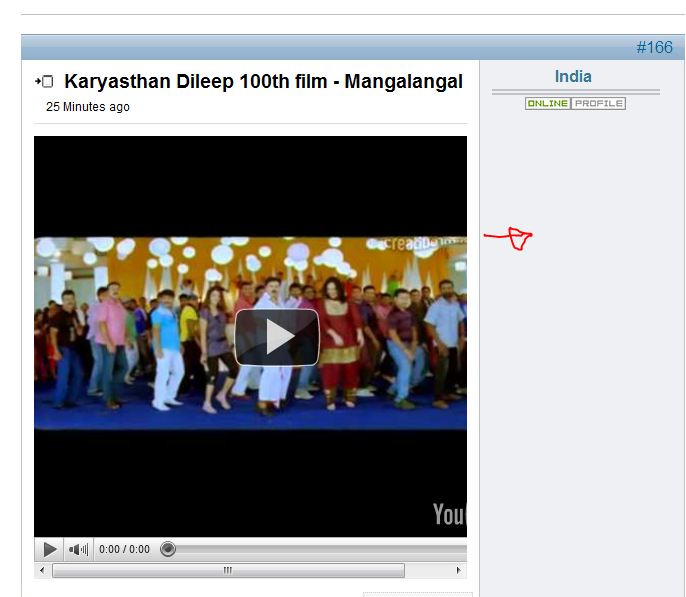
Question I have is, How to adjust the width of topic text area? Image attached.
Link: www.iveedu.com/forum/23-video-songs/165-malayalam
Appreciated any help.
Question I have is, How to adjust the width of topic text area? Image attached.
Link: www.iveedu.com/forum/23-video-songs/165-malayalam
Appreciated any help.
Please Log in or Create an account to join the conversation.


15 years 8 months ago - 15 years 8 months ago #71712
by sozzled
Blue Eagle vs. Crypsis reference guide
Read my blog and

Replied by sozzled on topic Re: Kunena 1.5.11 , Adjusting the topic width
G'day, Iveedu, and welcome to Kunena.
I've moved your message to a more appropriate area.
K 1.5.11 is not supported any more. If you must use K 1.5 then please upgrade to K 1.5.13. We recommend K 1.6.1 for new installations.
Useful information for you: Before you ask for help with template issues ... It really helps to look at the tutorial Firebug in the Wiki. I hope this helps.
I've moved your message to a more appropriate area.
K 1.5.11 is not supported any more. If you must use K 1.5 then please upgrade to K 1.5.13. We recommend K 1.6.1 for new installations.
Useful information for you: Before you ask for help with template issues ... It really helps to look at the tutorial Firebug in the Wiki. I hope this helps.
Blue Eagle vs. Crypsis reference guide
Read my blog and
Last edit: 15 years 8 months ago by sozzled.
Please Log in or Create an account to join the conversation.
15 years 8 months ago #71714
by iVeedu
Replied by iVeedu on topic Re: Kunena 1.5.11 , Adjusting the topic width
Thank u for moving it to the right forum and the tips.
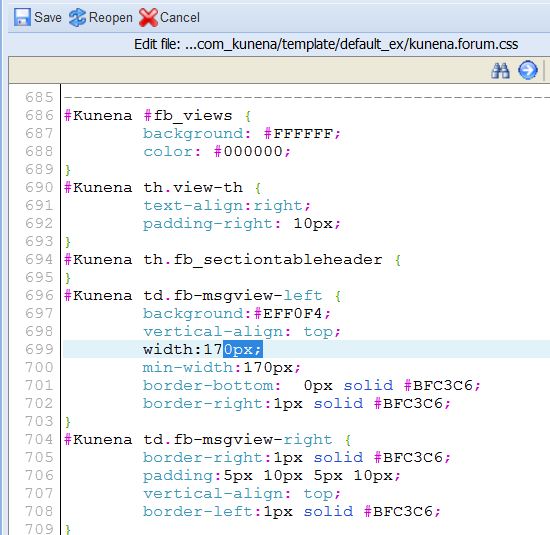
I have installed firebug and found the block of text in css. (image attached) Changed it from 170 to 100 but no luck.. it is not changing the width.
any thoughts/help is appreciated.THANKS
#Kunena td.fb-msgview-left {
background:#EFF0F4;
vertical-align: top;
width:100px;
min-width:100px;
border-bottom: 0px solid #BFC3C6;
border-right:1px solid #BFC3C6;
}
I have installed firebug and found the block of text in css. (image attached) Changed it from 170 to 100 but no luck.. it is not changing the width.
any thoughts/help is appreciated.THANKS
#Kunena td.fb-msgview-left {
background:#EFF0F4;
vertical-align: top;
width:100px;
min-width:100px;
border-bottom: 0px solid #BFC3C6;
border-right:1px solid #BFC3C6;
}
Please Log in or Create an account to join the conversation.
15 years 8 months ago #71717
by sozzled
Blue Eagle vs. Crypsis reference guide
Read my blog and
Replied by sozzled on topic Re: Kunena 1.5.11 , Adjusting the topic width
Even after you edit the template CSS file and copy the new file to your website (and make sure that you've put it into the right place - see
Where is the CSS file?
and make sure you read the relevant parts of that article in relation to K 1.5) you may not necessarily see any changes.
This is often caused if you are still using the cached version of the file. Make sure you clear your browser cache first or force a new page refresh.
This is often caused if you are still using the cached version of the file. Make sure you clear your browser cache first or force a new page refresh.
Blue Eagle vs. Crypsis reference guide
Read my blog and
Please Log in or Create an account to join the conversation.
15 years 8 months ago #71841
by iVeedu
Replied by iVeedu on topic Re: Kunena 1.5.11 , Adjusting the topic width
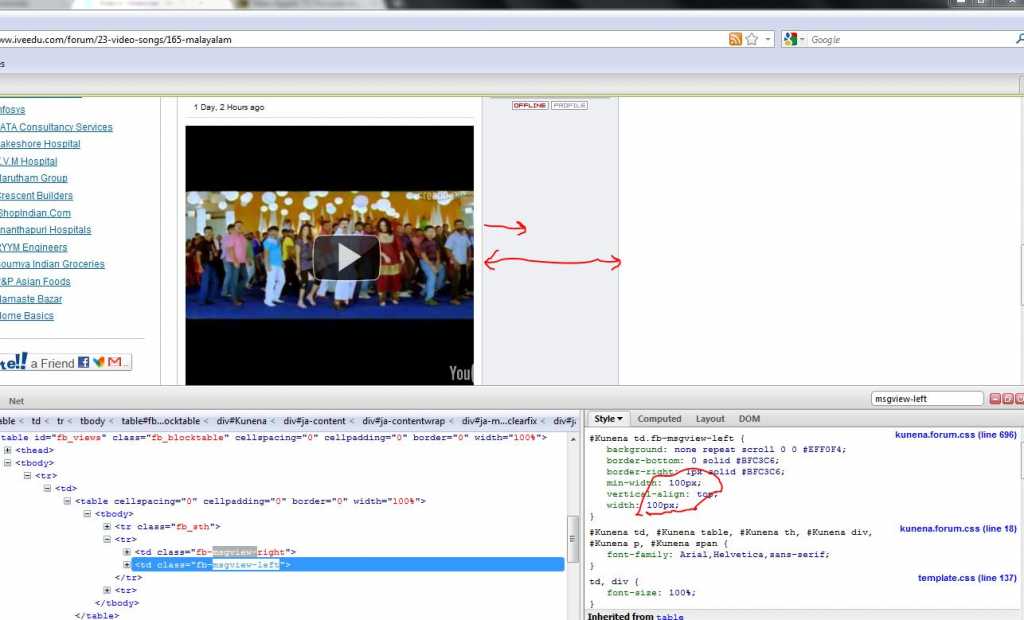
Changed fb-msgview-left width from 170 to 100 and cleared the browser cache but no change in the display!
That probably means I did not change the correct value controlling the width of profile box. Any suggestions on which variable is controlling the width? Any help is appreciated.
Image attached.
Thanks in advance.
That probably means I did not change the correct value controlling the width of profile box. Any suggestions on which variable is controlling the width? Any help is appreciated.
Image attached.
Thanks in advance.
Please Log in or Create an account to join the conversation.
15 years 8 months ago #72068
by iVeedu
Replied by iVeedu on topic Re: Kunena 1.5.11 , Adjusting the topic width
any help...please
Please Log in or Create an account to join the conversation.
Time to create page: 0.488 seconds