


- Posts: 7
- Thank you received: 0
Kunena 7.0.9 & Kunena 6.4.14 – Security Updates Released
The Kunena team has announce the arrival of Kunena 7.0.9 [K 7.0.9] in stable which is now available for download as a native Joomla extension for J! 5.4.x/6.0.x./6.1.x. This version addresses most of the issues that were discovered in K 6.2 / K 6.3 / K 6.4 and issues discovered during the last development stages of K 7.0
Please read
Before you ask for help with template issues ...
Question Mini search box next to menu bar
16 years 3 months ago #49521
by stephen78
Mini search box next to menu bar was created by stephen78
Hi All,
I understand that may not suitable to ask this question in here. but I really need help for this.
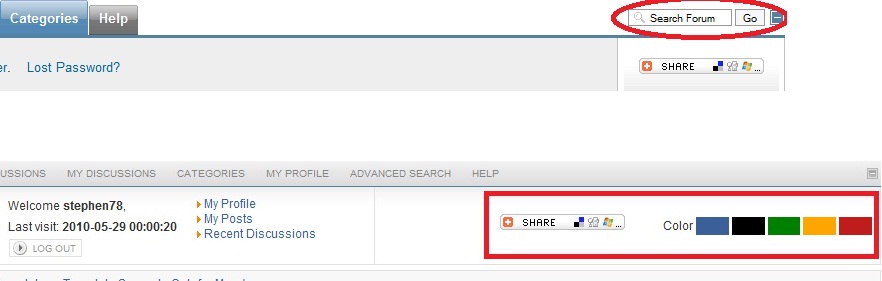
I am using Cubo pro template and I just want to know how to add/enable the mini search fucntion onto the color choosing area? Or same as default template right next to the menu bar.
I had post this question on the support forum but haven't got any reply yet. So try my luck in here.

I found some code under components com_kunena template tk_cubo_pro header.html
<tr>
<td align="left" nowrap="nowrap">{MENU}</td>
<!--<td align="right" width="5%">{SEARCHBOX} </td>-->
<td align="right" width="1%" ><img id="BoxSwitch_topprofilebox__topprofilebox_tbody" class="hideshow" src="{PB_IMGSWITCHURL}" alt="" /></td>
</tr>
the searchbox have been disabled. So I enable it back, but still have nothing. Does anyone can tell me why please. @_@ many thanks
I understand that may not suitable to ask this question in here. but I really need help for this.
I am using Cubo pro template and I just want to know how to add/enable the mini search fucntion onto the color choosing area? Or same as default template right next to the menu bar.
I had post this question on the support forum but haven't got any reply yet. So try my luck in here.
I found some code under components com_kunena template tk_cubo_pro header.html
<tr>
<td align="left" nowrap="nowrap">{MENU}</td>
<!--<td align="right" width="5%">{SEARCHBOX} </td>-->
<td align="right" width="1%" ><img id="BoxSwitch_topprofilebox__topprofilebox_tbody" class="hideshow" src="{PB_IMGSWITCHURL}" alt="" /></td>
</tr>
the searchbox have been disabled. So I enable it back, but still have nothing. Does anyone can tell me why please. @_@ many thanks
Please Log in or Create an account to join the conversation.


16 years 3 months ago - 16 years 3 months ago #49523
by sozzled
Blue Eagle vs. Crypsis reference guide
Read my blog and

Replied by sozzled on topic Re: Mini search box next to menu bar
stephen78 wrote:
We encourage users, who want to make changes, to use the latest version of the default_ex template as the basis of making changes. If you try to make changes to a template that someone else designed, that may not have factored in the many changes that have taken place with Kunena since when it was first conceived, you are asking for trouble, In situations like those, (e.g. when you use the "Cubo pro" template) you should always first approach the developer of that template to ask them how to go about making the changes you require. If that approach fails, then we strongly urge you to read (and work your way through the links embedded in) Before you ask for help with template issues ...
If the information I have given above still doesn't give you enough pointers to deal with the situation, then you're most welcome to ask here. However, we cannot give you any guarantees, either, that we will be able to solve your problem any better than what you've tried to do ... as long as you've followed the same approach as we always use. In other words, go back to basics: make sure you are using the latest version of Kunena (1.5.11) without any modifications made to it - and by no modifications, I mean also, the default values in the Kunena configuration settings which also means that default_ex template is chosen. This doesn't just give you a stable basis to work from, it provides you and us with a common point of reference. The more changes you make, the more we have to chase you for information. You understand?
In addition to all that I have written here, and in many other places on this forum, please test your ideas out first on a quarantined test site that has the minimum number of potentially conflicting other things. In other words, follow this guide .
It's highly probable that you can't achieve what you want to do without getting your hands dirty with the PHP code - I'm sorry, but that's a looming reality - and as soon as you start changing PHP code you're painting yourself into a corner as far as being able to upgrade your version of Kunena in the future. So, my best advice to you is don't! The position of the searchbox isn't such a big deal.
I'm sorry but I don't remember the question. The only topic of yours that is unanswered in the support category is waiting on a response from you. It isn't apparent to me how your other question ( gTranslate and Kunena ) relates to this "mini search box" request. Perhaps you could enlighten us?I had post this question on the support forum but haven't got any reply yet. So try my luck in here.
We encourage users, who want to make changes, to use the latest version of the default_ex template as the basis of making changes. If you try to make changes to a template that someone else designed, that may not have factored in the many changes that have taken place with Kunena since when it was first conceived, you are asking for trouble, In situations like those, (e.g. when you use the "Cubo pro" template) you should always first approach the developer of that template to ask them how to go about making the changes you require. If that approach fails, then we strongly urge you to read (and work your way through the links embedded in) Before you ask for help with template issues ...
If the information I have given above still doesn't give you enough pointers to deal with the situation, then you're most welcome to ask here. However, we cannot give you any guarantees, either, that we will be able to solve your problem any better than what you've tried to do ... as long as you've followed the same approach as we always use. In other words, go back to basics: make sure you are using the latest version of Kunena (1.5.11) without any modifications made to it - and by no modifications, I mean also, the default values in the Kunena configuration settings which also means that default_ex template is chosen. This doesn't just give you a stable basis to work from, it provides you and us with a common point of reference. The more changes you make, the more we have to chase you for information. You understand?
In addition to all that I have written here, and in many other places on this forum, please test your ideas out first on a quarantined test site that has the minimum number of potentially conflicting other things. In other words, follow this guide .
It's highly probable that you can't achieve what you want to do without getting your hands dirty with the PHP code - I'm sorry, but that's a looming reality - and as soon as you start changing PHP code you're painting yourself into a corner as far as being able to upgrade your version of Kunena in the future. So, my best advice to you is don't! The position of the searchbox isn't such a big deal.
Blue Eagle vs. Crypsis reference guide
Read my blog and
Last edit: 16 years 3 months ago by sozzled.
Please Log in or Create an account to join the conversation.
16 years 3 months ago - 16 years 3 months ago #49525
by stephen78
Replied by stephen78 on topic Re: Mini search box next to menu bar
hi Sozzled,
Sorry for my bad english as english is not my first language. What I want to ask is I am using a template that purchase from " www.templatekunena.com " and I post this question to them but no reply yet (this is what I mean i posted this question on ""other"" suppport forum ""website""). I am sorry for missing few words when I post the question.
Anyway back to my question. On the Kunena default template, it have a mini search box on the right hand side next to the forum menu bar. But when I switch to the Cubo Pro template, the mini search box is gone. And I found some code that from the header.html under the folder of the template I am using;
<tr>
<td align="left" nowrap="nowrap">{MENU}</td>
<!--<td align="right" width="5%">{SEARCHBOX} </td>-->
<td align="right" width="1%" ><img id="BoxSwitch_topprofilebox__topprofilebox_tbody" class="hideshow" src="{PB_IMGSWITCHURL}" alt="" /></td>
</tr>
the searchbox have been disabled from the coding. So I enable it back, but still can't see the search box come back.
You are right, the position of the search box is not a big deal. but i think that would be nice if I can get the search box back instead of click on the "advance search" when if the user jsut want to do a quick search. many thanks.
I understand and totally agree that sometime need to change the PHP or CSS code to achieve what we want. This is the thing I try to and try to avoid as well, because I don't have enough skill. However I think the "searchbox" function is already build in, so I am just trying to enable it back and give a little advantage to the user.
Sorry for my bad english as english is not my first language. What I want to ask is I am using a template that purchase from " www.templatekunena.com " and I post this question to them but no reply yet (this is what I mean i posted this question on ""other"" suppport forum ""website""). I am sorry for missing few words when I post the question.
Anyway back to my question. On the Kunena default template, it have a mini search box on the right hand side next to the forum menu bar. But when I switch to the Cubo Pro template, the mini search box is gone. And I found some code that from the header.html under the folder of the template I am using;
<tr>
<td align="left" nowrap="nowrap">{MENU}</td>
<!--<td align="right" width="5%">{SEARCHBOX} </td>-->
<td align="right" width="1%" ><img id="BoxSwitch_topprofilebox__topprofilebox_tbody" class="hideshow" src="{PB_IMGSWITCHURL}" alt="" /></td>
</tr>
the searchbox have been disabled from the coding. So I enable it back, but still can't see the search box come back.
You are right, the position of the search box is not a big deal. but i think that would be nice if I can get the search box back instead of click on the "advance search" when if the user jsut want to do a quick search. many thanks.
I understand and totally agree that sometime need to change the PHP or CSS code to achieve what we want. This is the thing I try to and try to avoid as well, because I don't have enough skill. However I think the "searchbox" function is already build in, so I am just trying to enable it back and give a little advantage to the user.
Last edit: 16 years 3 months ago by stephen78.
Please Log in or Create an account to join the conversation.
16 years 3 months ago #49527
by sozzled
Blue Eagle vs. Crypsis reference guide
Read my blog and
Replied by sozzled on topic Re: Mini search box next to menu bar
I'm sorry. I don't know anything about the Cube Pro template and I don't know why it does not work for you. The website where you purchased the Cube Pro template is not associated with the Kunena project.
Blue Eagle vs. Crypsis reference guide
Read my blog and
Please Log in or Create an account to join the conversation.
16 years 3 months ago #49528
by stephen78
Replied by stephen78 on topic Re: Mini search box next to menu bar
you don't have to said sorry. I just try my luck in here. Also I have to said thank you for your reply and the time you read my message. Thanks again.
Please Log in or Create an account to join the conversation.
Time to create page: 0.260 seconds