


- Posts: 18
- Thank you received: 0
Kunena 7.0.4 Released
The Kunena team has announce the arrival of Kunena 7.0.4 [K 7.0.4] in stable which is now available for download as a native Joomla extension for J! 5.4.x/6.0.x. This version addresses most of the issues that were discovered in K 6.2 / K 6.3 / K 6.4 and issues discovered during the last development stages of K 7.0
Question How to assign a moderator to my Kunena forum
16 years 3 weeks ago - 16 years 3 weeks ago #44957
by Mick
How to assign a moderator to my Kunena forum was created by Mick
Can someone please tell me how to make a member into a mod? Mod doesn't seem like an option in the groups thing.
Link to my forum...
www.nikkershaw.net/fan-forum
Link to my forum...
www.nikkershaw.net/fan-forum
Last edit: 16 years 3 weeks ago by sozzled. Reason: Changed subject to improve search relevance
Please Log in or Create an account to join the conversation.


16 years 3 weeks ago - 16 years 3 weeks ago #44961
by Cerberus
in admin sectio of kunena go to USER MANAGER then select the user you want to make a mod and then change there RANK setting to MODERATOR  and your done..
and your done..
Last edit: 16 years 3 weeks ago by Cerberus.
Please Log in or Create an account to join the conversation.



16 years 3 weeks ago - 16 years 3 weeks ago #44987
by sozzled
Blue Eagle vs. Crypsis reference guide
Read my blog and

Replied by sozzled on topic Re:How to assign a moderator to my Kunena forum
The solution is not quite as Cerberus has described. The assignment of a user as a forum moderator is achieved with the Kunena User Administration control in the backend. I started to write some notes for the documentation Wiki but, somehow, my work was lost; I failed to regain sufficient enthusiasm to do the work again.
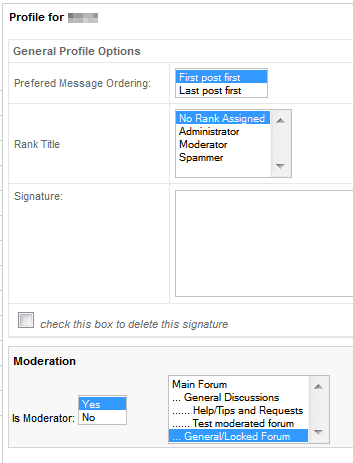
There are two types of moderators: those who are assigned to specific moderated categories and those who are "global moderators" who have moderator privileges across all categories in the forum. The assignment is achieved through the User Administration function and the following screenshot illustrates what you need to do:

As you see, it's not a case of assigning the rank of "moderator" (in fact it's better to use the "no rank assigned" option) but instead you set Is Moderator = Yes.
Optionally, you may select one or more categories from the list to the right of this setting. Selecting specific categories will assign the user to moderate those categories (and no others). If you do not select any categories, the user will be a "global moderator" with associated privileges across all categories.
There are two types of moderators: those who are assigned to specific moderated categories and those who are "global moderators" who have moderator privileges across all categories in the forum. The assignment is achieved through the User Administration function and the following screenshot illustrates what you need to do:
As you see, it's not a case of assigning the rank of "moderator" (in fact it's better to use the "no rank assigned" option) but instead you set Is Moderator = Yes.
Optionally, you may select one or more categories from the list to the right of this setting. Selecting specific categories will assign the user to moderate those categories (and no others). If you do not select any categories, the user will be a "global moderator" with associated privileges across all categories.
Blue Eagle vs. Crypsis reference guide
Read my blog and
Last edit: 16 years 3 weeks ago by sozzled.
Please Log in or Create an account to join the conversation.
16 years 3 weeks ago #45004
by Mick
Replied by Mick on topic Re:How to assign a moderator to my Kunena forum
Where do I find User Administration? I can only find User Manager and I can't do what is needed from there.
Please Log in or Create an account to join the conversation.
Time to create page: 0.210 seconds