
Kunena 7.0.9 & Kunena 6.4.14 – Security Updates Released
The Kunena team has announce the arrival of Kunena 7.0.9 [K 7.0.9] in stable which is now available for download as a native Joomla extension for J! 5.4.x/6.0.x./6.1.x. This version addresses most of the issues that were discovered in K 6.2 / K 6.3 / K 6.4 and issues discovered during the last development stages of K 7.0
Question Kunena menu in website language


But when I try to restore menu
I get note: The next menu item with the higher level has the same option:
and 2 the same errors "false menu items"
I saw this link just a half hour ago but thought it is for old Joomla and didn't find my menu trash
P.S. I am so sorry to trouble you...
Please Log in or Create an account to join the conversation.


Yes, you're right. The administrator backend (to locate the menu trash) changed after J! 3.1.Beata43 wrote: I saw this link just a half hour ago but thought it is for old Joomla and didn't find my menu trash
Here is the information for J! 3.4:
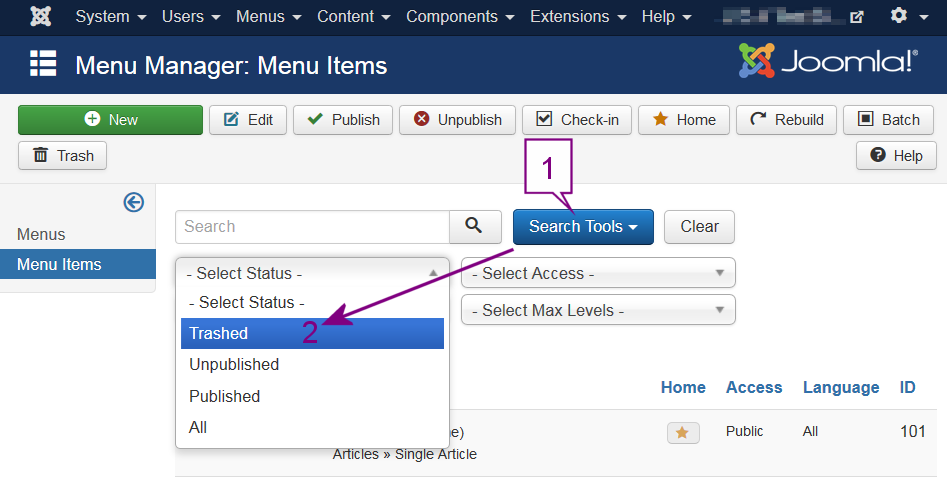
P.S. It's no trouble. That's what we're here for.
Blue Eagle vs. Crypsis reference guide
Read my blog and

Please Log in or Create an account to join the conversation.


- Posts: 12291
- Thank you received: 2538
1. Go to "Menus > Menu Manager"
2. Mark the Kunena Menu
3. Delete the Kunena Menu
4. Delete in virsutinismeniu the menu item DISKUSIJOS
5. Delete in mainmenu the menu item FORUMAS
6. Delete in mainmenuen the menu item Forum en
7. Switch the backend language to Lithuanian
8. Restore the Kunena menu
9. Enable in main menu the Forum link
Important! Always create a backup before you make any changes to your website!
Please Log in or Create an account to join the conversation.
As for other your message I will do it tomorrow with fresh head
 in the morning
Thank you very much for a while
Please Log in or Create an account to join the conversation.
- Posts: 12291
- Thank you received: 2538
Important! Always create a backup before you make any changes to your website!
Please Log in or Create an account to join the conversation.
As long as I didn't delete all trash, I had the same, even 3 errors one time.
I did everything what you suggested and created again one item from the main page and from all others
I don't see errors anymore.
I think, there is nothing bad that I have created one additional link "Pagrindinis tinklapis" in Kunena menu to return to main menu (first page of website)
Thank you again, I learned a lot
Please Log in or Create an account to join the conversation.