
- Posts: 13
- Thank you received: 0
Kunena 7.0.9 & Kunena 6.4.14 – Security Updates Released
The Kunena team has announce the arrival of Kunena 7.0.9 [K 7.0.9] in stable which is now available for download as a native Joomla extension for J! 5.4.x/6.0.x./6.1.x. This version addresses most of the issues that were discovered in K 6.2 / K 6.3 / K 6.4 and issues discovered during the last development stages of K 7.0
Topics must relate to a currently supported version of Kunena. If you are unsure what is the current supported version of Kunena, please go to the
download
page.
If you are having problems then, for your own benefit, it would save us all a lot of time if you would kindly post your configuration report when you ask for help from this forum. If you do not post your configuration report we will not ask you for it but you will probably not get your problem solved, either.
If you are having problems then, for your own benefit, it would save us all a lot of time if you would kindly post your configuration report when you ask for help from this forum. If you do not post your configuration report we will not ask you for it but you will probably not get your problem solved, either.
Solved What folder KF 5 using to store smiles?
- 1Alexander1
-
 Topic Author
- Offline
- New Member
-

Less
More
9 years 6 months ago - 9 years 6 months ago #184289
by 1Alexander1
Template settings: bootstrap css - no, theme icons - old images, write access - no, categories icon colour - #rrggbb, new icon text and colour - #48a348.
In the forum setting path to category icons for compatibility with old templates set to "category_images".
Bootstrap icons and default icons are OK.
Problem only with custom icons.
I did like written in "If you want to use your own image." part.
1. Upload icon to "components\com_kunena\template\blue_eagle5\images\icons\gs.png". I even renamed .png icon file to gs.png.
2. In custom.css write
#Kunena .icon-gs {
background-image: url("../images/icons/gs.png");
width: 16px;
height:16px;
}
3. Select category and set category icon "icon-gs". In the category settings themes icons set "default".
Clearing cache in Joomla.
And...
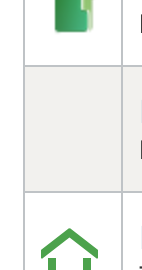
There is no icon
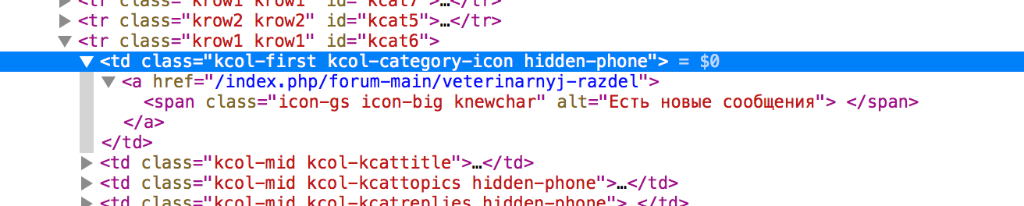
In the source code we can see gs-icon class
Please help.
Replied by 1Alexander1 on topic What folder KF 5 using to store smiles?
KF 5.0.6.1, template Blue Eagle 5.rich wrote: Please create a own topic for this question, it has nothing to do with this topic.
Please give us more details.I tried to set icon by that way but it not work.
It lacks the default icons generally or only if you want show own icons?There is no custom or default icon.
Template settings: bootstrap css - no, theme icons - old images, write access - no, categories icon colour - #rrggbb, new icon text and colour - #48a348.
In the forum setting path to category icons for compatibility with old templates set to "category_images".
Bootstrap icons and default icons are OK.
Problem only with custom icons.
I did like written in "If you want to use your own image." part.
1. Upload icon to "components\com_kunena\template\blue_eagle5\images\icons\gs.png". I even renamed .png icon file to gs.png.
2. In custom.css write
#Kunena .icon-gs {
background-image: url("../images/icons/gs.png");
width: 16px;
height:16px;
}
3. Select category and set category icon "icon-gs". In the category settings themes icons set "default".
Clearing cache in Joomla.
And...
There is no icon
In the source code we can see gs-icon class
Please help.
Last edit: 9 years 6 months ago by 1Alexander1.
Please Log in or Create an account to join the conversation.


Less
More
- Posts: 12291
- Thank you received: 2538
9 years 6 months ago #184298
by rich
Important! Always create a backup before you make any changes to your website!
Replied by rich on topic What folder KF 5 using to store smiles?
Please go to the blue eagle category. I've revised the instructions.KF 5.0.6.1, template Blue Eagle 5.
Important! Always create a backup before you make any changes to your website!
Please Log in or Create an account to join the conversation.
- 1Alexander1
-
Topic Author
- Offline
- New Member
-
Less
More
- Posts: 13
- Thank you received: 0
9 years 6 months ago #184304
by 1Alexander1
 There is no changes in instructions.
Replied by 1Alexander1 on topic What folder KF 5 using to store smiles?
Excuse me, where should I go to?rich wrote:
Please go to the blue eagle category. I've revised the instructions.KF 5.0.6.1, template Blue Eagle 5.
There is no changes in instructions. Please Log in or Create an account to join the conversation.
Less
More
- Posts: 12291
- Thank you received: 2538
9 years 6 months ago #184305
by rich
Important! Always create a backup before you make any changes to your website!
Replied by rich on topic What folder KF 5 using to store smiles?
Here in the forum is a own category for Blue Eagle5.
www.kunena.org/forum/blue-eagle-5/140030...ons-with-blue-eagle5
www.kunena.org/forum/blue-eagle-5/140030...ons-with-blue-eagle5
Important! Always create a backup before you make any changes to your website!
Please Log in or Create an account to join the conversation.
- 1Alexander1
-
Topic Author
- Offline
- New Member
-
Less
More
- Posts: 13
- Thank you received: 0
9 years 6 months ago - 9 years 6 months ago #184306
by 1Alexander1
Replied by 1Alexander1 on topic What folder KF 5 using to store smiles?
Thanks, Rich! It works! Now I can start migration to new forum version (from 4.0.12 to 5.0.6.1). Is there any migration instructions or I need just to update it in Joomla?rich wrote: Here in the forum is a own category for Blue Eagle5.
www.kunena.org/forum/blue-eagle-5/140030...ons-with-blue-eagle5
Last edit: 9 years 6 months ago by 1Alexander1.
Please Log in or Create an account to join the conversation.
Less
More
- Posts: 12291
- Thank you received: 2538
9 years 6 months ago #184313
by rich
Important! Always create a backup before you make any changes to your website!
Replied by rich on topic What folder KF 5 using to store smiles?
You can update via Joomla updater or just install over the old version. Disable outdated Kunena extensions previously.
Important! Always create a backup before you make any changes to your website!
Please Log in or Create an account to join the conversation.
Time to create page: 0.278 seconds