
Search Results (Searched for: you do not have)

Yesterday 18:14 - Yesterday 18:26
Replied by joomod on topic Kunena Poll does not work
I have created an update pack for SCEditor 3 month ago.
github.com/Kunena/Kunena-Forum/issues/10096
which corrects many problems, also the poll options (including edit function).
xillibit informed me, that he include this in the upcoming v7.1,
I don't know which parts of my update pack he will include,
and also if the new code for the poll (edit) option will be there
CKEditor of course is the better editor, but its BBCode plugin is very basic and can not handle
some old Kunena formats
(If you update an old Kunena version where you have inside images with size attribute the editor won't open)
github.com/Kunena/Kunena-Forum/issues/10096
which corrects many problems, also the poll options (including edit function).
xillibit informed me, that he include this in the upcoming v7.1,
I don't know which parts of my update pack he will include,
and also if the new code for the poll (edit) option will be there
that's unfortunately not trueSo why not use Kunena 7.0.4 with CKEditor. You won't have any problems
CKEditor of course is the better editor, but its BBCode plugin is very basic and can not handle
some old Kunena formats
(If you update an old Kunena version where you have inside images with size attribute the editor won't open)

05 Sep 2026 13:45
Replied by Pinkeltje on topic Kunena Poll does not work
In my humble opinion SCeditor has too many flaws. So why not use Kunena 7.0.4 with CKEditor. You won't have any problems.
17 Aug 2026 18:59
Yes, this may be caused by the same issue.
treek_ajax.php is created only when the AJAX request reaches the TreeK AJAX plugin. If Joomla is installed in a subdirectory and TreeK builds the wrong AJAX URL, the request may not reach the plugin at all. In that case the file administrator/logs/treek_ajax.php will not be created.
This have fixed in TreeK 2.0.7.
Please note:
- keep plugin=treek, not plugin=treeks;
- after enabling Debug AJAX log, reproduce the problem once by clicking the TreeK icon;
- if treek_ajax.php still does not appear, check Joomla's actual log folder in:
System -> Global Configuration -> System -> Path to Log Folder.
---
A corrected version of TreeK 2.0.7 is now on Jed . Please test it.
Fixes:
- Fixed TreeK AJAX URL generation when Joomla is installed in a subdirectory.
Changes:
- Added AJAX diagnostics instructions to the installation documentation.
- Changed the TreeK installation log to English.
Notes:
- If the tree does not open, enable "Debug AJAX log" in the TreeK AJAX plugin and check administrator/logs/treek_ajax.php.
Thank you very much for the important remark.
Leon
Replied by lemur on topic TreeK. Tree-Shell for Kunena Forum
but the administrator/logs/treek_ajax.php is nowhere to be found on my test sites
maybe that also has to do with the previous problem?
Yes, this may be caused by the same issue.
treek_ajax.php is created only when the AJAX request reaches the TreeK AJAX plugin. If Joomla is installed in a subdirectory and TreeK builds the wrong AJAX URL, the request may not reach the plugin at all. In that case the file administrator/logs/treek_ajax.php will not be created.
This have fixed in TreeK 2.0.7.
Please note:
- keep plugin=treek, not plugin=treeks;
- after enabling Debug AJAX log, reproduce the problem once by clicking the TreeK icon;
- if treek_ajax.php still does not appear, check Joomla's actual log folder in:
System -> Global Configuration -> System -> Path to Log Folder.
---
A corrected version of TreeK 2.0.7 is now on Jed . Please test it.
Fixes:
- Fixed TreeK AJAX URL generation when Joomla is installed in a subdirectory.
Changes:
- Added AJAX diagnostics instructions to the installation documentation.
- Changed the TreeK installation log to English.
Notes:
- If the tree does not open, enable "Debug AJAX log" in the TreeK AJAX plugin and check administrator/logs/treek_ajax.php.
Thank you very much for the important remark.
Leon
17 Aug 2026 14:49
treek_install.php is only the installation/update log (Yes, it's in Russian, but I'll fix that.). It is not the AJAX diagnostic log.
After enabling "Debug AJAX log" in the TreeK AJAX plugin, please reproduce the problem once: open a topic and click the TreeK icon.
Then check this file:
administrator/logs/treek_ajax.php
If your Joomla log folder has been changed, use the path shown in:
System -> Global Configuration -> System -> Path to Log Folder
Please send the last lines from treek_ajax.php after reproducing the problem.
After testing, you can disable "Debug AJAX log" again.
If treek_ajax.php is not created at all, the AJAX plugin may not be reached, the plugin may still be disabled, or Joomla may be writing logs to another folder.
Leon
P.S. If you are testing Trick on the live web rather than a local server, please send a link to the site.
Replied by lemur on topic TreeK. Tree-Shell for Kunena Forum
Hello, I have enabled debug mode in the plugin.
But where do I find the error log?
treek_install.php is only the installation/update log (Yes, it's in Russian, but I'll fix that.). It is not the AJAX diagnostic log.
After enabling "Debug AJAX log" in the TreeK AJAX plugin, please reproduce the problem once: open a topic and click the TreeK icon.
Then check this file:
administrator/logs/treek_ajax.php
If your Joomla log folder has been changed, use the path shown in:
System -> Global Configuration -> System -> Path to Log Folder
Please send the last lines from treek_ajax.php after reproducing the problem.
After testing, you can disable "Debug AJAX log" again.
If treek_ajax.php is not created at all, the AJAX plugin may not be reached, the plugin may still be disabled, or Joomla may be writing logs to another folder.
Leon
P.S. If you are testing Trick on the live web rather than a local server, please send a link to the site.
26 Jul 2026 20:10 - 26 Jul 2026 20:11
Replied by guidocx84 on topic Polls - "Date piker" and "Users who voted" are no more visible
Hi Kunena team,I would like to share two issues I found with polls in Kunena 6.x and the fixes I applied on my Joomla 5 website. Maybe they can be useful for future releases.1) "See less" button breaks "Show more" voters listIssue:In the poll results, when there are more than 5 voters, the "Show more" link works correctly and expands the full voters list.However, after clicking "See less", the extra users are hidden again, but the "Show more" button does not reappear. The only way to get it back is to reload the page.The cause was a wrong anchor target in:
The generated HTML contained:
There was a typo (
instead of
) and the anchor was also unnecessary because the JavaScript handles the visibility.I solved it by overriding the Kunena JavaScript behavior from my template custom JS:
This also prevents the page from jumping because of the anchor.2) Poll expiration date picker not workingIssue:When creating a poll, the "Poll time to live" field no longer opens the date picker. Users have to manually enter the date.The date picker library itself was correctly loaded. The problem was in:
The initialization code was:
The issue is this line:
because
returns something like:
and jQuery interprets it as a tag selector, not as an ID selector.The correct code should be:
or alternatively:
Since I prefer not to modify Kunena core files, I fixed it with a template Custom JS override using a MutationObserver that detects when the CKEditor poll dialog is created and applies the datepicker correctly:
After this, the date picker works again normally.I hope this helps. Both issues seem relatively easy to fix in future releases.Thanks for your great work on Kunena!
Code:
components/com_kunena/template/aurelia/layouts/topic/poll/results/default.php
Code:
<a href="#kpoll-lesssers-span" class="link-show-extra-users" id="kpoll-lessusers">
Code:
lesssers
Code:
lessusers
Code:
jQuery(document).ready(function ($) {
$(".link-show-extra-users").off('click').on('click', function (event) {
event.preventDefault();
if (!$(this).hasClass('link-show-more')) {
$("#kpoll-moreusers-span").hide();
$("#kpoll-moreusers").show();
$(this).hide();
} else {
$("#kpoll-moreusers").hide();
$("#kpoll-moreusers-span").show();
$("#kpoll-lessusers").show();
$(this).hide();
}
});
});
Code:
media/kunena/core/js/plugins/polls/dialogs/polls.js
Code:
var theInput = jQuery('#' + this.domId).find('input');
jQuery(theInput.attr('id')).datepicker({
showButtonPanel: true,
format: "yyyy-mm-dd",
todayHighlight: true,
autoclose: true
});
Code:
jQuery(theInput.attr('id'))
Code:
theInput.attr('id')
Code:
cke_177_textInput
Code:
theInput.datepicker({
showButtonPanel: true,
format: "yyyy-mm-dd",
todayHighlight: true,
autoclose: true
});
Code:
jQuery('#' + theInput.attr('id')).datepicker({
showButtonPanel: true,
format: "yyyy-mm-dd",
todayHighlight: true,
autoclose: true
});
Code:
jQuery(function ($) {
const observer = new MutationObserver(function () {
const input = $('.cke_dialog_ui_labeled_label')
.filter(function () {
return $(this).text().includes('Poll time to live');
})
.closest('.cke_dialog_ui_text')
.find('input');
if (input.length && !input.hasClass('hasDatepicker')) {
input.datepicker({
showButtonPanel: true,
format: "yyyy-mm-dd",
todayHighlight: true,
autoclose: true
});
}
});
observer.observe(document.body, {
childList: true,
subtree: true
});
});
21 Jul 2026 20:51 - 21 Jul 2026 20:56
Apple ipad K Menu "log In" Left Shifted Unresponsive was created by Profaders
First, I would like to thank the K dev community for what it does. I have been with K since around 2014.
Thanks also to GIT Hub and the fix for the "0" user does not exist..." ..issues/9832. Saved me from total exasperation.
I am not a developer. but even into my late 70s I can follow the song if others sing along with me, even on occasions well out of tune
The issue I am reporting is shown in the attachment. KMenu Login unresponsive in Mini ipad Firefox et al browser. I even went to K Forum to experience the same problem.
We test all compatibilities, but this one took the biscuit when I was ready to publish.
Site:
Joomla: 5.4.7 all other specs (PHP & DB) comply.
Kunena: 6.08 not the cause, because your site looks the same as the attachments.
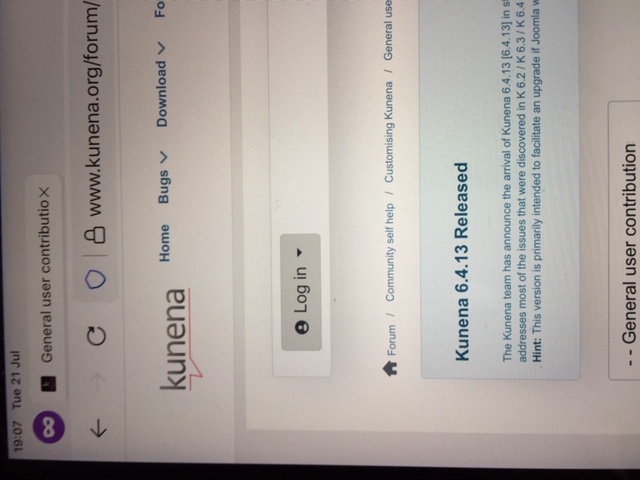
Old iphones OK, older ipads not so, even maxing out the OS with up to date browsers. In this instance FF.
I have felt for a very long time using K was always bleeding edge as there were often code changes to be made. Took me back to Mambo when almost weekly there were issues to re-code.
Nonetheless, still greatly appreciate the volunteers, but now you are talking about version 7.x.x. when some of us have not yet even sorted out 6.x.x.
Thanks also to GIT Hub and the fix for the "0" user does not exist..." ..issues/9832. Saved me from total exasperation.
I am not a developer. but even into my late 70s I can follow the song if others sing along with me, even on occasions well out of tune
The issue I am reporting is shown in the attachment. KMenu Login unresponsive in Mini ipad Firefox et al browser. I even went to K Forum to experience the same problem.
We test all compatibilities, but this one took the biscuit when I was ready to publish.
Site:
Joomla: 5.4.7 all other specs (PHP & DB) comply.
Kunena: 6.08 not the cause, because your site looks the same as the attachments.
Old iphones OK, older ipads not so, even maxing out the OS with up to date browsers. In this instance FF.
I have felt for a very long time using K was always bleeding edge as there were often code changes to be made. Took me back to Mambo when almost weekly there were issues to re-code.
Nonetheless, still greatly appreciate the volunteers, but now you are talking about version 7.x.x. when some of us have not yet even sorted out 6.x.x.

18 Jul 2026 16:39
08 Jul 2026 10:20
Replied by sthop on topic After Kunena update to v.7.0.1 : Deprecated dynamic property 'Twitter'.
Hello xillibit,
Thank you for your answer.
I tried the 'Launch Setup Socials' (result text: "Socials exists so nothing to do.") but this seems not to change anything.
I still have the error message in the frontend:
"Deprecated: Creation of dynamic property Kunena\Forum\Libraries\User\KunenaUser::$twitter is deprecated in ../joomla/libraries/kunena/src/User/KunenaUser.php on line 700"
Friendly regards,
Sthop
Kunena 7.0.6 extension.
Joomla v.6.1.2 environment:
+ PHP 8.3.30
+ MySQLi 10.11.14-MariaDB
+ Cassiopeia is the Joomla site template based on Bootstrap 5.
Thank you for your answer.
I tried the 'Launch Setup Socials' (result text: "Socials exists so nothing to do.") but this seems not to change anything.
I still have the error message in the frontend:
"Deprecated: Creation of dynamic property Kunena\Forum\Libraries\User\KunenaUser::$twitter is deprecated in ../joomla/libraries/kunena/src/User/KunenaUser.php on line 700"
Friendly regards,
Sthop
Kunena 7.0.6 extension.
Joomla v.6.1.2 environment:
+ PHP 8.3.30
+ MySQLi 10.11.14-MariaDB
+ Cassiopeia is the Joomla site template based on Bootstrap 5.
06 Jul 2026 13:52 - 09 Jul 2026 15:41
Replied by lemur on topic TreeK. Tree-Shell for Kunena Forum
Hi 9themestore,
I am very sorry to hear that the installation of Treek Free didn't work out for you.
Since you didn't provide specific details, I need to ask a few questions:
1. Did you download Treek Free from JED ? Please try downloadiit again.
2. Did the installation complete successfully, and did you enable both the plugin and the Treek template (completing all the necessary "configuring" steps)?
3. What do you mean by "the tree structure didn't display"? If a modal window appears and something goes wrong, an error message explaining the issue should show up instead of the tree. Please let me know what that message says.
4. Which version of Kunena did you use? TreeK has been tested and works 100% on K7.0.4 and K7.0.5.
And yes, I "have a demo link for the tree structure display".
Detailed information about TreeK can be found on the dedicated website treek.support . There is a special example on the forum of this site.
I hope the issue gets resolved at this stage.
Thanks for the feedback.
P.S. From the documentation:
Troubleshooting
If the tree does not open:
4. Если, несмотря на это, проблема не устранена, проверьте журналы `administrator\logs\1.treek_install` и `administrator\logs\1.treek_ajax`.
I am very sorry to hear that the installation of Treek Free didn't work out for you.
Since you didn't provide specific details, I need to ask a few questions:
1. Did you download Treek Free from JED ? Please try downloadiit again.
2. Did the installation complete successfully, and did you enable both the plugin and the Treek template (completing all the necessary "configuring" steps)?
3. What do you mean by "the tree structure didn't display"? If a modal window appears and something goes wrong, an error message explaining the issue should show up instead of the tree. Please let me know what that message says.
4. Which version of Kunena did you use? TreeK has been tested and works 100% on K7.0.4 and K7.0.5.
And yes, I "have a demo link for the tree structure display".
Detailed information about TreeK can be found on the dedicated website treek.support . There is a special example on the forum of this site.
I hope the issue gets resolved at this stage.
Thanks for the feedback.
P.S. From the documentation:
Troubleshooting
If the tree does not open:
- confirm that the TreeK AJAX plugin is enabled;
- check whether the current Kunena template is TreeK;
- confirm that Kunena is installed and working;
- clear Joomla and browser cache.
4. Если, несмотря на это, проблема не устранена, проверьте журналы `administrator\logs\1.treek_install` и `administrator\logs\1.treek_ajax`.
05 Jul 2026 17:58 - 05 Jul 2026 18:02
Replied by lemur on topic TreeK. Tree-Shell for Kunena Forum
Download and Installation of TreeK
TreeK Free can be downloaded by clicking on the link GitHub Releases .
TreeK Pro is distributed separately for €20. and can be ordered through the menu item Get TreeK Pro .
Installation
TreeK is installed as a Joomla package.
Requirements
Install TreeK (Free and Pro)
After Installation
In Kunena's Recent Topics tab, the Replies number for topics with responses is clickable and highlighted in color. Clicking this number opens the topic's post tree.
If you have already entered a topic, you can access the post tree by clicking the tree icon located in the header of each post.
Use the settings button in the tree window to adjust the visible tree.
Uninstall TreeK (Free and Pro)
1. In the Joomla control Panel, go to Components -> Kunena Forum: Templates
Switch the default template from TreeK to another one (e.g., Aurelia).
2. In the Joomla control panel, go to System -> Manage -> Extensions.
3. Select the TreeK Package row and perform the Uninstall action.
If the TreeK template is set as the default at the time of uninstallation, the process will be blocked, and a warning message will appear.
The TreeK tables are removed when the package is uninstalled. No traces of TreeK remain on the site.
Before installing TreeK Pro, it is recommended to perform a test installation and uninstallation of TreeK Free.
Updating
Install the new package over the old one using Joomla extension installer. User settings are preserved.
Troubleshooting
If the tree does not open:
TreeK Free can be downloaded by clicking on the link GitHub Releases .
TreeK Pro is distributed separately for €20. and can be ordered through the menu item Get TreeK Pro .
Installation
TreeK is installed as a Joomla package.
Requirements
- Joomla 5.4.x, 6.0.x, 6.1.x.
- Kunena Forum 7.x.
- A working Kunena installation before installing TreeK.
Install TreeK (Free and Pro)
- Download the latest TreeK package.
- In the Joomla control Panel, go to System -> Install -> Extensions.
- Upload and install the TreeK package ZIP.
- Open System -> Plugins and make sure the TreeK AJAX plugin is enabled.
- Open Kunena -> Templates and activate the TreeK template.
After Installation
In Kunena's Recent Topics tab, the Replies number for topics with responses is clickable and highlighted in color. Clicking this number opens the topic's post tree.
If you have already entered a topic, you can access the post tree by clicking the tree icon located in the header of each post.
Use the settings button in the tree window to adjust the visible tree.
Uninstall TreeK (Free and Pro)
1. In the Joomla control Panel, go to Components -> Kunena Forum: Templates
Switch the default template from TreeK to another one (e.g., Aurelia).
2. In the Joomla control panel, go to System -> Manage -> Extensions.
3. Select the TreeK Package row and perform the Uninstall action.
If the TreeK template is set as the default at the time of uninstallation, the process will be blocked, and a warning message will appear.
The TreeK tables are removed when the package is uninstalled. No traces of TreeK remain on the site.
Before installing TreeK Pro, it is recommended to perform a test installation and uninstallation of TreeK Free.
Updating
Install the new package over the old one using Joomla extension installer. User settings are preserved.
Troubleshooting
If the tree does not open:
- confirm that the TreeK AJAX plugin is enabled;
- check whether the current Kunena template is TreeK;
- confirm that Kunena is installed and working;
- clear Joomla and browser cache.

03 Jul 2026 04:04
Replied by 9themestore on topic Cannot edit or change Avatars in Kunena 6.4.11
Thank you @rick,
The issue was due to our template. We have fixed and updated on our customer website and the download package.
Kind regards,
The issue was due to our template. We have fixed and updated on our customer website and the download package.
Kind regards,

16 Jun 2026 17:54
Error on opening new thread was created by jeyjey
In the website:
ciig.it
there is a 706 Kunena installation on Joomla 6 and Astroid Framework. The website is new and all menus are working instead of "Create new Topic" ina only one category. I set permissions as manual; I have set all to be working. But there is an error:403 Forbidden : Non hai i permessi per avviare una nuova discussione! %sNon è possibile visualizzare questa pagina, potrebbe essere a causa di:
I write the English version:
403 Forbidden: You do not have permission to start a new thread! %s
This page cannot be viewed. This could be due to:
an expired bookmark/favorite
a search using a search engine that has outdated indexing for this site
JERROR_LAYOUT_MIS_TYPED_ADDRESS
You do not have access to this page
The requested resource does not exist.
An error occurred while processing the request.
If you continue to experience difficulties, contact the administrator of this site and report the error.
- un bookmark/preferiti scaduto
- una ricerca attraverso il motore di ricerca che ha una indicizzazione non aggiornata di questo sito
- JERROR_LAYOUT_MIS_TYPED_ADDRESS
- non hai accesso a questa pagina
- la risorsa richiesta non esiste.
- si è verificato un errore durante l'esecuzione della richiesta.
I write the English version:
403 Forbidden: You do not have permission to start a new thread! %s
This page cannot be viewed. This could be due to:
an expired bookmark/favorite
a search using a search engine that has outdated indexing for this site
JERROR_LAYOUT_MIS_TYPED_ADDRESS
You do not have access to this page
The requested resource does not exist.
An error occurred while processing the request.
If you continue to experience difficulties, contact the administrator of this site and report the error.
16 Jun 2026 05:39 - 25 Jun 2026 23:20
Replied by lemur on topic TreeK. Tree-Shell for Kunena Forum
A special site, treek.support, has been created to support and maintain TreeK.
It contains up-to-date information about TreeK and provides useful tools for current and potential users.
The main guide for the TreeK end user are a slideshow ,a forum topic and an article , all of which provide the same amount of information and demonstrate methods of working with Kunena topic post trees using examples.
In addition, text descriptions of TreeK and TreekView are published on the site.
The forum has sections for questions, comments, and suggestions to the TreeK developer, and for questions to the site administrator.
TreeK and TreekView can be tested on treek.support in several ways.
In the specially created small topic Example of tree (link), you can immediately try all TreeK options: create a tree, play with settings, and even export the tree.
For a deeper introduction to TreeK and TreekView, you can use the "sandbox" (link). Registered users of treek.support can create their own topics in the sandbox with any desired post tree structure and practice on them. Of course, other registered users can write posts in other people's topics, as happens on real Kunena forums, and in this way also become familiar with TreekView and TreeK. Naturally, all trees in the sandbox are also available to unregistered users.
***
The information about TreeK in this thread is intended primarily for administrators using Kunena. It is published here in shortened form so as not to overload readers during their first introduction to TreeK, but it contains all essential information. This information should be enough for the administration of any site to evaluate whether TreeK will be useful for that site.
Once again, I emphasize that detailed information on working with the post tree and the modified Kunena interface is available on treek.support.
***
The next planned steps in TreeK development are:
- publication of a detailed TreeK description for administrators;
- publication of a brief TreeK and TreekView guide for end users, that is forum users;
- resolving GitHub-related issues;
- publication of the add-on on JED.
I hope to do this within a couple of weeks. This time has been deliberately chosen as a pause before opening access to TreeK, in order to have an opportunity to receive feedback and comments on this development. If errors or other problems are discovered during testing of TreeK and TreekView, I will make every effort to fix them.
***
It contains up-to-date information about TreeK and provides useful tools for current and potential users.
The main guide for the TreeK end user are a slideshow ,a forum topic and an article , all of which provide the same amount of information and demonstrate methods of working with Kunena topic post trees using examples.
In addition, text descriptions of TreeK and TreekView are published on the site.
The forum has sections for questions, comments, and suggestions to the TreeK developer, and for questions to the site administrator.
TreeK and TreekView can be tested on treek.support in several ways.
In the specially created small topic Example of tree (link), you can immediately try all TreeK options: create a tree, play with settings, and even export the tree.
For a deeper introduction to TreeK and TreekView, you can use the "sandbox" (link). Registered users of treek.support can create their own topics in the sandbox with any desired post tree structure and practice on them. Of course, other registered users can write posts in other people's topics, as happens on real Kunena forums, and in this way also become familiar with TreekView and TreeK. Naturally, all trees in the sandbox are also available to unregistered users.
***
The information about TreeK in this thread is intended primarily for administrators using Kunena. It is published here in shortened form so as not to overload readers during their first introduction to TreeK, but it contains all essential information. This information should be enough for the administration of any site to evaluate whether TreeK will be useful for that site.
Once again, I emphasize that detailed information on working with the post tree and the modified Kunena interface is available on treek.support.
***
The next planned steps in TreeK development are:
- publication of a detailed TreeK description for administrators;
- publication of a brief TreeK and TreekView guide for end users, that is forum users;
- resolving GitHub-related issues;
- publication of the add-on on JED.
I hope to do this within a couple of weeks. This time has been deliberately chosen as a pause before opening access to TreeK, in order to have an opportunity to receive feedback and comments on this development. If errors or other problems are discovered during testing of TreeK and TreekView, I will make every effort to fix them.
***
This message contains confidential information
16 Jun 2026 05:34 - 09 Jul 2026 15:33
Replied by lemur on topic TreeK. Tree-Shell for Kunena Forum
An apology for the Kunena team
I have been using Kunena for 17 years, starting with Kunena 1.0.
But only after diving into the structure of the Kunena code and database while working on the topic2article component, and now on TreeK, did I understand what enormous work the Kunena team has done and continues to do!
I want to emphasize that my interventions in the Kunena code contain not the slightest underestimation of the work done by the creators of the forum code.
There was a time when I wondered why the Kunena team did not respond to my appeals. But now, after diving into the depths of the code, I understand that the point is not the complexity of the changes (the code change is often minor), but probably the fear of breaking backward compatibility, the difficulties of coordination, and so on.
An equally important role, when the issue is not an obvious problem interfering with forum operation, is probably played by the absence of a strongly expressed need from users. For example, under my post Option " User can specify their own title for their post " there is not a single post of support and only one Thank You. Why should developers suffer when there is no demand?
And yet Kunena, as stated on the official site, rests on a very small number of truly active developers - xillibit and a few others. As a site administrator, I long ago singled out Rich, who has saved me many times, and even added my gratitude to him in my Signature.
With such limited resources, priorities are set naturally: first compatibility with new Joomla versions (this is the main task: fail to do it, and the extension is dead), then security, then bugs involving data loss or incorrect forum operation. UI issues, especially such a subtle point as "a post subject must not override the topic title", do not break the site, so they remain in the queue.
In addition, most users who notice such things are not developers and do not suspect that things could be done differently. And developers who could fix the problem area, while not breaking anything, rarely use the forum actively and do not feel the pain. It so happened that I am both a user and a former chief developer and manager of a large project, and therefore, after retiring, I decided to intervene.
From this reasoning I want to draw the following conclusion: the Kunena team, whose work we - thousands of administrators and, through us, millions of site users - benefit from, lives with a constant sense of responsibility, under pressure and in hard work. Therefore, it deserves serious financial support. Donate to Kunena, meine Damen und Herren.
In my posts Option "User can specify their own title for their post" and "It is necessary to prohibit the possibility of changing topic", I raised questions about the effect of a custom subject in a new post on the subjects of previous posts and on the topic title as a whole. I even followed the advice given at the time: "You can always post a feature request in the appropriate category". Before this publication, I checked the current state of the issue. Both a reply to a post and a reply in a topic with custom subjects in Kunena 7.0.5 change the topic title.
I previously tried to explain to myself the lack of a solution to this issue over a long period by the fact that, in a flat scheme for displaying posts, subjects do not play a significant role. Perhaps also by the fact that the importance of real discussions on forums with many participants and posts is underestimated by developers.
As shown above, TreeK corrects the situation with post subjects and the topic title. I would be glad if the corresponding few files with the proposed changes were accepted by the Kunena team and included in the Kunena code, of course after thorough testing. Possibly, including a number of other proposed changes in Kunena would also be useful.
If my proposal is accepted, I will be proud to have made at least a small contribution to this wonderful open-source application - Kunena.
If, for some reason, these overrides are not implemented in Kunena, they will be offered as an addition to TreeK.
***
Special THANKS.
At the final stage of working on TreeK, I encountered a problem that was completely incomprehensible and far from my experience: the inability to reliably install and enable the TreeK template as the default template in Kunena. I spent a great deal of time overcoming this obstacle. A specialist in templates from 9themestore voluntarily helped me. I express my great gratitude to him! Сайт шаблонов Kunena 9themestore.com, судя по всему, связан с экосистемой Kunena, поскольку информация о нем размещена непосредственно в разделе «Шаблоны Kunena».
I have been using Kunena for 17 years, starting with Kunena 1.0.
But only after diving into the structure of the Kunena code and database while working on the topic2article component, and now on TreeK, did I understand what enormous work the Kunena team has done and continues to do!
I want to emphasize that my interventions in the Kunena code contain not the slightest underestimation of the work done by the creators of the forum code.
There was a time when I wondered why the Kunena team did not respond to my appeals. But now, after diving into the depths of the code, I understand that the point is not the complexity of the changes (the code change is often minor), but probably the fear of breaking backward compatibility, the difficulties of coordination, and so on.
An equally important role, when the issue is not an obvious problem interfering with forum operation, is probably played by the absence of a strongly expressed need from users. For example, under my post Option " User can specify their own title for their post " there is not a single post of support and only one Thank You. Why should developers suffer when there is no demand?
And yet Kunena, as stated on the official site, rests on a very small number of truly active developers - xillibit and a few others. As a site administrator, I long ago singled out Rich, who has saved me many times, and even added my gratitude to him in my Signature.
With such limited resources, priorities are set naturally: first compatibility with new Joomla versions (this is the main task: fail to do it, and the extension is dead), then security, then bugs involving data loss or incorrect forum operation. UI issues, especially such a subtle point as "a post subject must not override the topic title", do not break the site, so they remain in the queue.
In addition, most users who notice such things are not developers and do not suspect that things could be done differently. And developers who could fix the problem area, while not breaking anything, rarely use the forum actively and do not feel the pain. It so happened that I am both a user and a former chief developer and manager of a large project, and therefore, after retiring, I decided to intervene.
From this reasoning I want to draw the following conclusion: the Kunena team, whose work we - thousands of administrators and, through us, millions of site users - benefit from, lives with a constant sense of responsibility, under pressure and in hard work. Therefore, it deserves serious financial support. Donate to Kunena, meine Damen und Herren.
In my posts Option "User can specify their own title for their post" and "It is necessary to prohibit the possibility of changing topic", I raised questions about the effect of a custom subject in a new post on the subjects of previous posts and on the topic title as a whole. I even followed the advice given at the time: "You can always post a feature request in the appropriate category". Before this publication, I checked the current state of the issue. Both a reply to a post and a reply in a topic with custom subjects in Kunena 7.0.5 change the topic title.
I previously tried to explain to myself the lack of a solution to this issue over a long period by the fact that, in a flat scheme for displaying posts, subjects do not play a significant role. Perhaps also by the fact that the importance of real discussions on forums with many participants and posts is underestimated by developers.
As shown above, TreeK corrects the situation with post subjects and the topic title. I would be glad if the corresponding few files with the proposed changes were accepted by the Kunena team and included in the Kunena code, of course after thorough testing. Possibly, including a number of other proposed changes in Kunena would also be useful.
If my proposal is accepted, I will be proud to have made at least a small contribution to this wonderful open-source application - Kunena.
If, for some reason, these overrides are not implemented in Kunena, they will be offered as an addition to TreeK.
***
Special THANKS.
At the final stage of working on TreeK, I encountered a problem that was completely incomprehensible and far from my experience: the inability to reliably install and enable the TreeK template as the default template in Kunena. I spent a great deal of time overcoming this obstacle. A specialist in templates from 9themestore voluntarily helped me. I express my great gratitude to him! Сайт шаблонов Kunena 9themestore.com, судя по всему, связан с экосистемой Kunena, поскольку информация о нем размещена непосредственно в разделе «Шаблоны Kunena».
16 Jun 2026 05:23 - 16 Jun 2026 05:29
Replied by lemur on topic TreeK. Tree-Shell for Kunena Forum
TreeK: a brief description
(Links to detailed instructions for working with the post tree and the modified Kunena interface are given below.)
The topic is presented in the window as a tree according to the following rules:
- each post is displayed as one row containing the post subject and, optionally, the author's name, creation time, and post index.
Additional useful information may be placed in and under the post row, for example symbols that help navigate the tree.
The latest post in the topic by creation time is shown in bold in the tree.
The way the tree is displayed is determined by the tree view settings. When the settings are changed, the tree view changes instantly. Registered users of the site can save individual tree display settings and, if desired, restore them in another session and even for other topics.
Since the "level" of each post is known (the distance from the root of the tree, a term explained in the theoretical part), this level is graphically expressed by the length of the indent from the left edge of the window. Literally, the indent of the post row from the left edge equals the "indent size" multiplied by the post level. There is also a setting that adds a grid to the window to show the tree structure more clearly.
The 💬 symbol, when hovered over, shows the beginning of the post text as a tooltip. All other TreeK buttons and symbols also have explanatory tooltips.

You can choose what is shown at the beginning of the post row in the tree: the post subject followed by the author, the author followed by the subject, or only the subject.
The display of the date and time, as well as the post index, can be enabled or disabled.
TreeK has important options for showing post excerpts. The "text excerpt" setting displays a text fragment from the beginning of the post under the first post row, with a specified number of characters. The "screenshot excerpt" setting shows a fragment from the beginning of the post under the first post row as a screenshot with a specified height in pixels.

Additional symbols can be enabled in tree rows to help users navigate the tree more quickly.
TreeK can copy the topic tree to the clipboard in three export formats: BBCode, HTML (where subjects contain links to the posts of the exported tree), and Text.
Many users can work with the same topic at the same time, especially shortly after the topic is created. Working with a topic means simply reading its posts, replying to existing posts or editing them, studying the tree, and so on.
If a post is added to the topic while a user is working with the TreeK tree, an information message about this appears over the tree window no later than within one minute.
***
TreeK is based on the standard packages of the Kunena forum and the Aurelia template, but it changes some of their files and also connects a number of its own files, including language files that provide TreeK localization. These modified and additional files and their functions are combined in the TreekView part of the Treek package.
The interface changes required for working with topic post trees provide:
- freedom to assign post subjects and fixation of the topic title;
- clickability of the number of replies in a topic on the Recent Topics tab and of the 🌳 button in topic posts.
The other additions and changes in TreekView are not mandatory, but from the developer's point of view they make working with the forum a little faster.
(The developer could not resist implementing some of his own views on this matter, since he had to study the Kunena code in depth anyway.)
For example, the following features have been added.
The topic title is now protected: it is set once when the first post is created and never changes from the frontend. (And if a user really made a tragic mistake in the topic title and wrote "My Best Tupic" instead of "My Best Topic" in the first post, the kind site administrator and the database are always nearby.)
The reply form has been slightly changed. In particular, the subject field name Thema has been replaced with Subject, because it should describe the idea of this reply. The reply form title has been made understandable and shows whose post, and exactly which post, the user is replying to.
The subject of every reply now begins with an up arrow (⇑). This is a link to the parent post. Clicking ⇑ takes the user to the post that was replied to.
Instead of words requiring localization, such as "replied to", TreekView uses a simple, understandable, and quickly learned system of arrows listed below. Clickable arrows are buttons because they trigger certain actions. Arrows may be visible in reply forms (Reply and Quick Reply) and in post subjects.
As mentioned above, the subject of the post being created can be arbitrary text. But to speed up work with the forum, the concept of a suffix has been introduced.
Suffixes
When replying to a message, special text related to the subject of the parent post can be added to the reply subject.
In TreekView, this special text is called a suffix. Suffixes help automatically preserve the link between the reply subject and the parent post subject, and make the topic easier to read because they help show which post was replied to.
The use of suffixes looks as follows.
When the reply form is opened, information about the parent post subject is automatically added to the subject field in the form "⇒ Parent subject" (the "⇒" arrow is a replacement for "Reply to").

If the user does not add new text to the subject to clarify the meaning of the post, the suffix becomes the subject of the created post.
If new text is entered in the Subject field and the suffix is not completely removed, it becomes part of the post subject together with the new subject text.
New text is entered in the Subject field to the left of the suffix. The cursor is positioned automatically, and it is impossible to place it inside the suffix.
The suffix cannot be changed by editing. However, if the new post subject becomes so long that the combined length of the new text and the suffix exceeds the subject length set in Kunena, the end of the suffix is gradually pushed out of the line. If the user decides to shorten their text, for example by deleting the end of their text with Backspace, the pushed-out end of the suffix returns accordingly. If the suffix is partially pushed out, it is included in the post subject in shortened form.
The suffix can be removed at any time by clicking the ⇏ button located to the right of the word Subject. The ⇏ button then changes to ⇍. Clicking ⇍ disables the addition of suffixes for the whole session. After that, the ⇒ button appears next to the word Subject; clicking it restores the use of suffixes.
The site administrator can disable the use of suffixes entirely, although this is not recommended.
If the parent's Subject already has the form "⇒ Reply to post", the child's suffix will become "⇒ ⇒ Reply to post", with two ⇒ ⇒ arrows. These two arrows remain in suffixes regardless of which generation in a chain of posts with suffix-only subjects the given post belongs to.
The administrator can change the arrow symbols in the language file, for example replacing "⇒" with "→".
(Adding no more than two ⇒ arrows gives us a reason to discuss the theory of working with posts; and where, if not on this forum, should theory be discussed?
The situation with posts in a topic can, forgive me, be compared with the situation among people. Just as in life someone dies, and someone divorces and takes the children with them, so in a topic a post can be deleted, and some part of a topic can be moderated and moved to another topic. This leads to important consequences for the TreeK tree-building algorithm, but, as stated above, we will not go into theory here.)
Let us note a few more interface changes that, in the developer's view, make the user's work with Kunena slightly faster.
Attachments
In post creation and editing forms (screenshots), there is an Attachments block. Although it is used relatively rarely, when an attachment really needs to be inserted into or removed from a message, users still have to spend time scrolling past this block every time.
In TreekView, the Attachments block is collapsed by default. Instead of the full block, the existing word Attachments is shown, followed in parentheses by the number of attachments if there are any, and then by the expansion symbol for this block: a black filled triangle ▼. This triangle has a tooltip: "Open attachments block". Clicking ▼ opens the Attachments block, and the user sees what is currently visible in the block.
The arrow then changes to ▲, with the tooltip: "Close attachments block". Clicking ▲ collapses the block.

The Action menu in a post.
The developer considered the drop-down Action "menu" at the bottom of a post to be another factor slowing work down.
TreekView restores a view that once existed in Kunena, where each option - Reply, Quote, and Edit - has its own button.
Some other small interface details have also been changed, for example the reply form title has been changed from <h1> to <h5>.
(Links to detailed instructions for working with the post tree and the modified Kunena interface are given below.)
The topic is presented in the window as a tree according to the following rules:
- each post is displayed as one row containing the post subject and, optionally, the author's name, creation time, and post index.
Additional useful information may be placed in and under the post row, for example symbols that help navigate the tree.
The latest post in the topic by creation time is shown in bold in the tree.
The way the tree is displayed is determined by the tree view settings. When the settings are changed, the tree view changes instantly. Registered users of the site can save individual tree display settings and, if desired, restore them in another session and even for other topics.
Since the "level" of each post is known (the distance from the root of the tree, a term explained in the theoretical part), this level is graphically expressed by the length of the indent from the left edge of the window. Literally, the indent of the post row from the left edge equals the "indent size" multiplied by the post level. There is also a setting that adds a grid to the window to show the tree structure more clearly.
The 💬 symbol, when hovered over, shows the beginning of the post text as a tooltip. All other TreeK buttons and symbols also have explanatory tooltips.
You can choose what is shown at the beginning of the post row in the tree: the post subject followed by the author, the author followed by the subject, or only the subject.
The display of the date and time, as well as the post index, can be enabled or disabled.
TreeK has important options for showing post excerpts. The "text excerpt" setting displays a text fragment from the beginning of the post under the first post row, with a specified number of characters. The "screenshot excerpt" setting shows a fragment from the beginning of the post under the first post row as a screenshot with a specified height in pixels.
Additional symbols can be enabled in tree rows to help users navigate the tree more quickly.
TreeK can copy the topic tree to the clipboard in three export formats: BBCode, HTML (where subjects contain links to the posts of the exported tree), and Text.
Many users can work with the same topic at the same time, especially shortly after the topic is created. Working with a topic means simply reading its posts, replying to existing posts or editing them, studying the tree, and so on.
If a post is added to the topic while a user is working with the TreeK tree, an information message about this appears over the tree window no later than within one minute.
***
TreeK is based on the standard packages of the Kunena forum and the Aurelia template, but it changes some of their files and also connects a number of its own files, including language files that provide TreeK localization. These modified and additional files and their functions are combined in the TreekView part of the Treek package.
The interface changes required for working with topic post trees provide:
- freedom to assign post subjects and fixation of the topic title;
- clickability of the number of replies in a topic on the Recent Topics tab and of the 🌳 button in topic posts.
The other additions and changes in TreekView are not mandatory, but from the developer's point of view they make working with the forum a little faster.
(The developer could not resist implementing some of his own views on this matter, since he had to study the Kunena code in depth anyway.)
For example, the following features have been added.
The topic title is now protected: it is set once when the first post is created and never changes from the frontend. (And if a user really made a tragic mistake in the topic title and wrote "My Best Tupic" instead of "My Best Topic" in the first post, the kind site administrator and the database are always nearby.)
The reply form has been slightly changed. In particular, the subject field name Thema has been replaced with Subject, because it should describe the idea of this reply. The reply form title has been made understandable and shows whose post, and exactly which post, the user is replying to.
The subject of every reply now begins with an up arrow (⇑). This is a link to the parent post. Clicking ⇑ takes the user to the post that was replied to.
Instead of words requiring localization, such as "replied to", TreekView uses a simple, understandable, and quickly learned system of arrows listed below. Clickable arrows are buttons because they trigger certain actions. Arrows may be visible in reply forms (Reply and Quick Reply) and in post subjects.
As mentioned above, the subject of the post being created can be arbitrary text. But to speed up work with the forum, the concept of a suffix has been introduced.
Suffixes
When replying to a message, special text related to the subject of the parent post can be added to the reply subject.
In TreekView, this special text is called a suffix. Suffixes help automatically preserve the link between the reply subject and the parent post subject, and make the topic easier to read because they help show which post was replied to.
The use of suffixes looks as follows.
When the reply form is opened, information about the parent post subject is automatically added to the subject field in the form "⇒ Parent subject" (the "⇒" arrow is a replacement for "Reply to").
If the user does not add new text to the subject to clarify the meaning of the post, the suffix becomes the subject of the created post.
If new text is entered in the Subject field and the suffix is not completely removed, it becomes part of the post subject together with the new subject text.
New text is entered in the Subject field to the left of the suffix. The cursor is positioned automatically, and it is impossible to place it inside the suffix.
The suffix cannot be changed by editing. However, if the new post subject becomes so long that the combined length of the new text and the suffix exceeds the subject length set in Kunena, the end of the suffix is gradually pushed out of the line. If the user decides to shorten their text, for example by deleting the end of their text with Backspace, the pushed-out end of the suffix returns accordingly. If the suffix is partially pushed out, it is included in the post subject in shortened form.
The suffix can be removed at any time by clicking the ⇏ button located to the right of the word Subject. The ⇏ button then changes to ⇍. Clicking ⇍ disables the addition of suffixes for the whole session. After that, the ⇒ button appears next to the word Subject; clicking it restores the use of suffixes.
The site administrator can disable the use of suffixes entirely, although this is not recommended.
If the parent's Subject already has the form "⇒ Reply to post", the child's suffix will become "⇒ ⇒ Reply to post", with two ⇒ ⇒ arrows. These two arrows remain in suffixes regardless of which generation in a chain of posts with suffix-only subjects the given post belongs to.
The administrator can change the arrow symbols in the language file, for example replacing "⇒" with "→".
(Adding no more than two ⇒ arrows gives us a reason to discuss the theory of working with posts; and where, if not on this forum, should theory be discussed?
The situation with posts in a topic can, forgive me, be compared with the situation among people. Just as in life someone dies, and someone divorces and takes the children with them, so in a topic a post can be deleted, and some part of a topic can be moderated and moved to another topic. This leads to important consequences for the TreeK tree-building algorithm, but, as stated above, we will not go into theory here.)
Let us note a few more interface changes that, in the developer's view, make the user's work with Kunena slightly faster.
Attachments
In post creation and editing forms (screenshots), there is an Attachments block. Although it is used relatively rarely, when an attachment really needs to be inserted into or removed from a message, users still have to spend time scrolling past this block every time.
In TreekView, the Attachments block is collapsed by default. Instead of the full block, the existing word Attachments is shown, followed in parentheses by the number of attachments if there are any, and then by the expansion symbol for this block: a black filled triangle ▼. This triangle has a tooltip: "Open attachments block". Clicking ▼ opens the Attachments block, and the user sees what is currently visible in the block.
The arrow then changes to ▲, with the tooltip: "Close attachments block". Clicking ▲ collapses the block.
The Action menu in a post.
The developer considered the drop-down Action "menu" at the bottom of a post to be another factor slowing work down.
TreekView restores a view that once existed in Kunena, where each option - Reply, Quote, and Edit - has its own button.
Some other small interface details have also been changed, for example the reply form title has been changed from <h1> to <h5>.
Time to create page: 0.276 seconds