- Posts: 4
- Thank you received: 0
Kunena 7.0.4 Released
The Kunena team has announce the arrival of Kunena 7.0.4 [K 7.0.4] in stable which is now available for download as a native Joomla extension for J! 5.4.x/6.0.x. This version addresses most of the issues that were discovered in K 6.2 / K 6.3 / K 6.4 and issues discovered during the last development stages of K 7.0
Question [Feature Request] Ability to tag/mention another user in posts
1 year 4 months ago - 1 year 4 months ago #232600
by megat
Replied by megat on topic [Feature Request] Ability to tag/mention another user in posts
I did asked the CHATGPT to generate the plugin and it response in a quite good response here, but as my programming skills is limited, I can't find it working correctly well here
If anyone would like to contribute some times to debugging this long awaited features, you're welcome to fork this code and complete the development here, for the rest of us fellow users
To create a custom Joomla 4 plugin for Kunena that allows users to @mention other usernames in their posts, we need to extend Kunena's functionality. This involves listening for when a post is made, processing the content to find mentions, and notifying the mentioned users.Here is a step-by-step guide on how to build this plugin:1. Plugin StructureThe plugin will be placed in the Joomla plugin directory. We will create a new plugin called
.Here's the basic structure:
2. The Plugin Class:
This is the main plugin file that will contain the logic for handling mentions.
3. Language File:
The language file is used to provide the text for email notifications and any other language-related output.
4. Installation Script:
The script file is responsible for handling the installation process, including setting up the necessary plugin metadata and adding the plugin to the system.
5. Enabling the PluginOnce the plugin is installed, you can enable it by navigating to Extensions → Plugins in the Joomla admin panel. Look for Kunena Mention and enable it.6. Mention Processing Logic
To enhance the
feature in Kunena with Ajax support, a toast notification when a mentioned user is online, and integration with Joomla/Kunena’s notification system, we will break down the solution into the following components:
(Main Plugin File)
2. Language File (
)We can reuse the existing language file to customize the toast messages for better user interaction.
3. JavaScript to Display Toast Notification (Frontend)To display the toast notification on the frontend, we need a custom JavaScript file that listens for the Ajax response and shows a toast when needed.You can add this JavaScript in the plugin’s
folder (or directly into the template’s
folder). For this example, we'll assume you're adding it to
.
This script listens for any AJAX responses and checks for the
,
, and
fields. If they are present, it triggers a toast notification on the screen.4. Enqueue the JavaScriptNow, we need to enqueue this JavaScript in Joomla so that it runs on the frontend. You can add this to the plugin's
method.
5. Final Steps
If anyone would like to contribute some times to debugging this long awaited features, you're welcome to fork this code and complete the development here, for the rest of us fellow users
To create a custom Joomla 4 plugin for Kunena that allows users to @mention other usernames in their posts, we need to extend Kunena's functionality. This involves listening for when a post is made, processing the content to find mentions, and notifying the mentioned users.Here is a step-by-step guide on how to build this plugin:1. Plugin StructureThe plugin will be placed in the Joomla plugin directory. We will create a new plugin called
Code:
plg_kunena_mention
Code:
/plugins/kunena/mention/
├── plg_kunena_mention.php
├── language/
│ ├── en-GB.plg_kunena_mention.ini
├── tmpl/
└── script.php
Code:
plg_kunena_mention.php
Code:
<?php
defined('_JEXEC') or die;
use Joomla\CMS\Language\Text;
use Joomla\CMS\Plugin\CMSPlugin;
use Kunena\Forum\KunenaForum;
class PlgKunenaMention extends CMSPlugin
{
/**
* Method to handle the @mention functionality when a user posts a message.
*/
public function onAfterSubmitPost($config)
{
// Get the post content
$postContent = $config['message'];
// Regular expression to find @mentions
$pattern = '/@([a-zA-Z0-9_]+)/';
// Find all mentions in the post content
preg_match_all($pattern, $postContent, $matches);
if (!empty($matches[1])) {
$mentionedUsers = $matches[1];
// Process mentions: Notify the mentioned users
foreach ($mentionedUsers as $mentionedUsername) {
$user = $this->getUserByUsername($mentionedUsername);
if ($user) {
// Send notification to the mentioned user
$this->sendNotification($user, $config['author'], $config['message']);
}
}
}
}
/**
* Get a Joomla user by username.
*
* @param string $username The username to search for.
* @return object|null Joomla User object or null if not found.
*/
private function getUserByUsername($username)
{
// Get Joomla User model
$userModel = \JModelLegacy::getInstance('User', 'JModel');
$user = $userModel->getItemByUsername($username);
return $user;
}
/**
* Send a notification to the mentioned user.
*
* @param object $user The user to notify.
* @param string $author The author of the post.
* @param string $message The content of the post.
*/
private function sendNotification($user, $author, $message)
{
// This can be extended to use Joomla's Notification system
// For simplicity, we're just creating an email notification here
$mail = \JFactory::getMailer();
$mail->addRecipient($user->email);
$mail->setSubject(Text::sprintf('PLG_KUNENA_MENTION_SUBJECT', $author));
$mail->setBody(Text::sprintf('PLG_KUNENA_MENTION_BODY', $author, $message));
$mail->send();
}
}
Code:
en-GB.plg_kunena_mention.ini
Code:
PLG_KUNENA_MENTION="Kunena Mention"
PLG_KUNENA_MENTION_SUBJECT="You were mentioned by %s"
PLG_KUNENA_MENTION_BODY="Hello, %s mentioned you in a post: %s"
Code:
script.php
Code:
<?php
defined('_JEXEC') or die;
class plgKunenaMentionInstallerScript
{
/**
* Method to install the plugin
*/
public function install($parent)
{
// Plugin install logic goes here
echo "Plugin installed successfully!";
}
/**
* Method to update the plugin
*/
public function update($parent)
{
// Update logic goes here
echo "Plugin updated successfully!";
}
/**
* Method to uninstall the plugin
*/
public function uninstall($parent)
{
// Uninstall logic goes here
echo "Plugin uninstalled successfully!";
}
/**
* Method to check the installation status
*/
public function preflight($type, $parent)
{
// Check installation preconditions here
}
/**
* Method to handle post-install actions
*/
public function postflight($type, $parent)
{
// Handle post-install actions
}
}
- When a user posts a message, the
method is triggered.Code:onAfterSubmitPost
- The method uses a regular expression to find all instances of
in the post content.Code:@username
- For each mentioned username, it looks up the corresponding Joomla user and sends them a notification (in this case, via email).
- User Profile: You could enhance this plugin by adding links to the user's profile when they are mentioned.
- Notification Center: Instead of just email, integrate with Joomla's built-in notification system or Kunena's own notification system.
- Permissions: You may want to implement a permission check to ensure users can only mention other users in certain contexts (e.g., within the same group or forum).
To enhance the
Code:
@mention
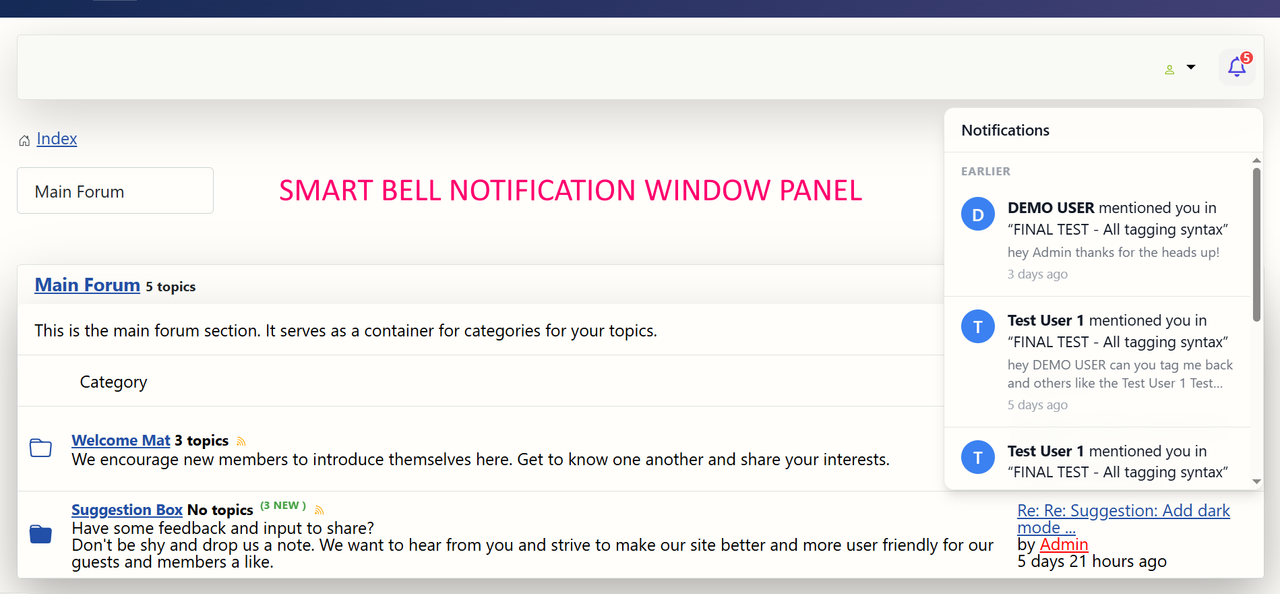
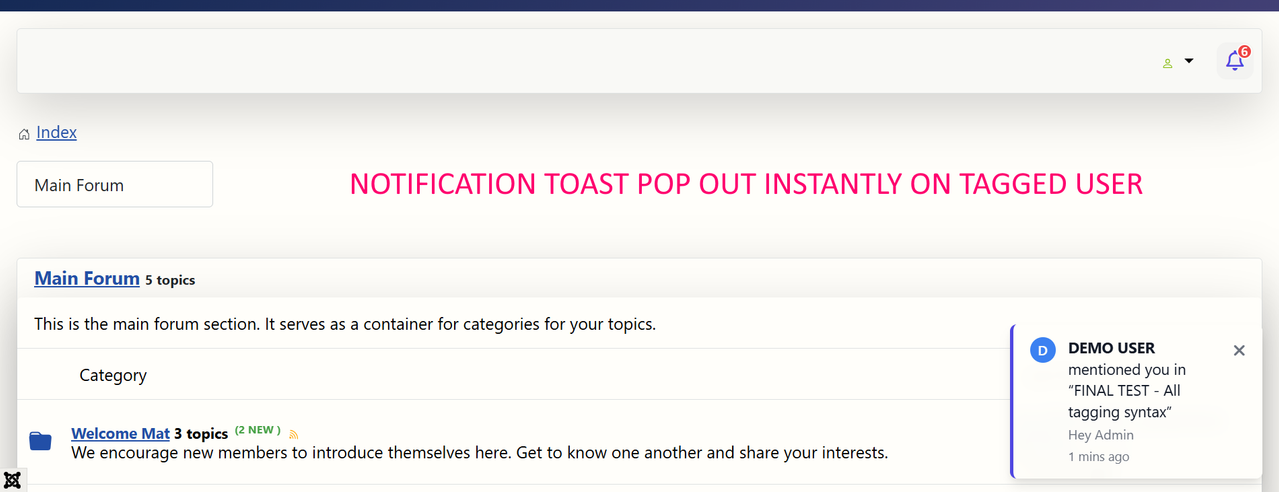
- Send Toast Notification to Active Users: Display a toast notification on the bottom right of the page when a mentioned user is online.
- Ajax Support: Implement an Ajax-based solution to handle notifications dynamically, so users see notifications in real-time without needing to reload the page.
- Integrate with Kunena's Notification System: We will ensure that notifications are also integrated with Kunena's built-in notification system.
Code:
plg_kunena_mention.php
Code:
<?php
defined('_JEXEC') or die;
use Joomla\CMS\Language\Text;
use Joomla\CMS\Plugin\CMSPlugin;
use Kunena\Forum\KunenaForum;
use Joomla\CMS\Factory;
use Joomla\CMS\Uri\Uri;
class PlgKunenaMention extends CMSPlugin
{
/**
* Method to handle the @mention functionality when a user posts a message.
*/
public function onAfterSubmitPost($config)
{
// Get the post content
$postContent = $config['message'];
// Regular expression to find @mentions
$pattern = '/@([a-zA-Z0-9_]+)/';
// Find all mentions in the post content
preg_match_all($pattern, $postContent, $matches);
if (!empty($matches[1])) {
$mentionedUsers = $matches[1];
// Process mentions: Notify the mentioned users
foreach ($mentionedUsers as $mentionedUsername) {
$user = $this->getUserByUsername($mentionedUsername);
if ($user) {
// Send notification to the mentioned user
$this->sendNotification($user, $config['author'], $config['message']);
// Check if the user is online
$this->checkOnlineStatusAndSendToast($user, $config['author'], $config['message']);
}
}
}
}
/**
* Get a Joomla user by username.
*
* @param string $username The username to search for.
* @return object|null Joomla User object or null if not found.
*/
private function getUserByUsername($username)
{
// Get Joomla User model
$user = Factory::getUser($username);
return $user && !$user->get('blocked') ? $user : null;
}
/**
* Send a notification to the mentioned user.
*
* @param object $user The user to notify.
* @param string $author The author of the post.
* @param string $message The content of the post.
*/
private function sendNotification($user, $author, $message)
{
// Send notification via Kunena notification system
// You can customize it more as needed
$notification = KunenaForum::getInstance()->getNotification();
$notification->send($user, Text::sprintf('PLG_KUNENA_MENTION_SUBJECT', $author), Text::sprintf('PLG_KUNENA_MENTION_BODY', $author, $message));
}
/**
* Check if the mentioned user is currently online in the forum.
*
* @param object $user The user to check.
* @param string $author The post author.
* @param string $message The post content.
*/
private function checkOnlineStatusAndSendToast($user, $author, $message)
{
// Check if the user is online
$userOnline = $this->isUserOnline($user);
// If the user is online, send a toast notification
if ($userOnline) {
$this->sendToastNotification($user->id, $author, $message);
}
}
/**
* Check if the user is currently online in the forum.
*
* @param object $user The user to check.
* @return bool
*/
private function isUserOnline($user)
{
// Here we can use Kunena's built-in methods or Joomla session
$session = Factory::getSession();
return $session->has('user_id') && $session->get('user_id') == $user->id;
}
/**
* Send a toast notification to the browser of the mentioned user (AJAX).
*
* @param int $userId The ID of the user to notify.
* @param string $author The author of the post.
* @param string $message The post content.
*/
private function sendToastNotification($userId, $author, $message)
{
// Use Ajax to send the toast notification
$uri = Uri::getInstance();
$response = [
'user_id' => $userId,
'author' => $author,
'message' => $message,
'toast_url' => $uri->toString(),
];
// Store the response in session or send it to the browser via Ajax
Factory::getApplication()->enqueueMessage(json_encode($response), 'message');
}
}
Code:
en-GB.plg_kunena_mention.ini
Code:
PLG_KUNENA_MENTION="Kunena Mention"
PLG_KUNENA_MENTION_SUBJECT="You were mentioned by %s"
PLG_KUNENA_MENTION_BODY="Hello, %s mentioned you in a post: %s"
Code:
tmpl
Code:
js
Code:
plugins/kunena/mention/js/toast.js
Code:
(function($) {
// Function to display toast notifications
function showToast(author, message) {
let toast = $("<div class='toast'></div>")
.text("@" + author + " mentioned you: " + message)
.css({
position: "fixed",
bottom: "10px",
right: "10px",
background: "#333",
color: "#fff",
padding: "10px",
borderRadius: "5px",
zIndex: 10000,
});
$("body").append(toast);
setTimeout(function() {
toast.fadeOut(function() {
$(this).remove();
});
}, 5000);
}
// Listen for custom AJAX response to trigger the toast notification
$(document).on('ajaxComplete', function(event, xhr, settings) {
try {
var response = JSON.parse(xhr.responseText);
if (response.user_id && response.author && response.message) {
showToast(response.author, response.message);
}
} catch (e) {
console.log('Error parsing response for toast notification', e);
}
});
})(jQuery);
Code:
user_id
Code:
author
Code:
message
Code:
onAfterRender()
Code:
public function onAfterRender()
{
$app = Factory::getApplication();
if ($app->isClient('site')) {
$doc = Factory::getDocument();
$doc->addScript(Uri::root() . 'plugins/kunena/mention/js/toast.js');
}
}
- Install the Plugin: Place your plugin in the
directory, create a ZIP archive of the plugin folder, and install it through the Joomla Admin Panel.Code:plugins/kunena/mention/
- Enable the Plugin: Go to the Extensions → Plugins menu, search for the
plugin, and enable it.Code:Kunena Mention
- Test the Functionality: Make sure users who are mentioned receive notifications via email, and if they are online, the toast notification appears on the frontend.
- Mention notifications are sent via email.
- Real-time toast notifications appear when mentioned users are online, using Ajax and JavaScript.
- Integration with Kunena's notification system allows for better management of user notifications.
Last edit: 1 year 4 months ago by megat.
Please Log in or Create an account to join the conversation.
1 year 4 months ago - 1 year 4 months ago #232632
by stunalan
Replied by stunalan on topic [Feature Request] Ability to tag/mention another user in posts
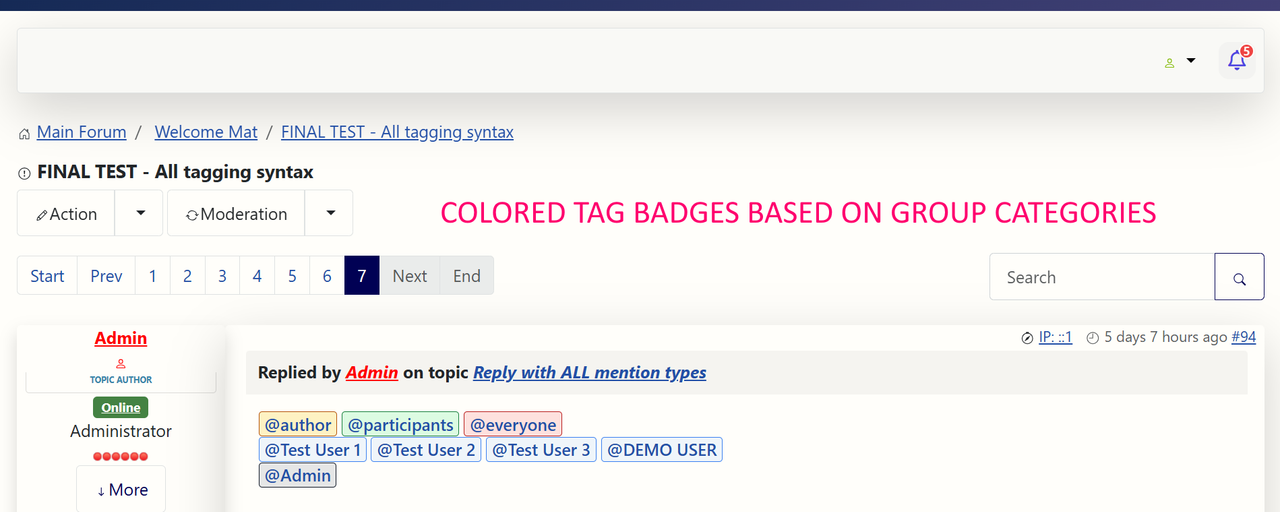
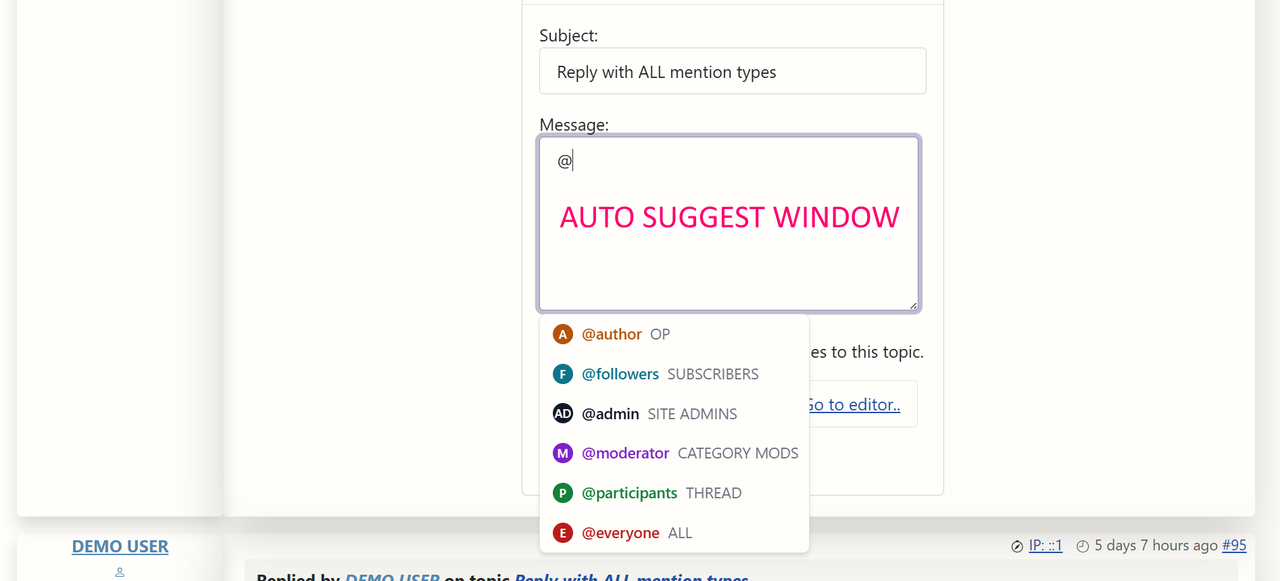
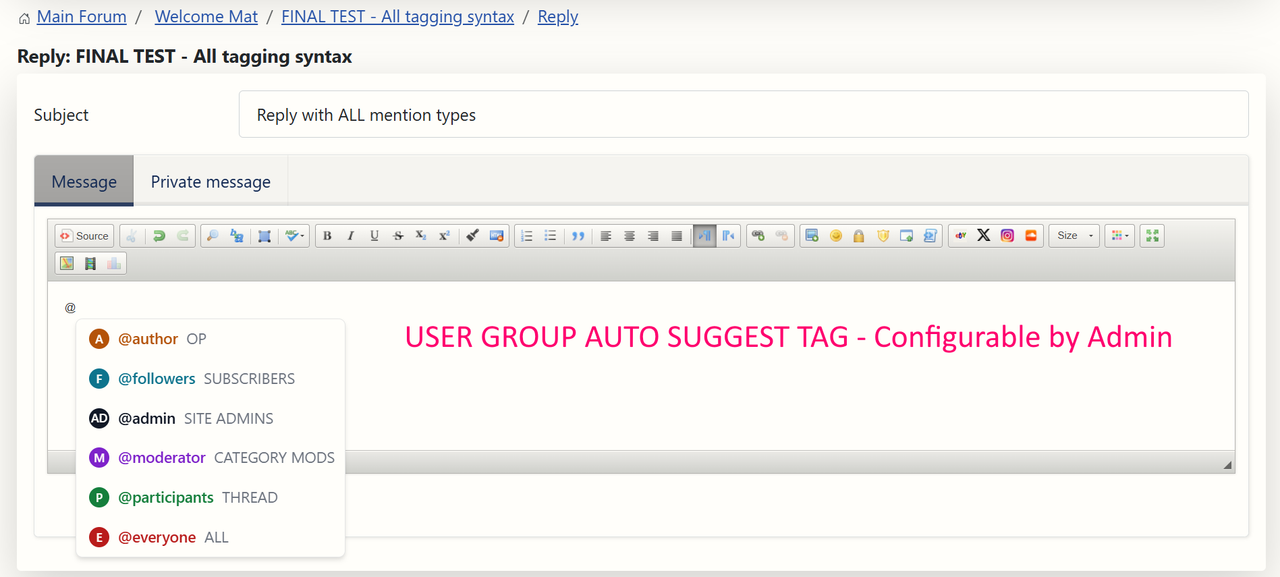
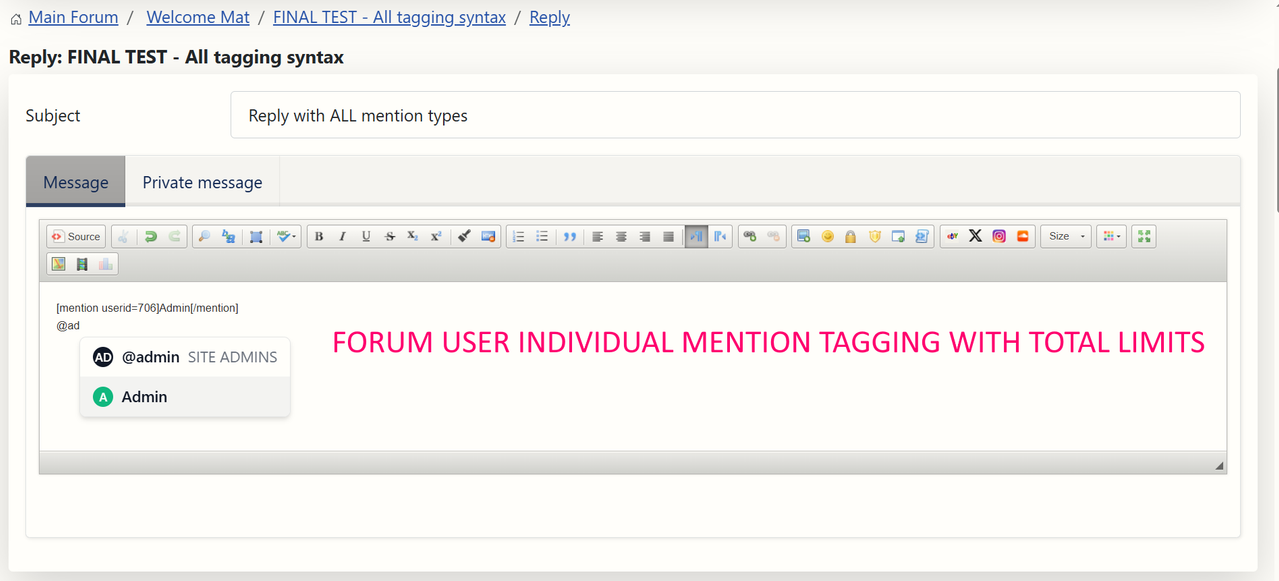
Mentions are available if you do a @ in the kunena editor it will list a user.
This feature is mentioned
in the latest release info
www.kunena.org/forum/76-Official-Announc...r-joomla-4-4-5-0-5-1
This feature is mentioned
Last edit: 1 year 4 months ago by stunalan. Reason: more precise info
Please Log in or Create an account to join the conversation.
2 months 2 weeks ago - 2 months 2 weeks ago #234547
by guidocx84
Replied by guidocx84 on topic [Feature Request] Ability to tag/mention another user in posts
Yes, I confirm it works but only to mention users who have already post at least one message in the topic.
@stunalan do you know if the mention can send some kind of notify to the mentioned user?
Thanks!
@stunalan do you know if the mention can send some kind of notify to the mentioned user?
Thanks!
Last edit: 2 months 2 weeks ago by guidocx84.
Please Log in or Create an account to join the conversation.
Time to create page: 0.439 seconds