
Kunena 7.0.4 Released
The Kunena team has announce the arrival of Kunena 7.0.4 [K 7.0.4] in stable which is now available for download as a native Joomla extension for J! 5.4.x/6.0.x. This version addresses most of the issues that were discovered in K 6.2 / K 6.3 / K 6.4 and issues discovered during the last development stages of K 7.0
This category is for the plugin developed, endorsed, maintained and supported by the Kunena project team. The topics in this category only relate to the plugin developed for K 3.0 and later versions.
If you are having problems then, for your own benefit, it would save us all a lot of time if you would kindly post your configuration report when you ask for help from this forum. If you do not post your configuration report we will not ask you for it but you will probably not get your problem solved, either.
If you are having problems then, for your own benefit, it would save us all a lot of time if you would kindly post your configuration report when you ask for help from this forum. If you do not post your configuration report we will not ask you for it but you will probably not get your problem solved, either.
Sticky A Kunena Discuss workshop: How to allow my users to comment on my Joomla articles in my forum


12 years 2 months ago #153712
by sozzled
Blue Eagle vs. Crypsis reference guide
Read my blog and

Replied by sozzled on topic A Kunena Discuss workshop: How to allow my users to comment on my Joomla articles in my forum
OK, good start. This means that you want people to comment on all your Joomla articles - no exceptions.
The next thing we need to do is to get those comments into your forum.
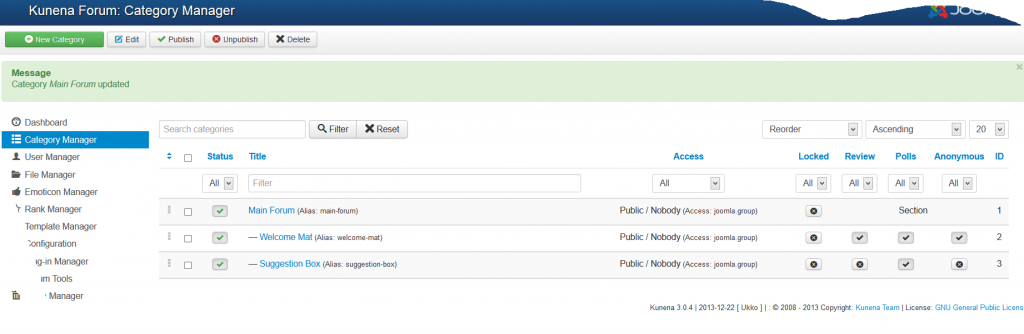
In which one Kunena category do you want people's "comments" to appear? If you want to know what Kunena categories you have, go to Components » Kunena » Category Manager in the backend.
The next thing we need to do is to get those comments into your forum.
In which one Kunena category do you want people's "comments" to appear? If you want to know what Kunena categories you have, go to Components » Kunena » Category Manager in the backend.
Blue Eagle vs. Crypsis reference guide
Read my blog and
Please Log in or Create an account to join the conversation.


12 years 2 months ago - 12 years 2 months ago #153713
by Uncle Sam
Replied by Uncle Sam on topic A Kunena Discuss workshop: How to allow my users to comment on my Joomla articles in my forum
ok-recent topics is fine- I can fine tune when I get the lay of the land- 1 week ago I never did anything like this-I been sitting at this desk 15 hours a day for the last 5 days learning how to do this.
Last edit: 12 years 2 months ago by Uncle Sam.
Please Log in or Create an account to join the conversation.
12 years 2 months ago #153714
by sozzled
Blue Eagle vs. Crypsis reference guide
Read my blog and
Replied by sozzled on topic A Kunena Discuss workshop: How to allow my users to comment on my Joomla articles in my forum
"Recent Topics" is not a category. Go to Components » Kunena » Category Manager and post a screenshot of that page.
Blue Eagle vs. Crypsis reference guide
Read my blog and
Please Log in or Create an account to join the conversation.
12 years 2 months ago #153715
by Uncle Sam
22
Replied by Uncle Sam on topic A Kunena Discuss workshop: How to allow my users to comment on my Joomla articles in my forum
22
Please Log in or Create an account to join the conversation.
12 years 2 months ago #153716
by sozzled
Blue Eagle vs. Crypsis reference guide
Read my blog and
Replied by sozzled on topic A Kunena Discuss workshop: How to allow my users to comment on my Joomla articles in my forum
Great work! :woohoo:
I have changed the subject of this topic and made it "sticky" because it may help other people who are in a similar situation to you.
You have two Kunena categories . They are "Welcome Mat" and "Suggestions Box" (their corresponding IDs are 2 and 3 respectively).
The next thing to do is to change the setting in the Kunena Discuss plugin as follows:
Kunena Discuss » Default Forum Category = 2
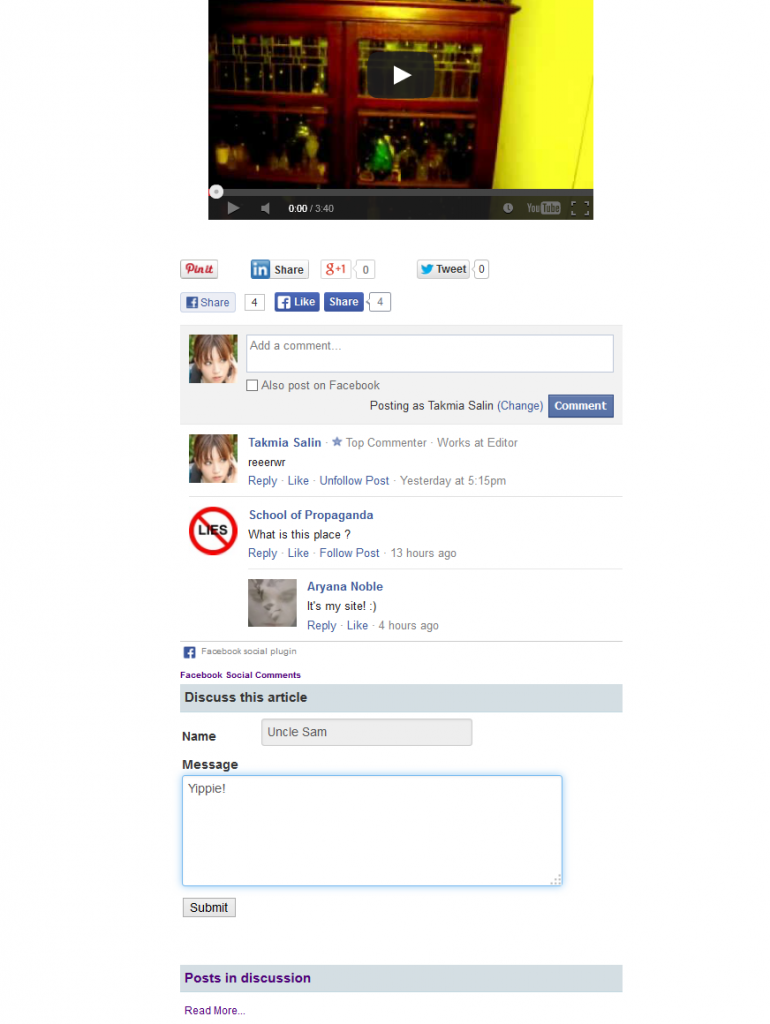
This means that, when people post comments about any Joomla articles you write, their comments will create new topics in your "Welcome Mat" category. You can create a different category later if you want to keep comments separate from the rest of your forum's activities.
Let's try that change to see what happens next, OK?
I have changed the subject of this topic and made it "sticky" because it may help other people who are in a similar situation to you.
You have two Kunena categories . They are "Welcome Mat" and "Suggestions Box" (their corresponding IDs are 2 and 3 respectively).
The next thing to do is to change the setting in the Kunena Discuss plugin as follows:
Kunena Discuss » Default Forum Category = 2
This means that, when people post comments about any Joomla articles you write, their comments will create new topics in your "Welcome Mat" category. You can create a different category later if you want to keep comments separate from the rest of your forum's activities.
Let's try that change to see what happens next, OK?
Blue Eagle vs. Crypsis reference guide
Read my blog and
Please Log in or Create an account to join the conversation.
12 years 2 months ago - 12 years 2 months ago #153717
by Uncle Sam

 :evil: BRB~trying now.Gott it! Now, Where did you find those numbers 2 and 3?
Replied by Uncle Sam on topic A Kunena Discuss workshop: How to allow my users to comment on my Joomla articles in my forum
:evil: BRB~trying now.Gott it! Now, Where did you find those numbers 2 and 3?
Last edit: 12 years 2 months ago by Uncle Sam.
Please Log in or Create an account to join the conversation.
Time to create page: 0.262 seconds