
Kunena 7.0.8 Released
The Kunena team has announce the arrival of Kunena 7.0.8 [K 7.0.8] in stable which is now available for download as a native Joomla extension for J! 5.4.x/6.0.x./6.1.x. This version addresses most of the issues that were discovered in K 6.2 / K 6.3 / K 6.4 and issues discovered during the last development stages of K 7.0
This category is for the plugin developed, endorsed, maintained and supported by the Kunena project team. The topics in this category only relate to the plugin developed for K 3.0 and later versions.
If you are having problems then, for your own benefit, it would save us all a lot of time if you would kindly post your configuration report when you ask for help from this forum. If you do not post your configuration report we will not ask you for it but you will probably not get your problem solved, either.
If you are having problems then, for your own benefit, it would save us all a lot of time if you would kindly post your configuration report when you ask for help from this forum. If you do not post your configuration report we will not ask you for it but you will probably not get your problem solved, either.
Sticky A Kunena Discuss workshop: How to allow my users to comment on my Joomla articles in my forum


12 years 6 months ago - 12 years 6 months ago #153706
by sozzled
Blue Eagle vs. Crypsis reference guide
Read my blog and

Replied by sozzled on topic A Kunena Discuss workshop: How to allow my users to comment on my Joomla articles in my forum
Let me try to make this simpler for you.
I went to your website. I see you have articles created in the Joomla category called "Blind Light". I do not know the ID of this category but, knowing that information, if you want people to comment about articles only from that category, you enter this ID - it's a number - into the field
Kunena Discuss » Allowed Content Categories
If you want to allow people to comment on any article in any category, then you use the setting
Kunena Discuss » Allowed Content Categories = 0
If you want to allow discussions on certain categories, you enter the value as a comma-separated list (as I wrote about in the topic Kunena Discuss "quick and dirty" instructions for use . Alternatively, you can set Allowed Content Categories to the value of zero and you can exclude certain Joomla article categories from Kunena Discuss by entering category IDs in the field Denied Content Categories. Do you follow this so far?
What might help is to know which article category/categories you want to allow for people to discuss articles that are posted in them. Can you tell us what categories of Joomla articles are the ones you want people to be able to discuss? When you can tell us that, we can then go on to the next step.
Here is a tip to find out the IDs of the categories of articles in your Joomla site:
Go to Content » Category Manager in your J! 3.2 administrator site (the IDs are shown on the right side of that page).
I went to your website. I see you have articles created in the Joomla category called "Blind Light". I do not know the ID of this category but, knowing that information, if you want people to comment about articles only from that category, you enter this ID - it's a number - into the field
Kunena Discuss » Allowed Content Categories
If you want to allow people to comment on any article in any category, then you use the setting
Kunena Discuss » Allowed Content Categories = 0
If you want to allow discussions on certain categories, you enter the value as a comma-separated list (as I wrote about in the topic Kunena Discuss "quick and dirty" instructions for use . Alternatively, you can set Allowed Content Categories to the value of zero and you can exclude certain Joomla article categories from Kunena Discuss by entering category IDs in the field Denied Content Categories. Do you follow this so far?
What might help is to know which article category/categories you want to allow for people to discuss articles that are posted in them. Can you tell us what categories of Joomla articles are the ones you want people to be able to discuss? When you can tell us that, we can then go on to the next step.
Here is a tip to find out the IDs of the categories of articles in your Joomla site:
Go to Content » Category Manager in your J! 3.2 administrator site (the IDs are shown on the right side of that page).
Blue Eagle vs. Crypsis reference guide
Read my blog and
Last edit: 12 years 6 months ago by sozzled.
The following user(s) said Thank You: Ishtar
Please Log in or Create an account to join the conversation.


12 years 6 months ago #153707
by Uncle Sam
Replied by Uncle Sam on topic A Kunena Discuss workshop: How to allow my users to comment on my Joomla articles in my forum
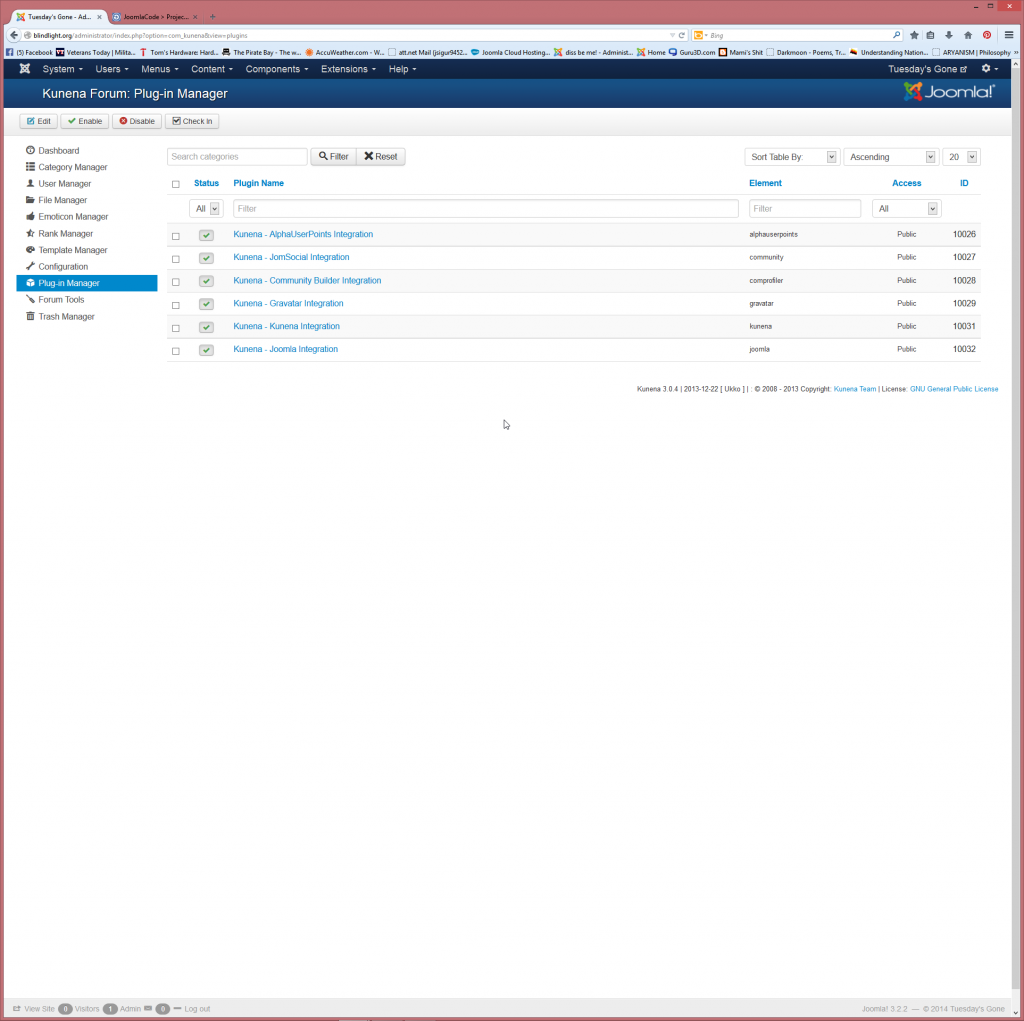
I did notice that it doesn't seem to be showing up in the Kunena plug ins area
Please Log in or Create an account to join the conversation.
12 years 6 months ago - 12 years 6 months ago #153708
by sozzled
Blue Eagle vs. Crypsis reference guide
Read my blog and
Replied by sozzled on topic A Kunena Discuss workshop: How to allow my users to comment on my Joomla articles in my forum
According to the configuration report you posted a few messages ago, you have installed the Kunena Discuss 3.0.1 plugin. Maybe you were looking in the wrong place? :dry:
Go to Extensions » Plugin Manager to see all the plugins you have installed on your site and I am fairly confident that you will find it.
Go to Extensions » Plugin Manager to see all the plugins you have installed on your site and I am fairly confident that you will find it.
Blue Eagle vs. Crypsis reference guide
Read my blog and
Last edit: 12 years 6 months ago by sozzled.
Please Log in or Create an account to join the conversation.
12 years 6 months ago - 12 years 6 months ago #153709
by Uncle Sam
Replied by Uncle Sam on topic A Kunena Discuss workshop: How to allow my users to comment on my Joomla articles in my forum
Yes it is there
Last edit: 12 years 6 months ago by Uncle Sam.
Please Log in or Create an account to join the conversation.
12 years 6 months ago #153710
by sozzled
Blue Eagle vs. Crypsis reference guide
Read my blog and
Replied by sozzled on topic A Kunena Discuss workshop: How to allow my users to comment on my Joomla articles in my forum
Good! 
Now, can you answer the question I asked you about the Joomla category ID (or IDs) that you want to allow so that the Kunena Discuss plugin will work with them?
Now, can you answer the question I asked you about the Joomla category ID (or IDs) that you want to allow so that the Kunena Discuss plugin will work with them?
Blue Eagle vs. Crypsis reference guide
Read my blog and
Please Log in or Create an account to join the conversation.
12 years 6 months ago - 12 years 6 months ago #153711
by Uncle Sam
Replied by Uncle Sam on topic A Kunena Discuss workshop: How to allow my users to comment on my Joomla articles in my forum
It's on 0.YOu want to come in and look?
Last edit: 12 years 6 months ago by Uncle Sam.
Please Log in or Create an account to join the conversation.
Time to create page: 0.255 seconds