
Kunena 7.0.9 & Kunena 6.4.14 – Security Updates Released
The Kunena team has announce the arrival of Kunena 7.0.9 [K 7.0.9] in stable which is now available for download as a native Joomla extension for J! 5.4.x/6.0.x./6.1.x. This version addresses most of the issues that were discovered in K 6.2 / K 6.3 / K 6.4 and issues discovered during the last development stages of K 7.0
Question Problem I do not have icons and I can not attach files


8 years 3 months ago #200076
by neon26
I do not get it, and I do not know what to do anymore
Help me please
Replied by neon26 on topic Problem I do not have icons and I can not attach files
rich wrote:
Now the problem I have is that the kunena menu does not come out, but this happens only when I just answered
That's a typical problem with wrong configured Kunena menu items.
www.kunena.org/forum/k5-1-support/151266...u-post-your-question
I do not get it, and I do not know what to do anymore
Help me please
Please Log in or Create an account to join the conversation.


Less
More
- Posts: 12291
- Thank you received: 2538
8 years 3 months ago #200079
by rich
Important! Always create a backup before you make any changes to your website!
Replied by rich on topic Problem I do not have icons and I can not attach files
I see in your configuration report (in your first message) followings wrong configured menu items. Is it still so or have you repaired this menu items? These three menu items must be in the Kunena menu!
Afterwards create in the Main and Menu-Registro new menu items. The menu items in the Main and Registro menu must be the Menu Item Type = Menu Item Alias!
www.kunena.org/forum/k5-1-support/151266...u-post-your-question
Code:
101 Portada mainmenu view=home&defaultmenu=1262 mensajes-recientes-foro-josportal
141 Foros mainmenu view=home&defaultmenu=1261 foro
1056 Perfil de usuario menu-registro view=user&layout=edit perfil-de-usuario
Afterwards create in the Main and Menu-Registro new menu items. The menu items in the Main and Registro menu must be the Menu Item Type = Menu Item Alias!
www.kunena.org/forum/k5-1-support/151266...u-post-your-question
Important! Always create a backup before you make any changes to your website!
Please Log in or Create an account to join the conversation.
8 years 3 months ago - 8 years 3 months ago #200082
by neon26
Replied by neon26 on topic Problem I do not have icons and I can not attach files
ok my problem is that in the main menu I need to put a link to my forum categories, but if I do that, the kunena menu does not appear

In Portada and Foros,, users view , recent messages and categories forum but if i put it in the main menu, the kunena menu does not appear
as I do to put in the menu that in the main menu and that the kunena menu

Thanks
In Portada and Foros,, users view , recent messages and categories forum but if i put it in the main menu, the kunena menu does not appear
as I do to put in the menu that in the main menu and that the kunena menu
Thanks
Last edit: 8 years 3 months ago by neon26.
Please Log in or Create an account to join the conversation.

8 years 3 months ago #200084
by Bouma
Replied by Bouma on topic Problem I do not have icons and I can not attach files
Maybe this can help you. This is based, after I did a Tools/Menu Manager/Restore Kunena Menu.
Then on my MainMenu
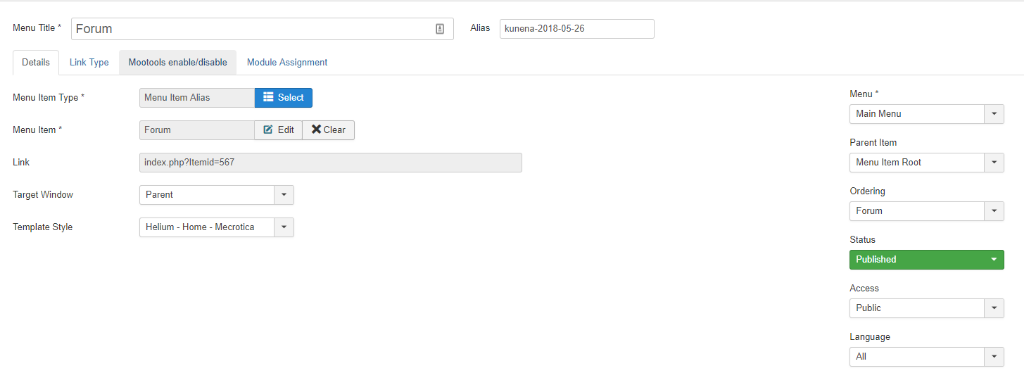
Then on my MainMenu
Please Log in or Create an account to join the conversation.
8 years 3 months ago #200104
by neon26
Replied by neon26 on topic Problem I do not have icons and I can not attach files
I have the same, but the kunena menu can not be seen when, for example, I enter to answer a topic, I answer and it goes out, there I can no longer see the menu.
Please Log in or Create an account to join the conversation.
Time to create page: 0.232 seconds