
- Posts: 11
- Thank you received: 0
Kunena 7.0.9 & Kunena 6.4.14 – Security Updates Released
The Kunena team has announce the arrival of Kunena 7.0.9 [K 7.0.9] in stable which is now available for download as a native Joomla extension for J! 5.4.x/6.0.x./6.1.x. This version addresses most of the issues that were discovered in K 6.2 / K 6.3 / K 6.4 and issues discovered during the last development stages of K 7.0
Solved Icons and menu items missing after upgrade
- intouchweb
-
 Topic Author
- Offline
- New Member
-

Less
More
10 years 1 month ago - 10 years 1 month ago #178803
by intouchweb
Icons and menu items missing after upgrade was created by intouchweb
I have upgraded to ver 5 on a test server and the forum is now missing icons and menu titles, I have checked configuration and not sure how to fix, can someone please advise where I should look to fix - see screen shot attached.
[UPDATE] To assist others with the same problem
I turned on debug mode (Configuration | General | Enable Debug Mode) and that provided a hint that my menus needed checking, I checked the menu item pointing to the forum and found I needed to update the 'default menu item' setting.
This fixed the missing menu titles, BUT still need help on the missing icons eg icon-folder, icon-clock missing...
I am also still missing the menus when clicking on topic links in the Latest module (even after updating the Kunena Latest module)
[UPDATE] To assist others with the same problem
I turned on debug mode (Configuration | General | Enable Debug Mode) and that provided a hint that my menus needed checking, I checked the menu item pointing to the forum and found I needed to update the 'default menu item' setting.
This fixed the missing menu titles, BUT still need help on the missing icons eg icon-folder, icon-clock missing...
I am also still missing the menus when clicking on topic links in the Latest module (even after updating the Kunena Latest module)
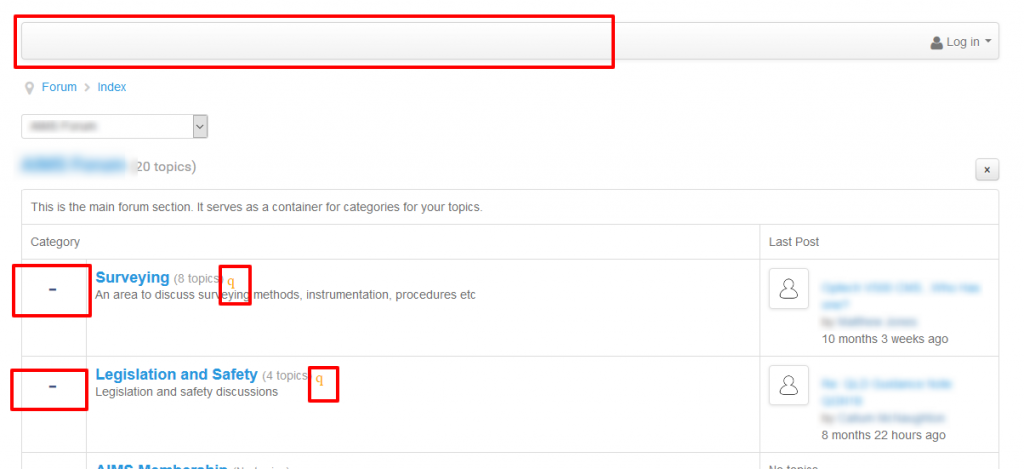
Last edit: 10 years 1 month ago by intouchweb.
Please Log in or Create an account to join the conversation.
- StudioTommy
-

- Offline
- Senior Member
-

10 years 1 month ago #178809
by StudioTommy
Replied by StudioTommy on topic Icons and menu items missing after upgrade
go to Kunena - Templates - Crypsis - functions, and activate "CDN Font Awesome '
Greeting Tommy
Greeting Tommy
Please Log in or Create an account to join the conversation.
- intouchweb
-
Topic Author
- Offline
- New Member
-
Less
More
- Posts: 11
- Thank you received: 0
10 years 1 month ago #178811
by intouchweb
Replied by intouchweb on topic Icons and menu items missing after upgrade
Thanks Tommy, Yes I have done that and it did help by bringing in some missing icons like the RSS feed icon, but I am still missing icons such as the folder icons and the little icon-clock etc.
And still also missing the menus when clicking on the Latest module links.
And still also missing the menus when clicking on the Latest module links.
Please Log in or Create an account to join the conversation.
- StudioTommy
-
- Offline
- Senior Member
-
10 years 1 month ago #178813
by StudioTommy
Replied by StudioTommy on topic Icons and menu items missing after upgrade
Hello intouchweb,
there is a link to your site?
Greeting Tommy
there is a link to your site?
Greeting Tommy
Please Log in or Create an account to join the conversation.


10 years 1 month ago #178814
by 810
Replied by 810 on topic Icons and menu items missing after upgrade
please select the icon type on the "Topic Icons" option located on the "Feature" tab select Bootstrap 2
Please Log in or Create an account to join the conversation.
- intouchweb
-
Topic Author
- Offline
- New Member
-
Less
More
- Posts: 11
- Thank you received: 0
10 years 1 month ago #178819
by intouchweb
Replied by intouchweb on topic Icons and menu items missing after upgrade
Thanks 810, when I change the setting to Bootstrap 2 I just lose more icons, like the RSS feed icon.
Tommy I would prefer not to list the site URL in a forum.
Tommy I would prefer not to list the site URL in a forum.
Please Log in or Create an account to join the conversation.
Time to create page: 0.208 seconds