


- Posts: 7
- Thank you received: 0
Kunena 7.0.6 & Kunena 6.4.12 – Security Updates Released
The Kunena team has announce the arrival of Kunena 7.0.6 [K 7.0.6] in stable which is now available for download as a native Joomla extension for J! 5.4.x/6.0.x. This version addresses most of the issues that were discovered in K 6.2 / K 6.3 / K 6.4 and issues discovered during the last development stages of K 7.0.
The Kunena team is also pleased to announce the twelfth version of Kunena 6.4, a native Joomla extension for Joomla! 5.0, 5.1, 5.2, 5.3, 5.4 and 6.0.
Question J3 to J4 problem
2 years 6 months ago #229944
by bradymc
J3 to J4 problem was created by bradymc
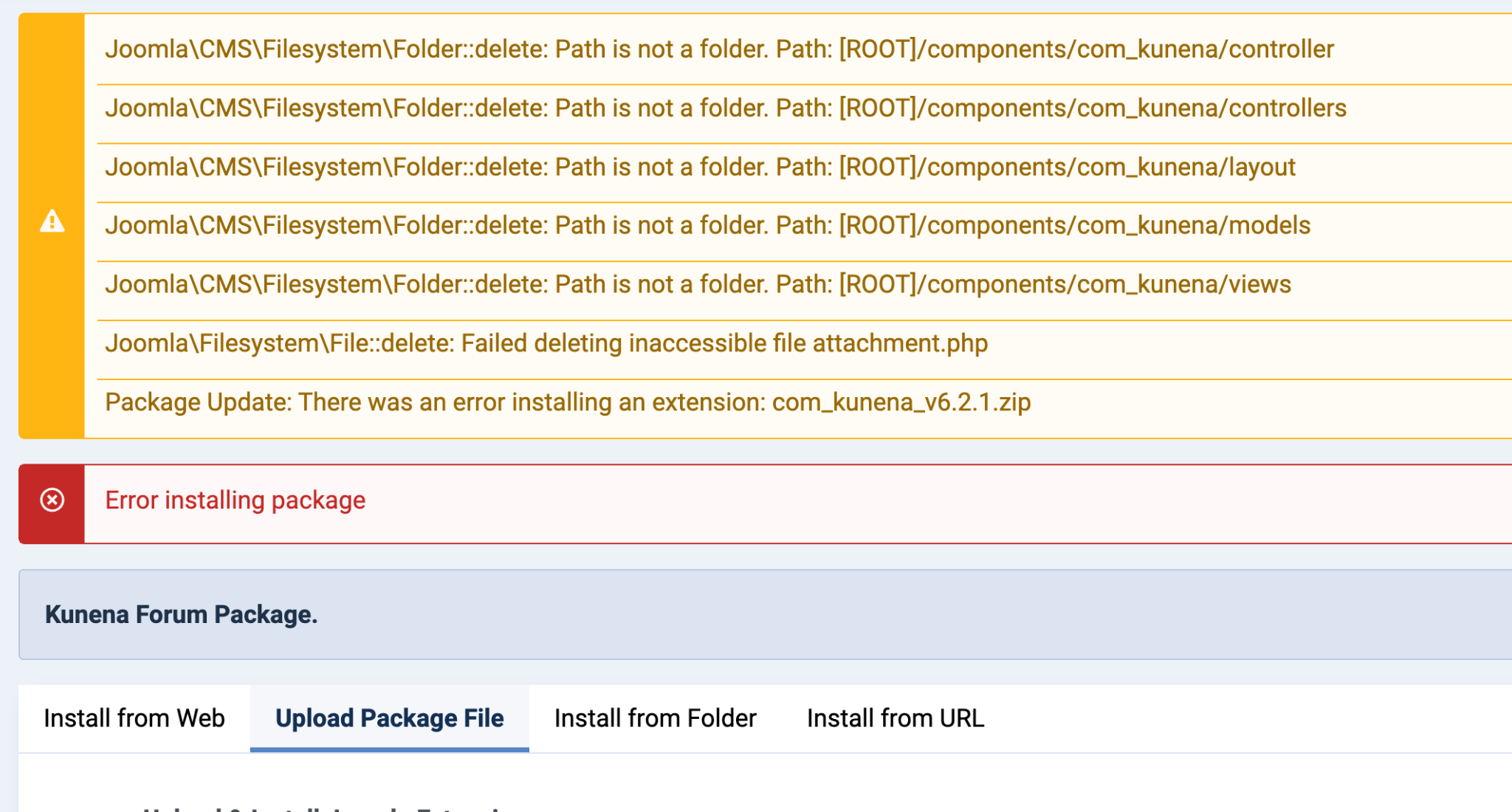
I upgraded my site to Joomla 4. I erroneously made the assumption that I could just install K6 on top of K5. But now I've created a situation where I'm in limbo. I'm currently running Joomla 4.4. When I try to uninstall K5 files, i get notified that it can only be done in Joomla 3. If I try to install K6, I get error messages and it won't install. Is there a way to unravel the mess I've created without reverting back to Joomla 3?
Please Log in or Create an account to join the conversation.


Less
More
- Posts: 12287
- Thank you received: 2535
2 years 6 months ago #229948
by rich
Important! Always create a backup before you make any changes to your website!
Replied by rich on topic J3 to J4 problem
Which version of K5 did you have installed? For a successful upgrade, it must be at least K5.1 or higher.
This is the way it has always worked in my tests. But it should also work if Kunena was not previously uninstalled via the Joomla installer.
Your problem seems to have to do with the permissions. Please check these, folders should be chmod 0755 and files 0644.
This is the way it has always worked in my tests. But it should also work if Kunena was not previously uninstalled via the Joomla installer.
Your problem seems to have to do with the permissions. Please check these, folders should be chmod 0755 and files 0644.
Important! Always create a backup before you make any changes to your website!
Please Log in or Create an account to join the conversation.
2 years 6 months ago #229953
by bradymc
Replied by bradymc on topic J3 to J4 problem
I had 5.2.14 installed.
I found the upgrade guide in the link you provided after I had created this problem. I didn't uninstall before migrating to J4. I did run a permissions fix through Akeeba AdminTools and double-checked that all files and folders had correct permissions.
I should point out that the migration to J4 was done with Migrate Me software. So I still have the J3 site active. The migration is in a temp folder "[ROOT]/mm4/". While I could go back and rerun the migration... doing so would cost me 2 days of getting everything else smoothed out in the J4 installation.
I changed .htaccess of the "mm4" folder to point the root to the "mm4" folder, but the error messages (see pic in first post) show "[ROOT]/administrator..." Could that be why it's not installing correctly? Is the installation not recognizing that the "root" is in "mm4"?
I found the upgrade guide in the link you provided after I had created this problem. I didn't uninstall before migrating to J4. I did run a permissions fix through Akeeba AdminTools and double-checked that all files and folders had correct permissions.
I should point out that the migration to J4 was done with Migrate Me software. So I still have the J3 site active. The migration is in a temp folder "[ROOT]/mm4/". While I could go back and rerun the migration... doing so would cost me 2 days of getting everything else smoothed out in the J4 installation.
I changed .htaccess of the "mm4" folder to point the root to the "mm4" folder, but the error messages (see pic in first post) show "[ROOT]/administrator..." Could that be why it's not installing correctly? Is the installation not recognizing that the "root" is in "mm4"?
Please Log in or Create an account to join the conversation.
Less
More
- Posts: 12287
- Thank you received: 2535
2 years 6 months ago #229957
by rich
Important! Always create a backup before you make any changes to your website!
Replied by rich on topic J3 to J4 problem
I don't know the Migrate Me tool. Which paths are entered in the configuration.php in the migrated Joomla 4 page?
Important! Always create a backup before you make any changes to your website!
Please Log in or Create an account to join the conversation.
2 years 6 months ago #229965
by bradymc
Replied by bradymc on topic J3 to J4 problem
The only path in the config file is...
$log_path = '/home/[myusername]/public_html/mm4/logs';
I tried changing $livesite from '' to ' myurl.com/mm4/ ' but that didn't help.
$log_path = '/home/[myusername]/public_html/mm4/logs';
I tried changing $livesite from '' to ' myurl.com/mm4/ ' but that didn't help.
Please Log in or Create an account to join the conversation.
Less
More
- Posts: 12287
- Thank you received: 2535
2 years 6 months ago #229969
by rich
Important! Always create a backup before you make any changes to your website!
Replied by rich on topic J3 to J4 problem
You also need a path to a temporary (tmp) folder, otherwise you will not be able to install Kunena.
Important! Always create a backup before you make any changes to your website!
Please Log in or Create an account to join the conversation.
Time to create page: 0.237 seconds