


- Posts: 5
- Thank you received: 0
Kunena 7.0.4 Released
The Kunena team has announce the arrival of Kunena 7.0.4 [K 7.0.4] in stable which is now available for download as a native Joomla extension for J! 5.4.x/6.0.x. This version addresses most of the issues that were discovered in K 6.2 / K 6.3 / K 6.4 and issues discovered during the last development stages of K 7.0
Question Freshly Installed and updated Helix Ultimate Quickstart Pack - Joomla 4
4 years 5 months ago - 4 years 5 months ago #220542
by Rohambili
Hello people!
I try to install Kunena 6.0.0 b5 on a freshly installed and updated Helix Ultimate quickstart thingy, and i cant install the forum template, the thing is stopped here, i can click million times to install sample, nothing happens.
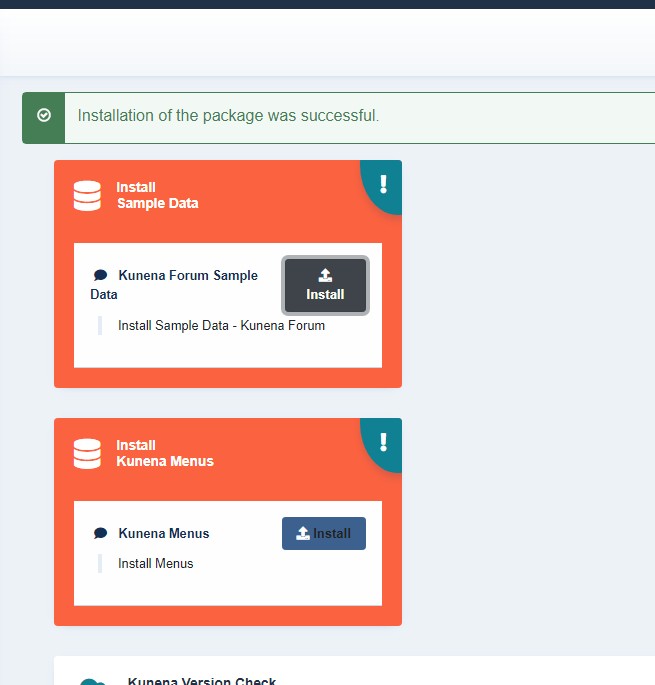
Is it any possible solution to install manually? The sample is helpfull to copy permissions to newly created topics pls help me!
I try to install Kunena 6.0.0 b5 on a freshly installed and updated Helix Ultimate quickstart thingy, and i cant install the forum template, the thing is stopped here, i can click million times to install sample, nothing happens.
Is it any possible solution to install manually? The sample is helpfull to copy permissions to newly created topics pls help me!
Last edit: 4 years 5 months ago by Rohambili.
Please Log in or Create an account to join the conversation.


4 years 5 months ago #220543
by xillibit
I don't provide support by PM, because this can be useful for someone else.
Replied by xillibit on topic Freshly Installed and updated Helix Ultimate Quickstart Pack - Joomla 4
Hello,
Try to install sample data by using the button in Joomla! home dashboard :
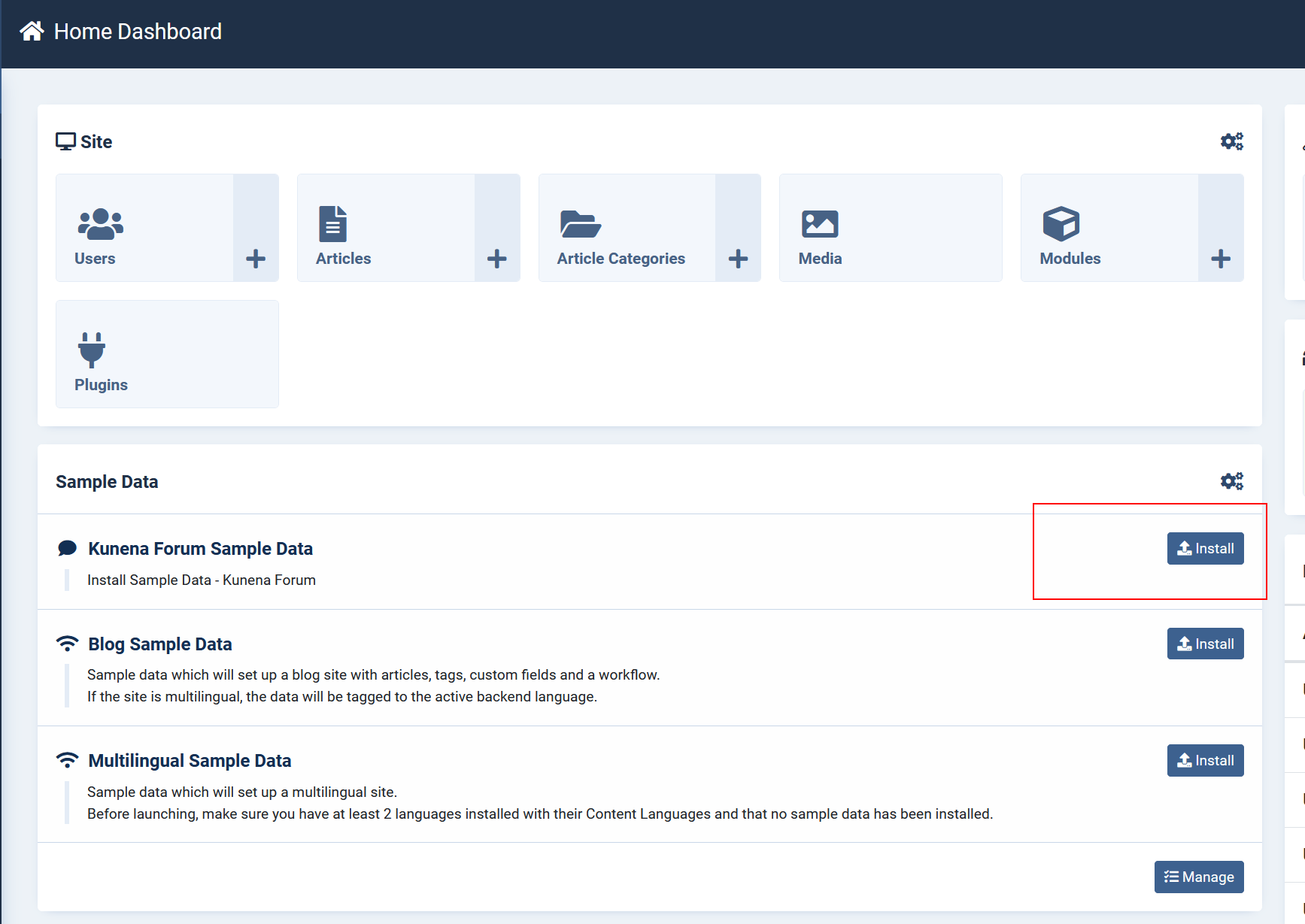
Try to install sample data by using the button in Joomla! home dashboard :
I don't provide support by PM, because this can be useful for someone else.
The following user(s) said Thank You: Rohambili
Please Log in or Create an account to join the conversation.
4 years 5 months ago - 4 years 5 months ago #220544
by Rohambili
Replied by Rohambili on topic Freshly Installed and updated Helix Ultimate Quickstart Pack - Joomla 4
Thank you! @xillibit
Please tell me what to read to know better what am i doing? (sorry im a noob)
I dont find any how-to for kunena6.
BTW I started to read Documentation ...
I cant find out how to get login working. Any idea?
If i click it, does not happen anything.
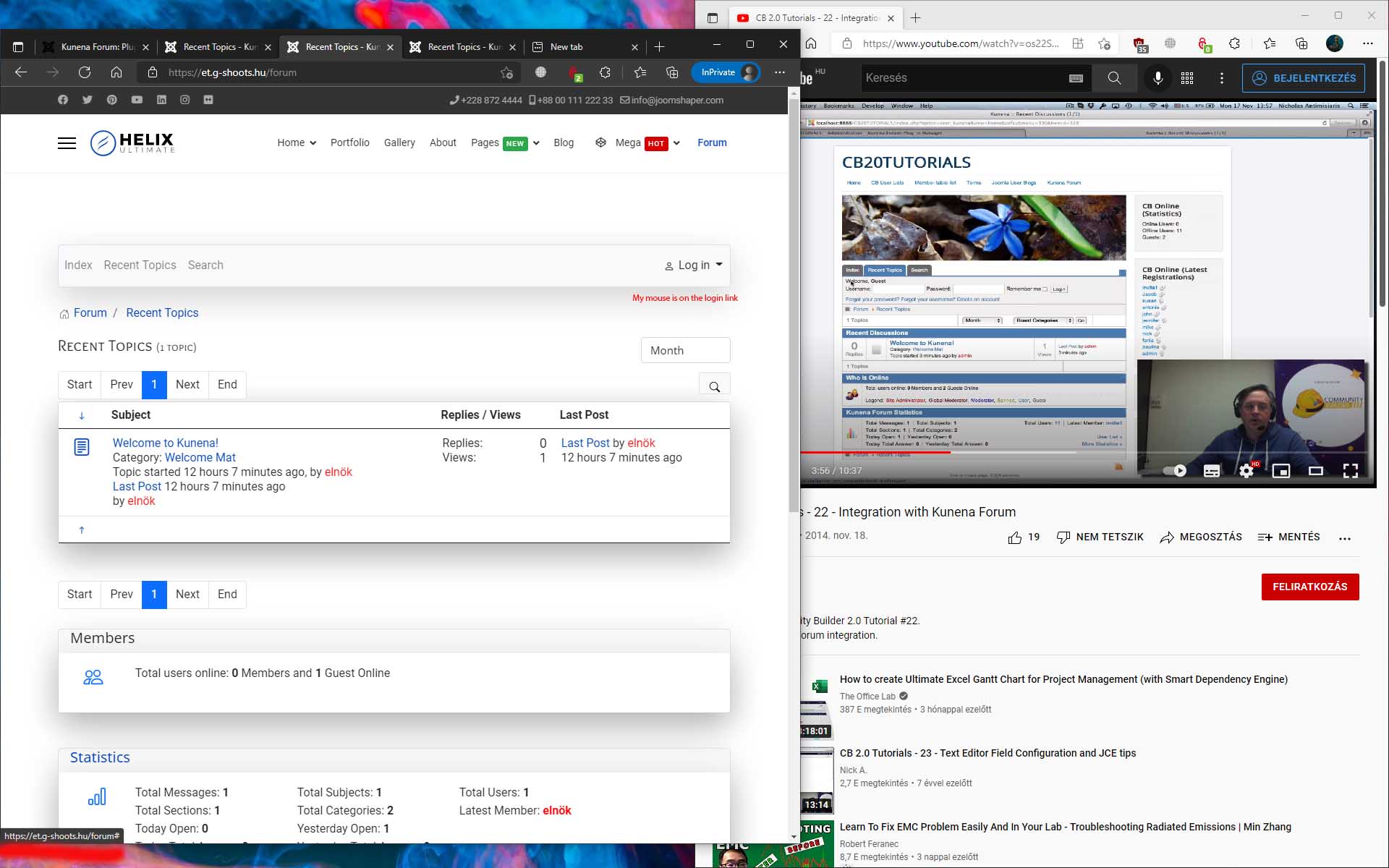
If i set to cassiopeia to default theme, then enter the browser https://myhostname/forum , and click the login link its popped up the "login/register dialog"

Maybe, can you suggest me a free theme with quickstart to use with kunena, which dont have complications
Thank you!
Looks Like T4 Framework quickstart works out of the box. Till i want to register a new user.

One problem solved another created.
Registering to the site is enabled BTW. This one is whos falt? T4 Framework or kunena?
Please tell me what to read to know better what am i doing? (sorry im a noob)
I dont find any how-to for kunena6.
BTW I started to read Documentation ...
I cant find out how to get login working. Any idea?
If i click it, does not happen anything.
If i set to cassiopeia to default theme, then enter the browser https://myhostname/forum , and click the login link its popped up the "login/register dialog"
Maybe, can you suggest me a free theme with quickstart to use with kunena, which dont have complications
Thank you!
Looks Like T4 Framework quickstart works out of the box. Till i want to register a new user.
One problem solved another created.
Registering to the site is enabled BTW. This one is whos falt? T4 Framework or kunena?
Last edit: 4 years 5 months ago by Rohambili.
Please Log in or Create an account to join the conversation.


4 years 5 months ago #220555
by rich
Important! Always create a backup before you make any changes to your website!
Replied by rich on topic Freshly Installed and updated Helix Ultimate Quickstart Pack - Joomla 4
Have you not enabled in the main menu the menu item Forum?If i set to cassiopeia to default theme, then enter the browser https://myhostname/forum
Why you don't use the Joomla default template Cassiopeia? It's easy to configure and has all, which you need for a web page. You can always install another template later when you have more experience. Remember that Kunena is still a beta version, and it may be difficult for you to determine if errors are coming from the template or from Kunena.Maybe, can you suggest me a free theme with quickstart to use with kunena, which dont have complications
Important! Always create a backup before you make any changes to your website!
Please Log in or Create an account to join the conversation.
- LTCreations
-

- Offline
- Junior Member
-

4 years 5 months ago #220564
by LTCreations
YouTube.com/@SEO-Tom
Replied by LTCreations on topic Freshly Installed and updated Helix Ultimate Quickstart Pack - Joomla 4
If I may, I'd like to share something that may help.
I'm having an issue with the log in also. The log in form in Kunena works only to log in, but the links for Registration and both Forgot links are simply "/1" which leads to nothing. So you stay on the same page where you clicked the link, but nothing happens.
I just updated J4 today, got all the other links working (finally), reset the index.php page to "Default" (home), and everything seems to be working except the registration (and other log in form links).
As you know, Rich, I am using Cassiopeia. There are no errors - just the links in the Kunena log in form do not work.
I "thought" this may be part of the link "bugs" in J4, but all the other links I "was" finding that were problems (until you switched the form to the home) are resolved - at least as far as I can tell.
I've reset the menu and haven't touched anything in Kunena admin since you were last there. I've worked on a menu link to the registration form because there wasn't one while I was waiting for the J4 update. That came through today, but did not resolve the links in the log in form for Kunena. In the J4 log in form, the links all work as expected.
Let me know if you need more and you can mess with my development site again if necessary.
And if there is something I'm missing, let me know. Thanks.
I'm having an issue with the log in also. The log in form in Kunena works only to log in, but the links for Registration and both Forgot links are simply "/1" which leads to nothing. So you stay on the same page where you clicked the link, but nothing happens.
I just updated J4 today, got all the other links working (finally), reset the index.php page to "Default" (home), and everything seems to be working except the registration (and other log in form links).
As you know, Rich, I am using Cassiopeia. There are no errors - just the links in the Kunena log in form do not work.
I "thought" this may be part of the link "bugs" in J4, but all the other links I "was" finding that were problems (until you switched the form to the home) are resolved - at least as far as I can tell.
I've reset the menu and haven't touched anything in Kunena admin since you were last there. I've worked on a menu link to the registration form because there wasn't one while I was waiting for the J4 update. That came through today, but did not resolve the links in the log in form for Kunena. In the J4 log in form, the links all work as expected.
Let me know if you need more and you can mess with my development site again if necessary.
And if there is something I'm missing, let me know. Thanks.
YouTube.com/@SEO-Tom
Please Log in or Create an account to join the conversation.
4 years 4 months ago #220572
by rich
Important! Always create a backup before you make any changes to your website!
Replied by rich on topic Freshly Installed and updated Helix Ultimate Quickstart Pack - Joomla 4
Yes, I confirm the wrong links to the registration form and add this problem to our bug list.
Important! Always create a backup before you make any changes to your website!
The following user(s) said Thank You: Rohambili
Please Log in or Create an account to join the conversation.
Time to create page: 0.305 seconds