
- Posts: 1
- Thank you received: 0
Kunena 7.0.11 & Kunena 6.4.16 – Security Updates Released and K7.1 in RC1 2
The Kunena team has announce the arrival of three simultaneous security release : K6.4.16, K7.0.11 and K7.1 RC2. Just a reminder K6.4.16 receives only securities fixes untill end of 2026, so it's advised for users to upgrade to K7.0.11. K7.0.11 is the last release of the K7.0 because it's replaced by K7.1 branch with the stable release in the corner. The translations for K7.1 on crowdin.com/project/kunena-forum-7-1 needs to be checked or improved becasue it has been generated by TM (Translation Machine).
Solved My messages can not be read properly
- henery_smith
-

- Offline
- New Member
-

Less
More
4 years 11 months ago #220222
by henery_smith
Replied by henery_smith on topic My messages can not be read properly
yeah same isssue i faced but now its resolved
Please Log in or Create an account to join the conversation.
4 years 10 months ago - 4 years 10 months ago #220598
by drszac
Replied by drszac on topic My messages can not be read properly
I was busy and so I could not reply earlier.
I am using cloudbase 3
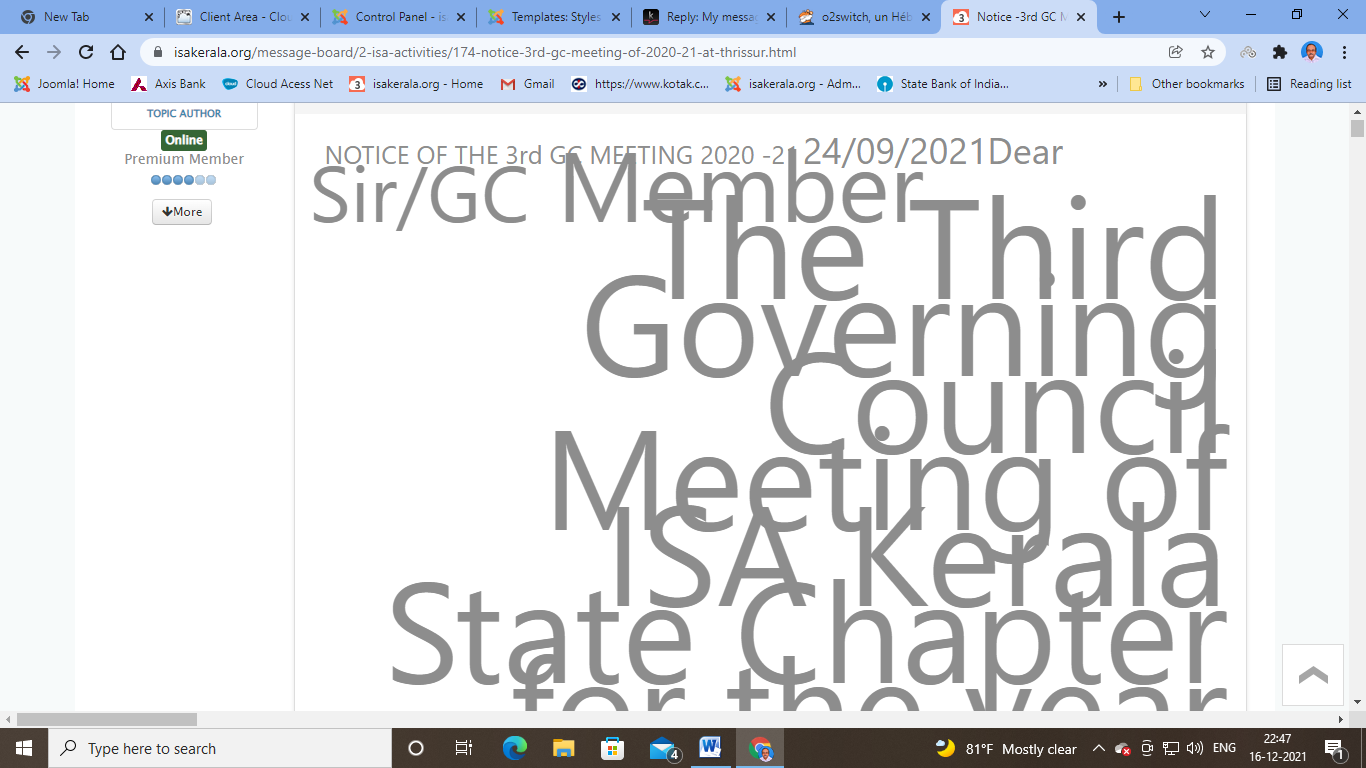
Above is the screenshot of the message that I posted in my Kuena Forum
Only this post is affected
My other posts are not affected
Please advise as to what I should do
By the way I am a beginner and so please use simple language and not code language
I am using cloudbase 3
Above is the screenshot of the message that I posted in my Kuena Forum
Only this post is affected
My other posts are not affected
Please advise as to what I should do
By the way I am a beginner and so please use simple language and not code language
Last edit: 4 years 10 months ago by drszac.
Please Log in or Create an account to join the conversation.


Less
More
- Posts: 12298
- Thank you received: 2544
4 years 10 months ago #220601
by rich
The easiest way, if you edit the message and remove this content. Afterwards, write this text new. But first make a copy of this text, so you have a pattern from this message.
Important! Always create a backup before you make any changes to your website!
Replied by rich on topic My messages can not be read properly
It seems to me, this is a copied text passage, which have been copied and pasted along with the hidden codes.Only this post is affected
The easiest way, if you edit the message and remove this content. Afterwards, write this text new. But first make a copy of this text, so you have a pattern from this message.
Important! Always create a backup before you make any changes to your website!
Please Log in or Create an account to join the conversation.
4 years 10 months ago #220626
by drszac
Replied by drszac on topic My messages can not be read properly
Thank you for responding to my post
This text was in pdf format and I converted it to word
I then copied the text from word and pasted it to make a post.
I usually do this and the post comes okay.
this time I find that the messages is all jumbled up and I can not read the post.
I am also finding it difficult to delete the post.
Please advise how I can delete this post
This text was in pdf format and I converted it to word
I then copied the text from word and pasted it to make a post.
I usually do this and the post comes okay.
this time I find that the messages is all jumbled up and I can not read the post.
I am also finding it difficult to delete the post.
Please advise how I can delete this post
Please Log in or Create an account to join the conversation.
Less
More
- Posts: 12298
- Thank you received: 2544
4 years 10 months ago #220649
by rich
Important! Always create a backup before you make any changes to your website!
Replied by rich on topic My messages can not be read properly
Where is the problem? You just need to click on the "Delete" button below the message. Don't you have moderator or admin access?I am also finding it difficult to delete the post.
Important! Always create a backup before you make any changes to your website!
Please Log in or Create an account to join the conversation.
4 years 9 months ago #221335
by drszac

I posted this message and I am not able to delete it
Under Action - I have only three options ,Subscribe ,Favourite.
There is no delete option.
Where do I find the delete option.
Please see the attachment for the screenshot
Please advise
Replied by drszac on topic My messages can not be read properly
I posted this message and I am not able to delete it
Under Action - I have only three options ,Subscribe ,Favourite.
There is no delete option.
Where do I find the delete option.
Please see the attachment for the screenshot
Please advise
Please Log in or Create an account to join the conversation.
Time to create page: 0.140 seconds