

- Posts: 6
- Thank you received: 0
Kunena 7.0.9 & Kunena 6.4.14 – Security Updates Released
The Kunena team has announce the arrival of Kunena 7.0.9 [K 7.0.9] in stable which is now available for download as a native Joomla extension for J! 5.4.x/6.0.x./6.1.x. This version addresses most of the issues that were discovered in K 6.2 / K 6.3 / K 6.4 and issues discovered during the last development stages of K 7.0
Solved Impossible to answer to a topic or create new topic
5 years 3 months ago #217802
by fastback2
Replied by fastback2 on topic Impossible to answer to a topic or create new topic
The ebay item id given is invalid, no result has been sent
rich post=217789 userid=2198Please see here: www.kunena.org/bugs/know-bugs
I will try this
Please Log in or Create an account to join the conversation.


Less
More
- Posts: 12291
- Thank you received: 2538
5 years 3 months ago - 5 years 3 months ago #217806
by rich
This solution shows how you can solve the problem caused by the plugin.
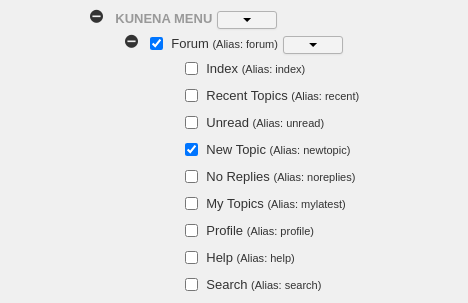
Solution when this problem is caused by JCH Optimize:
Click on the tab "Exclude CSS/JS" and scroll down. Mark this both menu items (see image) and save it.
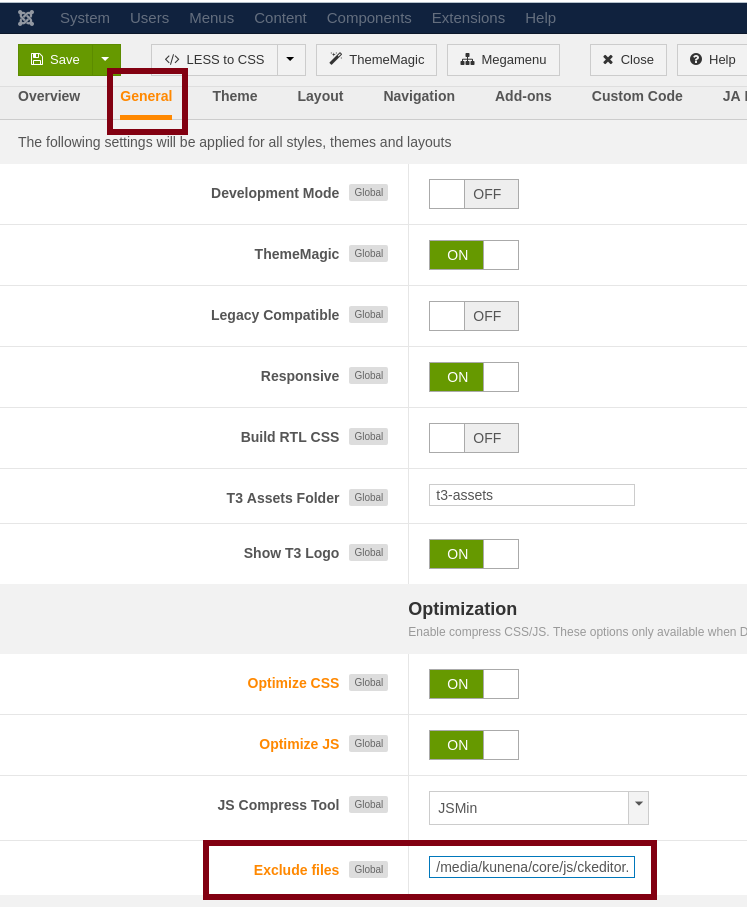
Solution when the problem is caused by your Joomla template (example Joomla template Purity III):
Important! Always create a backup before you make any changes to your website!
Replied by rich on topic Impossible to answer to a topic or create new topic
Do you have this plugin installed now? I'm sorry, but this is a misunderstanding. If you had the problem already before, this plugin won't solve it.Thank you!! I do have the JCH Optimizer plugin installed.
This solution shows how you can solve the problem caused by the plugin.
Solution when this problem is caused by JCH Optimize:
Click on the tab "Exclude CSS/JS" and scroll down. Mark this both menu items (see image) and save it.
Solution when the problem is caused by your Joomla template (example Joomla template Purity III):
Important! Always create a backup before you make any changes to your website!
Last edit: 5 years 3 months ago by rich.
Please Log in or Create an account to join the conversation.
- cmcminiadmin
-

- Offline
- Junior Member
-

Less
More
- Posts: 19
- Thank you received: 0
5 years 3 months ago - 5 years 3 months ago #217807
by cmcminiadmin
Replied by cmcminiadmin on topic Impossible to answer to a topic or create new topic
Ok, so the weird thing is that I had the jch_optimize when it was working, then I applied the latest update and the latest blue-eagle
I followed everything you have shown me, and it still doesn't change. Am I missing something?

I followed everything you have shown me, and it still doesn't change. Am I missing something?
Last edit: 5 years 3 months ago by cmcminiadmin.
Please Log in or Create an account to join the conversation.
Less
More
- Posts: 12291
- Thank you received: 2538
5 years 3 months ago #217809
by rich
Important! Always create a backup before you make any changes to your website!
Replied by rich on topic Impossible to answer to a topic or create new topic
Empty also the browser cache, some browsers are persistent.
Important! Always create a backup before you make any changes to your website!
Please Log in or Create an account to join the conversation.
- cmcminiadmin
-
- Offline
- Junior Member
-
Less
More
- Posts: 19
- Thank you received: 0
5 years 3 months ago #217811
by cmcminiadmin
Replied by cmcminiadmin on topic Impossible to answer to a topic or create new topic
Just tried that. I also tried another browser. I can try another computer if you think it will help, I don't think so considering when I clear the cache things change for other parts of the page. Why would it have worked before I did the updates?
Please Log in or Create an account to join the conversation.
- cmcminiadmin
-
- Offline
- Junior Member
-
Less
More
- Posts: 19
- Thank you received: 0
5 years 3 months ago - 5 years 3 months ago #217812
by cmcminiadmin
Replied by cmcminiadmin on topic Impossible to answer to a topic or create new topic
I cleared the browser cache and also used a different browser. I can try another computer, but I don't think that is the case. Why would it have worked before I did the updates? ---duplicate reply sorry
Last edit: 5 years 3 months ago by cmcminiadmin.
Please Log in or Create an account to join the conversation.
Time to create page: 0.260 seconds