


- Posts: 225
- Thank you received: 12
Kunena 7.0.4 Released
The Kunena team has announce the arrival of Kunena 7.0.4 [K 7.0.4] in stable which is now available for download as a native Joomla extension for J! 5.4.x/6.0.x. This version addresses most of the issues that were discovered in K 6.2 / K 6.3 / K 6.4 and issues discovered during the last development stages of K 7.0
Solved Emoticon issue
5 years 1 month ago #216491
by Ratman
Replied by Ratman on topic Emoticon issue
Thanks rich. I played around with the values a little bit and at the moment this code makes it look a bit better:
Result:
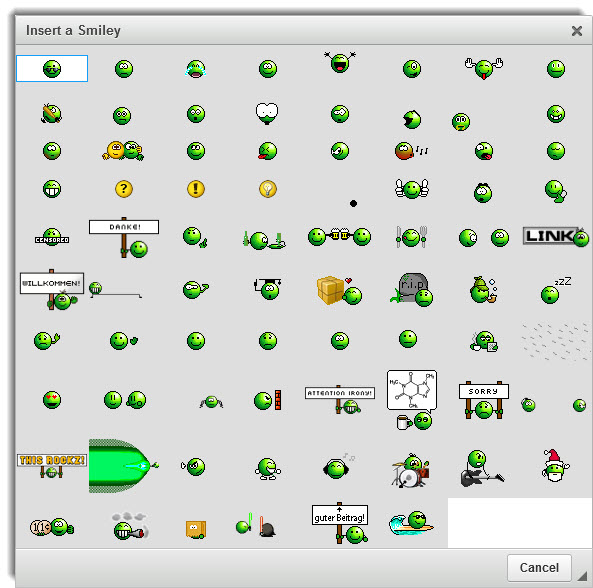
But what I don't understand: In your example screenshots the rows and columns of the (invisible) grid are of different sizes. For example, the columns where the lemon and pear are in are much bigger than the other columns. In my emoticon palette all rows/columns seem to use the same size.
And the lemon and pear in your screenshot are way bigger than the other smilies. In my palette even the biggest emoticons (229 x 177 px) are only slightly bigger than the standard 18 x 18 smilies.
Code:
.cke_smile {
max-width: 70px;
min-width: 70px;
}
Result:
But what I don't understand: In your example screenshots the rows and columns of the (invisible) grid are of different sizes. For example, the columns where the lemon and pear are in are much bigger than the other columns. In my emoticon palette all rows/columns seem to use the same size.
And the lemon and pear in your screenshot are way bigger than the other smilies. In my palette even the biggest emoticons (229 x 177 px) are only slightly bigger than the standard 18 x 18 smilies.
Please Log in or Create an account to join the conversation.


5 years 1 month ago #216505
by rich
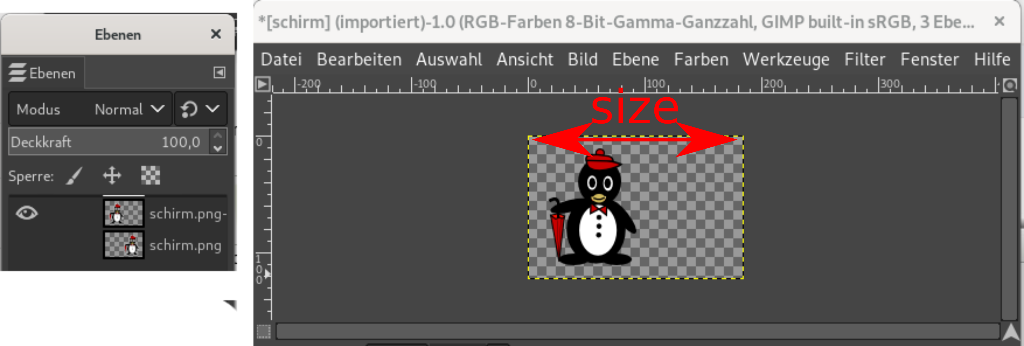
As can be seen in my example, the figure would jump from left to right and back again and so on.
You only see one penguin, and one is hidden. However, the size of the image includes all the content. Your large smileys are displayed with the value of 70px, but you cannot see the transparency.
Important! Always create a backup before you make any changes to your website!
Replied by rich on topic Emoticon issue
Because I set the min value to the smallest smiley face. Therefore, only the columns that contain larger smileys are widened. You use for min and max width the same value, so all columns have the same size.But what I don't understand: In your example screenshots the rows and columns of the (invisible) grid are of different sizes. For example, the columns where the lemon and pear are in are much bigger than the other columns. In my emoticon palette all rows/columns seem to use the same size.
It has nothing to do with css, you need to know how your smileys or animated gifs are structured. Animated gifs are made up of multiple frames, and some smileys have lots of transparent placeholders.And the lemon and pear in your screenshot are way bigger than the other smilies. In my palette even the biggest emoticons (229 x 177 px) are only slightly bigger than the standard 18 x 18 smilies.
As can be seen in my example, the figure would jump from left to right and back again and so on.
You only see one penguin, and one is hidden. However, the size of the image includes all the content. Your large smileys are displayed with the value of 70px, but you cannot see the transparency.
Important! Always create a backup before you make any changes to your website!
Please Log in or Create an account to join the conversation.
5 years 1 month ago #216513
by Ratman
Replied by Ratman on topic Emoticon issue
I already tried to set the min-value to my smallest emoticon, and the max-value to the largest. But when I use
all I end up with is this:
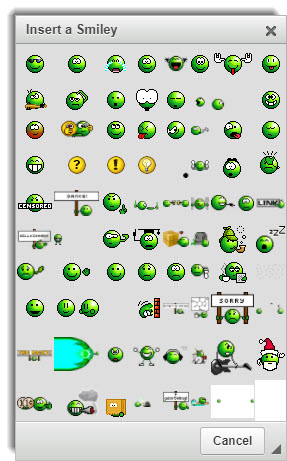
It just scales all images to a width of 18 pixels. I also thought that this happens with animated GIFs only. For a short test I inserted a static GIF with 229 x 177 pixels, but the result was the same
 It just not behaves as in your example. Something must be different on my side
Off topic: Quoting messages with the new editor is a nightmare
Code:
.cke_smile {
min-width: 18px;
max-width: 150px;
}
all I end up with is this:
It just scales all images to a width of 18 pixels. I also thought that this happens with animated GIFs only. For a short test I inserted a static GIF with 229 x 177 pixels, but the result was the same
Off topic: Quoting messages with the new editor is a nightmare
Please Log in or Create an account to join the conversation.
5 years 1 month ago #216514
by Ratman

Replied by Ratman on topic Emoticon issue
Sorry, this is not true. In the above example, it has scaled the "smiley_emoticons_wafe99.gif" to 41x32 pixelsIt just scales all images to a width of 18 pixels.
Please Log in or Create an account to join the conversation.
Time to create page: 0.302 seconds